
mynah 🐦
Local-first transcription for Korean meetings.
Record directly or drop an audio file — get a clean.txtin minutes.
No cloud. No per-meeting cost. Runs entirely on your Mac.



Screenshots
Features
- Transcribes while you record — 60–90 s chunks are cut at natural pauses and transcribed in the background, so the transcript is ready seconds after you stop instead of an hour later
- Survives a crash — audio is written as headerless raw PCM with no close step, so killing the terminal cannot corrupt it. Unfinished sessions are found on the next launch and can be resumed, finished, or discarded
- Apple GPU acceleration — MLX runs Qwen3-ASR on the Metal GPU at about 6–13× realtime, so transcription keeps pace with the meeting
- Automatic gain correction — quiet recordings are the single largest cause of hallucination loops; input is normalized to −18 dBFS before transcription (the archived audio keeps its original level)
- Or drop an existing file — m4a, mp3, wav, flac, webm, mp4 supported
- Korean-first — Qwen3-ASR 1.7B (8-bit), fixed
kolanguage. Chosen over Whisper large-v3 on this project's own recordings; see Model choice - Word-level timestamps —
[HH:MM:SS]prefix per segment (optional) - Replacements — find/replace rules applied after transcription, editable inside the TUI
- TUI for daily use, CLI for scripting — both first-class, same pipeline
- System health check —
mynah --doctorverifies all dependencies and shows actionable fixes - Offline, always — no API calls after the first model download (~2.5 GB, one-time)
Output formats
| Flags | Format |
|---|---|
| (none) | continuous text |
--timestamps |
[HH:MM:SS] sentence... |
Output filename: <input>.txt. On collision: <input> (1).txt, <input> (2).txt, etc. — never silently overwrites.
Install
Prerequisites
| Requirement | Version | Install |
|---|---|---|
| macOS (Apple Silicon) | 14+ | — |
| Python | 3.11+ | brew install python@3.13 |
| ffmpeg | any | brew install ffmpeg |
| pipx | any | brew install pipx && pipx ensurepath |
One-line install
pipx install mynah-stt
Package vs. command name: the PyPI distribution is
mynah-stt, but the CLI you actually run ismynah(and Python imports areimport mynah). The-sttsuffix only shows up at install time — same pattern aspip install Pillow→import PIL.
First run: Qwen3-ASR (~2.5 GB) downloads automatically on the first transcription and is cached for all subsequent runs.
Upgrading from 0.4: Whisper is gone. Run
pipx uninstall mynah-stt && pipx install mynah-stt(a plain upgrade leaves torch and faster-whisper behind), thenmynah --doctor: it lists each Whisper model an older mynah left in~/.cache/huggingface/hub(~3 GB each) with the command to free it. mynah does not delete them for you, since other tools may share that cache.
Quick start
mynah                               # open TUI → Record → Stop → transcript ready
mynah meeting.m4a                   # CLI: transcribe existing file
mynah meeting.m4a --timestamps      # with time codes
mynah --doctor                      # check system dependencies
TUI
Run mynah with no arguments to open the TUI.
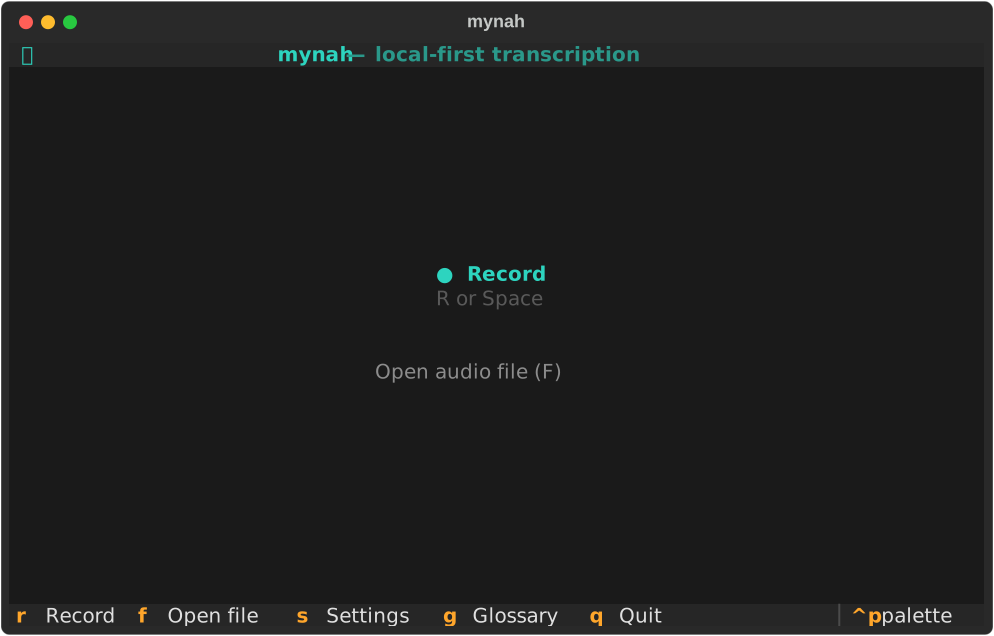
Main screen — press R or Space to start recording, F to open an existing audio file, S for settings, G for replacement rules, Q to quit.
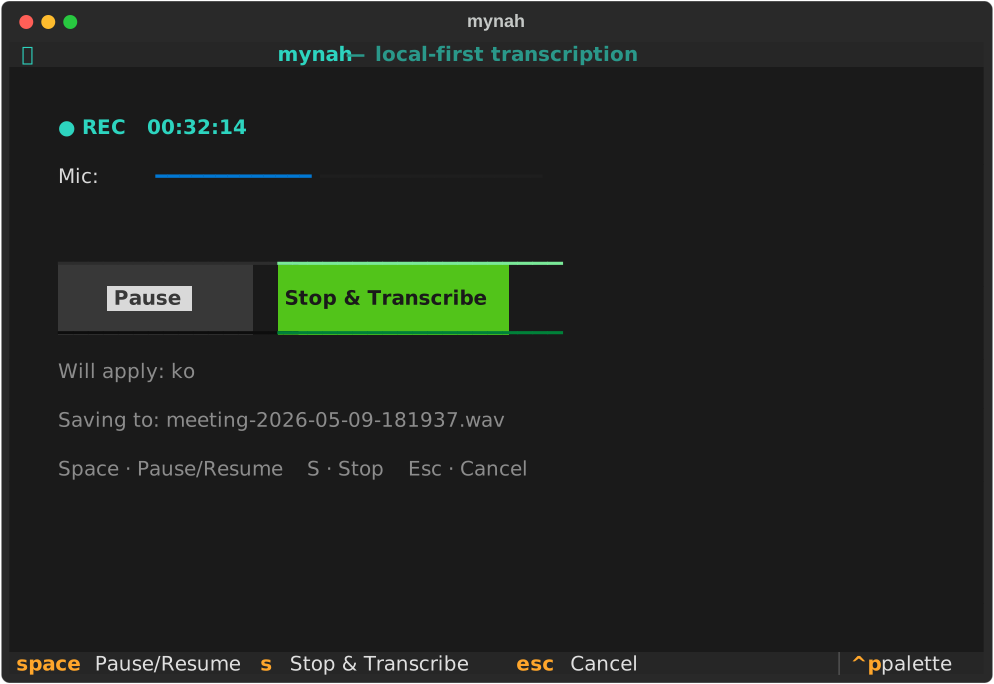
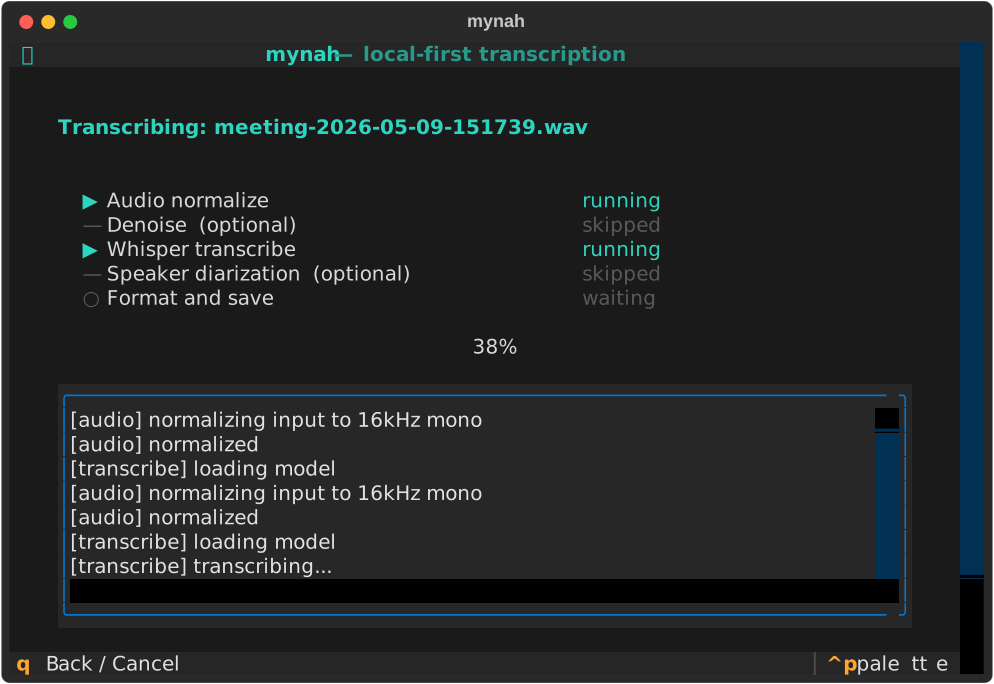
Recording screen — microphone captures at 16 kHz mono. The level meter shows live input amplitude, and transcribed text appears in the panel below as each chunk finishes. Space to pause/resume, S to stop and transcribe, Esc to leave the screen with the recording kept (finish or discard it later from the main screen). After S, an overlay covers the screen while the last chunk is transcribed, so the controls cannot be used on a recording that has already ended.
Recovering an unfinished session — if mynah was killed mid-recording, the main screen shows a banner. Press U to resume recording into the same session, finalize what was captured, or discard it. Nothing is deleted until you confirm twice.
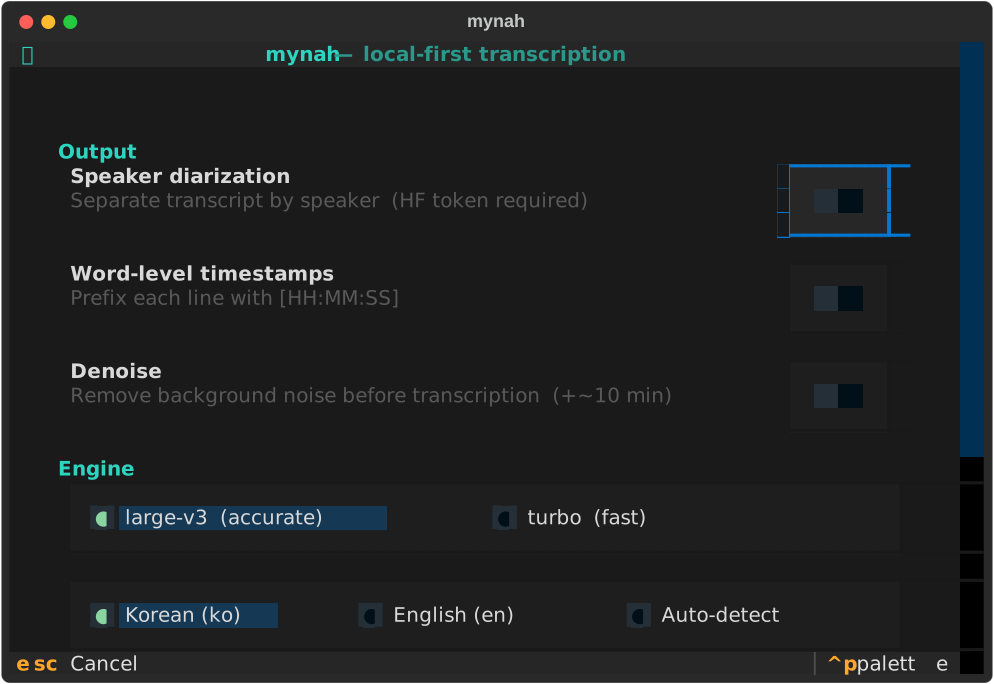
Settings (S from anywhere) — toggle timestamps; switch the input language.
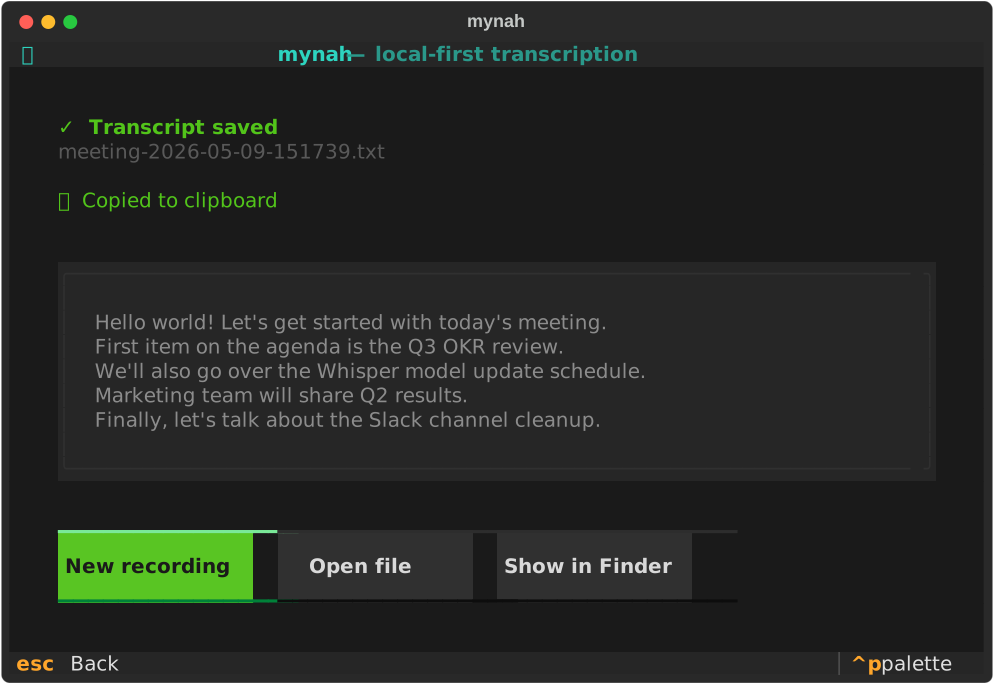
Result screen — transcript is auto-copied to the clipboard the moment it appears. Open the file or reveal it in Finder directly from this screen.
CLI
mynah <audio_file> [flags]
| Flag | Description |
|---|---|
--timestamps |
Word-level timestamps ([HH:MM:SS] prefixes) |
--lang |
ko (default), en, auto |
--doctor |
System dependency health check |
--edit-replacements |
Open the TUI replacements editor |
Replacements
Find/replace rules applied to the finished transcript, for mistakes the model makes repeatedly:
# ~/Library/Application Support/mynah/replacements.toml
[[rule]]
from = "슬랙"
to = "Slack"

[[rule]]
from = "위스퍼"
to = "Whisper"
Set regex = true on any rule to use Python regex syntax.
Configuration files
| Path | Purpose |
|---|---|
~/Library/Application Support/mynah/config.toml |
Last-used options (auto-saved) |
~/Library/Application Support/mynah/replacements.toml |
Post-transcription find/replace |
Recording sessions
Each recording gets its own folder under ~/Documents/mynah-recordings/:
2026-08-12-145934/
├── audio.pcm         raw 16 kHz mono, appended as you speak — no header to corrupt
├── transcript.jsonl  one line per finished chunk
├── session.json      options + status
├── meeting.wav       written when the session is finalized
└── 2026-09-17-1430.txt   the transcript
audio.pcm deliberately has no header. A WAV header stores the total length
and can only be written when the file is closed, so a process killed
mid-recording leaves an unreadable file. Headerless PCM is valid at every
instant, and the header is added afterwards from the file size — the same code
path for a normal stop and for a crash recovery.
Performance
Measured on an Apple M5 Mac, on 11.9 hours of real Korean meeting audio.
Qwen3-ASR on the Metal GPU ran at 6.3 – 13.5× realtime. Transcription keeps pace with the microphone, so a chunk is finished long before the next one is recorded and the wait after you press stop is a few seconds. Before 0.3, Whisper on the CPU ran at 0.86×: a one-hour meeting meant an hour of waiting.
Model choice
bench/asr.py compared Qwen3-ASR with Whisper large-v3 (both on MLX) on two
sets: 665 chunks of this project's own recorded meetings, and the HiKE
Korean-English code-switching benchmark (1,121 utterances).
| Whisper large-v3 | Qwen3-ASR | |
|---|---|---|
| Recorded chunks that looped | 17.0% | 3.0% |
| Recorded chunks with U+FFFD / other script | 1.5% / 2.4% | 0.3% / 0.3% |
| HiKE CER | 48.5% | 21.9% |
| HiKE English terms missed | 212 | 142 |
Check the setup and your microphone level:
mynah --doctor # reports dependencies, model cache, and last input level
Troubleshooting
Run the built-in health check first:
mynah --doctor
Common issues and fixes:
| Error | Fix |
|---|---|
ffmpeg not found |
brew install ffmpeg |
| Microphone not captured | macOS System Settings → Sound → Input → select the correct device |
| Words repeated over and over | The recording is too quiet. mynah --doctor reports the input level; below about −30 dBFS the model starts hallucinating. Move the mic closer or raise the input gain in System Settings → Sound → Input |
| Recording lost after a crash | It is not. Relaunch mynah — the main screen offers the unfinished session under U |
Development
git clone https://github.com/rlawjdghksdlqslek/mynah-stt.git
cd mynah-stt

# Install with dev extras (editable mode — code changes take effect immediately)
pipx install -e '.[dev]'

# Unit tests — no model download required
pytest tests/

# Lint
ruff check .
mynah/core/ and mynah/config/ have no UI dependencies; the TUI and CLI are
thin wrappers over them. ML packages are imported lazily inside the functions
that need them, so the whole test suite runs without downloading a model.
mynah/
├── core/
│   ├── session.py    # session folder, raw PCM, JSONL, crash recovery
│   ├── live.py       # chunk transcription worker + hallucination guard
│   ├── record.py     # mic capture, silence-based chunk boundaries
│   ├── audio.py      # ffmpeg normalize + gain correction
│   ├── transcribe.py # Qwen3-ASR on the GPU via mlx-audio
│   └── pipeline.py   # file pipeline + session finalization
├── config/           # settings, replacements (no ML deps)
├── tui/              # Textual app + screens
└── app.py            # dispatches TUI vs CLI based on argv
There are two pipelines. Live recording streams PCM to a session folder
while a worker transcribes silence-cut chunks into transcript.jsonl;
finalize_session() renders it and wraps the audio into a WAV. File input
(pipeline.run()) normalizes the file, cuts it at silence exactly as the
recorder would, and sends each chunk through the same code.
core/live.py checks each chunk for a loop and retries it once with a
repetition penalty, falling back to
an explicit gap marker rather than writing garbage or dropping audio silently.
License
Apache-2.0. See LICENSE.
Acknowledgments
1 maintainer

Metadata
1 maintainer
Release files for mynah-stt 0.5.0
For a detailed explanation of source distributions (sdists) and built distributions (wheels), please see the package formats documentation.
Source distribution (sdist)
| File | Size | Uploaded | Provenance | |
|---|---|---|---|---|
| mynah_stt-0.5.0.tar.gz | 60.4 kB | With provenance | Details |
Built distribution (wheel)
| File | Interpreter | ABI | Platform | Reset |
|---|---|---|---|---|
| mynah_stt-0.5.0-py3-none-any.whl | Python 3 | none | any | Details |
Total release size: 112.2 kB
Release files / mynah_stt-0.5.0.tar.gz
| Download URL | mynah_stt-0.5.0.tar.gz |
|---|---|
| Size | 60.4 kB |
| Tags | Source |
|
SHA-256 checksum How to use checksums |
4c4db427cfbb8a94715b0286900b9f176e8cece96aae249907f1c4702862ca80
|
|
BLAKE2b-256 checksum How to use checksums |
a401658ba50a83319d9d92df3ad1659bb27cb9b0196c71e2cc8c68ff0630e141
|
| Upload date | |
|
Uploaded using Trusted Publishing? What is trusted publishing? |
Yes |
| Uploaded via |
twine/7.0.0 CPython/3.13.16
|
Provenance
Provenance describes where a file came from. On PyPI, provenance is shared via attestations, which provide a verifiable record of the build or publishing details. View details, limitations and caveats.


PyPI Publish Attestation
PyPI verified that this artifact, at this checksum, originated from the publisher listed below.
Signed by GitHub Actions, verified by PyPI on Oct 22, 2026.
Transparency logRelease files / mynah_stt-0.5.0-py3-none-any.whl
| Download URL | mynah_stt-0.5.0-py3-none-any.whl |
|---|---|
| Size | 51.8 kB |
| Tags | Python 3 |
|
SHA-256 checksum How to use checksums |
adea47d19735231000ada5d5d602c828f6be7f172e71905563f49ab64c6bb404
|
|
BLAKE2b-256 checksum How to use checksums |
ef6e41936c2928bc247698c845edf8ffacf9bab4107d7682b159399dbb207ba9
|
| Upload date | |
|
Uploaded using Trusted Publishing? What is trusted publishing? |
Yes |
| Uploaded via |
twine/7.0.0 CPython/3.13.16
|
Provenance
Provenance describes where a file came from. On PyPI, provenance is shared via attestations, which provide a verifiable record of the build or publishing details. View details, limitations and caveats.
PyPI Publish Attestation
PyPI verified that this artifact, at this checksum, originated from the publisher listed below.
Signed by GitHub Actions, verified by PyPI on Oct 22, 2026.
Transparency logSecurity for mynah-stt 0.5.0
Provenance
Provenance describes where a file came from. On PyPI, provenance is shared via attestations, which provide a verifiable record of the build or publishing details. View details, limitations and caveats.
Full provenance
All 2 files in this release have been uploaded with provenance metadata.
Attestation for mynah_stt-0.5.0.tar.gz
PyPI Publish Attestation
PyPI verified that this artifact, at this checksum, originated from the publisher listed below.
Signed by GitHub Actions, verified by PyPI on Oct 22, 2026.
Transparency logA note on package security
PyPI is a repository for distributing packages, not a service for auditing them. While third-party security researchers and our staff do their best to detect and remove malicious packages, PyPI cannot guarantee the quality, security or suitability of any given package.














