
Builder for boto3-stubs and types-aiobotocore

Project description
mypy_boto3_builder








Type annotations builder for boto3-stubs project. Compatible with VSCode, PyCharm, Emacs, Sublime Text, mypy, pyright and other tools.
See how it helps to find and fix potential bugs:
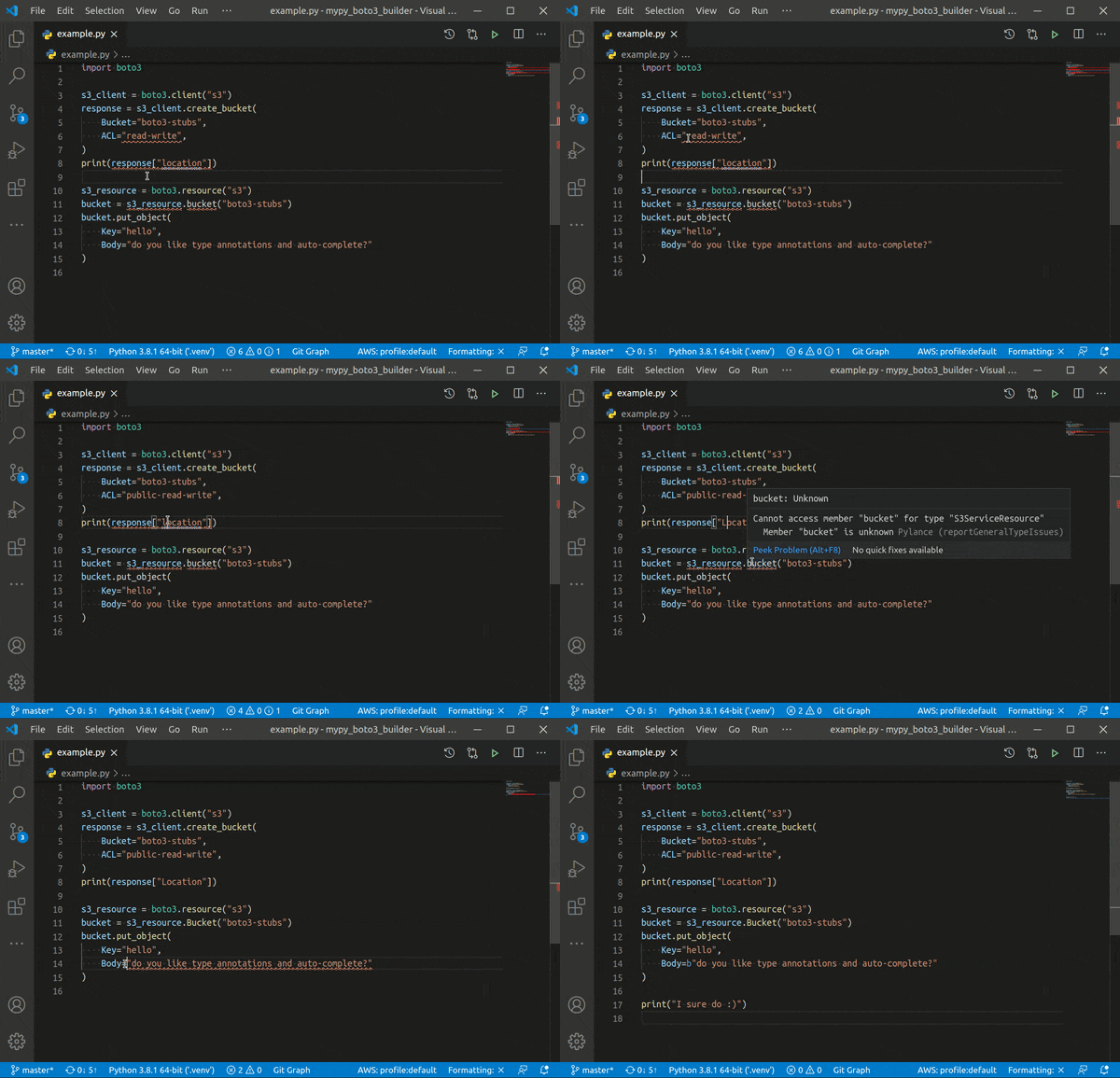
Do you want more? Check the documentation and use boto3 like a pro!
Using built libraries
boto3
Check boto3-stubs project for installation and usage instructions.
If you use VSCode, add AWS Boto3
extension to your VSCode and run AWS boto3: Quick Start command.
If not, just install boto3-stubs with pip:
python -m pip install 'boto3-stubs[essential]'

# Lite version does not provide session.client/resource overloads
# it is more RAM-friendly, but requires explicit type annotations
python -m pip install 'boto3-stubs-lite[essential]'

# do not forget to install mypy or pyright
That's it! You should already have code completion and type checking in your IDE.
aiobotocore
Check types-aiobotocore project for installation and usage instructions.
Or just install types-aiobotocore with pip:
python -m pip install 'types-aiobotocore[essential]'

# Lite version does not provide session.create_client overloads
# it is more RAM-friendly, but requires explicit type annotations
python -m pip install 'types-aiobotocore-lite[essential]'

# do not forget to install mypy or pyright
Ready to go! Enjoy code completion and type checking in your aiobotocore project.
aioboto3
Check types-aioboto3 project for installation and usage instructions.
Or just install types-aioboto3 with pip:
python -m pip install 'types-aioboto3[essential]'

# Lite version does not provide session.client/resource overloads
# it is more RAM-friendly, but requires explicit type annotations
python -m pip install 'types-aioboto3-lite[essential]'

# do not forget to install mypy or pyright
Whoa! All aioboto3 methods and attributes are now type-annotated and even code completion works.
How to build type annotations
Locally
# Install preferred version of `boto3`
python -m pip install boto3==1.16.25 botocore==1.19.25

# Install `mypy-boto3-builder`
python -m pip install mypy-boto3-builder

# Build all packages in mypy_boto3_output directory
python -m mypy_boto3_builder mypy_boto3_output

# Or specify required services explicitly
python -m mypy_boto3_builder mypy_boto3_output -s ec2 s3

# Install custom `boto3-stubs` packages
cd mypy_boto3_output
python -m pip install -e ./mypy_boto3_ec2_package
python -m pip install -e ./mypy_boto3_s3_package
python -m pip install -e ./boto3_stubs_package
With Docker image
- Install Docker
- Pull latest
mypy_boto3_builderversion and tag it
docker pull docker.pkg.github.com/youtype/mypy_boto3_builder/mypy_boto3_builder_stable:latest
docker tag docker.pkg.github.com/youtype/mypy_boto3_builder/mypy_boto3_builder_stable:latest mypy_boto3_builder
- Generate stubs in
outputdirectory
mkdir output

# generate stubs for all services
docker run -v `pwd`/output:/output -ti mypy_boto3_builder_stable

# generate stubs for s3 service
docker run -v `pwd`/output:/output -ti mypy_boto3_builder_stable -s s3

# generate stubs for a specific boto3 version
docker run -e BOTO3_VERSION=1.16.25 BOTOCORE_VERSION=1.19.25 -v `pwd`/output:/output -ti mypy_boto3_builder_stable
- Install packages from
outputdirectory as described above
Development
- Install Python 3.10+, ideally with pyenv
- Install poetry:
pip install poetry - Install dependencies:
poetry install - Use scripts for repo to check if everything works:
./scripts/build.sh - Run manual pre-commit:
./scripts/before_commit.sh
Versioning
mypy_boto3_builder version is not related to boto3 version and follows
PEP 440.
Latest changes
Full changelog can be found in Releases.
Thank you
Toolset
- black developers for an awesome formatting tool
- Timothy Edmund Crosley for isort and how flexible it is
- mypy developers for doing all dirty work for us
- pyright team for the new era of typed Python
Contributors
Release history Release notifications | RSS feed


Download files
Download the file for your platform. If you're not sure which to choose, learn more about installing packages.
Source Distribution
Built Distribution
Filter files by name, interpreter, ABI, and platform.
If you're not sure about the file name format, learn more about wheel file names.
Copy a direct link to the current filters
File details
Details for the file mypy-boto3-builder-7.9.0.tar.gz.
File metadata
- Download URL: mypy-boto3-builder-7.9.0.tar.gz
- Upload date:
- Size: 145.3 kB
- Tags: Source
- Uploaded using Trusted Publishing? No
- Uploaded via: twine/4.0.1 CPython/3.10.5
File hashes
| Algorithm | Hash digest | |
|---|---|---|
| SHA256 |
28dd6b352864b55b61a317e908708b6a2efb55726112404ed189ca849c2e8242
|
|
| MD5 |
4f4e8b437fcfd4db715cb881d4fd585c
|
|
| BLAKE2b-256 |
be6890fd3f6cda340a0f64ceab44570a815593336c450aa63c361102a596b447
|
File details
Details for the file mypy_boto3_builder-7.9.0-py3-none-any.whl.
File metadata
- Download URL: mypy_boto3_builder-7.9.0-py3-none-any.whl
- Upload date:
- Size: 270.7 kB
- Tags: Python 3
- Uploaded using Trusted Publishing? No
- Uploaded via: twine/4.0.1 CPython/3.10.5
File hashes
| Algorithm | Hash digest | |
|---|---|---|
| SHA256 |
0fe1292799393556b77d8ae04ba5988824e323e72077b57b42da29482a52e24a
|
|
| MD5 |
673200fab841a6b8f1ea33551bf1d3d3
|
|
| BLAKE2b-256 |
6061897114e4bd93a8af29856fe231576209d9d6c9a387b245af52975f8e8777
|






