
mypy-boto3-kinesis-video-archived-media




Type annotations for boto3 KinesisVideoArchivedMedia 1.43.0 compatible with VSCode, PyCharm, Emacs, Sublime Text, mypy, pyright and other tools.
Generated with mypy-boto3-builder 8.12.0.
More information can be found on boto3-stubs page and in mypy-boto3-kinesis-video-archived-media docs.
See how it helps you find and fix potential bugs:
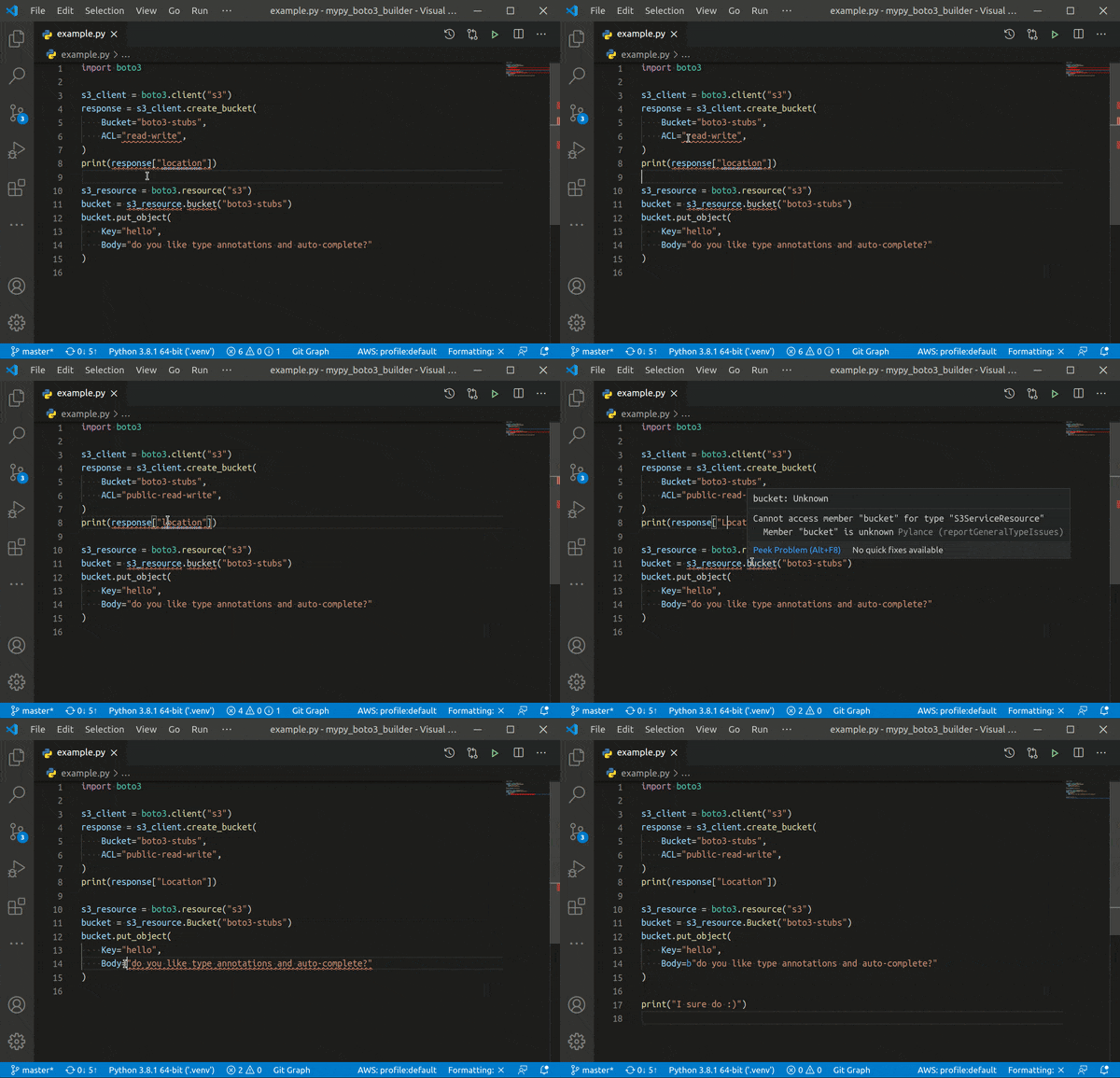
- mypy-boto3-kinesis-video-archived-media
How to install
Generate locally (recommended)
You can generate type annotations for boto3 package locally with
mypy-boto3-builder. Use
uv for build
isolation.
- Run mypy-boto3-builder in your package root directory:
uvx --with 'boto3==1.43.0' mypy-boto3-builder - Select
boto3-stubsAWS SDK. - Add
KinesisVideoArchivedMediaservice. - Use provided commands to install generated packages.
VSCode extension
Add
AWS Boto3
extension to your VSCode and run AWS boto3: Quick Start command.
Click Modify and select boto3 common and KinesisVideoArchivedMedia.
From PyPI with pip
Install boto3-stubs for KinesisVideoArchivedMedia service.
# install with boto3 type annotations
python -m pip install 'boto3-stubs[kinesis-video-archived-media]'

# Lite version does not provide session.client/resource overloads
# it is more RAM-friendly, but requires explicit type annotations
python -m pip install 'boto3-stubs-lite[kinesis-video-archived-media]'

# standalone installation
python -m pip install mypy-boto3-kinesis-video-archived-media
How to uninstall
python -m pip uninstall -y mypy-boto3-kinesis-video-archived-media
Usage
VSCode
- Install Python extension
- Install Pylance extension
- Set
Pylanceas your Python Language Server - Install
boto3-stubs[kinesis-video-archived-media]in your environment:
python -m pip install 'boto3-stubs[kinesis-video-archived-media]'
Both type checking and code completion should now work. No explicit type
annotations required, write your boto3 code as usual.
PyCharm
⚠️ Due to slow PyCharm performance on
Literaloverloads (issue PY-40997), it is recommended to use boto3-stubs-lite until the issue is resolved.
⚠️ If you experience slow performance and high CPU usage, try to disable
PyCharmtype checker and use mypy or pyright instead.
⚠️ To continue using
PyCharmtype checker, you can try to replaceboto3-stubswith boto3-stubs-lite:
pip uninstall boto3-stubs
pip install boto3-stubs-lite
Install boto3-stubs[kinesis-video-archived-media] in your environment:
python -m pip install 'boto3-stubs[kinesis-video-archived-media]'
Both type checking and code completion should now work.
Emacs
- Install
boto3-stubswith services you use in your environment:
python -m pip install 'boto3-stubs[kinesis-video-archived-media]'
- Install use-package, lsp, company and flycheck packages
- Install lsp-pyright package
(use-package lsp-pyright
  :ensure t
  :hook (python-mode . (lambda ()
                          (require 'lsp-pyright)
                          (lsp)))  ; or lsp-deferred
  :init (when (executable-find "python3")
          (setq lsp-pyright-python-executable-cmd "python3"))
  )
- Make sure emacs uses the environment where you have installed
boto3-stubs
Type checking should now work. No explicit type annotations required, write
your boto3 code as usual.
Sublime Text
- Install
boto3-stubs[kinesis-video-archived-media]with services you use in your environment:
python -m pip install 'boto3-stubs[kinesis-video-archived-media]'
- Install LSP-pyright package
Type checking should now work. No explicit type annotations required, write
your boto3 code as usual.
Other IDEs
Not tested, but as long as your IDE supports mypy or pyright, everything
should work.
mypy
- Install
mypy:python -m pip install mypy - Install
boto3-stubs[kinesis-video-archived-media]in your environment:
python -m pip install 'boto3-stubs[kinesis-video-archived-media]'
Type checking should now work. No explicit type annotations required, write
your boto3 code as usual.
pyright
- Install
pyright:npm i -g pyright - Install
boto3-stubs[kinesis-video-archived-media]in your environment:
python -m pip install 'boto3-stubs[kinesis-video-archived-media]'
Optionally, you can install boto3-stubs to typings directory.
Type checking should now work. No explicit type annotations required, write
your boto3 code as usual.
Pylint compatibility
It is totally safe to use TYPE_CHECKING flag in order to avoid
mypy-boto3-kinesis-video-archived-media dependency in production. However,
there is an issue in pylint that it complains about undefined variables. To
fix it, set all types to object in non-TYPE_CHECKING mode.
from typing import TYPE_CHECKING

if TYPE_CHECKING:
    from mypy_boto3_ec2 import EC2Client, EC2ServiceResource
    from mypy_boto3_ec2.waiters import BundleTaskCompleteWaiter
    from mypy_boto3_ec2.paginators import DescribeVolumesPaginator
else:
    EC2Client = object
    EC2ServiceResource = object
    BundleTaskCompleteWaiter = object
    DescribeVolumesPaginator = object

...
Explicit type annotations
Client annotations
KinesisVideoArchivedMediaClient provides annotations for
boto3.client("kinesis-video-archived-media").
from boto3.session import Session

from mypy_boto3_kinesis_video_archived_media import KinesisVideoArchivedMediaClient

client: KinesisVideoArchivedMediaClient = Session().client("kinesis-video-archived-media")

# now client usage is checked by mypy and IDE should provide code completion
Paginators annotations
mypy_boto3_kinesis_video_archived_media.paginator module contains type
annotations for all paginators.
from boto3.session import Session

from mypy_boto3_kinesis_video_archived_media import KinesisVideoArchivedMediaClient
from mypy_boto3_kinesis_video_archived_media.paginator import (
    GetImagesPaginator,
    ListFragmentsPaginator,
)

client: KinesisVideoArchivedMediaClient = Session().client("kinesis-video-archived-media")

# Explicit type annotations are optional here
# Types should be correctly discovered by mypy and IDEs
get_images_paginator: GetImagesPaginator = client.get_paginator("get_images")
list_fragments_paginator: ListFragmentsPaginator = client.get_paginator("list_fragments")
Literals
mypy_boto3_kinesis_video_archived_media.literals module contains literals
extracted from shapes that can be used in user code for type checking.
Full list of KinesisVideoArchivedMedia Literals can be found in
docs.
from mypy_boto3_kinesis_video_archived_media.literals import ClipFragmentSelectorTypeType


def check_value(value: ClipFragmentSelectorTypeType) -> bool: ...
Type definitions
mypy_boto3_kinesis_video_archived_media.type_defs module contains structures
and shapes assembled to typed dictionaries and unions for additional type
checking.
Full list of KinesisVideoArchivedMedia TypeDefs can be found in
docs.
# TypedDict usage example
from mypy_boto3_kinesis_video_archived_media.type_defs import FragmentTypeDef


def get_value() -> FragmentTypeDef:
    return {
        "FragmentNumber": ...,
    }
How it works
Fully automated
mypy-boto3-builder carefully
generates type annotations for each service, patiently waiting for boto3
updates. It delivers drop-in type annotations for you and makes sure that:
- All available
boto3services are covered. - Each public class and method of every
boto3service gets valid type annotations extracted frombotocoreschemas. - Type annotations include up-to-date documentation.
- Link to documentation is provided for every method.
- Code is processed by ruff for readability.
What's new
Implemented features
- Fully type annotated
boto3,botocore,aiobotocoreandaioboto3libraries mypy,pyright,VSCode,PyCharm,Sublime TextandEmacscompatibilityClient,ServiceResource,Resource,WaiterPaginatortype annotations for each service- Generated
TypeDefsfor each service - Generated
Literalsfor each service - Auto discovery of types for
boto3.clientandboto3.resourcecalls - Auto discovery of types for
session.clientandsession.resourcecalls - Auto discovery of types for
client.get_waiterandclient.get_paginatorcalls - Auto discovery of types for
ServiceResourceandResourcecollections - Auto discovery of types for
aiobotocore.Session.create_clientcalls
Latest changes
Builder changelog can be found in Releases.
Versioning
mypy-boto3-kinesis-video-archived-media version is the same as related
boto3 version and follows
Python Packaging version specifiers.
Thank you
- Allie Fitter for boto3-type-annotations, this package is based on top of his work
- black developers for an awesome formatting tool
- Timothy Edmund Crosley for isort and how flexible it is
- mypy developers for doing all dirty work for us
- pyright team for the new era of typed Python
Documentation
All services type annotations can be found in boto3 docs
Support and contributing
This package is auto-generated. Please reports any bugs or request new features in mypy-boto3-builder repository.
1 maintainer

Release files for mypy-boto3-kinesis-video-archived-media 1.43.0
For a detailed explanation of source distributions (sdists) and built distributions (wheels), please see the package formats documentation.
Source distribution (sdist)
| File | Size | Uploaded | |
|---|---|---|---|
| mypy_boto3_kinesis_video_archived_media-1.43.0.tar.gz | 18.1 kB | Details |
Built distribution (wheel)
| File | Interpreter | ABI | Platform | Reset |
|---|---|---|---|---|
| mypy_boto3_kinesis_video_archived_media-1.43.0-py3-none-any.whl | Python 3 | none | any | Details |
Total release size: 43.0 kB
Release files / mypy_boto3_kinesis_video_archived_media-1.43.0.tar.gz
| Download URL | mypy_boto3_kinesis_video_archived_media-1.43.0.tar.gz |
|---|---|
| Size | 18.1 kB |
| Tags | Source |
|
SHA-256 checksum How to use checksums |
c9f39cbb37a4d46e9204ed3f88aadc9a2e3f9762a51356b7e607f551d99b2841
|
|
BLAKE2b-256 checksum How to use checksums |
4a82d9b8221726c5e390f2e8455ac90dae6e3ff22ac3613ce7e1bd0cd051784a
|
| Upload date | |
|
Uploaded using Trusted Publishing? What is trusted publishing? |
No |
| Uploaded via |
twine/6.2.0 CPython/3.13.13
|
Release files / mypy_boto3_kinesis_video_archived_media-1.43.0-py3-none-any.whl
| Download URL | mypy_boto3_kinesis_video_archived_media-1.43.0-py3-none-any.whl |
|---|---|
| Size | 24.9 kB |
| Tags | Python 3 |
|
SHA-256 checksum How to use checksums |
f94720a28a2c80b63b8fc4b9c3b5022270021d92ec6ef34ffb56d5b24d397301
|
|
BLAKE2b-256 checksum How to use checksums |
8bf9e4cb9e5480f467ffa2a5005bcc2891961e744b98e34217ef7c2815cae269
|
| Upload date | |
|
Uploaded using Trusted Publishing? What is trusted publishing? |
No |
| Uploaded via |
twine/6.2.0 CPython/3.13.13
|














