
mytask manager tool

Project description
MyTask - Command Line Tool


Introduction
MyTask is command line task manager. It is a command line utility to add, delete, update and display the tasks. It is a powerful task manager written in Python. It uses SQLite3 database to store the tasks.
Features
- Add one Task at one time
- Auto records date and time when add the task.
- Display all Tasks in table format
- Remove a Task with specific ID
- Remove all Tasks
- Update a Task with a specific ID
- It uses offline
- Auto status of task is Todo. User update it later.
- User can give a deadline for tasks also.
- If user won't provide deadline it auto takes deadline of 5 days.
- Sort the tasks as per date.
Dependencies
| Features | Dependancy |
|---|---|
Scripting Language |
Python 3.0+ |
Command-Line Option and argument parsing |
click |
Database Used |
SQLite3 |
Display Bookmarks in Table |
tabulate |
Installation
MyTask is installed using setup.py file:
python setup.py install
Command line options
Usage: MyTask [OPTIONS] [INSERT]...

  MyTask - Command-line Task manager tool.

Options:
-a, --add TEXT...       Add the Task
-d, --delete TEXT       Remove a Task of particular ID
-u, --update TEXT...    Update a Task for specific ID
-s, --show TEXT...      Show all Tasks
-c, --clear TEXT...     Clear all the tasks present in table
-st, --status TEXT...   Provide a status to the task
-o, --sort TEXT...      Sort the task by date
--help                  Show this message and exit.
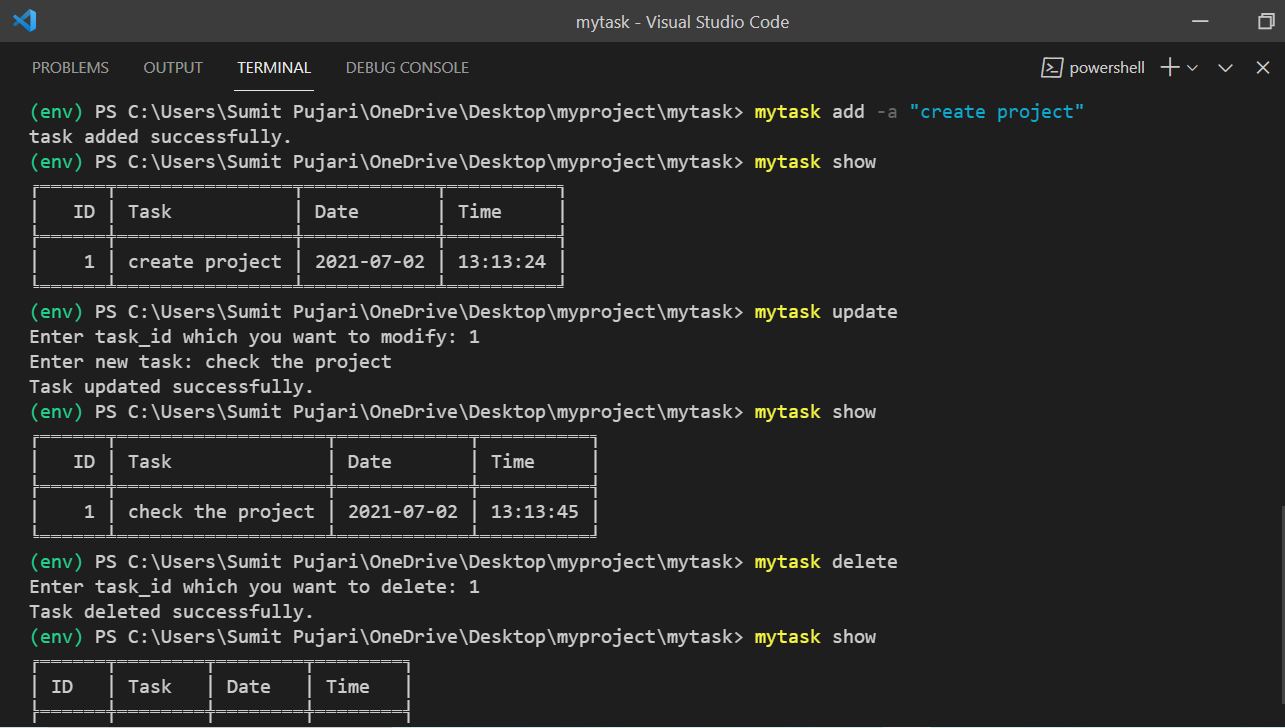
Examples
1. Add the Tasks:
$ mytask add --add "task" ...

 or

$ mytask add -a "task" ...
2. Show all added tasks:
$ mytask show
3. Update a task using its ID:
$ mytask update
4. Delete a task using its ID:
$ mytask delete
5. Sort the tasks as per the date:
$ mytask sort
6. Clear all the tasks present in table:
$ mytask clear
7. Status provide the status of task:
$ mytask status
How to install source code for development
-
Clone project from github:
$ git clone https://github.com/kasul092/todo.git -
We recommend to create and activate a virtualenv first:
$ cd mytask/ $ py -m virtualenv env $ env/Scripts/activate (env) $ -
To install using setup.py file:
(env) $ python setup.py install
MyTask - Command line tool is licensed under MIT License
Release history Release notifications | RSS feed


Download files
Download the file for your platform. If you're not sure which to choose, learn more about installing packages.
Source Distribution
mytask-0.1.2.tar.gz
(5.2 kB
view details)
File details
Details for the file mytask-0.1.2.tar.gz.
File metadata
- Download URL: mytask-0.1.2.tar.gz
- Upload date:
- Size: 5.2 kB
- Tags: Source
- Uploaded using Trusted Publishing? No
- Uploaded via: twine/3.4.1 importlib_metadata/4.5.0 pkginfo/1.7.0 requests/2.25.1 requests-toolbelt/0.9.1 tqdm/4.61.1 CPython/3.9.5
File hashes
| Algorithm | Hash digest | |
|---|---|---|
| SHA256 |
6d7a7ec6bc16b8c91311f03c0c774a1221b82fb0258de3bfd8bdc0a8dfa07aab
|
|
| MD5 |
46e149f7667173180673d66bf68bedef
|
|
| BLAKE2b-256 |
62af0ef16991ec5dcd8ab87088fc97b9c160d406a1dd26d7773e256b8a1b394a
|






