
A lightweight, keyboard-centric terminal player for streaming YouTube music.
Verified details
These details have been verified by PyPIProject links
GitHub Statistics
Maintainers

Project description
🎵 MyTunes Pro (Korean)
현대적인 CLI 유튜브 뮤직 플레이어 (v1.7.7)
터미널 환경에서 YouTube 음악을 검색하여 듣는 가볍고 빠른 키보드 중심의 플레이어입니다.
한국어 입력 환경에서도 **숫자 키(1~5)**를 통해 지연 없는 쾌적한 조작이 가능합니다.
💡 개발 배경
이 프로그램은 하루 종일 터미널을 보는 개발자들이 작업 흐름을 끊지 않고 편하게 음악을 듣기 위해 만들어졌습니다.
특히 **모니터가 없는(Headless) 미니 PC (Debian Server)**를 거실이나 책상의 '뮤직 스테이션'으로 활용하고자 했던 개인적인 필요에서 시작되었습니다.
복잡한 설정 없이, 터미널 하나만 있으면 어디서든 당신만의 오디오 플레이어가 됩니다.


📸 Screenshots
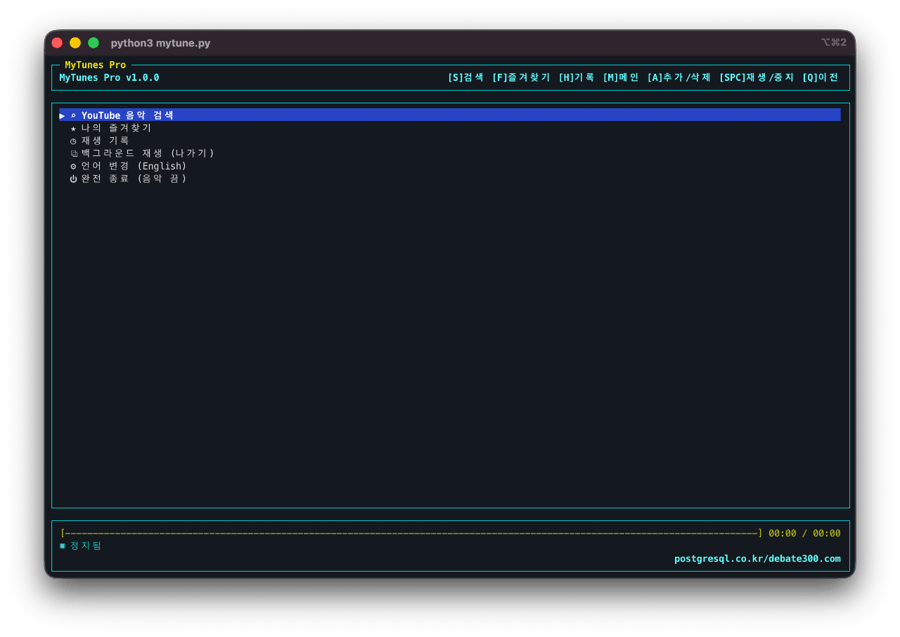 |
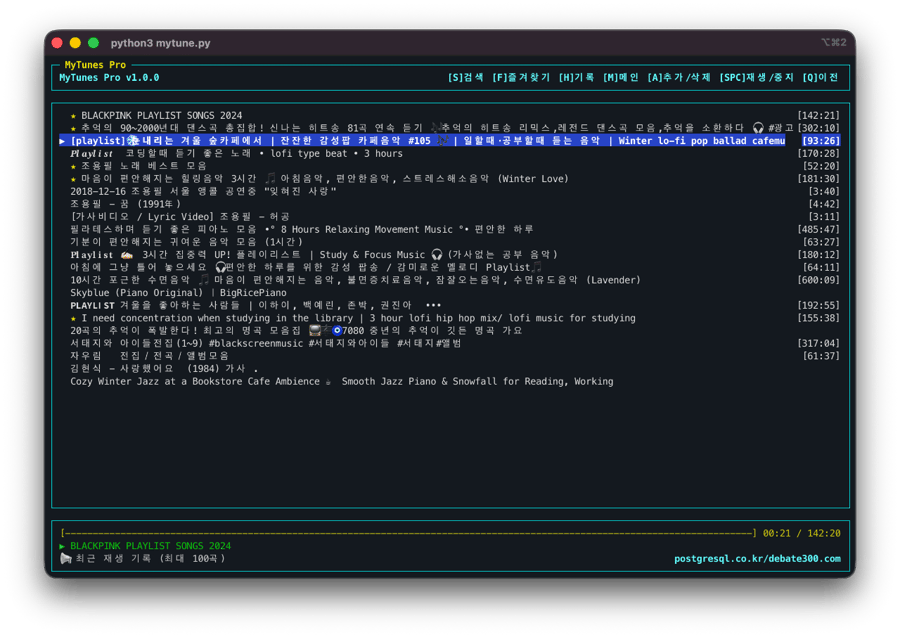 |
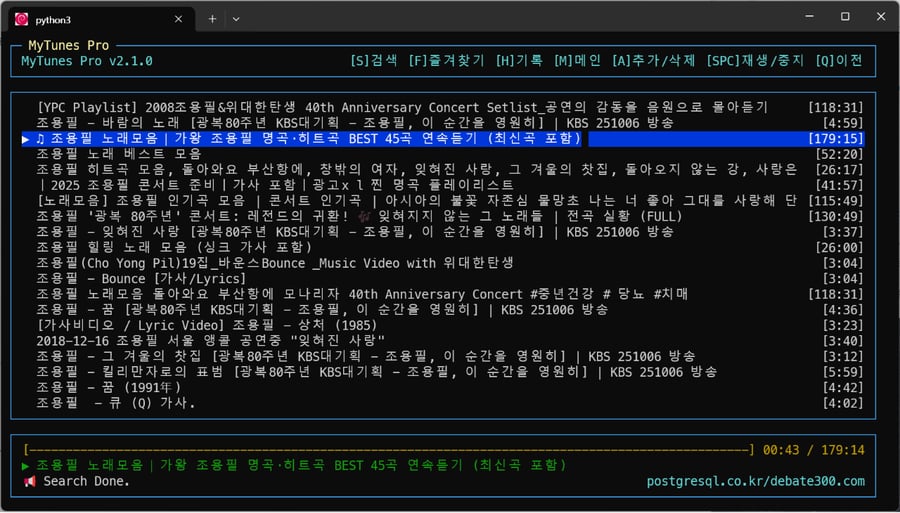 |
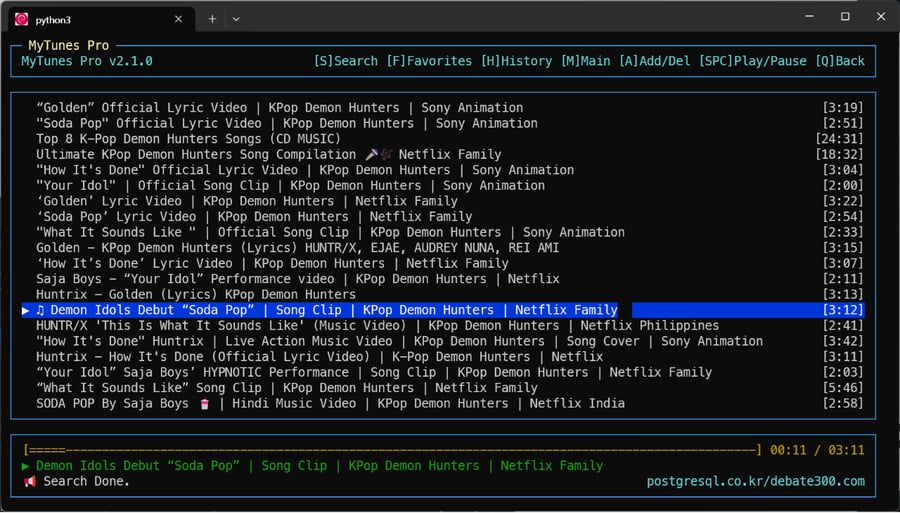 |
✨ 주요 기능
- 강력한 검색:
yt-dlp엔진을 사용하여 광고 없는 고음질 오디오 스트리밍. - 쾌적한 조작:
curses기반 TUI로 빠르고 직관적인 인터페이스. - 연속 재생: 한 곡이 끝나면 리스트의 다음 곡을 자동으로 재생합니다.
- 이어듣기: 중단된 위치부터 이어서 재생할지 선택할 수 있습니다.
- 한글 최적화: 한글 자소 조합 대기 시간 없이 즉시 반응하는 숫자 단축키 지원.
- 스마트 기능: 즐겨찾기, 재생 기록(최대 100곡), 자동 음악 필터링 검색.
- 라이브 (F8): 전 세계 유저들과 함께 듣는 실시간 음악 대시보드 (전용 팝업).
- 공유 (F9): 내가 듣는 곡을 라이브 스테이션에 즉시 송출하여 함께 즐깁니다.
- 비주얼: 현대적인 심볼 아이콘(⌕, ★, ◷)과 깔끔한 디자인.
💻 구동 환경 안내
MyTunes Pro는 터미널(CLI) 기반 애플리케이션입니다. 각 운영체제에서 고음질 오디오를 재생하기 위해 **mpv**라는 엔진을 사용합니다.
- macOS: 터미널(iTerm2, Warp 추천) 지원. Python 3.9 이상 필요.
- Linux: 우분투, 데비안 등 모든 리눅스 배포판 지원.
- Windows: WSL(Windows Subsystem for Linux) 환경이 필요합니다. (아래 가이드를 참고하세요.)
🚀 빠른 설치 (Quick Install)
최신 macOS/Linux 시스템(PEP 668)에서는 pipx 사용을 강력히 권장합니다.
1. 추천 방식 (pipx)
자동으로 격리된 환경을 만들고 명령어를 등록해줍니다.
# pipx install 이후 명령어 등록을 위해 ensurepath 실행 시점 확인!
pipx install mytunes-pro
pipx ensurepath
source ~/.zshrc  # 또는 source ~/.bashrc (현재 터미널에 즉시 적용)
2. 일반 pip 방식
만약 externally-managed-environment 에러가 발생한다면 아래 플래그를 추가하세요:
pip install mytunes-pro --break-system-packages
설치 후 터미널 어디서든 **mp**를 입력하면 실행됩니다!
🔄 최신 버전 업데이트 (Update)
이미 설치되어 있다면 아래 명령어로 간단히 최신 기능을 반영하세요:
pipx upgrade mytunes-pro
🛠 환경별 요구사항 (Prerequisites)
실행 전 각 운영체제에 맞는 필수 도구들을 설치해 주세요.
macOS (Homebrew 사용)
brew install mpv python3 pipx
Linux (Ubuntu/Debian)
sudo apt update
sudo apt install mpv python3 python3-pip pipx python3-venv -y
Windows (초보자용 WSL 가이드)
Windows 환경에서 한글 검색이 안 되거나 설치가 어려운 분들을 위한 가이드입니다.
❓ WSL이란?
윈도우 안에서 리눅스를 앱처럼 쓸 수 있게 해줍니다. MyTunes는 이 환경에서 완벽하게 작동합니다.
-
WSL 설치하기:
시작버튼 우클릭 ->터미널(관리자)실행.- 아래 명령어 입력 후 재부팅:
wsl --install -d Debian
-
필수 도구 설치:
sudo apt update && sudo apt install mpv python3-pip pipx -y
-
MyTunes 설치:
pipx install mytunes-pro
pipx ensurepath
source ~/.bashrc  # 설정 즉시 반영
🧑💻 개발자용 수동 설치 (Manual Installation)
직접 소스크드를 수정하거나 개발 버전을 사용하려면 아래 과정을 따르세요.
-
저장소 클론:
git clone https://github.com/postgresql-co-kr/mytunes.git
cd mytunes
-
가상환경 설정:
python3 -m venv venv
source venv/bin/activate  # macOS/Linux
pip install -r requirements.txt
-
실행:
python3 mytune.py
⌨️ 조작 방법 (Controls)
MyTunes Pro는 키보드만으로 모든 기능을 제어합니다.
한글 입력 상태에서도 끊김 없는 조작을 위해 숫자 단축키 사용을 권장합니다.
⚡️ 즉시 반응 단축키 (숫자키)
한영 전환 없이 언제든 누르면 즉시 실행됩니다.
| 키 | 기능 | 설명 |
|---|---|---|
1 |
검색 (Search) | 음악 검색창 열기 (단축키 S와 동일) |
2 |
즐겨찾기 (Fav) | 저장된 즐겨찾기 목록 보기 (단축키 F와 동일) |
3 |
기록 (History) | 최근 재생한 100곡 보기 (단축키 R와 동일) |
4 |
메인 (Main) | 메인 화면으로 돌아가기 (단축키 M와 동일) |
5 |
추가/삭제 | 선택한 곡 즐겨찾기 토글 (단축키 A와 동일) |
+ |
볼륨 UP | 볼륨 +5% (단축키 =와 동일) |
- |
볼륨 DOWN | 볼륨 -5% (단축키 _와 동일) |
F7 |
유튜브 열기 | 현재 곡을 브라우저에서 보기 |
F8 |
라이브 (Live) | 실시간 음악 대시보드 열기 (전용 팝업창) |
F9 |
공유 (Share) | 현재 곡을 라이브 스테이션에 즉시 공유 |
6 |
뒤로가기 | 이전 화면으로 이동 (단축키 Q, H와 동일) |
ESC |
배경재생 | 음악 끄지 않고 나가기 (백그라운드 재생) |
🧭 기본 탐색
| 키 | 동작 |
|---|---|
↑ / ↓ / k / j |
리스트 위/아래 이동 (Vim 키 지원) |
Enter / l |
선택 / 재생 (한글 ㅣ도 지원) |
Space |
재생 / 일시정지 (Play/Pause) |
- / + |
볼륨 조절 (- / +) |
, / . |
10초 뒤로 / 앞으로 감기 |
< / > |
30초 뒤로 / 앞으로 감기 (Shift) |
Backspace / h / q |
뒤로 가기 / 검색어 지우기 |
/ |
검색 (Vim Style) |
📂 데이터 저장
- 즐겨찾기와 재생 기록은 홈 디렉토리의
~/.pymusic_data.json파일에 영구 저장됩니다. - 프로그램 종료 후 다시 실행해도 데이터가 유지됩니다.
🎵 MyTunes Pro (English)
Modern CLI YouTube Music Player (v1.7.7)
A lightweight, keyboard-centric terminal player for streaming YouTube music.
💻 Environment Support
MyTunes Pro is a Terminal-native application.
- macOS: Native Terminal support. Python 3.9+ required.
- Linux: Supports all distributions (Ubuntu, Debian, etc.).
- Windows: Requires WSL (Windows Subsystem for Linux).
🚀 Quick Start
On modern macOS/Linux systems (PEP 668), using pipx is highly recommended.
1. Recommended (pipx)
pipx install mytunes-pro
pipx ensurepath
source ~/.zshrc  # or source ~/.bashrc to apply changes immediately
2. Standard pip
pip install mytunes-pro --break-system-packages
Run simply by typing mp in your terminal!
🛠 Prerequisites
macOS (Homebrew)
brew install mpv python3 pipx
Linux (Ubuntu/Debian)
sudo apt update
sudo apt install mpv python3 python3-pip pipx python3-venv -y
Windows (Beginner's WSL Guide)
-
Install WSL:
wsl --install -d Debian
Restart your computer after installation.
-
Install Core Tools:
sudo apt update && sudo apt install mpv python3-pip pipx -y
-
Install MyTunes:
pipx install mytunes-pro
pipx ensurepath
source ~/.bashrc
⌨️ English Controls
| Key | Function | Description |
|---|---|---|
1 |
Search | Open search bar (Same as S) |
2 |
Favs | View favorites list (Same as F) |
3 |
Hist | View history (Same as R) |
4 |
Main | Go to Main Menu (Same as M) |
5 |
Add/Del | Toggle Favorite (Same as A) |
+ |
Vol Up | Volume +5% (Same as =) |
- |
Vol Down | Volume -5% (Same as _) |
6 |
Back | Go back (Same as Q, H) |
ESC |
Bg Play | Exit app but keep music playing |
🔄 Changelog
v1.7.7 (Latest)
- PowerShell Launch (WSL/Win): Switched to
powershell.exefor launching browsers from WSL to ensure robust argument parsing and path handling. - Directory Fix: Resolved "cannot read or write" error on Windows/WSL by utilizing
$env:TEMPdirectly within a native shell context. - Reliable Sizing: Guaranteed window size application by combining isolated profiles with PowerShell's superior process management.
v1.7.6
- Isolated Browser Profile: Guaranteed window sizing for the Live Station (F8) on Windows/WSL by forcing an isolated browser profile using the Windows
%TEMP%directory. - WSL Path Translation: Implemented automatic Windows temp path resolution in WSL to enable session persistence and profile isolation.
v1.7.5
- WSL Integration: Fully optimized browser launch from WSL by utilizing
cmd.exeto trigger native Windows browsers. - F7 Windows Resolve: Fixed an issue where YouTube (F7) wouldn't open in WSL environments.
- F8 App Mode (WSL/Win): Enhanced flags to ensure "App Mode" (no address bar) works consistently even when launched from WSL.
v1.7.4
- Windows UI Refinement: Forced Chrome "App Mode" on Windows by reordering flags and disabling extensions/default-apps to ensure a clean popup without an address bar.
- Improved Isolation: Switched to higher-frequency session rotation for Live Station (F8) to guarantee window size and position persistence fixes.
v1.7.3
- Windows Fixes: Resolved issue where F7 (YouTube) failed to open browsers on Windows by implementing
os.startfilelogic. - F8 Initialization: Improved Live Station (F8) window sizing on Windows by forcing a clean session state.
- Robustness: Enhanced cross-platform browser redirection logic to ensure consistent behavior.
v1.7.2
- Windows Optimization: Fixed an issue where the Live Station (F8) window size was not correctly applied on Windows.
- Improved Browser Support: Added Microsoft Edge to the automatic browser detection list.
- Robust Launch Logic: Enhanced browser internal flags for a better initial window experience.
v1.7.1
- Performance & Logic Optimization: Standardized browser launch logic for Live Station (F8) across Mac, Windows, and Linux.
- UI Polish: Silenced browser launch warnings in the terminal and added professional UI flags (disable translation/bubble) for a cleaner experience.
- Improved Popup Behavior: Optimized web interface to reuse the same window for Live Station, matching CLI application behavior.
- Global Sync: Version 1.7.1 synchronization across all platforms.
v1.6.0
- Global Version Synchronization: Synchronized version 1.6.0 across CLI, README, and Web interface.
- Dependency Fix: Ensured
pusherdependency is correctly included for real-time features.
v1.5.6
- Refined Search History Display: Improved the search preview logic to use a temporary 'search' view state, providing a smoother experience when opening and canceling search.
- Bug Fix: Resolved an issue where the 'Search Results History' was not displaying correctly in the background.
v1.5.5
- Search Result History: Automatically saves up to 200 search results.
- Enhanced Search UX: Previously searched items are displayed in the background automatically when opening search.
- Deduplication: Automatically removes duplicate search results to keep history clean.
v1.5.4
- Documentation Refinement: Clarified installation steps and removed redundant WSL locale guide.
- Code Cleanup: Reverted unnecessary locale settings in source code.
v1.5.3
- Locale Optimization: Removed complicated locale generation steps for Windows/WSL users. Now relies on standard system locale or simple
C.UTF-8fallback.
v1.5.2
- Documentation: Major README overhaul for beginner friendliness. Added dedicated Windows/WSL "Zero-to-Hero" guide.
v1.5.0
- Release: Milestone v1.5.0 release with polished documentation and stable features.
Project details
Verified details
These details have been verified by PyPIProject links
GitHub Statistics
Maintainers
Release history Release notifications | RSS feed


Download files
Download the file for your platform. If you're not sure which to choose, learn more about installing packages.
Source Distribution
Built Distribution
Filter files by name, interpreter, ABI, and platform.
If you're not sure about the file name format, learn more about wheel file names.
Copy a direct link to the current filters
File details
Details for the file mytunes_pro-1.7.7.tar.gz.
File metadata
- Download URL: mytunes_pro-1.7.7.tar.gz
- Upload date:
- Size: 30.2 kB
- Tags: Source
- Uploaded using Trusted Publishing? Yes
- Uploaded via: twine/6.1.0 CPython/3.13.7
File hashes
| Algorithm | Hash digest | |
|---|---|---|
| SHA256 |
8de6a7941489dd17dc6030db69584a45c54ef3f4fb406447e4dd5c70eeef99f0
|
|
| MD5 |
2dfe0a779345fced54e9b57741831056
|
|
| BLAKE2b-256 |
978b0c37c5ecf2134afb6e7434f89afc4778ebebf827d022e4de3399b9d2583f
|
Provenance
The following attestation bundles were made for mytunes_pro-1.7.7.tar.gz:
Publisher:
pypi.yml on postgresql-co-kr/mytunes
-
Statement:
-
Statement type:
https://in-toto.io/Statement/v1 -
Predicate type:
https://docs.pypi.org/attestations/publish/v1 -
Subject name:
mytunes_pro-1.7.7.tar.gz -
Subject digest:
8de6a7941489dd17dc6030db69584a45c54ef3f4fb406447e4dd5c70eeef99f0 - Sigstore transparency entry: 854959050
- Sigstore integration time:
-
Permalink:
postgresql-co-kr/mytunes@f0eb6544c707378b4a300de2998cab60e31d13c7 -
Branch / Tag:
refs/tags/v1.7.7 - Owner: https://github.com/postgresql-co-kr
-
Access:
public
-
Token Issuer:
https://token.actions.githubusercontent.com -
Runner Environment:
github-hosted -
Publication workflow:
pypi.yml@f0eb6544c707378b4a300de2998cab60e31d13c7 -
Trigger Event:
push
-
Statement type:
File details
Details for the file mytunes_pro-1.7.7-py3-none-any.whl.
File metadata
- Download URL: mytunes_pro-1.7.7-py3-none-any.whl
- Upload date:
- Size: 24.9 kB
- Tags: Python 3
- Uploaded using Trusted Publishing? Yes
- Uploaded via: twine/6.1.0 CPython/3.13.7
File hashes
| Algorithm | Hash digest | |
|---|---|---|
| SHA256 |
2c5b14eb020e6a490c2e84a9b71bdfc4c65fadc0bf3f7bfff8ae12630ce26aa2
|
|
| MD5 |
c46fcd80541fd98b6862f603007bf2ef
|
|
| BLAKE2b-256 |
502b9378ecae5bddae8118aa274acd450f3d7f645b586955ee730cc7e40a9624
|
Provenance
The following attestation bundles were made for mytunes_pro-1.7.7-py3-none-any.whl:
Publisher:
pypi.yml on postgresql-co-kr/mytunes
-
Statement:
-
Statement type:
https://in-toto.io/Statement/v1 -
Predicate type:
https://docs.pypi.org/attestations/publish/v1 -
Subject name:
mytunes_pro-1.7.7-py3-none-any.whl -
Subject digest:
2c5b14eb020e6a490c2e84a9b71bdfc4c65fadc0bf3f7bfff8ae12630ce26aa2 - Sigstore transparency entry: 854959053
- Sigstore integration time:
-
Permalink:
postgresql-co-kr/mytunes@f0eb6544c707378b4a300de2998cab60e31d13c7 -
Branch / Tag:
refs/tags/v1.7.7 - Owner: https://github.com/postgresql-co-kr
-
Access:
public
-
Token Issuer:
https://token.actions.githubusercontent.com -
Runner Environment:
github-hosted -
Publication workflow:
pypi.yml@f0eb6544c707378b4a300de2998cab60e31d13c7 -
Trigger Event:
push
-
Statement type:






