
N0RMA
Formerly called Homewatch.
Home counter-surveillance detector for Linux (BlueZ + NetworkManager + iw). Detect-only: no jamming, no spoofing.
Run: ./n0rma.sh setup once, then ./n0rma.sh run -> http://127.0.0.1:8777
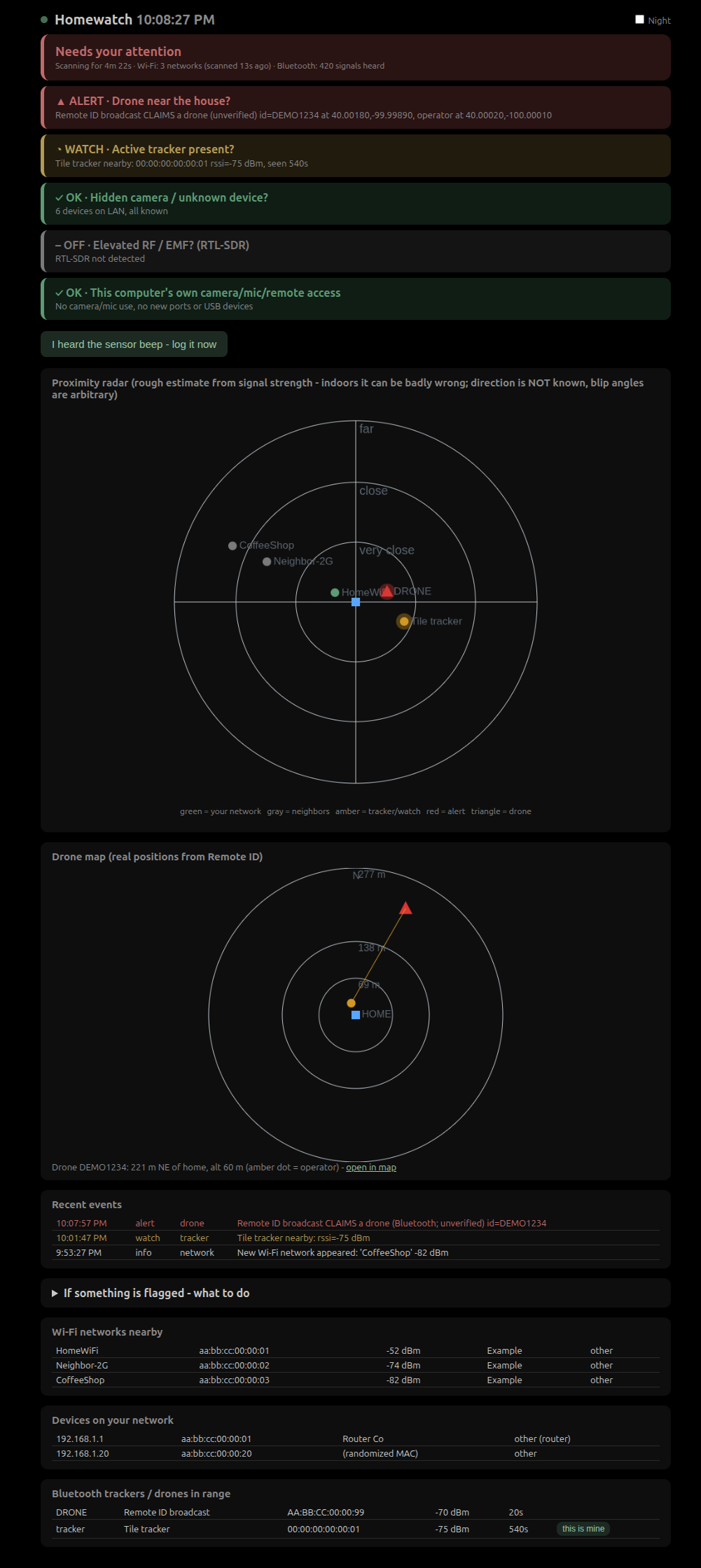
What's new in 0.2
- Dark, muted, low-glare dashboard (no flashing alerts; every status is word + icon + color) with a Night switch (dim red on black)
- A plain-language banner ("All clear" / "Keeping an eye on something" / "Needs your attention") with a breathing dot and live scan ages, so you can see it is working
- "This is mine" on trackers: your own Tile/AirTag stops flagging and shows as yours
- Sister project: n0rma-android (public, with signed APKs on its Releases page) - same detection on a phone, with tap-to-find, room sweeps and survey exports
Install
pip install n0rma-sec (the command it installs is n0rma) (or from source below). System packages are still needed:
sudo apt install ieee-data nmap iw network-manager bluez (the vendor database from ieee-data/nmap is required for
camera/drone vendor detection - N0RMA warns at startup if it is missing), then
python3 -m venv .venv --system-site-packages && .venv/bin/pip install bleak.
Optional RF module: sudo apt install rtl-sdr + an RTL-SDR dongle (24 MHz-1.7 GHz only; not 2.4/5.8 GHz).
Commands
| Command | What |
|---|---|
setup |
first-run walkthrough: your Wi-Fi, home position, which devices are yours |
run [--lan] |
all detectors + dashboard (type b+Enter to log a sensor beep) |
scan |
one-shot scan |
beep [--ago MIN] / report |
log sensor beeps / line them up against detections (with background baseline) |
devices / trust all|<mac> |
LAN inventory; the first scan auto-trusts everything - review it |
find <BLE addr> |
hot/cold locator |
home <lat> <lon> |
home position for the drone map (west longitude is negative) |
ntfy setup|test|on|off |
phone alerts (generic text only, via ntfy.sh) |
selftest |
unit tests |
Read this first
- This is not a guarantee of safety. A quiet dashboard means "nothing seen by these radios", not "nothing is there". Blind spots: drones without Remote ID, SD-card-only cameras, cellular/GPS trackers, anything on 2.4/5.8 GHz video.
- Remote ID is unauthenticated. Anyone can broadcast a fake one, so a red drone alert means a broadcast claims a drone. Position and operator location are whatever the sender says. Operator coordinates are shown live and are never written to disk; events are pruned after 30 days.
- Do not interfere with a drone (shooting at, jamming or spoofing one is a federal crime). Report it to law enforcement or the FAA.
- The radar is a rough estimate. Signal strength gives only a crude distance, badly distorted indoors, and no direction.
- If you find something: don't touch or move it, photograph it where it is, note the time, and contact local law enforcement. A tracker you don't own: Apple/Android show unknown-tracker alerts and can help identify it.
--lanis plain HTTP. Anyone sniffing your Wi-Fi can see the private link/token. Use it only on a network you trust. Localhost mode only acceptsHost: 127.0.0.1/localhost(blocks DNS rebinding) and state-changing requests need anX-Homewatchheader.- Your Wi-Fi name, home position, tokens and the ntfy topic live in
~/.local/share/n0rma/config.json(mode 600), never in the code.
1 maintainer

Metadata
1 maintainer
Release files for n0rma-sec 0.3.1
For a detailed explanation of source distributions (sdists) and built distributions (wheels), please see the package formats documentation.
Source distribution (sdist)
| File | Size | Uploaded | |
|---|---|---|---|
| n0rma_sec-0.3.1.tar.gz | 40.5 kB | Details |
Built distribution (wheel)
| File | Interpreter | ABI | Platform | Reset |
|---|---|---|---|---|
| n0rma_sec-0.3.1-py3-none-any.whl | Python 3 | none | any | Details |
Total release size: 78.7 kB
Release files / n0rma_sec-0.3.1.tar.gz
| Download URL | n0rma_sec-0.3.1.tar.gz |
|---|---|
| Size | 40.5 kB |
| Tags | Source |
|
SHA-256 checksum How to use checksums |
20d307df1ab40cb6d3b6846edb27b90f024faeed9dd8d473393c4c38f7c84baa
|
|
BLAKE2b-256 checksum How to use checksums |
d4c604c9dd9a48f7fb2b26d8a58bacc72caa7c2230f1cb00399ba277f21ab365
|
| Upload date | |
|
Uploaded using Trusted Publishing? What is trusted publishing? |
Yes |
| Uploaded via |
twine/7.0.0 CPython/3.13.14
|
Provenance
Provenance describes where a file came from. On PyPI, provenance is shared via attestations, which provide a verifiable record of the build or publishing details. View details, limitations and caveats.


PyPI Publish Attestation
PyPI verified that this artifact, at this checksum, originated from the publisher listed below.
Signed by GitHub Actions, verified by PyPI on Oct 7, 2026.
Transparency logRelease files / n0rma_sec-0.3.1-py3-none-any.whl
| Download URL | n0rma_sec-0.3.1-py3-none-any.whl |
|---|---|
| Size | 38.2 kB |
| Tags | Python 3 |
|
SHA-256 checksum How to use checksums |
df472d7acd5da38eadc59d45352bd2d46ddb85cb8e04bb5020efa40f5b4a983f
|
|
BLAKE2b-256 checksum How to use checksums |
77bbeda3b8b06ce7a6fb26a7eb2b0104af37ab5e7a424be0e41a7e74b1457b2b
|
| Upload date | |
|
Uploaded using Trusted Publishing? What is trusted publishing? |
Yes |
| Uploaded via |
twine/7.0.0 CPython/3.13.14
|
Provenance
Provenance describes where a file came from. On PyPI, provenance is shared via attestations, which provide a verifiable record of the build or publishing details. View details, limitations and caveats.
PyPI Publish Attestation
PyPI verified that this artifact, at this checksum, originated from the publisher listed below.
Signed by GitHub Actions, verified by PyPI on Oct 7, 2026.
Transparency log













