
Dynamic LLM Model Selector based on Prompt Complexity
Verified details
These details have been verified by PyPIProject links
GitHub Statistics
Maintainers

Project description
Nadir

No Overhead, Just Output
AI-Driven LLM Selection • Complexity Analysis • Cost-Efficient Compression • Multi-Provider Support




🔍 Overview
Nadir is an intelligent LLM selection framework that dynamically chooses the best AI model for a given prompt based on:
- 🚀 Complexity Analysis: Evaluates text structure, difficulty, and token usage.
- ⚡ Multi-Provider Support: Works with OpenAI, Anthropic, Gemini, and Hugging Face models.
- 💰 Cost & Speed Optimization: Balances model accuracy, response time, and pricing.
- 🔄 Adaptive Compression: Reduces token usage via truncation, keyword extraction, or AI-powered compression.
Why LLM Selection Matters
- Tailored Performance: The right LLM understands the nuances in your detailed prompts, delivering responses that are both precise and insightful.
- Empowered Creativity: When your prompts are crafted with depth, the LLM becomes an extension of your vision, helping you explore ideas and solve problems innovatively.
- Maximized Impact: Strategic LLM selection ensures that every dollar spent translates into greater creative output and operational efficiency.
Prompt Complexity: The Key to Unlocking Brilliance
- Guiding Detail: Complex prompts provide rich context and clear instructions, steering the LLM towards high-quality, context-aware responses.
- Enhanced Innovation: Detailed prompts allow the LLM to process multi-step reasoning and intricate logic, unlocking layers of creativity that simple prompts might miss.
- Precision and Insight: When you invest in crafting thoughtful, detailed prompts, you set the stage for the LLM to deliver outputs that elevate your work to the next level.
Balancing Complexity and Cost
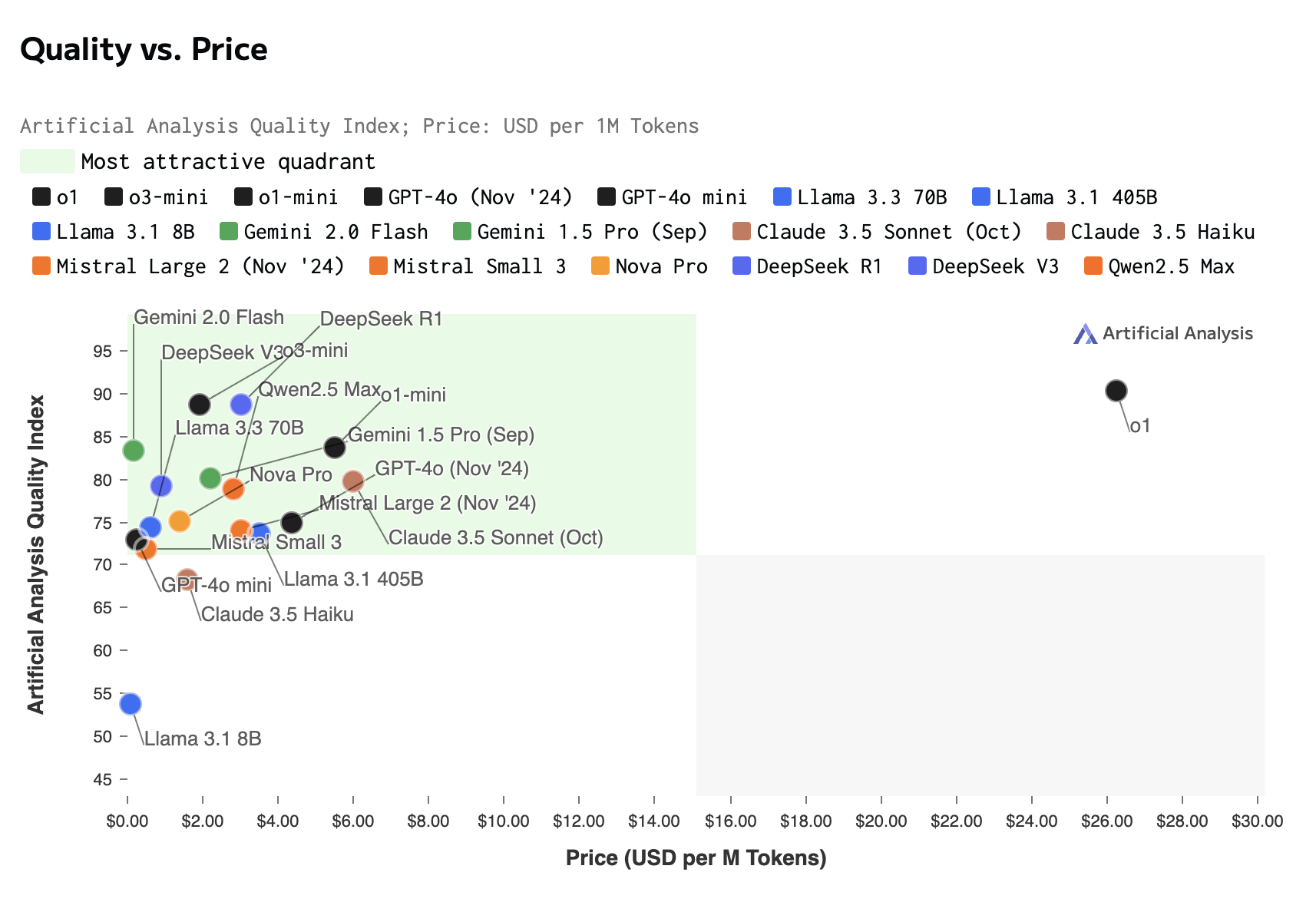
- Invest Wisely: Advanced LLMs excel with complex prompts but come at a higher cost. The key is to find the right balance that meets your needs without overspending.
- Optimize Your Approach: Start with simple prompts to gauge performance, then gradually introduce more complexity as needed. This iterative approach ensures you get the best value for your investment.
- Maximize ROI: By aligning the depth of your prompts with the appropriate LLM, you achieve optimal efficiency—harnessing the full power of AI while managing expenses effectively.
Why Choose Nadir?
- Dynamic Model Selection: Automatically choose the best LLM for any given task based on complexity and cost thresholds.
- Cost Optimization: Minimize token usage and costs with intelligent prompt compression.
- Multi-Provider Support: Seamless integration with OpenAI, Anthropic, Google Gemini, and Hugging Face.
- Extensible Design: Add your own complexity analyzers, compression strategies, or new providers effortlessly.
- Rich Insights: Generate detailed metrics on token usage, costs, and model performance.
 ---
---
Installation
Install Nadir using pip:
pip install nadir-llm
Set Up Environment Variables
Create a .env file to store your API keys:
# .env file
OPENAI_API_KEY=your_openai_api_key
ANTHROPIC_API_KEY=your_anthropic_api_key
GEMINI_API_KEY=your_google_ai_key
HUGGINGFACE_API_KEY=your_huggingface_api_key
🚀 Usage
🔹 Select the Best LLM for a Prompt
from nadir.llm_selector.selector.auto import AutoSelector

nadir = AutoSelector()
prompt = "Explain quantum entanglement in simple terms."
response = nadir.generate_response(prompt)

print(response)
🔹 Get Complexity Analysis & Recommended Model
complexity_details = nadir.get_complexity_details("What is the speed of light in vacuum?")
print(complexity_details)
🔹 List Available Models
models = nadir.list_available_models()
print(models)
⚙️ Advanced Usage: Using LLMComplexityAnalyzer and Compression
🔹 Analyzing Code Complexity and Selecting the Best LLM
from nadir.complexity.llm import LLMComplexityAnalyzer
from nadir.llm_selector.selector.auto import AutoSelector

# Initialize the LLM-based complexity analyzer
complexity_analyzer = LLMComplexityAnalyzer()

# Sample Python code
code_snippet = """
def factorial(n):
    if n == 0:
        return 1
    else:
        return n * factorial(n-1)
"""

# Get detailed complexity metrics
complexity_details = complexity_analyzer.get_complexity_details(code_snippet)
print("Complexity Details:", complexity_details)

# Initialize Nadir and dynamically select the best model
nadir = AutoSelector(complexity_analyzer=complexity_analyzer)
selected_model = nadir.select_model(code_snippet)
print("Selected Model:", selected_model.name)
🔹 Compressing Long Prompts Before Model Selection
from nadir.compression import GeminiCompressor
from nadir.llm_selector.selector.auto import AutoSelector

# Initialize Gemini-based prompt compression
compressor = GeminiCompressor()

# A very long prompt
long_prompt = """
Machine learning models require extensive preprocessing and feature engineering.
However, feature selection techniques vary widely based on the type of data.
For example, in text-based datasets, TF-IDF, word embeddings, and transformers
play a significant role, whereas in tabular data, methods like PCA, correlation
analysis, and decision tree-based feature selection are preferred.
"""

# Compress the prompt
compressed_prompt = compressor.compress(long_prompt, method="auto", max_tokens=100)
print("Compressed Prompt:", compressed_prompt)

# Use Nadir to select the best model for the compressed prompt
nadir = AutoSelector()
selected_model = nadir.select_model(compressed_prompt)
print("Selected Model:", selected_model.name)
🔹 Combining Compression & Complexity Analysis
from nadir.compression import GeminiCompressor
from nadir.complexity.llm import LLMComplexityAnalyzer
from nadir.llm_selector.selector.auto import AutoSelector

# Initialize complexity analyzer and compressor
complexity_analyzer = LLMComplexityAnalyzer()
compressor = GeminiCompressor()

# A long, complex prompt
long_prompt = """
Deep learning models often suffer from overfitting when trained on small datasets.
To combat this, techniques such as dropout, batch normalization, and L2 regularization
are widely used. Furthermore, transfer learning from pre-trained models has become
a popular method for reducing the need for large labeled datasets.
"""

# Step 1: Compress the prompt
compressed_prompt = compressor.compress(long_prompt, method="auto", max_tokens=80)
print("Compressed Prompt:", compressed_prompt)

# Step 2: Analyze complexity
complexity_details = complexity_analyzer.get_complexity_details(compressed_prompt)
print("Complexity Details:", complexity_details)

# Step 3: Select the best model
nadir = AutoSelector(complexity_analyzer=complexity_analyzer)
selected_model = nadir.select_model(compressed_prompt, complexity_details)
print("Selected Model:", selected_model.name)
⚙️ How It Works
1️⃣ Complexity Analysis
Uses LLMComplexityAnalyzer to evaluate token usage, linguistic difficulty, and structural complexity.
Assigns a complexity score (0-100).
2️⃣ Intelligent Model Selection
Compares complexity score with pre-configured LLM models. Chooses the best trade-off between cost, accuracy, and speed.
3️⃣ Efficient Response Generation
Compresses long prompts when necessary. Calls the selected model and tracks token usage & cost.
Community & Support
🛠 Development & Contributions
💡 We welcome contributions! Follow these steps:
1️⃣ Fork the Repository
git clone https://github.com/your-username/Nadir.git
cd Nadir
2️⃣ Create a Feature Branch
git checkout -b feature-improvement
3️⃣ Make Changes & Run Tests
pytest tests/
4️⃣ Commit & Push Changes
git add .
git commit -m "Added a new complexity metric"
git push origin feature-improvement
5️⃣ Submit a Pull Request
Open a PR on GitHub 🚀
Join the conversation and get support in our Discord Community.
📢 Connect with Us
💬 Have questions or suggestions? Create an Issue or Start a Discussion on GitHub.
🔥 Happy coding with Nadir! 🚀
Project details
Verified details
These details have been verified by PyPIProject links
GitHub Statistics
Maintainers
Release history Release notifications | RSS feed


Download files
Download the file for your platform. If you're not sure which to choose, learn more about installing packages.
Source Distribution
Built Distribution
Filter files by name, interpreter, ABI, and platform.
If you're not sure about the file name format, learn more about wheel file names.
Copy a direct link to the current filters
File details
Details for the file nadir_llm-0.2.0.tar.gz.
File metadata
- Download URL: nadir_llm-0.2.0.tar.gz
- Upload date:
- Size: 32.9 kB
- Tags: Source
- Uploaded using Trusted Publishing? Yes
- Uploaded via: twine/6.1.0 CPython/3.12.8
File hashes
| Algorithm | Hash digest | |
|---|---|---|
| SHA256 |
038b4c7da91118292c3399e5842d2f85c5ede5780c9a6987809531ee34d07e04
|
|
| MD5 |
8c047161fa87b9200b079c5d8c94a99f
|
|
| BLAKE2b-256 |
eacb7c30694e80d8bc201c159ccf0260412f900c69dd2efac99180832aa8a4b5
|
Provenance
The following attestation bundles were made for nadir_llm-0.2.0.tar.gz:
Publisher:
python-publish.yml on doramirdor/Nadir
-
Statement:
-
Statement type:
https://in-toto.io/Statement/v1 -
Predicate type:
https://docs.pypi.org/attestations/publish/v1 -
Subject name:
nadir_llm-0.2.0.tar.gz -
Subject digest:
038b4c7da91118292c3399e5842d2f85c5ede5780c9a6987809531ee34d07e04 - Sigstore transparency entry: 170264187
- Sigstore integration time:
-
Permalink:
doramirdor/Nadir@edb021a04f77ba8ade22e418c938f88a8e95de99 -
Branch / Tag:
refs/tags/v0.2 - Owner: https://github.com/doramirdor
-
Access:
public
-
Token Issuer:
https://token.actions.githubusercontent.com -
Runner Environment:
github-hosted -
Publication workflow:
python-publish.yml@edb021a04f77ba8ade22e418c938f88a8e95de99 -
Trigger Event:
release
-
Statement type:
File details
Details for the file nadir_llm-0.2.0-py3-none-any.whl.
File metadata
- Download URL: nadir_llm-0.2.0-py3-none-any.whl
- Upload date:
- Size: 41.7 kB
- Tags: Python 3
- Uploaded using Trusted Publishing? Yes
- Uploaded via: twine/6.1.0 CPython/3.12.8
File hashes
| Algorithm | Hash digest | |
|---|---|---|
| SHA256 |
55b6f69b1437abf1d8a0fc53a3c72a84e7c50e1c56844d7f71974cd07daa406a
|
|
| MD5 |
b48661e654d4cc91b393d488cdfdc4ce
|
|
| BLAKE2b-256 |
504d9303ad8e655684a66d99896ebb85607c08ebe701c8a187d2ff1c4810c31d
|
Provenance
The following attestation bundles were made for nadir_llm-0.2.0-py3-none-any.whl:
Publisher:
python-publish.yml on doramirdor/Nadir
-
Statement:
-
Statement type:
https://in-toto.io/Statement/v1 -
Predicate type:
https://docs.pypi.org/attestations/publish/v1 -
Subject name:
nadir_llm-0.2.0-py3-none-any.whl -
Subject digest:
55b6f69b1437abf1d8a0fc53a3c72a84e7c50e1c56844d7f71974cd07daa406a - Sigstore transparency entry: 170264191
- Sigstore integration time:
-
Permalink:
doramirdor/Nadir@edb021a04f77ba8ade22e418c938f88a8e95de99 -
Branch / Tag:
refs/tags/v0.2 - Owner: https://github.com/doramirdor
-
Access:
public
-
Token Issuer:
https://token.actions.githubusercontent.com -
Runner Environment:
github-hosted -
Publication workflow:
python-publish.yml@edb021a04f77ba8ade22e418c938f88a8e95de99 -
Trigger Event:
release
-
Statement type:






