





Naga
Naga is a simulation engine for Python, built on SimPy, for people who have a question about how a system behaves and want an answer they can show their work for. You describe the system once, as a data file of blocks, resources and expressions, and Naga runs it as a discrete-event, system-dynamics or agent-based model, or as all three on one clock. Around each run it puts what turns a single run into evidence: independent replications with confidence intervals, scenarios compared on the same random numbers, designed experiments, optimisation and calibration. The same model can also be connected to a plant, so that it starts from what is happening now, forecasts what comes next, checks those forecasts against what then happened, and proposes what to change. Because the model stays a file that can be read, compared and shared, whichever way you drive it, the answer it gives is one a team can inspect and repeat rather than take on trust.
pip install nagasim
naga run single_server --replications 5 --report report.html
Documentation: https://thematthub.github.io/naga/
How it fits together
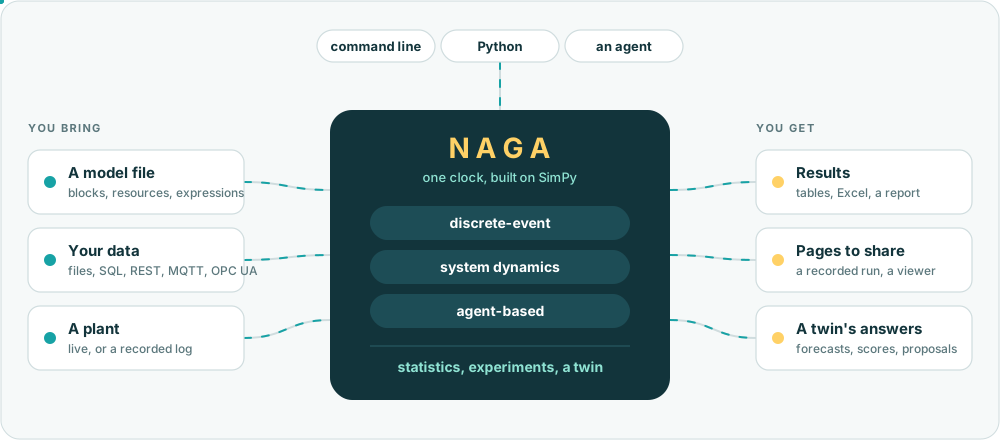
The picture reads from left to right. On the left is what you bring: a model file, the data it draws on and, if you have one, a plant to follow. In the middle the engine runs the model on a single clock, whichever of the three ways of modelling it uses, and wraps the run in statistics, experiments or a twin. On the right is what comes back: results and a report, pages you can send to someone else, and a twin's forecasts and proposals. Along the top are the three ways in, the command line, Python and an agent, and because a model is a data file and not a program, the same file gives the same answer through each of them.
What it does
- Discrete-event models from blocks (create, process, seize/release, batch, match, decide, route, transport, ...) with resources, sets, schedules, failures, costs, expressions and submodels.
- Material handling: path networks, vehicle fleets with batteries and chargers, conveyors, motion cycles, machine tending.
- System dynamics (stocks, flows, auxiliaries, delays, subscripts, units, XMILE and Vensim import) and agent-based models (statecharts, messages, space, networks), in the same model and on the same clock as the discrete-event part.
- Statistics you can defend: independent replications, Student-t intervals, warm-up handling, reproducible random streams, validated against queueing theory.
- Experiments: named scenarios with paired comparisons, design of experiments, ranking-and-selection, optimisation, calibration, forecasting, an investment case.
- A twin of a plant (
naga twin): live readers for files, SQL, REST, MQTT and OPC UA, a run that starts from the observed state, forecasts scored against what happened, and candidate actions compared on the forecast. It reads a plant and never writes to one. - Model files as data: a versioned JSON schema, validation with stable problem codes,
semantic diff and three-way merge, assertions (
naga check) with a CI template. - Outputs: pandas frames, Excel, CSV, JSON, a self-contained HTML report, a recorded run to replay, and a viewer in which the engine itself runs in a browser.
- Agent tools: 68 tools over MCP to build, validate, run, debug and analyse a model.
Quick start
From the command line, with the bundled example models (naga examples lists them; a command
that takes a model file also takes one of their names):
naga examples
naga run single_server --replications 5 --report report.html
naga scenarios automation_cell
naga validate single_server
naga --help
From Python:
from nagasim import api, examples

results = api.run_model(examples.path("single_server"), replications=5, seed=0)
print(results["system"])
results is a dictionary of pandas frames (system, resources, queues, entities, costs and more).
What you can see
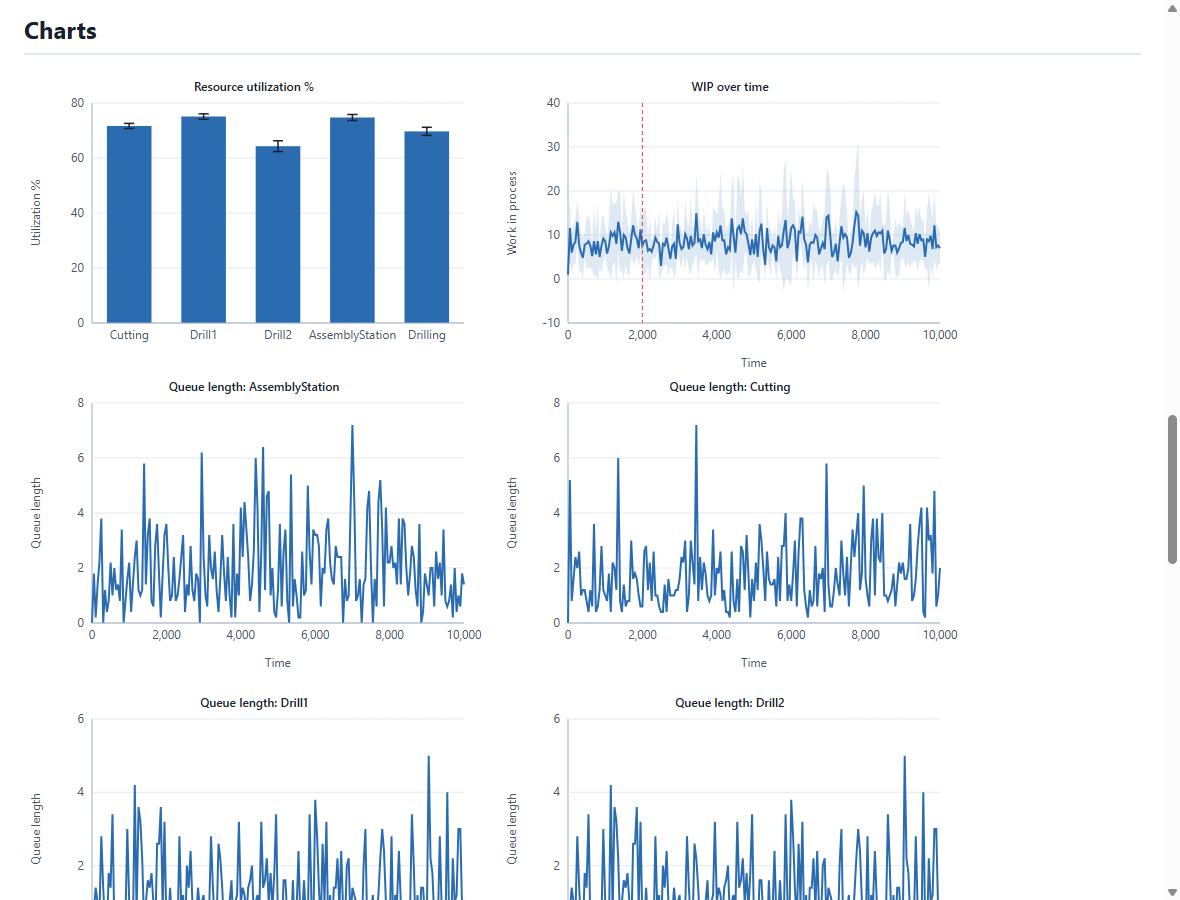
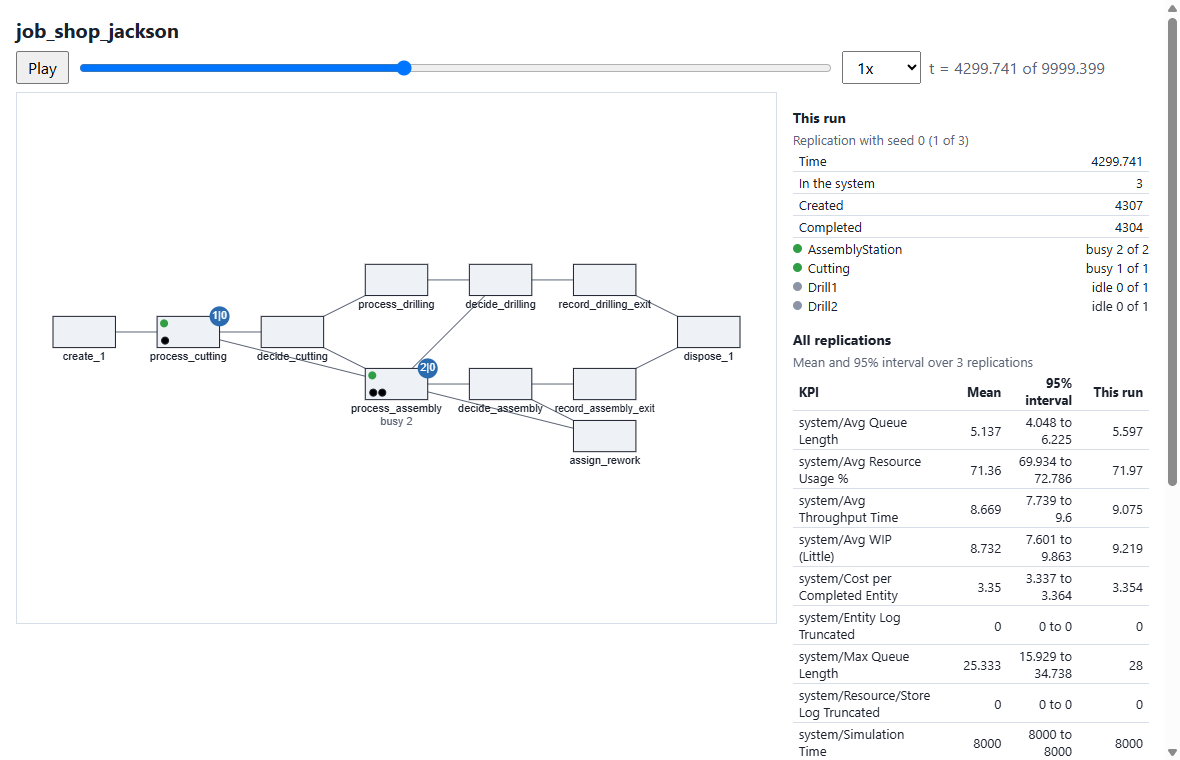
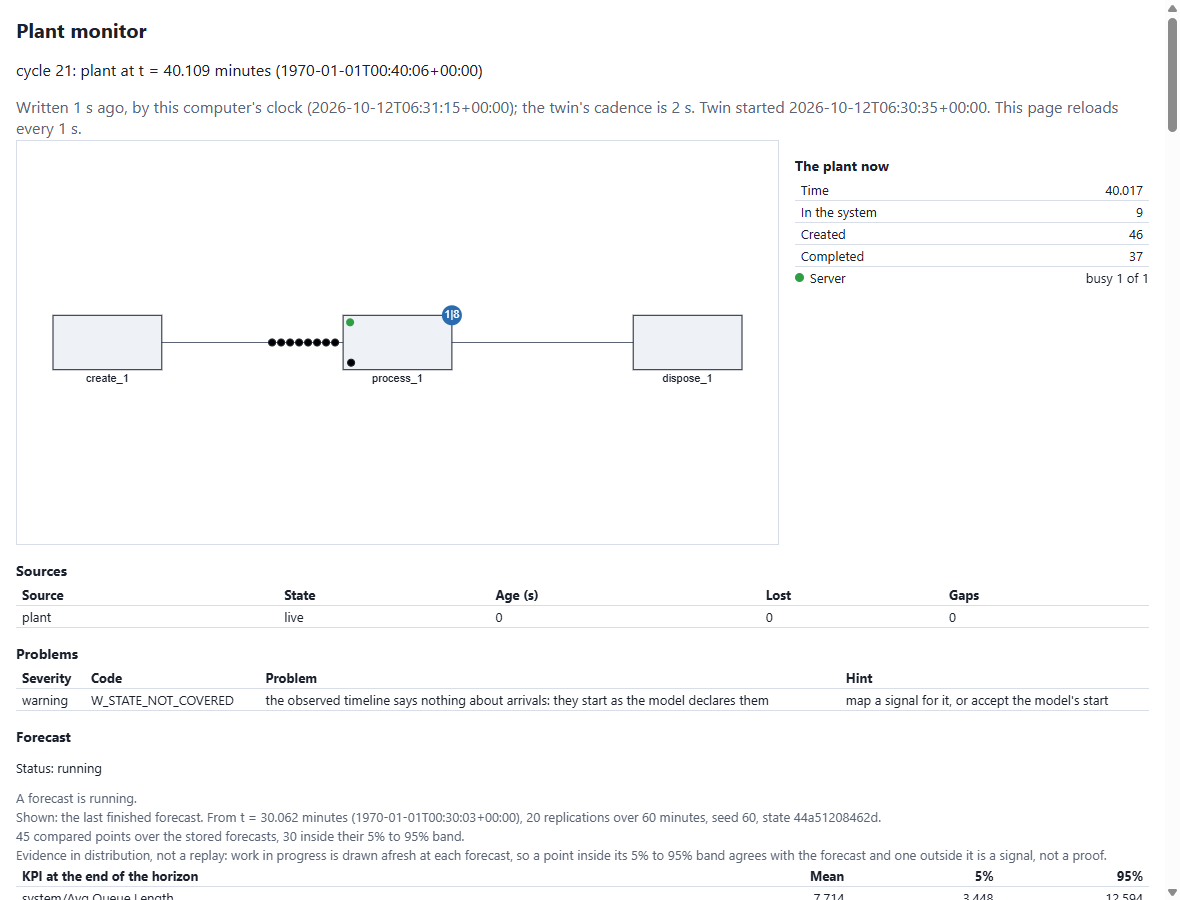
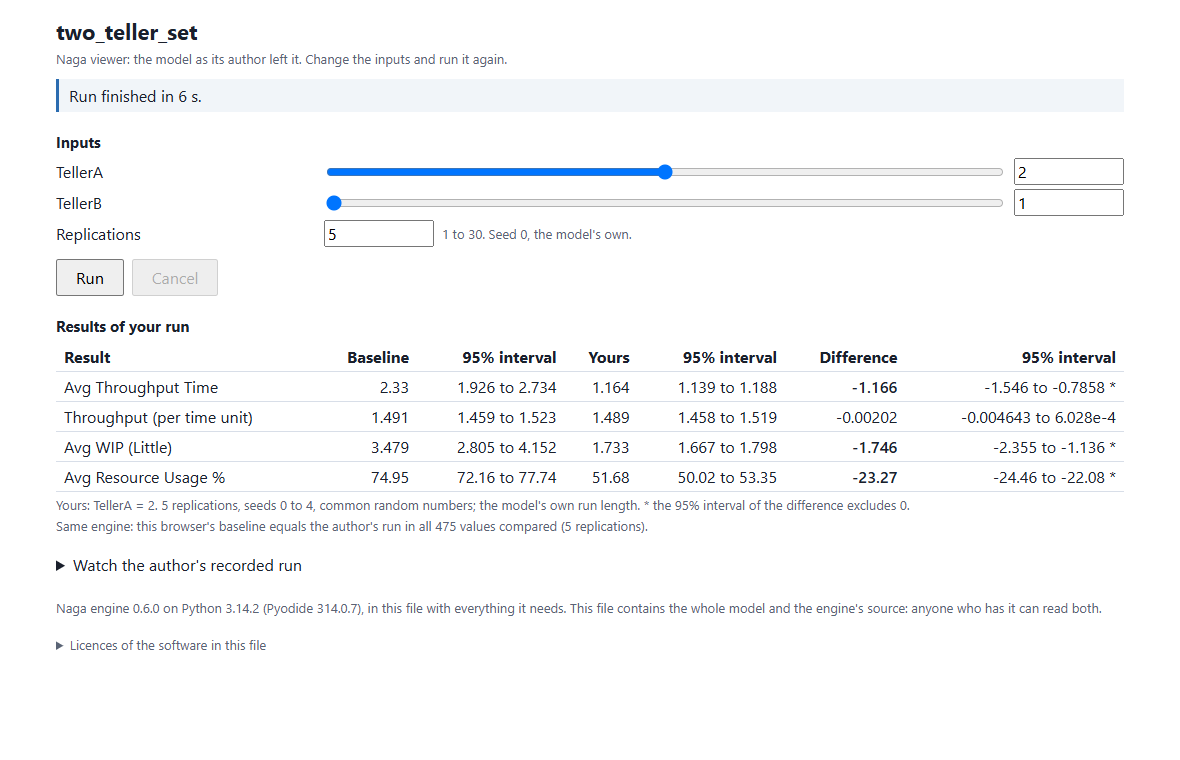
A run is easier to trust when you can look at it, so the engine writes what it finds as pages as well as tables. Each of the four below is a single file, made by one command, that opens in a browser with no server behind it: a report to read, a recorded run to replay, a monitor that follows a plant, and a viewer in which someone else can change the inputs and run the model again. They are what you hand to the people who asked the question.
 |
 |
A report. naga run MODEL --report report.html: KPIs with intervals, resources, costs and charts. |
A recorded run. naga run MODEL --player run.html: the run replayed on the model's layout, with its KPIs. |
 |
 |
A twin's monitor. naga twin run ... --monitor: the plant now, the forecast against what happened, problems with their hints. The page reloads itself. |
A viewer. naga viewer MODEL -o viewer.html: the engine runs in the reader's browser; they change the inputs you exposed and run it again. |
Example models
The package holds about fifty models: queues with a known analytical answer, job shops, warehouses with forklifts, an energy site, a biogas plant, a supply chain, system-dynamics classics, agent-based classics. Each runs as it is, and the documentation has a gallery of them with numbers from a run:
naga run warehouse_forklifts --replications 2
Some of them use submodels that came from asset libraries of a separate product; the engine runs the submodels, the product's artwork is not included here.
Use with an agent
The engine ships 68 tools an agent can call to build, validate, run, debug and analyse a model, and two ways to offer them:
pip install "nagasim[mcp]"
naga mcp --root path/to/models                 # an MCP server over stdio (Claude Code, Claude Desktop)

pip install "nagasim[assistant]"               # only for Claude
naga assist model.json "add a second server"   # one assistant turn on a model file
A local model needs no extra.
naga assist talks to a local model by default (an OpenAI-compatible server such as Ollama at
http://localhost:11434/v1; pass its model name with --model-id) or to Claude when
ANTHROPIC_API_KEY is set. Where a request goes is the caller's choice and nothing else's:
command-line flags, then the environment (NAGASIM_LLM_PROVIDER, NAGASIM_LLM_BASE_URL,
NAGASIM_LLM_MODEL; also NAGASIM_LLM_API_KEY and NAGASIM_LLM_REASONING), then the defaults.
naga mcp keeps every file inside --root and has the network off unless you allow it;
naga assist works on the one model file you give it and reaches only the endpoint you
configured. A model's own Python behaviour never runs through either.
Limits to know
- No test has run against a real broker, OPC UA server, MES or plant counter: the readers and the twin are tested on in-process stand-ins and recorded logs.
- A twin cannot yet start from the state of a model with vehicles or blocking buffers; such a model is monitored and its forecast is refused by name.
- Recommendations build one action, a resource's capacity, and one sink, a file.
- The viewer needs Chrome, Edge or Firefox on a desktop.
- There is no editor and no animation here beyond the recorded player: Naga is an engine.
Building a product on top
Naga is the engine only. It is written so that a product package (an editor, asset libraries,
an assistant, connectors) sits beside it and imports it, never the other way round: nothing in
nagasim imports such a package, and a test keeps it that way. Where the code or a comment says
product or "the product", that is the place such a package takes; none is part of this
repository.
What a product builds on:
nagasim.api(run_modeland friends) andnagasim.core.document.ModelDocument, the model as an editable, undoable document;- the model schema (
naga schema) and structured validation problems with stable codes; - the event bus and
nagasim.core.trace.TraceRecorder, withnagasim.core.playback.Timelineto turn a recorded or live run into the state at any instant (what an animation draws); - plugin entry points for blocks, distributions and exporters (
nagasim.plugins); nagasim.netguard, the one place file and network access is decided.
Development
git clone https://github.com/TheMattHub/naga
cd naga
pip install -e ".[plan,ml,sql,plot]" -r requirements-dev.txt
python -m pytest -q -n auto
Python 3.11 or later. The engine depends on SimPy, NumPy, pandas, SciPy and openpyxl; everything
else is optional and imported only where it is used. The documentation's sources are in docs/
(pip install -r requirements-docs.txt, then python -m mkdocs serve).
Versions
Before 1.0:
- Model files always migrate forward: a file saved by an older version opens in a newer one.
- Agent tool names and problem codes are permanent.
- The Python API may change between minor versions; every such change has a changelog line.
See the changelog.
Licence and citation
Apache License 2.0, see LICENSE and NOTICE. If you use Naga in published work, please cite it: see CITATION.cff.
1 maintainer

Metadata
1 maintainer
Release files for nagasim 0.6.1
For a detailed explanation of source distributions (sdists) and built distributions (wheels), please see the package formats documentation.
Source distribution (sdist)
| File | Size | Uploaded | |
|---|---|---|---|
| nagasim-0.6.1.tar.gz | 2.0 MB | Details |
Built distribution (wheel)
| File | Interpreter | ABI | Platform | Reset |
|---|---|---|---|---|
| nagasim-0.6.1-py3-none-any.whl | Python 3 | none | any | Details |
Total release size: 3.4 MB
Release files / nagasim-0.6.1.tar.gz
| Download URL | nagasim-0.6.1.tar.gz |
|---|---|
| Size | 2.0 MB |
| Tags | Source |
|
SHA-256 checksum How to use checksums |
e99577accdbf0bfd198faef1b7dbf454d9c09b53107760d7666d90b91c04e5d0
|
|
BLAKE2b-256 checksum How to use checksums |
ae84f58bad6d995bb2c1ff3cfda2348ec88cc2b168657f5e104232f5d352cd55
|
| Upload date | |
|
Uploaded using Trusted Publishing? What is trusted publishing? |
Yes |
| Uploaded via |
twine/7.0.0 CPython/3.13.14
|
Provenance
Provenance describes where a file came from. On PyPI, provenance is shared via attestations, which provide a verifiable record of the build or publishing details. View details, limitations and caveats.


PyPI Publish Attestation
PyPI verified that this artifact, at this checksum, originated from the publisher listed below.
Signed by GitHub Actions, verified by PyPI on Oct 13, 2026.
Transparency logRelease files / nagasim-0.6.1-py3-none-any.whl
| Download URL | nagasim-0.6.1-py3-none-any.whl |
|---|---|
| Size | 1.4 MB |
| Tags | Python 3 |
|
SHA-256 checksum How to use checksums |
649703821c8ebf141038caf3dda022a1b3711dcc6b45c4f2b118855836847d26
|
|
BLAKE2b-256 checksum How to use checksums |
62a9c45a7bad05a1e73c8b3bf1bbc3d172a2103bb70224884704a0930d9f0bb6
|
| Upload date | |
|
Uploaded using Trusted Publishing? What is trusted publishing? |
Yes |
| Uploaded via |
twine/7.0.0 CPython/3.13.14
|
Provenance
Provenance describes where a file came from. On PyPI, provenance is shared via attestations, which provide a verifiable record of the build or publishing details. View details, limitations and caveats.
PyPI Publish Attestation
PyPI verified that this artifact, at this checksum, originated from the publisher listed below.
Signed by GitHub Actions, verified by PyPI on Oct 13, 2026.
Transparency log













