
NAIL — Neutral AI Interaction Layer
Lead your agents. Review the results.
NAIL brings Claude Code, Codex and Antigravity conversations together with Git diffs, inline comments and agent controls in one browser workspace. Run it on your own Linux computer or server and connect from your laptop, tablet, phone or another computer.
Free to use · Self-hosted · Browser access
Website · How-to guides · PyPI · Detailed reference
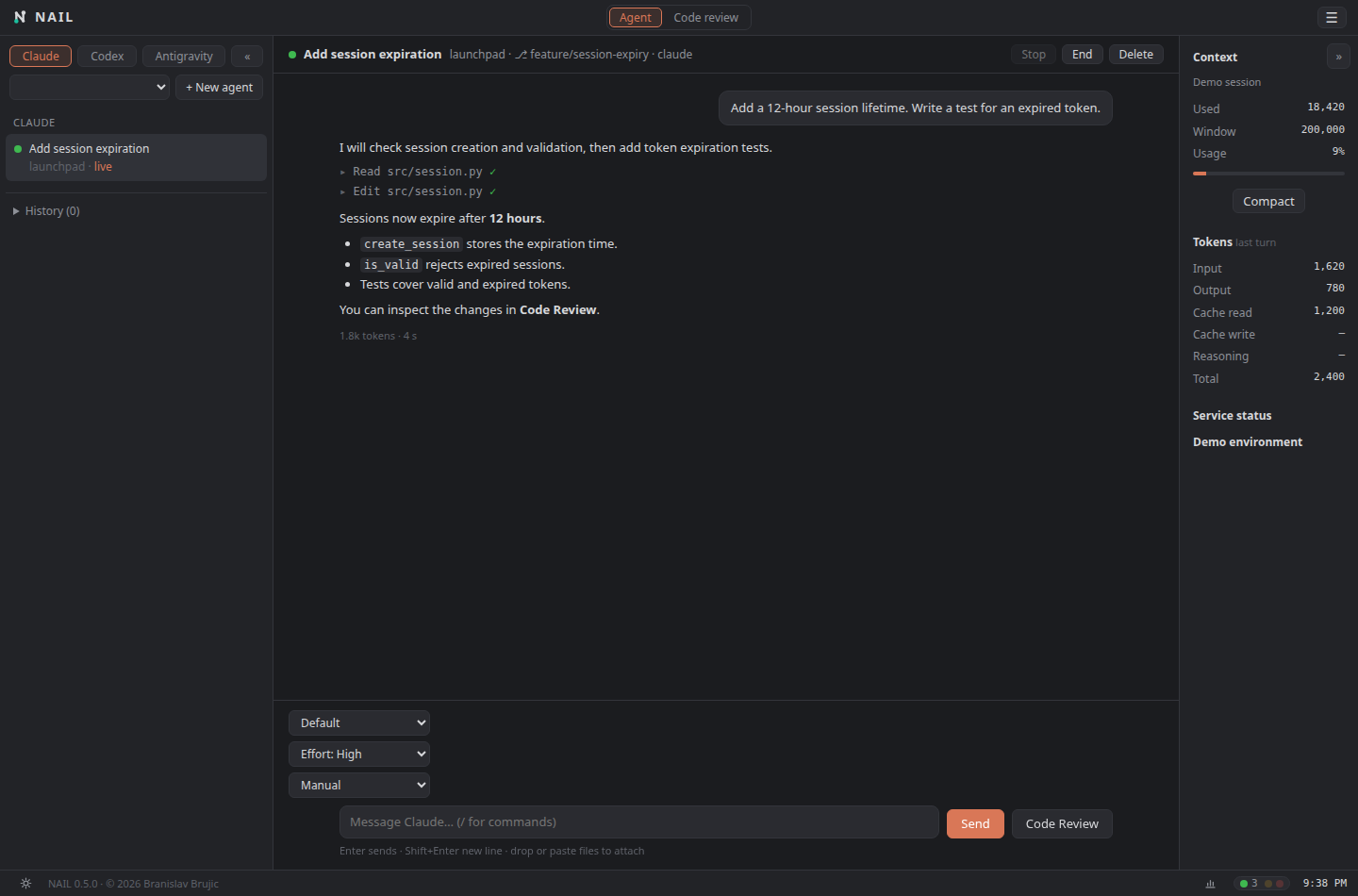
What you can do
- Work with multiple AI agents. Open conversations with Claude Code, Codex and Antigravity, stream their answers and inspect tool activity.
- Control permissions. Choose permission modes and answer approval requests directly in the conversation. Available behavior depends on the agent and backend.
- Review changes and send feedback. Read syntax-highlighted, word-level Git diffs, comment on lines or selections, and send comments to an agent.
- Track review progress. Mark files reviewed; files that change afterward return to the review queue.
- Explore history and subagents. Reopen conversations and inspect supported subagent activity without losing your place.
- Manage multiple accounts. Keep provider accounts in one workspace, with provider-specific login and account handling.
- Check usage. Inspect available token and quota information from supported providers.
- Follow agent status. Traffic lights show agents working, finished, or waiting for your input.
- Queue instructions. Prepare follow-up messages, use Send now, and keep separate unsent drafts for conversations.
- Generate diff summaries. Summarize the current changes with a supported AI tool or a local Ollama model.
- Switch repositories and worktrees. Browse projects, compare branches and review worktrees as files change.
- Protect remote access. Use admin/viewer roles, password login and authenticator-based MFA with recovery codes.
The workspace also includes file attachments, file mentions, supported slash commands and skills, keyboard shortcuts, themes and optional Web Push notifications.
Requirements
- Linux and Python 3.12 or newer.
- Git and a browser.
- The AI tools you want to use, installed and configured on the NAIL host:
claude,codex,agy, or Ollama for local summaries.
NAIL is free to use. AI provider subscriptions, API charges and hosting costs are separate. Agent capabilities and authentication differ by backend; see the integration reference.
Quick start
Install with pipx:
pipx install 'nailayer[claude-sdk,codex-sdk,push]'
Set up your workspace and open a project:
nail setup
nail ~/path/to/project
Open the address printed in the terminal. The default address is http://127.0.0.1:8765; the port can differ if it is already in use or configured otherwise.
On first launch, NAIL guides you through configuration and, when needed, creating the first administrator. Configure and authenticate each agent on the host using that provider’s normal setup.
Other useful commands:
nail                         # Start without selecting a project
nail -f                      # Run in the foreground
nail --gui                   # Open a local app window
nail --version
nail config check            # Inspect effective configuration
The optional GUI window requires a compatible local desktop environment. Browser access is the normal way to use NAIL remotely.
Agent backends
| Integration | Default live-chat backend | Installation and authentication |
|---|---|---|
| Claude Code | SDK | Install the claude-sdk extra; uses the selected Claude Code login. |
| Codex | SDK | Install the codex-sdk extra; uses the selected CLI account and CODEX_HOME. |
| Antigravity | CLI | Uses the installed agy CLI and its login. |
| Antigravity SDK | Optional | Install agy-sdk, set NAIL_AGY_BACKEND=sdk, and configure SDK API/Vertex credentials separately. |
NAIL_CLAUDE_BACKEND=cli and NAIL_CODEX_BACKEND=cli explicitly select the legacy adapters. Missing SDK dependencies produce an installation error rather than silently changing backends. Antigravity SDK credentials and billing are separate from its personal CLI subscription.
SDK integrations are evolving. See the detailed backend notes for compatibility constraints and validation limits.
Access from other devices
Phone / Tablet / Laptop / Remote computer
                    │
              Browser connection
                    │
          Your computer or server
              NAIL + AI tools
                    │
             Your repositories
The website is a static introduction and documentation site. The application and its agents run on your host, using that host’s repositories and configured provider credentials.
For remote access, configure HTTPS directly, use an HTTPS reverse proxy, or connect over a private VPN. NAIL listens on loopback by default. Network access requires configuration; see the remote access guide and deployment examples.
Create an administrator and enable MFA before remote login:
nail user add yourname --role admin
nail user mfa yourname
By default, administrators need MFA for network login. Agents execute with the host user’s access, subject to the selected permission mode and any configured sandbox. The optional bubblewrap cage can restrict their filesystem access; see the sandbox guide.
Configuration and data
Configuration defaults to ~/.config/nail/nail.toml. Use nail setup for guided configuration, or:
nail config init
nail config check
nail --config /path/to/nail.toml
| Location | Contents |
|---|---|
~/.config/nail/nail.toml |
Server and security configuration |
~/.config/nail/nail.db |
Users, logins and application settings |
~/.cache/nail/nail.log |
Server log |
.git/nail.json in the repository |
Review comments and review progress |
XDG environment settings can change the configuration and cache locations. Provider conversation data stays in provider-specific locations; optional SDK integrations can also maintain state under NAIL’s configuration directory.
See the configuration reference for individual options, defaults and examples.
Development
git clone https://github.com/branislav-brujic/nail.git
cd nail
python3 -m venv .venv
.venv/bin/pip install -e '.[dev,claude-sdk,codex-sdk,agy-sdk,push]'
.venv/bin/python nail.py -f
Run checks and build a package:
.venv/bin/python -m pytest
.venv/bin/ruff check src tests
.venv/bin/python -m build
Node.js enables the JavaScript checks run by the test suite. Most backend tests use local doubles; passing tests does not establish live provider compatibility. See the detailed reference for integration validation notes.
Application code is in src/nailayer/, browser assets in src/nailayer/web/, and tests in tests/. The package name is nailayer; the executable is nail.
License
NAIL is free to use, modify and share under the NAIL License, including use as a tool for paid work and internal company use. Selling NAIL, or offering a paid product or service whose value derives substantially from it, requires prior written permission. See the license for the full terms.
Bundled highlight.js is covered by its BSD-3-Clause license.
Created by Branislav Brujic.
1 maintainer

Metadata
1 maintainer
Release files for nailayer 0.5.0
For a detailed explanation of source distributions (sdists) and built distributions (wheels), please see the package formats documentation.
Source distribution (sdist)
| File | Size | Uploaded | Provenance | Actions |
|---|---|---|---|---|
| nailayer-0.5.0.tar.gz | 461.7 kB | Without provenance | Details for nailayer-0.5.0.tar.gz |
Built distribution (wheel)
| File | Interpreter | ABI | Platform | Actions Reset |
|---|---|---|---|---|
| nailayer-0.5.0-py3-none-any.whl | Python 3 | none | any | Details for nailayer-0.5.0-py3-none-any.whl |
Total release size: 841.1 kB
Release files / nailayer-0.5.0.tar.gz
| Download URL | nailayer-0.5.0.tar.gz |
|---|---|
| Size | 461.7 kB |
| Tags | Source |
|
SHA-256 checksum How to use checksums |
96d9c294ab7e9dac7f0dc2b541529170bbc1f68e1915535cc350c6e477daba51
|
|
BLAKE2b-256 checksum How to use checksums |
e4be365d835fe0773bacf24b97f4548efa2169ab39442eae18aa54480753b53e
|
| Upload date | |
|
Uploaded using Trusted Publishing? What is trusted publishing? |
No |
| Uploaded via |
twine/7.0.0 CPython/3.13.13
|
Release files / nailayer-0.5.0-py3-none-any.whl
| Download URL | nailayer-0.5.0-py3-none-any.whl |
|---|---|
| Size | 379.4 kB |
| Tags | Python 3 |
|
SHA-256 checksum How to use checksums |
3b8fb3b09090c094536d60dc05fba0c5ea5c48589986504cfc0cfa7f85da7d3c
|
|
BLAKE2b-256 checksum How to use checksums |
2c4850ba23d72dbfc6b02b0fffc51a559436e8602ad1ec6daa3421e0ae5479fe
|
| Upload date | |
|
Uploaded using Trusted Publishing? What is trusted publishing? |
No |
| Uploaded via |
twine/7.0.0 CPython/3.13.13
|
Security for nailayer 0.5.0
Provenance
Provenance describes where a file came from. On PyPI, provenance is shared via attestations, which provide a verifiable record of the build or publishing details. View details, limitations and caveats.
No provenance found
None of the files in this release were uploaded with provenance metadata.
A note on package security
PyPI is a repository for distributing packages, not a service for auditing them. While third-party security researchers and our staff do their best to detect and remove malicious packages, PyPI cannot guarantee the quality, security or suitability of any given package.
To learn more about protecting yourself from malicious actors, visit our package security documentation.













