
named-arrays






named-arrays is an implementation of a named tensor, which assigns a name to each axis of an n-dimensional array such as a numpy array.
With a bare numpy array, the meaning of each axis lives in the programmer's head, and combining two arrays usually means inserting singleton dimensions until their shapes line up. Naming the axes removes both problems: arrays broadcast against each other by matching names, so a singleton dimension is never needed, and an operation such as a mean along the wavelength axis says exactly that.
named-arrays provides a very unapologetic implementation of a named tensor, since axes can only be accessed using their names,
unlike xarray which allows for both name and index.
Support for astropy.units is built in, so the values inside an array can carry a physical unit.
Installation
named-arrays is available on PyPI and can be installed using pip
pip install named-arrays
Features
The array types form a hierarchy, from a plain named tensor up to a discrete function of several variables.
ScalarArray, a named tensor with Astropy Quantity support. Analogue ofxarray.Variable. Implicit variants such asScalarLinearSpacedescribe an array without materializing it.UncertainScalarArray, which carries a distribution alongside the nominal value and propagates uncertainty through every operation.Cartesian2dVectorArrayandCartesian3dVectorArray, along with named-component variants such asSpectralPositionalVectorArray, where each component is itself any of the array types above.Cartesian2dMatrixArrayand its relatives, which are vectors of vectors supporting the usual matrix operations.FunctionArray, a discrete function pairinginputswithoutputs. Analogue of anxarray.DataArray.
Several modules extend these types to other libraries: na.plt for matplotlib, na.random and na.stats for sampling and statistics, na.regridding for resampling curvilinear grids, na.optimize for root finding and minimization, and na.transformations for rotations and translations.
Key concepts
The shape is a dictionary.
shape maps each axis name to its length, and there is no positional equivalent.
Anywhere the numpy API takes an axis=0, this library takes an axis="detector_x".
Arrays broadcast by matching names.
Two arrays combine along the axes whose names they share, and the axes unique to either one are added to the result.
An array of shape {"x": 3} plus an array of shape {"y": 2} therefore has shape {"x": 3, "y": 2}, with no reshaping and no singleton dimensions.
Adding a new dimension to a calculation is a matter of giving an input an extra named axis.
Arrays are explicit or implicit.
An explicit array such as ScalarArray stores its values.
An implicit array such as ScalarLinearSpace stores the arguments that define it, so start, stop, and num remain available long after the array is created.
Implicit arrays work in every operation an explicit array does, and .explicit materializes one on demand.
Most of the numpy API already works.
These arrays implement the __array_function__ and __array_ufunc__ protocols, so np.mean, np.sqrt, and most of their siblings accept them directly, using axis names.
Operations that numpy cannot express are defined in the named_arrays namespace instead.
Documentation
The full documentation, including the API reference, tutorials, and executable versions of the examples below, is hosted at named-arrays.readthedocs.io.
Examples
Broadcasting by name
The fundamental type is the ScalarArray, a composition of a numpy ndarray-like object and a tuple of axis names, which must have the same length as the number of dimensions in the array.
import numpy as np
import named_arrays as na

a = na.ScalarArray(np.array([1, 2, 3]), axes=("x",))
b = na.ScalarArray(np.array([4, 5]), axes=("y",))
Since the two arrays have different axis names, adding them together broadcasts them against each other automatically.
c = a + b
ScalarArray(
    ndarray=[[5, 6],
             [6, 7],
             [7, 8]],
    shape={'x': 3, 'y': 2},
)
The result is two-dimensional, and its shape is a dictionary.
c.shape
{'x': 3, 'y': 2}
All the usual numpy reduction operations take the name of the axis to remove.
c.mean("x")
ScalarArray(
    ndarray=[6., 7.],
    shape={'y': 2},
)
To index the array, use a dictionary with the axis names as the keys, so the meaning of an index does not depend on the order of the axes.
c[dict(x=0)]
ScalarArray(
    ndarray=[5, 6],
    shape={'y': 2},
)
Implicit arrays
We recommend that you rarely create instances of ScalarArray directly.
Instead, use the implicit array classes ScalarLinearSpace, ScalarLogarithmicSpace, and ScalarGeometricSpace, which mirror numpy.linspace(), numpy.logspace(), and numpy.geomspace(), with the advantage of remembering the arguments used to define them.
d = na.ScalarLinearSpace(0, 1, axis="z", num=4)
ScalarLinearSpace(start=0, stop=1, axis='z', num=4, endpoint=True, centers=False)
These implicit classes work just like a ScalarArray in any operation, and .explicit materializes one on demand.
a + d
ScalarArray(
    ndarray=[[1.        , 1.33333333, 1.66666667, 2.        ],
             [2.        , 2.33333333, 2.66666667, 3.        ],
             [3.        , 3.33333333, 3.66666667, 4.        ]],
    shape={'x': 3, 'z': 4},
)
One extra axis, one plotting call
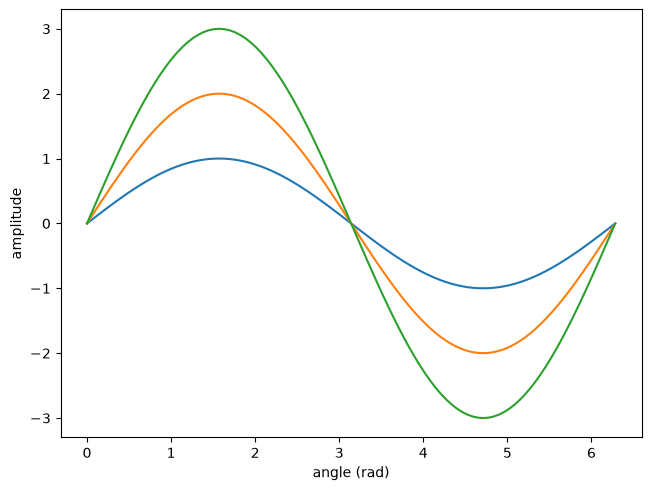
An extra named axis costs nothing, so a family of curves is a single array, and one plotting call draws all of them.
import astropy.units as u
import matplotlib.pyplot as plt

# Define the independent variable
x = na.linspace(0, 2 * np.pi, axis="x", num=101) * u.rad

# Add an axis representing three different amplitudes
amplitude = na.ScalarArray(np.array([1, 2, 3]), axes=("amplitude",))

# The result has both axes, without any reshaping
y = amplitude * np.sin(x)

fig, ax = plt.subplots(constrained_layout=True);
na.plt.plot(x, y, axis="x", ax=ax);
ax.set_xlabel(f"angle ({x.unit:latex_inline})");
ax.set_ylabel("amplitude");
Uncertainty propagation
An UncertainScalarArray carries a distribution alongside its nominal value, and every operation propagates it, so the error bar at the end of a calculation needs no separate bookkeeping.
# Define a radius known to about 5%
radius = na.NormalUncertainScalarArray(
    nominal=10 * u.cm,
    width=0.5 * u.cm,
    num_distribution=11,
)

# Compute the area of the corresponding circle
area = np.pi * np.square(radius)

# The uncertainty in the radius is carried into the area
area.nominal, np.std(area.distribution, axis="_distribution")
Citation
If you use named-arrays in your research, please cite it.
The citation metadata is kept in CITATION.cff,
which the "Cite this repository" button on GitHub can export as BibTeX or APA.
Every release of named-arrays is archived on Zenodo with its own DOI.
The concept DOI, 10.5281/zenodo.23072813,
always resolves to the latest version,
and the Zenodo page lists the DOI of every version.
Please include the version of named-arrays that you used,
which is given by importlib.metadata.version("named-arrays").
The BibTeX entry below uses the concept DOI.
To cite a specific version instead,
replace doi with the DOI of that version.
@software{named-arrays,
  author = {Smart, Roy T. and Parker, Jacob D.},
  title = {named-arrays},
  version = {X.Y.Z},
  doi = {10.5281/zenodo.23072813},
  url = {https://github.com/sun-data/named-arrays},
}
Development
Install the package in editable mode along with its test dependencies, and run the test suite using pytest:
pip install -e .[test]
pytest
The suite is large, so continuous integration spreads it over every available core using pytest-xdist. To do the same locally:
pytest -n auto
This project is linted using ruff, which is checked by continuous integration:
ruff check .
To build the documentation locally:
pip install -e .[doc]
sphinx-build docs docs/_build/html
1 maintainer

Metadata
1 maintainer
Release files for named-arrays 2.15.0
For a detailed explanation of source distributions (sdists) and built distributions (wheels), please see the package formats documentation.
Source distribution (sdist)
| File | Size | Uploaded | |
|---|---|---|---|
| named_arrays-2.15.0.tar.gz | 380.7 kB | Details |
Built distribution (wheel)
| File | Interpreter | ABI | Platform | Reset |
|---|---|---|---|---|
| named_arrays-2.15.0-py3-none-any.whl | Python 3 | none | any | Details |
Total release size: 766.6 kB
Release files / named_arrays-2.15.0.tar.gz
| Download URL | named_arrays-2.15.0.tar.gz |
|---|---|
| Size | 380.7 kB |
| Tags | Source |
|
SHA-256 checksum How to use checksums |
2fa734f5b04a40514ef32eb22f6716c24db708844d03f94c24988fd14b96220f
|
|
BLAKE2b-256 checksum How to use checksums |
ce5d9b6b5feae7971e624bbca7bd4379fa0db4d0df60c4fab817d44b479f8089
|
| Upload date | |
|
Uploaded using Trusted Publishing? What is trusted publishing? |
Yes |
| Uploaded via |
twine/7.0.0 CPython/3.13.14
|
Provenance
Provenance describes where a file came from. On PyPI, provenance is shared via attestations, which provide a verifiable record of the build or publishing details. View details, limitations and caveats.


PyPI Publish Attestation
PyPI verified that this artifact, at this checksum, originated from the publisher listed below.
Signed by GitHub Actions, verified by PyPI on Oct 12, 2026.
Transparency logRelease files / named_arrays-2.15.0-py3-none-any.whl
| Download URL | named_arrays-2.15.0-py3-none-any.whl |
|---|---|
| Size | 385.8 kB |
| Tags | Python 3 |
|
SHA-256 checksum How to use checksums |
7fa3ecc4d27b4a0548be5ce2d08d45e1a020267381e64d948101bc448df9fc15
|
|
BLAKE2b-256 checksum How to use checksums |
47f387c69d7c668f5749760fd008fc688004ca194b68f9eba094363ab6604b4f
|
| Upload date | |
|
Uploaded using Trusted Publishing? What is trusted publishing? |
Yes |
| Uploaded via |
twine/7.0.0 CPython/3.13.14
|
Provenance
Provenance describes where a file came from. On PyPI, provenance is shared via attestations, which provide a verifiable record of the build or publishing details. View details, limitations and caveats.
PyPI Publish Attestation
PyPI verified that this artifact, at this checksum, originated from the publisher listed below.
Signed by GitHub Actions, verified by PyPI on Oct 12, 2026.
Transparency log













