
NANDA Adapter
Bring your local agent. Make it persistent, discoverable and interoperable on the global internet with NANDA.
Help us build an Open and Vibrant Internet of Agents
Features
- Multiple AI Frameworks: Support for LangChain, CrewAI, and any custom logic.
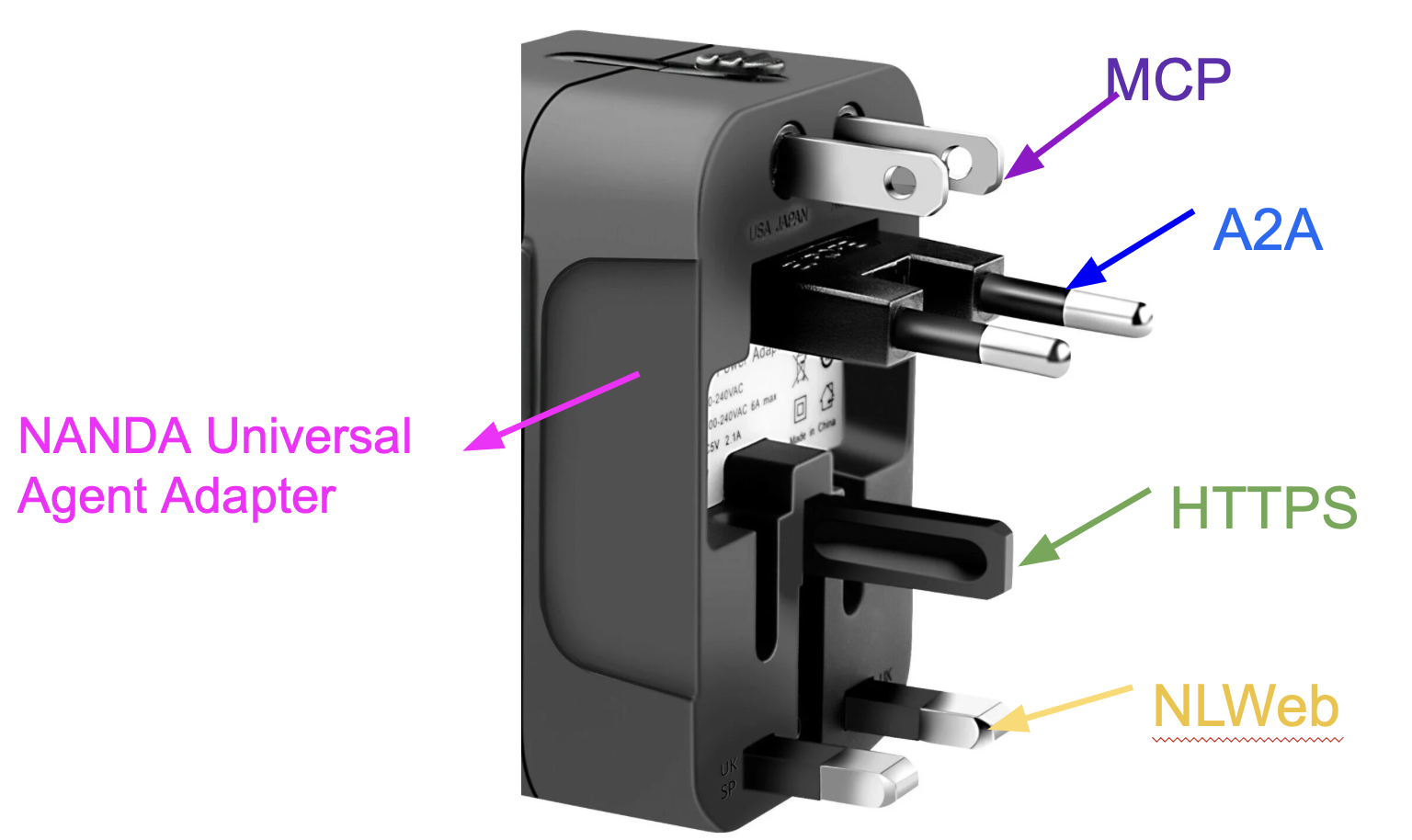
- Multi-protocol Communication: Built-in protocol that allows universal communication
- Global Index: Automatic agent discovery via MIT NANDA Index
- SSL Support: Production-ready with Let's Encrypt certificates
Installation
Basic Installation
pip install nanda-adapter
Steps to create a test example using this repo
1. Clone this repository
git clone github.com/projnanda/adapter
2. Setup dependencies
cd nanda_agent/examples
pip install -r requirements.txt
3. Configure your Domain and SSL Certificates (move certificates into current path)
sudo certbot certonly --standalone -d <YOUR_DOMAIN_NAME.COM>
sudo cp -L /etc/letsencrypt/live/<YOUR_DOMAIN_NAME.COM>/fullchain.pem .
sudo cp -L /etc/letsencrypt/live/<YOUR_DOMAIN_NAME.COM>/privkey.pem .
sudo chown $USER:$USER fullchain.pem privkey.pem
chmod 600 fullchain.pem privkey.pem`
4. Set Your enviroment variables ANTHROPIC_API_KEY (For running your personal hosted agents, need API key and your own domain)
export ANTHROPIC_API_KEY="your-api-key-here
export DOMAIN_NAME="<YOUR_DOMAIN_NAME.COM>
5. Run an example agent (langchain_pirate.py)
nohup python3 langchain_pirate.py > out.log 2>&1 &
6. Get your enrollment link from Log File
cat out.log
Examples for How to create your own agent
You can create an agent using your custom ReACT framework or any agent package like LangChain, CrewAI etc.
Then, you can deploy to internet of Agents using one line of code via NANDA.
1. Custom Agent
2.1 Write your improvement logic using the framework you like. Here it is a simple moduule without any llm call.
2.4 Move this file into your server(the domain should match to the IP address) and run this python file in background
#!/usr/bin/env python3
from nanda_adapter import NANDA
import os

def create_custom_improvement():
    """Create your custom improvement function"""

    def custom_improvement_logic(message_text: str) -> str:
        """Transform messages according to your logic"""
        try:
            # Your custom transformation logic here
            improved_text = message_text.replace("hello", "greetings")
            improved_text = improved_text.replace("goodbye", "farewell")

            return improved_text
        except Exception as e:
            print(f"Error in improvement: {e}")
            return message_text  # Fallback to original

    return custom_improvement_logic

def main():
    # Create your improvement function
    my_improvement = create_custom_improvement()

    # Initialize NANDA with your custom logic
    nanda = NANDA(my_improvement)

    # Start the server
    anthropic_key = os.getenv("ANTHROPIC_API_KEY")
    domain = os.getenv("DOMAIN_NAME")

    nanda.start_server_api(anthropic_key, domain)

if __name__ == "__main__":
    main()
Deploy a LangChain Agent
from nanda_agent import NANDA
from langchain_core.prompts import PromptTemplate
from langchain_core.output_parsers import StrOutputParser
from langchain_anthropic import ChatAnthropic

def create_langchain_improvement():
    llm = ChatAnthropic(
        api_key=os.getenv("ANTHROPIC_API_KEY"),
        model="claude-3-haiku-20240307"
    )

    prompt = PromptTemplate(
        input_variables=["message"],
        template="Make this message more professional: {message}"
    )

    chain = prompt | llm | StrOutputParser()

    def langchain_improvement(message_text: str) -> str:
        return chain.invoke({"message": message_text})

    return langchain_improvement

# Use it
nanda = NANDA(create_langchain_improvement())
# Start the server
anthropic_key = os.getenv("ANTHROPIC_API_KEY")
domain = os.getenv("DOMAIN_NAME")

nanda.start_server_api(anthropic_key, domain)
Deploy a CrewAI Agent
from nanda_agent import NANDA
from crewai import Agent, Task, Crew
from langchain_anthropic import ChatAnthropic

def create_crewai_improvement():
    llm = ChatAnthropic(
        api_key=os.getenv("ANTHROPIC_API_KEY"),
        model="claude-3-haiku-20240307"
    )

    improvement_agent = Agent(
        role="Message Improver",
        goal="Improve message clarity and professionalism",
        backstory="You are an expert communicator.",
        llm=llm
    )

    def crewai_improvement(message_text: str) -> str:
        task = Task(
            description=f"Improve this message: {message_text}",
            agent=improvement_agent,
            expected_output="An improved version of the message"
        )

        crew = Crew(agents=[improvement_agent], tasks=[task])
        result = crew.kickoff()
        return str(result)

    return crewai_improvement

# Use it
nanda = NANDA(create_crewai_improvement())
# Start the server
anthropic_key = os.getenv("ANTHROPIC_API_KEY")
domain = os.getenv("DOMAIN_NAME")

nanda.start_server_api(anthropic_key, domain)
Deploy from Scratch on a barebones machine (Ubuntu on Linode or Amazon Linux on EC2)
Assuming your customized improvement logic is in langchain_pirate.py

2. ssh into the server, ensure the latest software is in the system
Ubuntu Command : ssh root@<IP>
      sudo apt update  && sudo apt install python3 python3-pip python3-venv certbot

EC2 cmd : ssh -i <YOUR_PEM_KEY> ec2-user@<IP>
      sudo dnf update -y && sudo dnf install -y python3.11 python3.11-pip certbot

3. Move to the respective folder and create and Activate a virtual env in the folder where files are moved in step 1
cmd : cd /opt/test-agents && python3 -m venv <YOUR_ENV_NAME> && source <YOUR_ENV_NAME>/bin/activate

EC2 cmd: cd /home/ec2-user/test-agents && python3.11 -m <YOUR_ENV_NAME> jinoos && source <YOUR_ENV_NAME>/bin/activate

4. Generate SSL certificates on this machine for your domain.
(For ex: You should ensure in  DNS an A record is mapping this domain <DOMAIN_NAME> to IP address <YOUR_IP>). Ensure the domain has to be changed

cmd : sudo certbot certonly --standalone -d <YOUR_DOMAIN_NAME>

5. Move certificates to current folder for access and provide required access
Ensure the domain has to be changed

    sudo cp -L /etc/letsencrypt/live/<YOUR_DOMAIN_NAME>/fullchain.pem .
    sudo cp -L /etc/letsencrypt/live/<YOUR_DOMAIN_NAME>/privkey.pem .
    sudo chown $USER:$USER fullchain.pem privkey.pem
    chmod 600 fullchain.pem privkey.pem

6. Install the requirements file
cmd : python -m pip install --upgrade pip && pip3 install -r requirements.txt

7. Ensure the env variables are available either through .env or you can provide export
cmd : export ANTHROPIC_API_KEY=my-anthropic-key && export DOMAIN_NAME=my-domain

8. Run the new improvement logic as a batch process
cmd : nohup python3 langchain_pirate.py > out.log 2>&1 &

9. Open the log file and you could find the agent enrollment link
cmd : cat out.log

10. Take the link and go to browser for registration
The framework will automatically:
- Generate SSL certificates using Let's Encrypt
- Set up proper agent registration
- Configure production-ready logging
Appendix: Configuration Details
Environment Variables
You need the following environment details ()
ANTHROPIC_API_KEY: Your Anthropic API key (required)DOMAIN_NAME: Domain name for SSL certificates (required)AGENT_ID: Custom agent ID (optional, auto-generated if not provided)PORT: Agent bridge port (optional, default: 6000)IMPROVE_MESSAGES: Enable/disable message improvement (optional, default: true)
Production Deployment
For production deployment with SSL:
export ANTHROPIC_API_KEY="your-api-key"
export DOMAIN_NAME="your-domain.com"
nanda-pirate
API Endpoints
When running with start_server_api(), the following endpoints are available:
GET /api/health- Health checkPOST /api/send- Send message to agentGET /api/agents/list- List registered agentsPOST /api/receive_message- Receive message from agentGET /api/render- Get latest message
Agent Communication
Agents can communicate with each other using the @agent_id syntax:
@agent123 Hello there!
The message will be improved using your custom logic before being sent.
Command Line Tools
# Show help
nanda-adapter --help

# List available examples
nanda-adapter --list-examples

# Run specific examples
nanda-pirate              # Simple pirate agent
nanda-pirate-langchain    # LangChain pirate agent
nanda-sarcastic           # CrewAI sarcastic agent
Architecture
The NANDA framework consists of:
- AgentBridge: Core communication handler
- Message Improvement System: Pluggable improvement logic
- Registry System: Agent discovery and registration
- A2A Communication: Agent-to-agent messaging
- Flask API: External communication interface
Support
For issues and questions:
- GitHub Issues: https://github.com/nanda-ai/nanda-adapter/issues
Changelog
v1.0.0
- Initial release
- Basic NANDA framework
- LangChain integration
- CrewAI integration
- Example agents
- Production deployment support
1 maintainer

Metadata
1 maintainer
Release files for nanda-adapter 1.0.1
For a detailed explanation of source distributions (sdists) and built distributions (wheels), please see the package formats documentation.
Source distribution (sdist)
| File | Size | Uploaded | |
|---|---|---|---|
| nanda_adapter-1.0.1.tar.gz | 28.4 kB | Details |
Built distribution (wheel)
| File | Interpreter | ABI | Platform | Reset |
|---|---|---|---|---|
| nanda_adapter-1.0.1-py3-none-any.whl | Python 3 | none | any | Details |
Total release size: 57.9 kB
Release files / nanda_adapter-1.0.1.tar.gz
| Download URL | nanda_adapter-1.0.1.tar.gz |
|---|---|
| Size | 28.4 kB |
| Tags | Source |
|
SHA-256 checksum How to use checksums |
d2cc02d163ae5e9cabc2c4726f18b21ffa6d1c6978c238473f34c725dca36358
|
|
BLAKE2b-256 checksum How to use checksums |
2cf6e718222983641ec376d3c64b988266a774391ba0b055b1df57f9802ac591
|
| Upload date | |
|
Uploaded using Trusted Publishing? What is trusted publishing? |
No |
| Uploaded via |
twine/6.1.0 CPython/3.12.0
|
Release files / nanda_adapter-1.0.1-py3-none-any.whl
| Download URL | nanda_adapter-1.0.1-py3-none-any.whl |
|---|---|
| Size | 29.5 kB |
| Tags | Python 3 |
|
SHA-256 checksum How to use checksums |
3951fa53bee224b45bc17c1440878e3e5a13ab58715a1cdb59899f8e338e0968
|
|
BLAKE2b-256 checksum How to use checksums |
5a91951db3109fa909f242c7c33b3e347ea1b0935bc9fb5a1d63dd293de91e2c
|
| Upload date | |
|
Uploaded using Trusted Publishing? What is trusted publishing? |
No |
| Uploaded via |
twine/6.1.0 CPython/3.12.0
|














