
NanoNET







Introduction
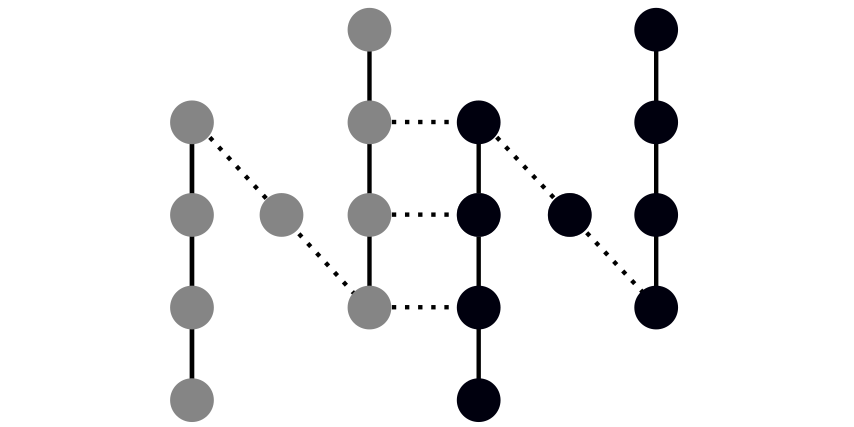
The project NanoNET (Nanoscale Non-equilibrium Electron Transport) represents an extendable Python framework for the electronic structure computations based on the tight-binding method. The code can deal with both finite and periodic systems translated in one, two or three dimensions.
All computations can be governed by means of the python application programming interface (pyAPI) or the command line interface (CLI).
Getting Started
Requirements
NanoNet requires openmpi to be installed in the system:
Ubuntu
sudo apt-get install libopenmpi-dev
MacOS
brew install open-mpi
Installing from PiPy
The easiest way to install NanoNet without tests is from the PiPy repository:
pip install nano-net
Installing from sources
The source distribution can be obtained from GitHub:
git clone https://github.com/freude/NanoNet.git
cd NanoNet
All other dependencies can be installed at once by invoking the following command from within the source directory:
pip install -r requirements.txt
In order to install the package Nanonet just invoke
the following line in the bash from within the source directory:
pip install .
Running the tests
If the source distribution is available, all tests may be run by invoking the following command in the root directory:
nosetests --with-doctest
Examples of usage
- Atomic chain
- Huckel model
- Bulk silicon
- Bulk silicon - initialization via an input file
- Silicon nanowire
Python interface
Below is a short example demonstrating usage of the tb package.
More illustrative examples can be found in the ipython notebooks
in the directory jupyter_notebooks inside the source directory.
Below we demonstrate band structure computation for a nanoribbon with four atoms per unit cell:
--A--
  |
--A--
  |
--A--
  |
--A--
-
If the package is properly installed, the work starts with the import of all necessary modules:
import numpy as np
import matplotlib.pyplot as plt
import nanonet.tb as tb
from nanonet.negf.recursive_greens_functions import recursive_gf
from nanonet.negf.greens_functions import surface_greens_function
-
First, one needs to specify atomic species and corresponding basis sets. We assume that each atom has one s-type atomic orbital with energy -1 eV. It is also possible to use predefined basis sets as is shown in examples in the ipython notebooks.
orb = tb.Orbitals('A')
orb.add_orbital(title='s', energy=-1.0)
-
Set tight-binding parameters:
tb.set_tb_params(PARAMS_A_A={"ss_sigma": 1.0})
-
Define atomic coordinates for the unit cell:
input_file = """4
                Nanostrip
                A1 0.0 0.0 0.0
                A2 0.0 1.0 0.0
                A3 0.0 2.0 0.0
                A4 0.0 3.0 0.0
             """
-
Make instance of the Hamiltonian class and specify periodic boundary conditions if any:
h = tb.Hamiltonian(xyz=input_file, nn_distance=1.4)
h.initialize()
h.set_periodic_bc([[0, 0, 1.0]])
h_l, h_0, h_r = h.get_hamiltonians()
-
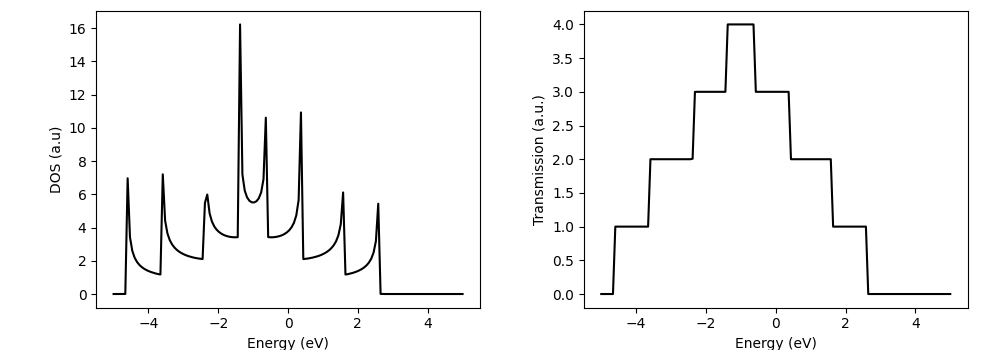
Compute DOS and transmission using Green's functions:
energy = np.linspace(-5.0, 5.0, 150)
dos = np.zeros((energy.shape[0]))
tr = np.zeros((energy.shape[0]))

for j, E in enumerate(energy):
    # compute surface Green's functions
    L, R = surface_greens_function(E, h_l, h_0, h_r)
    # recursive Green's functions
    g_trans, grd, grl, gru, gr_left = recursive_gf(E, [h_l], [h_0 + L + R], [h_r])
    # compute DOS
    dos[j] = np.real(np.trace(1j * (grd[0] - grd[0].conj().T)))
    # compute left-lead coupling
    gamma_l = 1j * (L - L.conj().T)
    # compute right-lead coupling
    gamma_r = 1j * (R - R.conj().T)
    # compute transmission
    tr[j] = np.real(np.trace(gamma_l @ g_trans @ gamma_r @ g_trans.conj().T)))
-
Plot DOS and transmission spectrum:
fig, ax = plt.subplots(1, 2)
ax[0].plot(energy, dos, 'k')
ax[0].set_ylabel(r'DOS (a.u)')
ax[0].set_xlabel(r'Energy (eV)')

ax[1].plot(energy, tr, 'k')
ax[1].set_ylabel(r'Transmission (a.u.)')
ax[1].set_xlabel(r'Energy (eV)')
fig.tight_layout()
plt.show()
-
Done. The result will appear on the screen.
Authors
- Mykhailo V. Klymenko (mike.klymenko@rmit.edu.au)
- Jackson S. Smith
- Jesse A. Vaitkus
- Jared H. Cole
License
This project is licensed under the MIT License - see the LICENSE.md file for details
Acknowledgments
We acknowledge support of the RMIT University, Australian Research Council through grant CE170100026, and National Computational Infrastructure, which is supported by the Australian Government.
References
1 maintainer

Metadata
1 maintainer
Release files for nano-net 1.3.12
For a detailed explanation of source distributions (sdists) and built distributions (wheels), please see the package formats documentation.
Source distribution (sdist)
| File | Size | Uploaded | |
|---|---|---|---|
| nano-net-1.3.12.tar.gz | 469.3 kB | Details |
Built distribution (wheel)
| File | Interpreter | ABI | Platform | Reset |
|---|---|---|---|---|
| nano_net-1.3.12-py3-none-any.whl | Python 3 | none | any | Details |
Total release size: 542.1 kB
Release files / nano-net-1.3.12.tar.gz
| Download URL | nano-net-1.3.12.tar.gz |
|---|---|
| Size | 469.3 kB |
| Tags | Source |
|
SHA-256 checksum How to use checksums |
1076cbfa4a4ac1ce895ae40ee0217c40f6125e71084b75810c8e1aee3a5cd9c6
|
|
BLAKE2b-256 checksum How to use checksums |
66a2b26d97a452e6fa47ae1447c2e40ba6186b965b9a99b04a4eec86417c5f1f
|
| Upload date | |
|
Uploaded using Trusted Publishing? What is trusted publishing? |
No |
| Uploaded via |
twine/4.0.2 CPython/3.9.18
|
Release files / nano_net-1.3.12-py3-none-any.whl
| Download URL | nano_net-1.3.12-py3-none-any.whl |
|---|---|
| Size | 72.8 kB |
| Tags | Python 3 |
|
SHA-256 checksum How to use checksums |
3b425f7bcd5e7603a59ce76812a341b2b232463a1ea26b3e0715102f53ec4fe8
|
|
BLAKE2b-256 checksum How to use checksums |
a741363c8ab364e5a88e088ede5e59acec3daa412dc9ba2072490e9b74123a8c
|
| Upload date | |
|
Uploaded using Trusted Publishing? What is trusted publishing? |
No |
| Uploaded via |
twine/4.0.2 CPython/3.9.18
|














