
nanopeek
A nano-style terminal editor with a
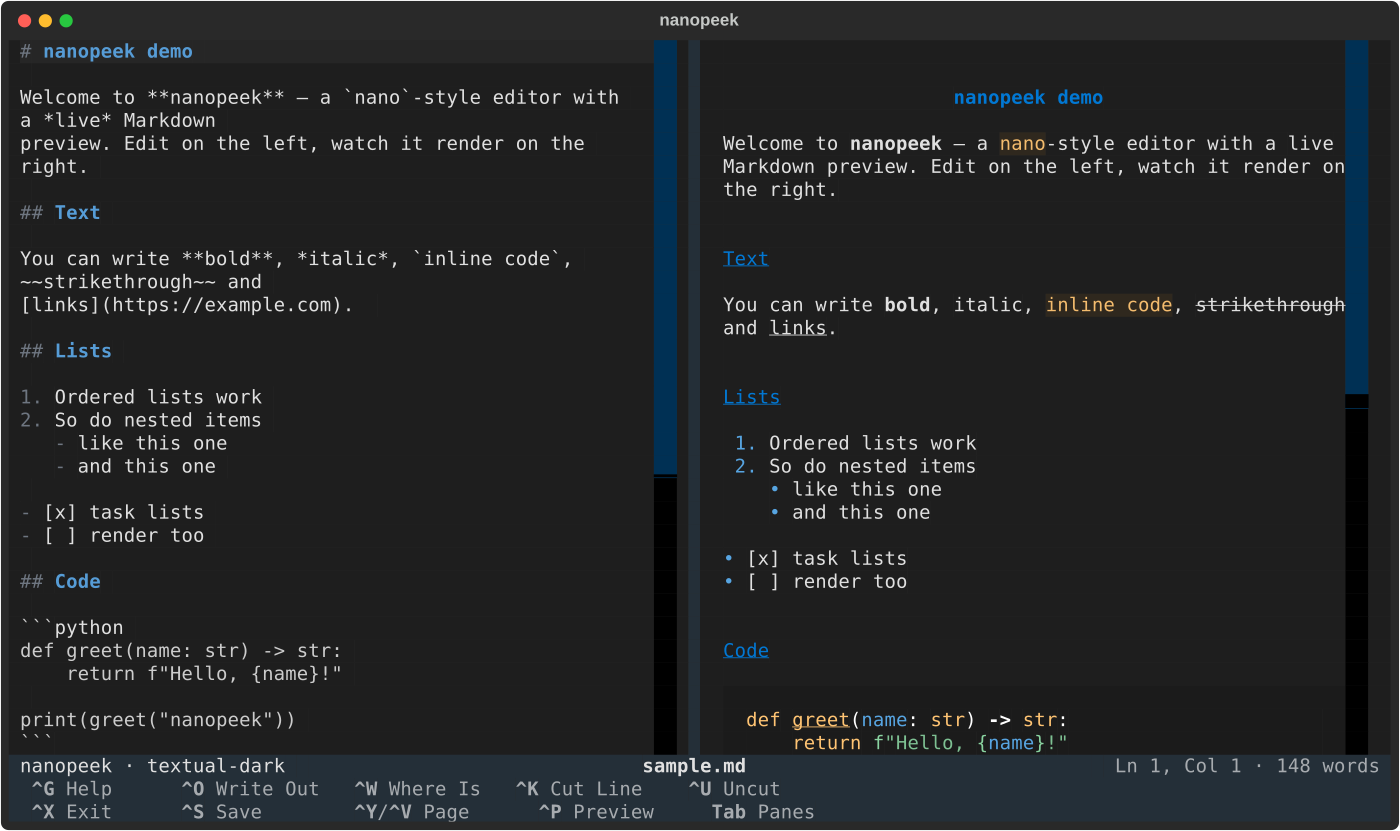
live, properly rendered preview — edit on the left, watch it render on
the right. For Markdown files the right pane shows the rendered document;
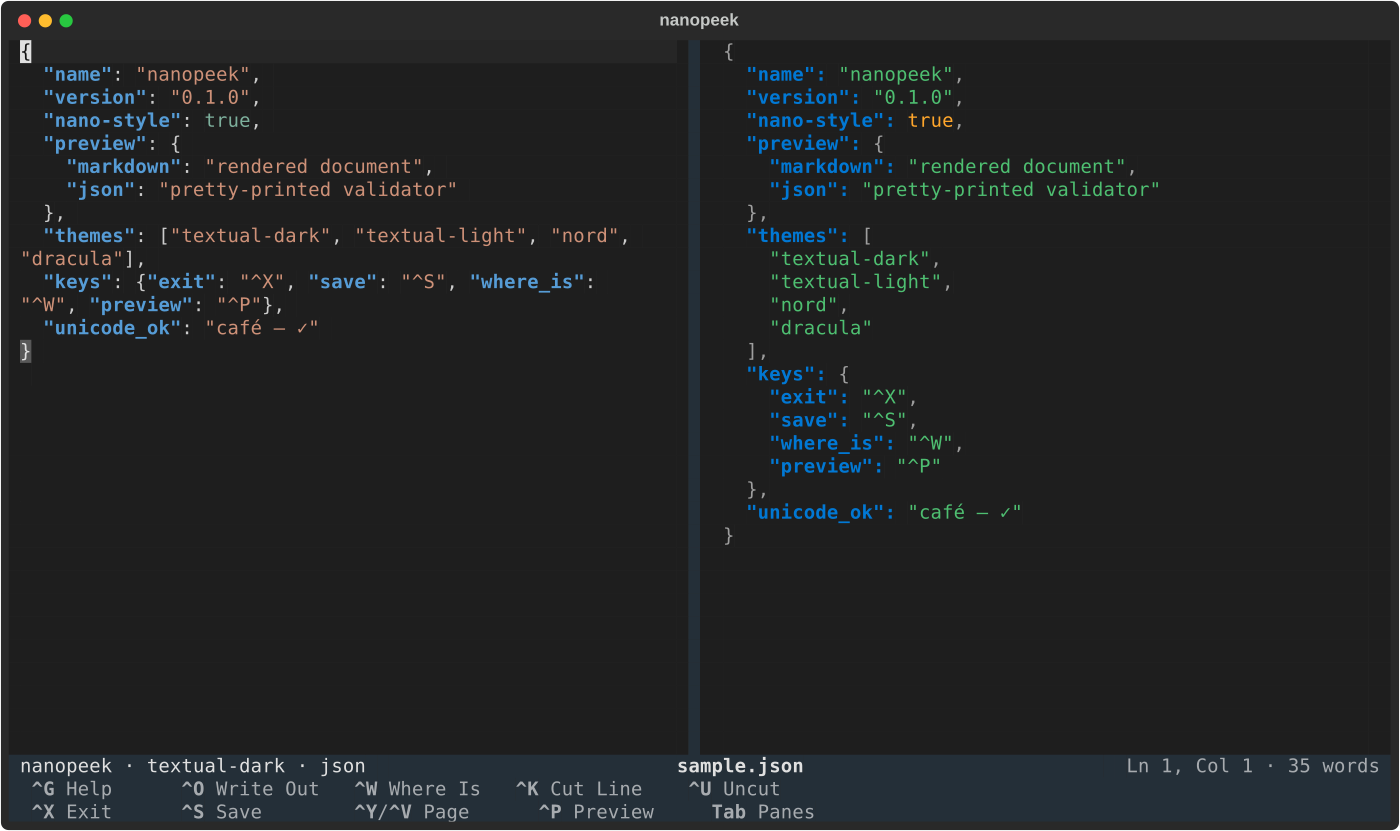
for .json files it becomes a live JSON formatter and validator.
YAML, TOML, and Dockerfiles get a syntax-highlighted source preview;
YAML and TOML also show live syntax errors.
What it does
- Split view — raw text on the left, rendered result on the right:
for Markdown, headings, bold/italic, lists (incl. task lists), tables,
fenced code blocks with syntax highlighting, block quotes, horizontal
rules, links; for
.json, a pretty-printed, syntax-highlighted formatter that doubles as a live validator (parse errors show the offending line and column as you type). - JSON mode is automatic — open any
.json,.jsonl,.ndjsonor.jsoncfile (or force it with--json;--markdownforces the Markdown view). The editor switches to JSON syntax highlighting too, and saving a buffer out as one of these switches the preview on the fly. JSON Lines files render as one pretty-printed, colored record each; JSONC comments (//,/* */) and trailing commas are tolerated — commented.jsonfiles get the same leniency. Broken input shows the exact line and column.
- Configuration viewers —
.yaml/.yml(including Docker Compose) and.tomlfiles display highlighted source with live syntax validation. Comments, ordering, spacing, and YAML document separators stay intact. Dockerfiles and Containerfiles are highlighted too, including names such asDockerfile.dev,Containerfile.prod, andbuild.Dockerfile. Dockerfile viewing does not run builds or validate Docker instructions; Compose validation checks YAML syntax, not the Compose schema. These previews show at most 2,000 lines without changing the buffer. - Live updates — the preview re-renders ~200 ms after you stop typing. The two panes scroll together, in both directions (mouse wheel, keys, either side). For Markdown the sync is section-aware: the preview anchors to the rendered heading matching your cursor's source section (via markdown-it), so long documents with code blocks and tables stay aligned instead of drifting; heading-less documents and the JSON views fall back to proportional scrolling.
- Scales to large files — on big buffers the app trims itself automatically: the JSON formatter renders at most 2,000 lines and the Markdown preview at most 12,000 (with a notice; your file is never touched), and for enormous single lines (minified JSON) or multi-hundred-KB buffers it turns off soft wrap, cursor blink and tree-sitter highlighting — everything comes back once the document is small again.
- nano keybindings — feel right at home:
^Owrite out,^Ssave,^Xexit (asks to save a modified buffer),^K/^Ucut line/uncut,^Wwhere is,^Y/^Vpage up/down,^A/^Eline start/end,^Ghelp. - Markdown syntax highlighting in the editor via tree-sitter.
- Auto-copy on select — highlighting text with the mouse (or Shift+arrows) copies it to the system clipboard immediately.
- Toggleable preview —
^Pcycles between the split view, a full-screen rendered Markdown page (read mode), and editor-only. - Display modes — cycle 12 themes including dark and light (
Alt+T), flip dark/light (Alt+D), switch color depth between truecolor, ANSI (16 colors) and mono (Alt+C), and force ASCII-only output for legacy terminals (Alt+A). All also available as CLI flags.
Install
Requires Python 3.9+.
pipx install .
or, for development:
pip install -e .
That installs the nanopeek command and its dependencies, including Textual,
tree-sitter grammars, PyYAML, and (on Python older than 3.11) tomli.
YAML and TOML editor highlighting uses their installed tree-sitter grammars;
the preview remains highlighted if an editor grammar is unavailable.
Usage
nanopeek                # new, unsaved buffer
nanopeek note.md        # open (or create on save) a file
nanopeek --theme nord   # start with a specific theme (--themes lists all)
nanopeek --color ansi   # 16-color mode (truecolor | ansi | mono)
nanopeek --ascii        # ASCII-only output for legacy terminals
nanopeek data.json      # JSON formatter/validator preview
nanopeek events.jsonl   # JSON Lines: one pretty record per line
nanopeek notes.txt --json  # force the JSON view for any file
nanopeek compose.yaml     # YAML source preview and syntax validation
nanopeek pyproject.toml   # TOML source preview and syntax validation
nanopeek Dockerfile       # Dockerfile source preview
nanopeek config --yaml    # force YAML for a file without an extension
nanopeek config --toml    # force TOML
nanopeek build --dockerfile  # force Dockerfile highlighting
| Key | Action |
|---|---|
^G |
Get help |
^O |
Write out (save, always prompting for name) |
^S |
Save |
^X |
Exit (prompts if the buffer is modified) |
^W |
Where is — Enter jumps to next match |
^K / ^U |
Cut line (consecutive cuts append) / uncut |
^Y / ^V |
Previous / next page |
^A / ^E |
Beginning / end of line |
^P |
Cycle view: split / full rendered page / editor only |
Alt+T / Alt+D |
Cycle themes / toggle dark-light |
Alt+C |
Cycle color mode: truecolor / ansi / mono |
Alt+A |
Toggle ASCII-only output |
Tab |
Switch focus between editor and preview |
Ctrl+Shift+X/C/V |
Cut / copy / paste in the editor |
Ctrl+Shift+P |
Textual command palette |
Development
Run the headless smoke tests (no TTY needed):
python3 tests/smoke_test.py
Run the exhaustive keyboard and save/exit-flow tests (32 checks — every keybinding in both focus panes, and every save / no-save / exit path verified against the real filesystem, content and mtime):
python3 tests/keyboard_test.py
Run the JSON formatter-mode tests:
python3 tests/json_test.py
Run the YAML, TOML, and Dockerfile viewer tests:
python3 tests/config_test.py
Regenerate the screenshot:
python3 scripts/screenshot.py
License
MIT — see LICENSE.
1 maintainer

Metadata
1 maintainer
Release files for nanopeek 0.1.0
For a detailed explanation of source distributions (sdists) and built distributions (wheels), please see the package formats documentation.
Source distribution (sdist)
| File | Size | Uploaded | Provenance | |
|---|---|---|---|---|
| nanopeek-0.1.0.tar.gz | 21.4 kB | Without provenance | Details |
Built distribution (wheel)
| File | Interpreter | ABI | Platform | Reset |
|---|---|---|---|---|
| nanopeek-0.1.0-py3-none-any.whl | Python 3 | none | any | Details |
Total release size: 43.1 kB
Release files / nanopeek-0.1.0.tar.gz
| Download URL | nanopeek-0.1.0.tar.gz |
|---|---|
| Size | 21.4 kB |
| Tags | Source |
|
SHA-256 checksum How to use checksums |
846e07b5c846b817ee3811b6fc30cef42a66246eda8fd320a6cac5a2e34e63f7
|
|
BLAKE2b-256 checksum How to use checksums |
3fad03ae03b426ce2325b28f51fa378f75124c59f953f675b15bb839b5d1b22d
|
| Upload date | |
|
Uploaded using Trusted Publishing? What is trusted publishing? |
Yes |
| Uploaded via |
uv/0.13.3 {"installer":{"name":"uv","version":"0.13.3","subcommand":["publish"]},"python":null,"implementation":{"name":null,"version":null},"distro":{"name":"Ubuntu","version":"24.04","id":"noble","libc":null},"system":{"name":null,"release":null},"cpu":null,"openssl_version":null,"setuptools_version":null,"rustc_version":null,"ci":true}
|
Release files / nanopeek-0.1.0-py3-none-any.whl
| Download URL | nanopeek-0.1.0-py3-none-any.whl |
|---|---|
| Size | 21.7 kB |
| Tags | Python 3 |
|
SHA-256 checksum How to use checksums |
b3567c10f354cea32ed028930513e5e4446e2b1ddadd08587c80c90e50cfdb94
|
|
BLAKE2b-256 checksum How to use checksums |
b60fd8d242327d1b2e87eb968b30d5eced8d9dff6c4c6fa6731b0ce36845c557
|
| Upload date | |
|
Uploaded using Trusted Publishing? What is trusted publishing? |
Yes |
| Uploaded via |
uv/0.13.3 {"installer":{"name":"uv","version":"0.13.3","subcommand":["publish"]},"python":null,"implementation":{"name":null,"version":null},"distro":{"name":"Ubuntu","version":"24.04","id":"noble","libc":null},"system":{"name":null,"release":null},"cpu":null,"openssl_version":null,"setuptools_version":null,"rustc_version":null,"ci":true}
|
Security for nanopeek 0.1.0
Provenance
Provenance describes where a file came from. On PyPI, provenance is shared via attestations, which provide a verifiable record of the build or publishing details. View details, limitations and caveats.
No provenance found
None of the files in this release were uploaded with provenance metadata.
A note on package security
PyPI is a repository for distributing packages, not a service for auditing them. While third-party security researchers and our staff do their best to detect and remove malicious packages, PyPI cannot guarantee the quality, security or suitability of any given package.














