
Nanoscrypt
A standalone agentic framework that dynamically synthesizes, validates, executes, versions, and reuses tools.





Installation · Quick Start · Architecture · CLI Reference · REST API · Configuration · Contributing
Overview
Nanoscrypt is an enterprise-grade agentic framework that eliminates the need for pre-built tool libraries. Instead of importing static tools, Nanoscrypt dynamically generates, validates, tests, and executes Python tools at runtime based on natural language instructions. The framework integrates role-based agents, static security analysis, human-in-the-loop approval workflows, and a multi-tier memory architecture to provide a complete, production-ready platform for autonomous tool synthesis and orchestration.
Unlike conventional agent frameworks that rely on pre-defined tool registries, Nanoscrypt synthesizes tools on demand using any LLM backend (local or cloud-hosted), validates the generated code through a multi-stage security and correctness pipeline, and automatically repairs failures through a self-healing loop. Successfully generated tools are versioned, persisted to a local registry, and reused across sessions without regeneration.
The framework is designed for organizations and developers who need programmatic automation capabilities that go beyond what static tool libraries can offer, while maintaining strict security controls, auditability, and governance over all generated and executed code.
Table of Contents
- Overview
- Key Features
- Architecture
- Installation
- Quick Start
- CLI Reference
- REST API
- Configuration
- Core Concepts
- Project Structure
- Testing
- Contributing
- Changelog
Key Features
Dynamic Tool Synthesis
Nanoscrypt generates fully functional Python tools at runtime from natural language prompts. Each synthesized tool includes production-quality source code, a typed manifest schema, pip dependency declarations, unit tests, and documentation. The generator enforces strict coding standards including type annotations, input validation, error handling, network resilience with exponential backoff, and platform-safe file operations.
Multi-Stage Validation Pipeline
Every generated tool passes through a comprehensive validation pipeline before execution. The pipeline includes eleven sequential stages: syntax verification, policy and guardrail enforcement, security AST scanning, entry point validation, import availability checks, schema contract verification, return type consistency analysis, dependency completeness verification, dead code detection, cyclomatic complexity analysis, and automated formatting via Ruff.
Self-Healing Repair Loop
When a generated tool fails validation or test execution, Nanoscrypt automatically enters a repair loop. The repair engine classifies the error into specific categories (syntax, import, type, timeout, network, assertion, and others), applies progressive repair strategies (minimal fix, refactor, or full rewrite), and maintains an incremental memory of prior attempts to prevent repeated mistakes. The loop supports up to five repair iterations with exponential backoff.
Shared Virtual Environment Cache
Nanoscrypt uses a centralized, shared virtual environment to eliminate redundant dependency installations. A local package index tracks every installed library. When a tool requires dependencies that are already present, the installation step completes instantly. New packages are installed incrementally without affecting existing installations, reducing tool execution latency from minutes to milliseconds for cached dependencies.
Role-Based Agent System
The framework supports dedicated agent profiles with configurable roles (planner, coder, researcher, executor, reviewer, or custom), goals, backstories, and fine-grained permissions. Each agent operates within defined boundaries, controlling access to file system operations, network requests, tool generation, tool execution, and delegation capabilities.
Human-in-the-Loop Approval Workflows
Nanoscrypt implements configurable risk-level gating that pauses execution and requests human authorization for operations that exceed a defined security threshold. Approval types include tool generation, tool execution, web access, file access, and high-risk operations. The approval system supports interactive CLI prompts, API-based polling, and webhook callbacks.
Guardrails Policy Engine
A static analysis engine scans all generated code using Python AST inspection to block disallowed built-in functions, imports, and attribute access patterns. The policy engine supports configurable domain allowlists and denylists for network operations, file size limits for write operations, and PII detection. Blocked constructs include exec, eval, compile, __import__, and direct access to os, sys, subprocess, shutil, ctypes, socket, and other privileged modules.
Immutable Audit Trail
Every significant operation is logged to an immutable audit trail, including LLM calls with token counts and cost estimates, tool generation and execution events, approval requests and resolutions, policy violations, and repair attempts. The audit system supports session-scoped queries and aggregated cost and usage summaries.
Three-Tier Memory Architecture
The memory system consists of three layers: short-term session buffers that maintain conversation context within a single execution session, long-term persistent key-value stores with category-based keyword search and recall across sessions, and entity memory that tracks tool success rates and usage patterns for future optimization.
Chained Pipeline Execution
The planner can decompose complex tasks into multi-step tool pipelines. Each pipeline step defines input mappings that connect outputs from previous steps to inputs of subsequent steps, enabling automatic data flow across sequentially executed tools. Pipeline error strategies include fail-fast, continue-on-error, and retry.
LLM Provider Flexibility
Nanoscrypt integrates with any LLM backend supported by LiteLLM, including local models via Ollama (Qwen, CodeLlama, DeepSeek), OpenAI, Anthropic, Google Gemini, Mistral, and dozens of other providers. The LLM layer includes automatic retry with exponential backoff, fallback model rotation, cost tracking, and token budget management.
Architecture
The framework follows a modular pipeline architecture where each stage is an independent, testable component:
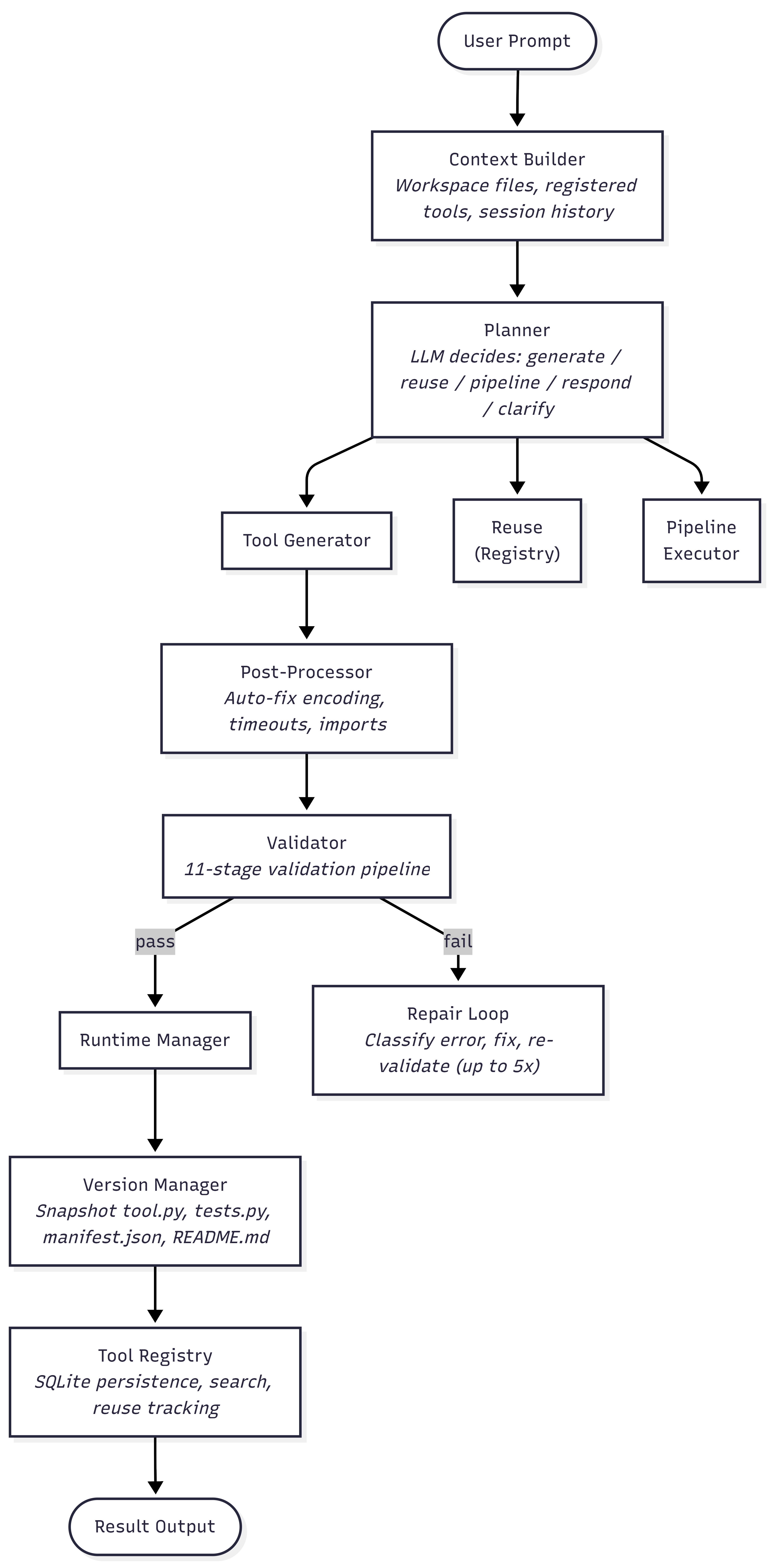
Cross-Cutting Components
| Component | Responsibility |
|---|---|
| Approval Gate | Pauses execution for human authorization when risk exceeds threshold |
| Policy Engine | AST-based static analysis to enforce security guardrails on generated code |
| Audit Logger | Immutable event trail for LLM calls, executions, approvals, and violations |
| Hook Manager | Lifecycle callbacks (before/after plan, generate, validate, execute, repair) |
| Memory System | Short-term session context, long-term persistent recall, entity tracking |
Installation
Prerequisites
- Python 3.10 or higher
- pip package manager
- An LLM backend (local via Ollama, or cloud API keys for OpenAI, Anthropic, Gemini, etc.)
Install from Source
git clone https://github.com/Nanoscrypt/Nanoscrypt.git
cd Nanoscrypt
pip install -e .
Install with Development and CLI Dependencies
pip install -e ".[dev,cli]"
Set Up a Local LLM (Optional)
Nanoscrypt works out of the box with local models via Ollama. To set up a local code-generation model:
# Install Ollama (https://ollama.ai)
ollama pull qwen2.5-coder
No API keys or cloud services are required when using local models.
Initialize Configuration
nanoscrypt init
This generates a nanoscrypt.toml configuration file in the current directory with default settings. Alternatively, copy the example configuration manually:
cp nanoscrypt.toml.example nanoscrypt.toml
cp .env.example .env
Quick Start
Generate and Execute a Tool
Submit a natural language prompt to the orchestrator. Nanoscrypt will plan the approach, synthesize a Python tool, validate it, run tests, and execute it:
nanoscrypt run "Parse the file report.pdf and extract all text content"
Use a Custom Agent Profile
Configure an agent with a specific role and permissions:
nanoscrypt run "Scrape the latest research papers on transformer architectures" \
  --agent-name "ResearchBot" \
  --agent-role researcher \
  --allow-web
Start the REST API Server
Expose the full framework as a REST API for programmatic access:
nanoscrypt serve --host 127.0.0.1 --port 8000
Programmatic Usage
import asyncio
from nanoscrypt.api.dependencies import get_orchestrator
from nanoscrypt.models.session import Session

async def main():
    orchestrator = get_orchestrator()
    session = Session()

    result = await orchestrator.execute_task(
        user_prompt="Count the words in the file notes.txt",
        session=session,
    )
    print(result)

asyncio.run(main())
CLI Reference
Nanoscrypt provides a Typer-based command-line interface with Rich terminal formatting.
nanoscrypt init
Generate a default nanoscrypt.toml configuration file.
nanoscrypt init [--model MODEL] [--workspace PATH]
| Option | Default | Description |
|---|---|---|
--model |
ollama/qwen2.5-coder |
LLM model identifier in LiteLLM format |
--workspace |
./workspaces |
Root directory for isolated tool workspaces |
nanoscrypt run
Execute a task through the full orchestration pipeline.
nanoscrypt run <prompt> [OPTIONS]
| Option | Default | Description |
|---|---|---|
--session-id |
Auto-generated | Reuse an existing session workspace |
--agent-name |
default |
Agent profile name |
--agent-role |
planner |
Agent role: planner, coder, researcher, executor, reviewer, custom |
--agent-goal |
None | Override the agent's goal for this execution |
--allow-web |
false |
Grant the agent network access permissions |
nanoscrypt serve
Start the FastAPI REST API server.
nanoscrypt serve [OPTIONS]
| Option | Default | Description |
|---|---|---|
--host |
127.0.0.1 |
Server bind address |
--port |
8000 |
Server port |
--reload / -r |
false |
Enable hot-reload for development |
nanoscrypt agents
Manage agent profiles.
nanoscrypt agents list                            # List all registered agents
nanoscrypt agents create <name> [OPTIONS]          # Create a new agent profile
nanoscrypt agents delete <name>                    # Delete an agent profile
| Option (create) | Default | Description |
|---|---|---|
--role |
planner |
Agent role assignment |
--goal |
Prompted | Agent's primary objective |
--backstory |
Prompted | Agent's background context |
nanoscrypt tools
Inspect the tool registry.
nanoscrypt tools list [--query SEARCH_TERM]        # List or search registered tools
nanoscrypt tools inspect <name>                    # Show detailed tool information
REST API
When the server is running (nanoscrypt serve), interactive OpenAPI documentation is available at http://127.0.0.1:8000/docs.
All endpoints are prefixed with /api/v1.
Session Management
| Method | Endpoint | Description |
|---|---|---|
POST |
/sessions |
Create a new execution session with an isolated workspace |
Task Execution
| Method | Endpoint | Description |
|---|---|---|
POST |
/tasks?session_id={id} |
Submit a natural language prompt for orchestrated execution |
Tool Registry
| Method | Endpoint | Description |
|---|---|---|
GET |
/tools |
List all registered tools. Supports ?query= for search |
GET |
/tools/{name} |
Retrieve detailed information for a specific tool |
Agent Management
| Method | Endpoint | Description |
|---|---|---|
POST |
/agents |
Create a new agent profile |
GET |
/agents |
List all registered agents |
GET |
/agents/{name} |
Retrieve a specific agent profile |
Approval Workflows
| Method | Endpoint | Description |
|---|---|---|
GET |
/approvals/pending |
List approval requests awaiting human validation. Supports ?session_id= |
POST |
/approvals/{request_id}/resolve |
Approve or deny a pending operation |
Audit and Governance
| Method | Endpoint | Description |
|---|---|---|
GET |
/audit |
Query audit logs. Supports ?session_id=, ?event_type=, ?limit= |
GET |
/audit/summary |
Aggregated statistics: total runs, cumulative cost, token usage |
Health Check
| Method | Endpoint | Description |
|---|---|---|
GET |
/health |
Returns {"status": "ok", "service": "nanoscrypt-api"} |
Configuration
Nanoscrypt is configured through a nanoscrypt.toml file in the project root. All settings can be overridden via environment variables using the NANOSCRYPT_ prefix with double-underscore delimiters for nested keys (e.g., NANOSCRYPT_LLM__MODEL).
LLM Settings
| Key | Type | Default | Description |
|---|---|---|---|
model |
string | ollama/qwen2.5-coder |
LLM model identifier in LiteLLM format |
temperature |
float | 0.2 |
Sampling temperature for code generation |
max_tokens |
integer | 131072 |
Maximum context window size |
max_output_tokens |
integer | 8192 |
Maximum generation output length |
retry_on_failure |
boolean | true |
Automatically retry failed LLM calls |
max_retries |
integer | 3 |
Maximum retry attempts per LLM call |
token_budget |
integer | 0 |
Token budget limit per session (0 = unlimited) |
Runtime Settings
| Key | Type | Default | Description |
|---|---|---|---|
timeout_seconds |
integer | 30 |
Maximum execution time per tool run |
max_memory_mb |
integer | 512 |
Memory limit per tool execution |
cleanup_after |
boolean | true |
Remove workspace files after execution |
workspace_root |
string | ./workspaces |
Root directory for isolated execution workspaces |
venv_cache_dir |
string | ./venv_cache |
Shared virtual environment cache directory |
Security Settings
| Key | Type | Default | Description |
|---|---|---|---|
approval_mode |
string | interactive |
Approval mode: interactive, auto, or webhook |
default_risk_threshold |
string | medium |
Auto-approve operations below this risk level |
blocked_domains |
list | [] |
Network domain denylist |
allowed_domains |
list | [] |
Network domain allowlist (empty = allow all) |
max_file_write_mb |
integer | 10 |
Maximum file write size in megabytes |
pii_detection |
boolean | false |
Enable PII scanning in generated code |
Registry Settings
| Key | Type | Default | Description |
|---|---|---|---|
database_url |
string | sqlite+aiosqlite:///./registry/tools.db |
SQLite database connection URL |
tools_dir |
string | ./generated_tools |
Directory for versioned tool snapshots |
Memory Settings
| Key | Type | Default | Description |
|---|---|---|---|
enabled |
boolean | true |
Enable the memory system |
short_term_max_entries |
integer | 50 |
Maximum entries in session buffer |
long_term_enabled |
boolean | true |
Enable persistent cross-session memory |
entity_tracking |
boolean | true |
Enable entity relationship tracking |
Resilience Settings
| Key | Type | Default | Description |
|---|---|---|---|
max_repair_attempts |
integer | 5 |
Maximum self-repair loop iterations |
retry_delay_seconds |
float | 1.0 |
Base delay between retry attempts |
exponential_backoff |
boolean | true |
Use exponential backoff for retries |
circuit_breaker_threshold |
integer | 5 |
Consecutive failures before circuit breaks |
fallback_model |
string | null |
Fallback LLM model on primary failure |
Logging Settings
| Key | Type | Default | Description |
|---|---|---|---|
level |
string | INFO |
Log level: DEBUG, INFO, WARNING, ERROR |
json_output |
boolean | false |
Output structured JSON logs |
Core Concepts
Orchestrator
The Orchestrator is the central coordinator of the framework. It receives a user prompt and a session context, delegates planning to the Planner, routes execution to the appropriate handler (tool generation, tool reuse, pipeline execution, or direct response), and manages the full lifecycle of validation, execution, repair, versioning, and registry persistence.
The orchestrator integrates all cross-cutting concerns: it consults the PolicyEngine for guardrail enforcement, the ApprovalGate for human-in-the-loop authorization, the AuditLogger for event tracking, the HookManager for lifecycle callbacks, and the memory system for context persistence.
Planner
The Planner is the decision-making engine. Given the assembled context (user prompt, workspace files, registered tools, session history, and active agent profile), it produces a PlannerDecision that specifies one of five actions:
| Action | When Selected |
|---|---|
generate_tool |
No existing tool matches; a new programmatic tool is needed |
reuse_tool |
An existing tool in the registry can satisfy the request |
execute_pipeline |
The task requires multiple sequential tool executions |
direct_response |
The user is asking a conceptual question, not requesting a programmatic action |
clarify |
The request is underspecified or ambiguous |
Each decision includes a risk assessment (low, medium, high, or critical), dependency hints for the generator, and chain-of-thought reasoning.
Tool Generator
The ToolGenerator synthesizes a complete Python tool package from the planner's decision. Each generated package includes:
- Source code (
tool.py): A standalone Python module with arun()entry point function - Requirements (
requirements.txt): Pip dependencies for third-party libraries - Manifest (
manifest.json): Typed input/output schema, language, entry point, and network flag - Unit tests (
tests.py): Self-contained test suite with structural assertions - Documentation (
README.md): Usage instructions and API description
The generator enforces enterprise-grade coding standards through its system prompt, including type annotations, input validation, error handling with structured error dictionaries, network resilience with retry and backoff, platform-safe file operations via pathlib, and resource cleanup via context managers.
Validator
The ToolValidator runs an eleven-stage validation pipeline on every generated tool:
| Stage | Check | Severity |
|---|---|---|
| 1. Syntax | Python AST parse succeeds | Error |
| 2. Policy | Guardrails engine clears code | Error |
| 3. Security | No blocked imports, builtins, or attributes | Error |
| 4. Entry Point | def run(...) exists with type annotations |
Error |
| 5. Import Availability | All imports are stdlib or listed in requirements | Error |
| 6. Schema Contract | run() parameter names match manifest input_schema keys |
Error |
| 7. Return Consistency | Return type annotation matches actual return statements | Warning |
| 8. Dependency Completeness | All non-stdlib imports are in requirements | Warning |
| 9. Dead Code | No unused imports or unreferenced top-level assignments | Warning |
| 10. Complexity | Cyclomatic complexity of run() does not exceed threshold |
Warning |
| 11. Formatting | Ruff auto-format and lint pass | Warning |
Runtime Manager
The RuntimeManager executes validated tools in isolated subprocess sandboxes. Each execution creates a temporary workspace directory containing the tool source code, writes a wrapper script that handles JSON input parsing and output serialization, and runs the tool using the Python interpreter from the shared virtual environment.
Execution is subject to configurable timeouts. The runtime captures stdout, stderr, return codes, and timing metrics, returning a structured ExecutionResult regardless of success or failure.
Repair Loop
When a tool fails validation or test execution, the RepairLoop attempts automated recovery. The repair process:
- Classifies the error into categories: syntax, import, type, timeout, assertion, attribute, key, network, runtime, or unknown.
- Selects a repair strategy based on attempt number: minimal fix (attempts 1-2), refactor (attempts 3-4), or full rewrite (attempt 5).
- Provides targeted guidance specific to the error category (e.g., encoding fixes for UnicodeDecodeError, dependency corrections for ImportError).
- Maintains repair memory to prevent the LLM from repeating previously failed approaches.
- Validates before testing: after each LLM patch, the full validator runs before expensive test execution.
Tool Registry and Versioning
Successfully validated and tested tools are persisted to a SQLite registry and versioned as file-based snapshots.
The Tool Registry stores tool metadata, purpose, schema, dependency declarations, success rates, usage counts, and status (active, deprecated, or failed). Tools are searchable by name and keyword.
The Version Manager creates immutable snapshots in generated_tools/{tool_name}/v{n}/, each containing the complete tool package (source, tests, manifest, readme, and version metadata with SHA-256 code hashes). A current.json pointer tracks the active version, and the system supports rollback and diff operations between versions.
Pipeline Execution
The PipelineExecutor handles multi-step tool chains. Each pipeline step defines:
- Tool name: which registered tool to execute
- Input mapping: a dictionary mapping the step's parameter names to keys from prior step outputs
- Condition: an optional expression controlling whether the step executes
Pipeline outputs are merged between steps, allowing downstream tools to consume upstream results automatically. Error strategies (fail_fast, continue, retry) control pipeline-level failure behavior.
Memory System
The memory architecture consists of three layers:
| Layer | Scope | Storage | Purpose |
|---|---|---|---|
| Short-Term | Single session | In-memory deque | Conversation context, recent tool outputs |
| Long-Term | Cross-session | SQLite database | Persistent key-value recall with category-based search |
| Entity | Cross-session | In-memory | Tool success rate tracking, usage pattern analysis |
Security and Guardrails
The PolicyEngine performs AST-based static analysis on every generated tool to enforce security boundaries. The engine is configured through GuardrailPolicy objects containing typed rules:
- Blocked Imports:
os,sys,subprocess,shutil,ctypes,importlib,socket,signal,multiprocessing,threading,pickle,shelve,code,codeop - Blocked Builtins:
exec,eval,compile,__import__,globals,locals,vars - Domain Controls: Configurable allowlists and denylists for network destinations
- File Size Limits: Maximum write size enforcement
- PII Detection: Optional scanning for personally identifiable information patterns
Human-in-the-Loop Approvals
The ApprovalGate intercepts operations that exceed the configured risk threshold. Approval types include:
| Type | Trigger |
|---|---|
TOOL_GENERATION |
New tool synthesis requested |
TOOL_EXECUTION |
Tool execution in sandbox |
WEB_ACCESS |
Network requests to external endpoints |
FILE_ACCESS |
File system read or write operations |
HIGH_RISK_OPERATION |
Operations classified as high or critical risk |
Approval status transitions: PENDING to APPROVED, DENIED, or EXPIRED. The system supports interactive CLI prompts with color-coded risk indicators, REST API polling for headless environments, and webhook callbacks for external integration.
Audit Logging
The AuditLogger records every significant framework event to an immutable SQLite-backed trail:
| Event Type | Recorded Data |
|---|---|
LLM_CALL |
Model, prompt tokens, completion tokens, cost estimate |
TOOL_GENERATED |
Tool name, version, code hash |
TOOL_EXECUTED |
Tool name, inputs, outputs, runtime, success/failure |
APPROVAL_REQUESTED |
Operation type, risk level, resource details |
APPROVAL_GRANTED/DENIED |
Resolution, reviewer, reason |
POLICY_VIOLATION |
Violated rule, code snippet, severity |
REPAIR_ATTEMPTED |
Attempt number, error class, strategy, outcome |
Project Structure
nanoscrypt/
├── src/nanoscrypt/
│   ├── api/                        # FastAPI REST API layer
│   │   ├── app.py                  # Application factory, CORS, lifespan
│   │   ├── dependencies.py         # Dependency injection providers
│   │   ├── schemas.py              # Pydantic request/response models
│   │   └── routers/                # Endpoint route handlers
│   │       ├── health.py           # Health check endpoint
│   │       ├── sessions.py         # Session management
│   │       ├── tasks.py            # Task submission and execution
│   │       ├── tools.py            # Tool registry queries
│   │       ├── agents.py           # Agent profile management
│   │       ├── approval.py         # Approval workflow endpoints
│   │       └── audit.py            # Audit log queries
│   ├── cli/                        # Typer CLI interface
│   │   ├── main.py                 # CLI application entry point
│   │   └── commands/               # Command implementations
│   │       ├── init.py             # Configuration initialization
│   │       ├── run.py              # Task execution command
│   │       ├── serve.py            # API server command
│   │       ├── agents.py           # Agent management commands
│   │       └── tools.py            # Tool inspection commands
│   ├── config/
│   │   └── settings.py             # Pydantic Settings with TOML loader
│   ├── core/                       # Framework engine
│   │   ├── orchestrator.py         # Central coordinator
│   │   ├── planner.py              # LLM decision engine
│   │   ├── generator.py            # Tool code synthesis
│   │   ├── validator.py            # 11-stage validation pipeline
│   │   ├── runtime.py              # Subprocess sandbox execution
│   │   ├── repair.py               # Self-healing repair loop
│   │   ├── registry.py             # SQLite tool persistence
│   │   ├── versioning.py           # File-based version snapshots
│   │   ├── pipeline.py             # Multi-step pipeline executor
│   │   ├── postprocessor.py        # Automatic code fixups
│   │   ├── context.py              # Prompt context assembly
│   │   ├── guardrails.py           # AST security policy engine
│   │   ├── approval.py             # Human-in-the-loop gate
│   │   ├── audit.py                # Immutable audit logger
│   │   ├── hooks.py                # Lifecycle callback manager
│   │   └── memory.py               # Three-tier memory system
│   ├── llm/                        # LLM integration layer
│   │   ├── base.py                 # LLMProvider protocol interface
│   │   ├── litellm_provider.py     # LiteLLM implementation
│   │   └── prompts/                # System prompts and templates
│   │       ├── generator.py        # Tool generation prompts
│   │       ├── planner.py          # Planning decision prompts
│   │       └── repair.py           # Repair loop prompts
│   ├── models/                     # Data models
│   │   ├── agent.py                # Agent and role definitions
│   │   ├── tool.py                 # Tool manifest and package models
│   │   ├── plan.py                 # Planner decision model
│   │   ├── session.py              # Session and output tracking
│   │   ├── permissions.py          # Permission level definitions
│   │   └── database.py             # SQLAlchemy ORM table models
│   └── utils/                      # Shared utilities
│       ├── async_runner.py         # Sync-to-async execution helper
│       ├── filesystem.py           # Directory and path utilities
│       └── hashing.py              # SHA-256 file hashing
├── tests/
│   ├── unit/                       # Unit tests (23 tests)
│   ├── integration/                # Integration lifecycle tests
│   └── e2e/                        # End-to-end CLI and API tests
├── examples/
│   └── basic_usage.py              # Programmatic usage example
├── nanoscrypt.toml.example         # Configuration template
├── .env.example                    # Environment variable template
├── pyproject.toml                  # Build configuration and dependencies
└── CHANGELOG.md                    # Version history
Testing
Nanoscrypt includes a comprehensive test suite covering unit, integration, and end-to-end scenarios.
Run the Full Test Suite
pytest tests/ -v
Run Unit Tests Only
pytest tests/unit/ -v
Run with Coverage Report
pytest tests/ --cov=nanoscrypt --cov-report=term-missing
Test Categories
| Directory | Scope | Tests |
|---|---|---|
tests/unit/ |
Individual components in isolation | 23 tests covering context, enterprise features, generator, planner, registry, repair, runtime, validator, and versioning |
tests/integration/ |
Full lifecycle workflows | End-to-end tool generation, validation, execution, and registry persistence |
tests/e2e/ |
CLI and API surface | Command-line interface and REST API endpoint verification |
Contributing
Contributions to Nanoscrypt are welcome. Before submitting a pull request, please review the following guidelines.
Development Setup
- Fork and clone the repository.
- Install development dependencies:
pip install -e ".[dev,cli]"
- Verify the test suite passes:
pytest tests/ -v
Code Standards
- Python Version: All code must be compatible with Python 3.10. Do not use Python 3.11+ features.
- Formatting: Code is formatted with Ruff (
ruff format). Runruff check --fixbefore committing. - Type Hints: All public functions and methods must include type annotations.
- Testing: New features must include unit tests. Maintain or improve the existing test coverage.
- Documentation: Update the README, CHANGELOG, and relevant docstrings for any user-facing changes.
Submitting Changes
- Create a feature branch from
main. - Make focused, atomic commits with descriptive messages.
- Ensure all tests pass and linting is clean.
- Open a pull request with a clear description of the changes and their motivation.
Reporting Issues
Open an issue on the GitHub issue tracker with:
- A clear title and description of the problem
- Steps to reproduce the issue
- Expected and actual behavior
- Python version, operating system, and LLM backend in use
Changelog
See CHANGELOG.md for a detailed record of changes across all versions.
1 maintainer

Metadata
1 maintainer
Release files for nanoscrypt 0.3.0
For a detailed explanation of source distributions (sdists) and built distributions (wheels), please see the package formats documentation.
Source distribution (sdist)
| File | Size | Uploaded | |
|---|---|---|---|
| nanoscrypt-0.3.0.tar.gz | 122.5 kB | Details |
Built distribution (wheel)
| File | Interpreter | ABI | Platform | Reset |
|---|---|---|---|---|
| nanoscrypt-0.3.0-py3-none-any.whl | Python 3 | none | any | Details |
Total release size: 245.2 kB
Release files / nanoscrypt-0.3.0.tar.gz
| Download URL | nanoscrypt-0.3.0.tar.gz |
|---|---|
| Size | 122.5 kB |
| Tags | Source |
|
SHA-256 checksum How to use checksums |
8406e95510993b7fd2aa1a9a86294f21d942da85e29ed4a46104a7c1f5b03e4c
|
|
BLAKE2b-256 checksum How to use checksums |
c1f3029fca03dab564dda2c43d6060cd9d01ef092d52b023dae80752e33fde73
|
| Upload date | |
|
Uploaded using Trusted Publishing? What is trusted publishing? |
No |
| Uploaded via |
twine/7.0.0 CPython/3.13.14
|
Release files / nanoscrypt-0.3.0-py3-none-any.whl
| Download URL | nanoscrypt-0.3.0-py3-none-any.whl |
|---|---|
| Size | 122.7 kB |
| Tags | Python 3 |
|
SHA-256 checksum How to use checksums |
57ca9f69226f28cbc56dcc8ec8c4836c2e37a66dd21721c00f768eff592e4515
|
|
BLAKE2b-256 checksum How to use checksums |
c95e241cef645a616b46c40be629c63165ceeea3b937a076b2d043653e8de4af
|
| Upload date | |
|
Uploaded using Trusted Publishing? What is trusted publishing? |
No |
| Uploaded via |
twine/7.0.0 CPython/3.13.14
|














