
A lightweight, wake word detection engine. Train custom, high-accuracy models with minimal effort.

Project description







NanoWakeword is a next-generation adaptive framework designed to build high-performance custom wake word models, acting as an intelligent engine that trains models, deploys them anywhere, and integrates them into any project with minimal code→from a Raspberry Pi Zero to a cloud server and across distributed edge/cloud systems, covering the full lifecycle seamlessly.
Quick Access
Choose Your Architecture, Build Your Pro Model
NanoWakeWord is a versatile framework offering a rich library of neural network architectures. Each is optimized for different scenarios, allowing you to build the perfect model for your specific needs. This Colab notebook lets you experiment with any of them.
| Architecture | Recommended Use Case | Performance Profile | Start Training |
|---|---|---|---|
| DNN | General use on resource-constrained devices (e.g., MCUs). | Fastest Training, Low Memory | ▶️ Launch |
| RNN | Baseline experiments or educational purposes. | Better than DNN | ▶️ Launch |
| CNN | Short, sharp, and explosive wake words. | Efficient Feature Extraction | ▶️ Launch |
| LSTM | Noisy environments or complex, multi-syllable phrases. | Best-in-Class Noise Robustness | ▶️ Launch |
| GRU | A faster, lighter alternative to LSTM with similar high performance. | Balanced: Speed & Robustness | ▶️ Launch |
| CRNN | Challenging audio requiring both feature and context analysis. | Hybrid Power: CNN + RNN | ▶️ Launch |
| TCN | Modern, high-speed sequential processing. | Faster than RNN (Parallel) | ▶️ Launch |
| BcResNet | Broadcasting-residual network | Accuracy Potential | ▶️ Launch |
| QuartzNet | Top accuracy with a small footprint on edge devices. | Parameter-Efficient & Accurate | ▶️ Launch |
| Transformer | Deep Contextual Understanding via Self-Attention mechanism. | SOTA Performance & Flexibility | ▶️ Launch |
| Conformer | State-of-the-art hybrid for ultimate real-world performance. | SOTA: Global + Local Features | ▶️ Launch |
| E-Branchformer | Bleeding-edge research for potentially the highest accuracy. | Accuracy Potential | ▶️ Launch |
NOTE: Nanowakeword is under active development. For important updates, version-specific notes, and the latest stability status of all features, please refer to our official status document.View Latest Release Notes & Project Status
State-of-the-Art Features and Architecture
NanoWakeword is a holistic, end-to-end ecosystem designed to make building and running custom wakeword models accessible to everyone. It goes beyond simple scripting by integrating multiple automated, production-grade systems that manage the entire lifecycle-from data analysis and feature engineering to advanced training and deployment-optimized inference.
༼ つ ◕_◕ ༽つ Each section below contains detailed technical explanations. Click to expand.
1. Builds a tiny student Model ↓
Built-in knowledge distillation - automatically generates a lightweight gate model from any trained model.
Trains a tiny "student" model to mimic the output of a larger "teacher" model. The student is a stripped-down DNN - always architecture type "dnn" regardless of what the teacher was - because the goal is maximum speed, not accuracy parity.
 Loss = alpha * KL(student_soft || teacher_soft)   ← soft label matching
    + (1 - alpha) * BCE(student_logit, hard_label) ← ground truth anchoring
Temperature scaling softens the teacher's probability distribution so the student learns from the full output distribution, not just the argmax.
2. The Production-Grade Data Pipeline: From Raw Audio to Optimized Features ↓
Recognizing that data is the bedrock of any great model, Nanowakeword automates the entire data engineering lifecycle with a pipeline designed for scale and quality:
-
TTS Model: Supports multiple TTS models & Speakers.
-
Phonetic Adversarial Negative Generation: This is a key differentiator. The system moves beyond generic noise and random words by performing a phonetic analysis of your wake word. It then synthesizes acoustically confusing counter-examples-phrases that sound similar but are semantically different. This forces the model to learn fine-grained phonetic boundaries, dramatically reducing the false positive rate in real-world use.
-
Augmentation: The powerful & flexible augmentation engine injects a rich tapestry of real-world acoustic scenarios in real-time. This includes applying background noise at different SNR levels, (Optional: convolving clips with room impulse response (RIR) for realistic reverberation), and applying various other transformations such as pitch shifting and filtering.
3. ISBL: Importance Sampling based on Loss (Dynamic Hard-Example Mining) ↓
The nanowakeword training pipeline introduces a highly optimized, custom sampling algorithm called ISBL (Importance Sampling based on Loss).
Instead of traditional random sampling or standard curriculum learning (which feeds easy data first), ISBL adopts a smarter "Active Mining" approach. It operates on a simple principle: Do not waste CPU/GPU cycles on audio samples the model already understands. Focus on the mistakes.
The system tracks the individual loss of every single audio sample across the entire dataset and dynamically increases the sampling probability of "hard" examples. To prevent model collapse (overfitting on unlearnable noisy data), ISBL introduces a non-linear smoothing factor.
🧮 The ISBL Master Equation
The core logic of the sampler is governed by the following dynamic probability distribution:
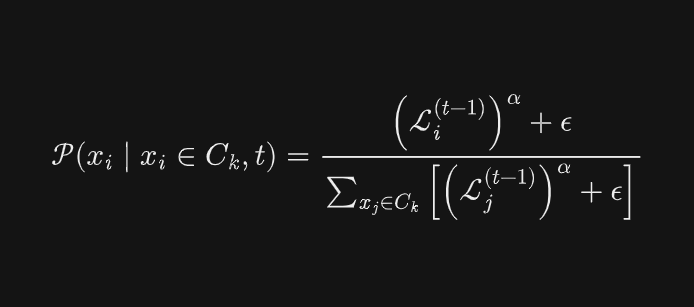
Where:
- $\mathcal{P}(x_i \mid x_i \in C_k, t)$: The conditional probability of selecting a specific data sample $x_i$ from class pool $C_k$ at training step $t$.
- $x_i, x_j$: Individual data samples (e.g., specific audio clips) within the dataset. Here, $x_i$ represents the target sample being evaluated, while $x_j$ represents all competing samples within the same pool during summation.
- $C_k$ (Class/Category Pool): A distinct subset or category of data (e.g.,
targetsornegatives), isolated via the dataset's index pools. - $t$ (Training Step / Time): The current iteration or time step of the training loop, defining the temporal state of the sampling probabilities.
- $\mathcal{L}_i^{(t-1)}$ (Loss/Hardness Score): The individual loss value computed for sample $x_i$ during its most recent forward pass at step $t-1$. Higher loss signifies higher "hardness". (Note: At $t=0$, before any training occurs, all scores are uniformly initialized to $\mathcal{L}_i^{(0)} = 1.0$).
- $\alpha$ (Smoothing Factor): A hyperparameter set to
0.75. It acts as a contrast control that dampens extreme loss values. This prevents unlearnable, corrupted, or heavily noisy audio clips from dominating the batch gradients and causing model collapse. - $\epsilon$ (Epsilon / Stability Constant): A tiny positive constant set to
1e-6serving a dual purpose:- Mathematical Safety: Prevents division-by-zero errors or absolute zero probabilities when a sample is perfectly learned.
- Catastrophic Forgetting Prevention: As the model converges and all individual losses drop near zero ($\mathcal{L} \approx 0$), the equation naturally transitions into a uniform random sampler ($\mathcal{P} \approx \frac{1}{N}$), ensuring balanced baseline revision in later training stages.
- $\sum_{x_j \in C_k}$ (Summation Over Class): The summation operator (Sigma) that aggregates the computed scores of all individual samples $x_j$ belonging to class $C_k$. Dividing the single sample's score by this total sum normalizes the output into a strict probability distribution bounded between $0$ and $1$.
⚙️ Architecture & Core Components
To implement the ISBL algorithm efficiently on massive audio datasets, the system relies on two custom PyTorch components:
1. AdaptiveLossAwareDataset (Memory & Search Optimized)
This dataset class manages millions of features without crashing system RAM.
- Zero-Copy Memory: Uses
numpy'smmap_mode='r'to read audio features directly from disk on the fly. - Global Loss Tracking: Maintains a global PyTorch tensor initialized to
1.0that tracks the exact $\mathcal{L}$ (loss) for every single sample across all data sources. - $O(\log N)$ Bisect Search: Finding the correct source file and local index for a global sample ID is traditionally an $O(N)$ bottleneck. We optimized
__getitem__to $O(\log N)$ using Python'sbisectalgorithm on pre-computed start indices, ensuring blazing-fast data loading.
2. DynamicClassAwareSampler (Composition-Driven)
Standard samplers blindly shuffle data. Our sampler acts as the executor of the ISBL equation.
- Batch Composition: It builds exact batches based on user rules (e.g., 32 Targets, 64 Negatives, 32 Noise).
- Weighted Multinomial Sampling: It extracts the raw loss for the requested category, applies the $\alpha$ smoothing and $\epsilon$, and uses
torch.multinomialto probabilistically select the batch. - Dynamic Replacement: It intelligently toggles
replacement=Falseto prevent the exact same hard sample from appearing multiple times in a single batch.
4. A Modern Training Paradigm: State-of-the-Art Optimization Techniques ↓
The training process itself is infused with cutting-edge techniques to ensure the final model is not just accurate, but exceptionally robust and reliable:
-
Super Learning: ISBL: Importance Sampling based on Loss
-
Seamless Large-Scale Data Handling (
mmap): The framework shatters the memory ceiling of conventional training scripts. By utilizing memory-mapped files, it streams features directly from disk, enabling seamless training on datasets that can be hundreds of gigabytes or even terabytes in size, all on standard consumer hardware. -
Checkpoint Ensembling / Stochastic Weight Averaging (SWA): Instead of relying on a single "best" checkpoint, the framework identifies and averages the weights of the most stable and high-performing models from the training run. This powerful ensembling technique finds a flatter, more robust minimum in the loss landscape, leading to a final model with provably better generalization to unseen data.
-
Universal Export: The final trained model is exported to the industry-standard ONNX & Pytorch format. This guarantees maximum hardware acceleration and platform-agnostic deployment across a vast range of environments, from powerful servers to resource-constrained edge devices.
5. The Deployment-Optimized Inference & Server ↓
A model's true value is in its deployment. Nanowakeword's inference engine is designed from the ground up for efficiency, low latency, and the challenges of real-world deployment:
-
Stateful Streaming Architecture: It processes continuous audio streams incrementally, maintaining temporal context via hidden states for recurrent models (like LSTMs/GRUs). This is essential for delivering instant, low-latency predictions in real-time applications.
-
Integrated On-Device Post-Processing Stack: The engine is a complete, production-ready solution. It incorporates an on-device stack that includes optional Voice Activity Detection (VAD) to conserve power, Noise Reduction to enhance clarity, intelligent Debouncing/Patience Filters and Gatekeeper Super light model that is always running. This stack transforms the raw model output into a reliable, robust trigger, ready for integration out of the box.
-
Server: A built-in server that helps run models in any way. All models can be run on the server, or some models can be run on the server while others run locally.The server has strong security measures like API keys, SSL, etc.
6. Signature Features ↓
-
Training Journal: Training Journal System
Nanowakeword will include a built-in Training Journal system that automatically records:
- All Training configuration
- Model parformence
This makes model training reproducible, debuggable, and research-friendly.
Users will be able to analyze:
- which configuration worked best
- Which model was the best
The goal is to make wakeword experimentation easier, transparent, and scalable. Designed for long-term experimentation and reproducible research.
-
Transparent Live Dashboard: A clean, dynamic terminal table provides a real-time, transparent view of all effective training parameters as they are being used, offering complete insight into the automated process.
-
Graph: An informative graph is available at the end of the training.
-
Resilient, Fault-Tolerant Workflow: Long training sessions are protected. The framework automatically saves the entire training state—model weights, optimizer progress, scheduler state, and even the precise position of the data generator. This allows you to resume an interrupted session from the exact point you left off, ensuring zero progress is lost.
A Stable & Dependency-Free Workflow
The framework is architected to eliminate the common dependency conflicts that often disrupt machine learning workflows. All required packages are carefully version-managed to guarantee a stable environment from initial setup through to the final training execution.
This design ensures that users can proceed from installation to model generation without encountering environment-related errors, allowing them to focus entirely on building their wake word model.
Getting Started
Prerequisites
- Python 3.9 or higher
Installation
Install the latest stable version from PyPI for inference:
pip install nanowakeword
To train your own models, install the full package with all training dependencies:
pip install "nanowakeword[train]"
Pro-Tip: Bleeding-Edge Updates
While the PyPI package offers the latest stable release, you can install the most up-to-the-minute version directly from GitHub to get access to new features and fixes before they are officially released:
pip install git+https://github.com/arcosoph/nanowakeword.git
Train Model
The primary method for controlling the NanoWakeWord framework is through a .yaml file. This file acts as the central hub for your entire project, defining data paths and controlling which pipeline stages are active.
Simple Example Workflow
-
Prepare Your Data Structure: Organize your raw audio files (
.wav,flacetc.) into their respective subfolders or you can generate synthetic data.training_data/ ├── positive/ # Your wake word samples ("hey_nano.wav") │ ├── sample.wav │ └── user_01.aiff ├── negative/ # Speech/sounds that are NOT the wake word │ ├── adversarial_word.pcm │ └── random_speech.wav ├── noise/ # Background noises (fan, traffic, crowd) │ ├── cafe.wav │ └── office_noise.flac └── rir/ # Room Impulse Response (If you want) ├── small_room.wav └── hall.wav -
Define Your Configuration: Create a
.yamlfile to manage your training pipeline. This approach ensures your experiments are repeatable and well-documented.# In your config.yaml # Essential Paths (Required) model_type: dnn # Or other architectures such as `LSTM`, `GRU`, `RNN`, `Transformer` etc.. model_name: "my_wakeword_v1" output_dir: "./trained_models" positive_data_path: "./training_data/positive" negative_data_path: "./training_data/negative" background_paths: - "./training_data/noise" rir_paths: - "./training_data/rir" # Enable the stages for a full run generate_clips: true transform_clips: true train_model: true # Add more setting (Optional) # For example, to apply a specific set of parameters: n_blocks: 3 # ... steps: 20000 # ... checkpointing: enabled: true interval_steps: 500 limit: 3 # Other...
For a full explanation & all parameters, please see the training_config or CONFIGURATION_GUIDE.
- Execute the Pipeline:
Launch the trainer by pointing it to your configuration file. The stages enabled in your config will run automatically.
nanowakeword -c ./path/to/config.yaml
Command-Line Arguments (Overrides)
For on-the-fly experiments or to temporarily modify your pipeline without editing your configuration file, you can use the following command-line arguments. Any flag used will take precedence over the corresponding setting in your config.yaml file.
| Argument | Shorthand | Description |
|---|---|---|
--config |
-c |
Required. Path to the base .yaml configuration file. |
--generate_clips |
-G |
Activates the 'Generation' stage. |
--transform_clips |
-t |
Activates the preparatory 'transform' stage (augmentation and feature extraction). |
--train |
-T |
Activates the final 'Training' stage to build the model. |
--distill |
-d |
Generate a lightweight lite model via knowledge distillation. |
--resume |
✗ | Resumes training from the latest checkpoint in the specified project directory. |
--overwrite |
✗ | Forces regeneration of feature files. Use with caution as this deletes existing data. |
Performance and Evaluation
Nanowakeword is engineered to produce state-of-the-art, highly accurate models with exceptional real-world performance. The new dual-loss training architecture, combined with our powerful Intelligent Configuration Engine, ensures models achieve a very low stable loss while maintaining a clear separation between positive and negative predictions. This makes them extremely reliable for always-on, resource-constrained applications.
Below is a typical training performance graph for a model trained on a standard dataset. This entire process, from hyperparameter selection to training duration, is managed automatically by Nanowakeword's core engine.
📈 Training Performance Graph
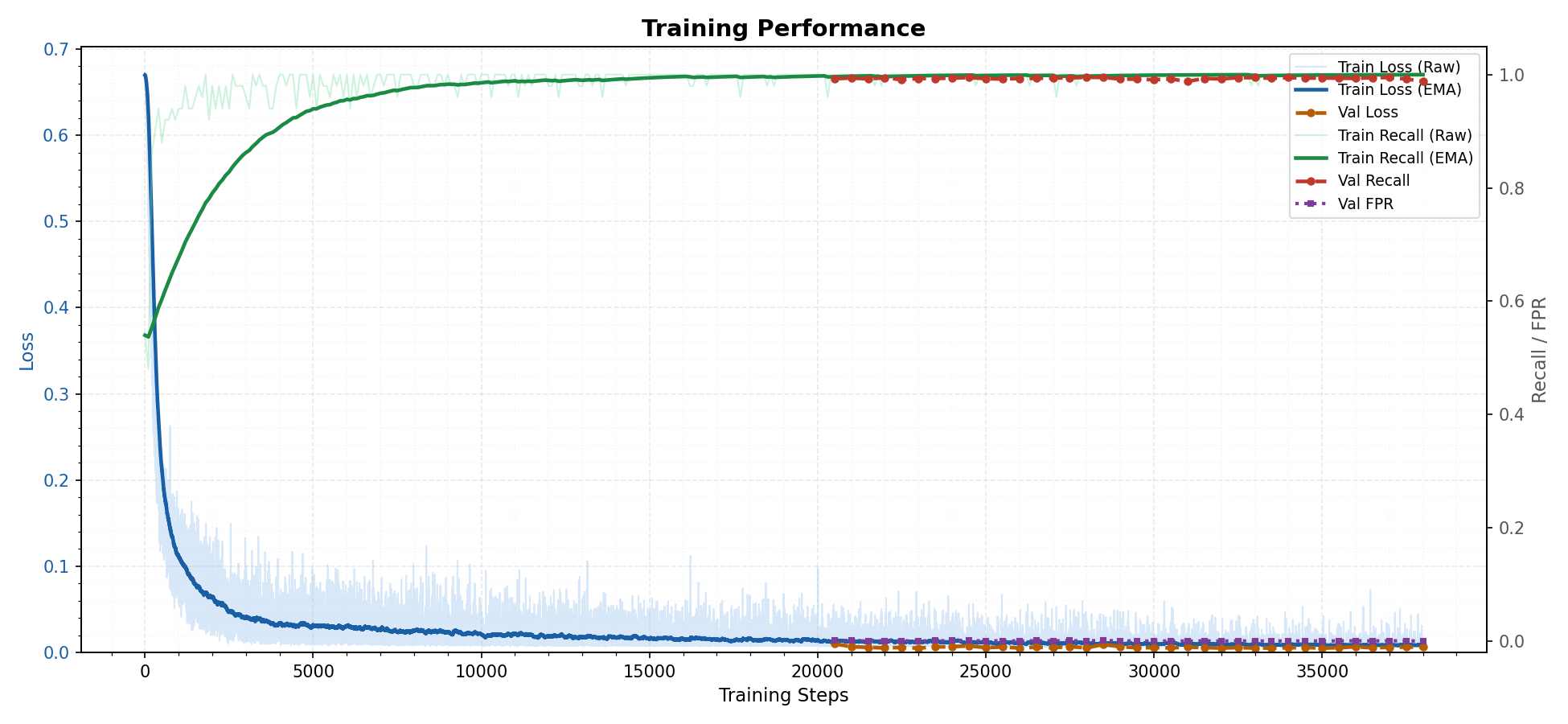
Key Performance Insights:
-
Stable and Efficient Learning: The "Training Loss (Stable/EMA)" curve demonstrates the model's rapid and stable convergence. The loss consistently decreases and flattens, indicating that the model has effectively learned the underlying patterns of the wake word without overfitting. The raw loss (light blue) shows the natural variance between batches, while the stable loss (dark blue) confirms a solid and reliable learning trend.
-
Exceptional Confidence and Separation: The final report card is a testament to the model's quality. With an Average Stable Loss of just 0.0086, the model is highly accurate. More importantly, the high margin between the positive and negative confidence scores highlights its decision-making power:
- Avg. Positive Confidence (Logit):
5.447(Extremely confident when the wake word is spoken) - Avg. Negative Confidence (Logit):
-5.721(Equally confident in rejecting incorrect words and noise) This large separation is crucial for minimizing false activations and ensuring the model responds only when it should.
- Avg. Positive Confidence (Logit):
-
Extremely Low False Positive Rate: While real-world performance depends on the environment, our new training methodology, which heavily penalizes misclassifications, produces models with an exceptionally low rate of false activations. A well-trained model often achieves less than one false positive every 16-28 hours on average, making it ideal for a seamless user experience.
Using Your Trained Model (Inference)
Your trained .onnx model is ready for action! The easiest and most powerful way to run inference is with our lightweight NanoInterpreter. It's designed for high performance and requires minimal code to get started.
Here’s a practical example of how to use it:
import pyaudio
import numpy as np
from nanowakeword import NanoInterpreter # Import the interpreter from the library

# Load model
interpreter = NanoInterpreter.load_model(
    r"model/path/your.onnx" # Your Model Path
)

# Setup microphone
pa = pyaudio.PyAudio()

stream = pa.open(
    format=pyaudio.paInt16,
    channels=1,
    rate=16000,
    input=True,
    frames_per_buffer=1280
)

print("Listening...")

while True:
    # Read audio from mic
    audio_chunk = np.frombuffer(
        stream.read(1280, exception_on_overflow=False),
        dtype=np.int16
    )

    # Run prediction
    result = interpreter.predict(audio_chunk)

    # Detection
    if result.score > 0.95:
        print("Detected!")

        # Optional
        interpreter.reset()
Deployment modes at a glance
| Mode | Edge runs | Server runs | Best for |
|---|---|---|---|
| Fully local | mel + embedding + model | ✗ | Common use |
| Local cascade | mel + embedding + gate + verifier | ✗ | Any device with a lite model |
| Gate + remote verifier | mel + embedding + gate | verifier only | Medium-power edge |
| Gate + remote full pipeline | gate only | mel + embedding + verifier | Low-power edge (Pi Zero, MCU) |
| Fully remote | ✗ | mel + embedding + verifier | Ultra-minimal edge |
Server Command-Line Arguments
Available command-line options for configuring, securing, and running the Nanowakeword server.
| Argument | Shorthand | Description |
|---|---|---|
--model |
✗ | Start RemoteVerifier server |
--pipeline |
✗ | verifier_only or full |
--port |
✗ | Server port (default 8765) |
--info |
✗ | Inspect a .onnx model file |
--api-key |
✗ | API keys for client authentication (repeat for multiple keys) |
--enable-tokens |
✗ | Allow clients to exchange API keys for short-lived tokens |
--token-ttl |
✗ | Token lifetime in seconds (default: 3600) |
--rate-limit |
✗ | Max requests per IP per window (0 = disabled) |
--rate-window |
✗ | Rate limit window in seconds (default: 60) |
--ip-allowlist |
✗ | Allow only specific IPs/CIDR ranges |
--ssl-certfile / --ssl-keyfile |
✗ | WSS/TLS certificate files |
--ssl-ca-certs |
✗ | CA bundle for mutual TLS |
--max-connections |
✗ | Maximum simultaneous clients |
--ban-duration |
✗ | Ban time after rate limit breach (default: 300) |
༼ つ ◕_◕ ༽つ Learn more about running models, NanoInterpreter, and Server here
🎙️ Pre-trained Models
To help you get started quickly, nanowakeword comes with a rich collection of pre-trained models. These pre-trained models are ready to use and support a wide variety of wake words, eliminating the need to spend time training your own model from scratch.
Because our library of models is constantly evolving with new additions and improvements, we maintain a live, up-to-date list directly on our GitHub project page. This ensures you always have access to the latest information.
For a comprehensive list of all available models and their descriptions, please visit the official model registry:
View the Official List of Pre-trained Models (✿◕‿◕✿)
⚖️ Our Philosophy
In a world of complex machine learning tools, Nanowakeword is built on a simple philosophy:
- Simplicity First: You shouldn't need a Ph.D. in machine learning to train a high-quality wake word model. We believe in abstracting away the complexity.
- Intelligence over Manual Labor: The best hyperparameters are data-driven. Our goal is to replace hours of manual tuning with intelligent, automated analysis.
- Performance on the Edge: Wake word detection should be fast, efficient, and run anywhere. We focus on creating models that are small and optimized for devices like the Raspberry Pi.
- Empowerment Through Open Source: Everyone should have access to powerful voice technology. By being fully open-source, we empower developers and hobbyists to build the next generation of voice-enabled applications.
FAQ
1. Which Python version should I use?
You can use Python 3.8 to 3.13. This setup has been tested and is fully supported.
2. What kind of hardware do I need for training?
Training can be performed on any modern device, including standard CPUs, without requiring specialized hardware. While a dedicated
GPUcan accelerate the process, it is not necessary. The training pipeline is optimized to run efficiently even on low-end systems.
3. How much data do I need to train a good model?
For a good starting point, we recommend at least 10000+ clean data of your wake words from a few different voices. The total duration of negative audio should be at least 3 times longer than positive audio. You can also create synthetic words using Nanowakeword. The more data you have, the better your model will be. Our intelligent engine is designed to work well even with small datasets.
4. Can I train a model for a language other than English?
Yes! Nanowakeword is language-agnostic. As long as you can provide audio samples for your wake words, you can train a model for any language.
5. What platforms are supported for running the trained model?
Inference (running the model) is extremely lightweight and can run smoothly on almost any device, including a Raspberry Pi 3/4, Linux systems, Android devices, and Apple platforms.
6. Is there an official C# port for nanowakeword?
There are no official ports for C#
Community & Support
Assistance for any issue-from data preparation to troubleshooting a stalled training process or an unexpected error-is readily available. The project prioritizes swift and effective solutions to ensure a smooth user experience.
For support, users can get help through the most convenient channel:
- GitHub Issues: For reporting bugs, technical issues, and making feature requests.
- Discord Server: Ideal for general questions, configuration help, and community discussion.
- Official Website: Provides documentation and includes a contact interface for direct communication.
All inquiries are reviewed and addressed as promptly as possible.
Contributing
Contributions are the lifeblood of open source. We welcome contributions of all forms, from bug reports and documentation improvements to new features.
To get started, please see our Contribution Guide, which includes information on setting up a development environment, running trsts, and our code of conduct.
Visit our website
License
This project is licensed under the Apache 2.0 License - see the LICENSE file for details.
💙 If you find this helpful, please support us at A r c o s o p h or give our repository a ⭐
Release history Release notifications | RSS feed


Download files
Download the file for your platform. If you're not sure which to choose, learn more about installing packages.
Source Distribution
Built Distribution
Filter files by name, interpreter, ABI, and platform.
If you're not sure about the file name format, learn more about wheel file names.
Copy a direct link to the current filters
File details
Details for the file nanowakeword-2.1.3.tar.gz.
File metadata
- Download URL: nanowakeword-2.1.3.tar.gz
- Upload date:
- Size: 153.4 kB
- Tags: Source
- Uploaded using Trusted Publishing? No
- Uploaded via: twine/6.2.0 CPython/3.13.12
File hashes
| Algorithm | Hash digest | |
|---|---|---|
| SHA256 |
0a1b34101058139ec25dfe5a2069cc241c64601b3874a33c484fd1c64f4951de
|
|
| MD5 |
85223dca5bb4e7d948cb1449899fd2db
|
|
| BLAKE2b-256 |
d4dbf051437fc07aad0486e54ceab70816dc94951b9fe0efb40fb2636eac09cd
|
File details
Details for the file nanowakeword-2.1.3-py3-none-any.whl.
File metadata
- Download URL: nanowakeword-2.1.3-py3-none-any.whl
- Upload date:
- Size: 151.5 kB
- Tags: Python 3
- Uploaded using Trusted Publishing? No
- Uploaded via: twine/6.2.0 CPython/3.13.12
File hashes
| Algorithm | Hash digest | |
|---|---|---|
| SHA256 |
30a1a9c8586b1a09c02078964cbcf1decd611a163b0abf921995c717e39ebbd3
|
|
| MD5 |
e52297f27d11c7d1a8fe9ad673a40af2
|
|
| BLAKE2b-256 |
069f0ea7306396e0b39e67ffa4f751ebb300e991038547f590c4721848cd0019
|






