

napari-TurboBox








napari-TurboBox is a napari plugin for annotating 2D and 3D images with axis-aligned bounding boxes (AABBs). All boxes of an annotation live in one shared store. One editable box layer and any number of read-only box layers in other napari viewers (for example two orthogonal slice views and a 3D view) display that store: every edit is written once and reaches all views, the 2D views on every edit and the 3D views when the edit ends. Mouse edits keep each box axis-aligned and, when the image shape is known, inside the image. The boxes can be exported as per-slice COCO or YOLO annotations, for example to train 2D detectors or to use as per-slice box prompts, or in a native NumPy/JSON format.
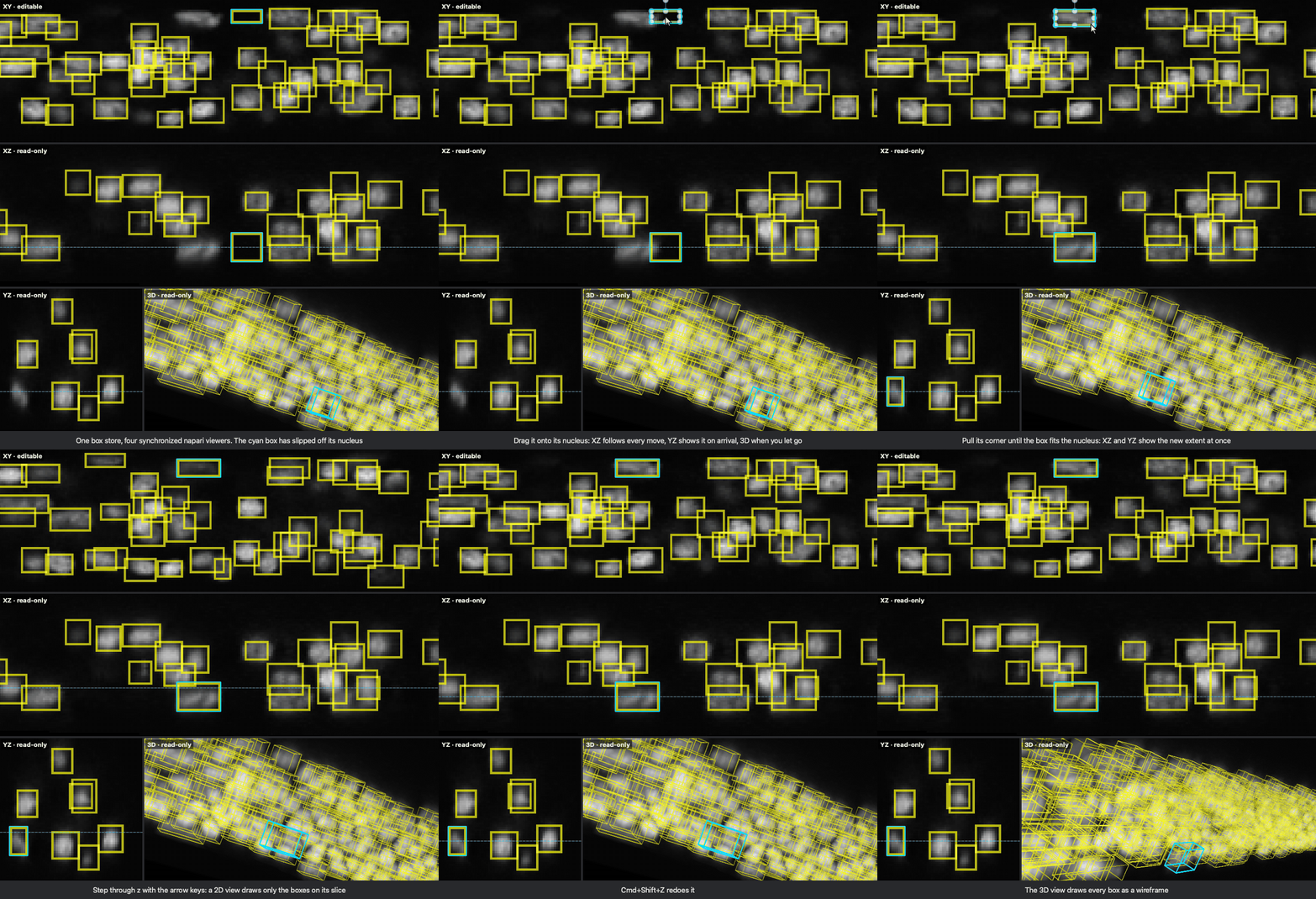
A real napari session, recorded by docs/make_demo.py:
every edit is a Qt mouse or key event on the XY canvas, and the 3D view is
turned by a mouse drag on its canvas. Before it starts, the script sets the
cameras and slices and moves one box off its nucleus and shrinks it. The
pointer, the dashed line that marks the XY slice in XZ and YZ, and the cyan
outline of the edited box are drawn on top. Data: C. elegans nuclei, Long et
al. (2022), doi:10.5281/zenodo.5942575,
CC BY 4.0 (see Application example).
Distribution name napari-turbobox, import name napari_turbobox, licence Apache 2.0.
Architecture and API documentation: docs/ (Sphinx sources).
Features
- One shared store.
BBoxDataStoreholds all boxes as one(N, 2, D)float32array ([min corner, max corner]per box). The layers of a synchronized layout all read this store; the store notifies them when it changes. - Synchronized multi-view layouts.
create_synchronized_bbox_layersbuilds one editable layer in a main viewer and read-only layers in any number of other viewers. Layers in 2D viewers update on every edit, including every mouse-move step of a drag. Layers in viewers that show 3D when the layers are created update once, when the edit session (for example a mouse drag) ends. - Slice-aware drawing. A 2D view draws only the boxes that intersect its current slice. Editing a single box updates, adds, or removes that box's shape in each view when the incremental path's checks pass; otherwise it rebuilds the view. A slice change or a bulk edit (add, delete, import, undo) rebuilds the view. A 3D view draws every box as a wireframe.
- Constrained AABB editing with the mouse. In the editable layer, dragging a
box moves it. Shift-dragging, or grabbing a box within 20 % of its size from
an edge, resizes it: on each displayed axis, the side nearer to the grab
point follows the mouse. Only the displayed axes change, and every axis keeps
an extent of at least one voxel. When the layer knows the image shape, a
moved box stops at the image border and resized coordinates are clamped to
[0, shape - 1]. When boxes overlap, the box with the smallest displayed area under the cursor is grabbed. napari's Transform mode and the non-rectangle drawing tools (ellipse, line, path, polygon, lasso) are switched back to Select mode. - napari's own tools work on single boxes. napari's Add Rectangle adds
one box. With a known image shape, a rectangle drawn on a slice is extruded
along the hidden axis through the full image depth (
0toshape - 1); a click without dragging adds nothing. napari's Delete selected shapes removes exactly the selected box(es). Read-only views ignore edits. - Undo/redo. The box layer binds Ctrl+Z / Ctrl+Y and Cmd+Z / Cmd+Shift+Z (active while the box layer is selected). On macOS, Cmd+Y is napari's own shortcut for switching between 2D and 3D display, so redo there with Cmd+Shift+Z or Ctrl+Y. The editable layer keeps up to 50 snapshots of all boxes by default (adjustable from 1 to 200 in the control panel). Undo and redo reach all synchronized views.
- Control panel (napari widget BBox Control Panel): add a box layer, draw a box, add a box that fits the image or the current viewport, remove all boxes, list, select and delete boxes, export and import.
- Export: native
.npy/.json, COCO JSON (one 2D annotation per slice), YOLO labels (one text file per slice). The same converters are available in Python (napari_turbobox.export). See Export conventions. Boxes store coordinates only: the control panel exports all boxes as one class, and the Python converters accept an optional class per box (category_ids). - Import of native
.npy/.jsonbox files; imported boxes are validated and appended to the existing boxes. COCO and YOLO files cannot be imported.
The npe2 manifest contributes one widget (BBox Control Panel) and no file readers or writers; images are opened with napari's own readers.
Installation
Requirements: Python >= 3.10 and napari >= 0.6.6, < 0.10 with a Qt binding (PyQt5, PyQt6 or PySide6). napari-turbobox itself depends only on napari, NumPy and qtpy.
pip install "napari-turbobox[all]" # napari-TurboBox + napari with a Qt binding
The all extra installs napari[all]>=0.6.6,<0.10; if napari is
already installed, pip install napari-turbobox is enough.
napari[all] installs a Qt binding (PyQt5 with napari 0.6.6, PyQt6 with
napari 0.7.0 and 0.9.1) and napari's optional compiled triangulation backend
(bermuda). The napari Shapes layers that napari-TurboBox builds on use that
backend when it is installed; napari-TurboBox does not require it. Without any
Qt binding, napari cannot open a viewer.
From a checkout of this repository (editable install with the test dependencies):
pip install -e ".[all,testing]"
pytest
Other extras: tutorials (JupyterLab and the file readers the notebooks use),
benchmark (napari-bbox 0.1.1, pandas, matplotlib for paper_benchmarks/),
dev (tests, ruff, npe2, build).
The tests build real napari viewers and therefore need a display (on Linux CI they run under Xvfb).
Tested on macOS with:
| napari | Python | Qt binding |
|---|---|---|
| 0.6.6 | 3.12 | PyQt6 |
| 0.7.0 | 3.10 | PyQt5, PyQt6 |
| 0.7.0 | 3.12 | PyQt6 |
| 0.9.1 | 3.12 | PyQt6 |
The full test suite passes in each of these environments (with napari 0.7.0 and Python 3.10 once per Qt binding). Tests that need the example data or the optional packages napari-bbox or hypothesis are skipped when these are missing, and four older widget tests are always skipped because they crash in headless runs. On napari 0.6.6 one test is an expected failure: napari's Shapes layer cannot switch a 2D layer back from 3D display (see Limitations). PySide6 was last tested with napari 0.7.0 at commit 1b2ba33 of the private development repository, before the final benchmark.
Quick start
In the napari GUI
- Open a 2D or 3D image in napari.
- In napari's Plugins menu, choose BBox Control Panel (listed with the plugin's display name in parentheses).
- Click Add Bounding Box Layer. The new layer takes its shape from the selected image layer (or the top-most image layer), and also its scale and translation when the image has as many dimensions as the viewer. Without an image layer, boxes are not clamped to image bounds.
- Click Draw New BBox (Interactive). This switches the layer to napari's Add Rectangle mode. Drag a rectangle on the current slice; the box spans the full depth of the hidden axis.
- Switch the layer to napari's Select mode. Drag a box to move it; Shift-drag it, or grab it near an edge, to resize it.
- Delete boxes with napari's Delete selected shapes, or select a box in the panel's list and click Delete Selected. Remove All Bounding Boxes clears the layer. Ctrl+Z / Ctrl+Y (or Cmd+Z / Cmd+Shift+Z on macOS) undo and redo.
- Export BBoxes... writes native
.npy/.json, a COCO JSON file or a directory of YOLO label files. Import BBoxes... appends boxes from a native.npy/.jsonfile.
Fit Current Image Layer adds one box that covers the whole image. Fit Current Viewport adds a box over the middle half of the displayed axes that is one slice thick along the hidden axes.
The panel can also be opened from Python:
viewer.window.add_plugin_dock_widget("napari-turbobox", "BBox Control Panel").
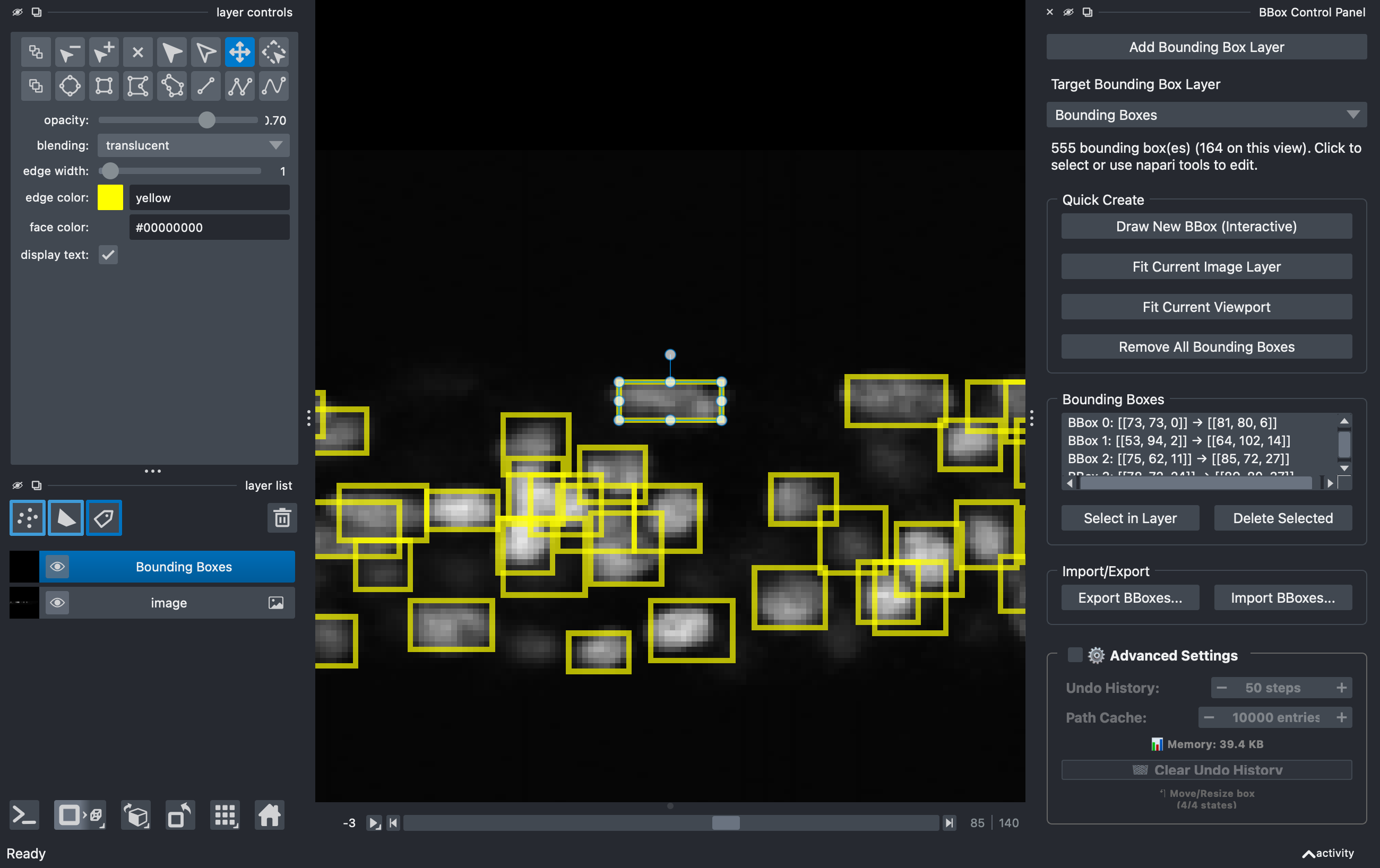
The panel manages the box layers of one viewer. Synchronized multi-view layouts are set up with the Python API below.
Python API: four synchronized viewers
import napari
import numpy as np

from napari_turbobox import create_synchronized_bbox_layers

volume = np.random.default_rng(0).random((60, 256, 256)).astype(np.float32)  # (z, y, x)

xy, yz, xz, v3d = (napari.Viewer(title=t) for t in ("XY (editable)", "YZ", "XZ", "3D"))
for viewer in (xy, yz, xz, v3d):
    viewer.add_image(volume, name="volume")
yz.dims.order = (2, 0, 1)  # displays (z, y); slices along x
xz.dims.order = (1, 0, 2)  # displays (z, x); slices along y
v3d.dims.ndisplay = 3      # set BEFORE creating the layers (see Limitations)

layers = create_synchronized_bbox_layers(
    main_viewer=xy,
    sub_viewers=[yz, xz, v3d],
    image_shape=volume.shape,
    edge_color="cyan",
)
# Boxes are [[z_min, y_min, x_min], [z_max, y_max, x_max]] in voxel indices.
layers[0].add_boxes(np.array([[[10, 40, 40], [30, 90, 110]]], dtype=float))

xy.window.add_plugin_dock_widget("napari-turbobox", "BBox Control Panel")
napari.run()
Signature: create_synchronized_bbox_layers(main_viewer, sub_viewers, bbox_data=None, image_shape=None, sync_mode="live", **layer_kwargs). It returns
one layer per viewer: layers[0] is the editable layer in main_viewer, the
others are read-only. layer_kwargs (for example edge_color, edge_width,
scale) are passed to every TurboBoxLayer. Each layer's update mode
is chosen from its viewer's display mode at creation (2D viewer: every edit;
3D viewer: end of each edit session). sync_mode="snapshot" instead creates
independent, unsynchronized layers.
Before validation, add_boxes and the bounding_boxes setter expand a flat
hidden axis. With image_shape set, that axis spans the full image depth (0
to shape - 1). Validation then checks image bounds and the minimum extent:
with image_shape set, every coordinate must lie in [0, shape - 1], and on
every axis max - min >= 1; invalid boxes raise ValueError. Boxes passed as
bbox_data, and writes made directly to the store (layer.store), are not
validated, so prefer add_boxes. layer.bounding_boxes returns a copy of all
boxes.
Export from Python:
from napari_turbobox.export import boxes_to_coco, boxes_to_yolo

boxes = layers[0].bounding_boxes                   # (N, 2, 3), float32
coco = boxes_to_coco(boxes, volume.shape)          # dict: images, annotations, categories
yolo = boxes_to_yolo(boxes, volume.shape)          # {"slice_0010.txt": "0 0.292969 0.253906 0.273438 0.195312\n", ...}
Export conventions
Box coordinates are in napari axis order, (z, y, x) for 3D and (y, x) for
2D, in the image's data (voxel index) coordinates. COCO and YOLO are 2D
formats, so 3D boxes are projected (napari_turbobox/export.py):
- Per slice (default; the only mode offered by the control panel): a 3D
box yields one 2D annotation on every integer slice from
ceil(z_min)tofloor(z_max)inclusive, all with the same x/y box. A box thinner than one slice (ceil(z_min) > floor(z_max)) yields one annotation on sliceround((z_min + z_max) / 2). With a known image shape, slice indices are clamped to[0, Z - 1]. - Max projection (Python API only,
mode="max_projection"): each box yields one annotation of its x/y footprint on a single image. - Axes and size: x is the last axis, y the second-to-last. The width is
x_max - x_minand the heighty_max - y_min(the drawn extent). For a box whose min and max are the first and last voxel index of an object, this is one pixel less than the object's pixel count. Image width and height are the last two axes of the image shape; if no image shape is available, they are derived from the box extents and a warning is issued. Coordinates outside the image are clamped (with a warning). - COCO JSON:
bbox = [x_min, y_min, width, height]in pixels,area = width * height,iscrowd = 0, annotation ids from 1. There is oneimagesentry per slice that has at least one annotation:id= slice index,file_name = "slice_NNNN.png"(four-digit zero-padded slice index),width,height. The exporter writes no image files; you supply the slice images under these names. The default category is{"id": 1, "name": "object"}; withcategory_ids(0-based) the COCOcategory_idisclass_id + 1. - YOLO: one
slice_NNNN.txtper slice that has at least one box, one lineclass x_center y_center width heightper box, normalized by the image width and height, six decimals. The class defaults to0;category_idsare used as given. - 2D boxes go to a single image:
image.png(COCO) /image.txt(YOLO). - Native:
.npystores the(N, 2, D)float32array,.jsonthe same array as nested lists. Import reads both formats, requiresD = layer.ndim, and appends the boxes to the layer.
Tutorials
The Jupyter notebooks in tutorials/ run as they are: each
application notebook downloads one public volume (verified against its
published checksum), derives one box per object, loads the boxes into the
synchronized four-viewer layout, replays a mouse drag, and exports COCO and
YOLO files.
pip install -e ".[all,tutorials]"
jupyter lab tutorials/
| Notebook | Modality, data | Boxes |
|---|---|---|
00_napari_turbobox_api |
the Python API on a synthetic volume | – |
01_confocal_celegans_nuclei |
confocal, C. elegans nuclei (Zenodo 5942575) | 555 |
02_electron_microscopy_nucmm_z |
serial-section EM, zebrafish nuclei (NucMM-Z) | 606 |
03_micro_ct_nucmm_m |
X-ray micro-CT, mouse cortex nuclei (NucMM-M) | 282 |
04_light_sheet_cellseg3d_mouse_brain |
light-sheet, cleared mouse brain nuclei (CellSeg3D) | 631 |
05_instant_sim_polii_clusters |
instant-SIM, nuclei and RNA Pol II clusters (Hajiabadi et al. 2022), boxes from a threshold segmentation | 38 |
Each notebook's counts and a screenshot of the four views are in
tutorials/results/.
Application example: C. elegans nuclei
examples/celegans_workflow.py applies napari-TurboBox to a public
fluorescence microscopy volume of C. elegans nuclei:
- Dataset: "3D nuclei instance segmentation dataset of fluorescence
microscopy volumes of C. elegans" by Long, Peng, Liu, Kim, Myers, Kainmueller
and Weigert, Zenodo, doi:10.5281/zenodo.5942575,
licence CC BY 4.0. Archive
c_elegans_nuclei.zip, 84,403,531 bytes, MD57d616d91c4a6cce75a7d4dd37d7e666a. The data are not part of this repository. If you use the data, the record asks you to cite Long et al. (2009), Nat. Methods 6:667–672 (raw data); the curated masks are from Hirsch and Kainmueller (2020), MIDL, and the train/val/test split follows Weigert et al. (2020), WACV. The README demo shows a cropped stretch of the first training volume with drawn annotations (pointer, slice line, outline). - Volume: the first training volume,
c_elegans_nuclei/train/images/C18G1_2L1_1.tif(140 × 140 × 1244 voxels,uint8), with its instance masksc_elegans_nuclei/train/masks/C18G1_2L1_1.tif(555 labelled nuclei). - Workflow: one 3D box per nucleus from the ground-truth masks (minimum and maximum voxel index of each label on every axis), loaded into the four-viewer layout (editable XY view; read-only YZ, XZ and 3D views) and exported as per-slice COCO and YOLO annotations.
python examples/celegans_workflow.py          # download (once), derive boxes, export
python examples/celegans_workflow.py --gui    # open the four-viewer layout instead
The script downloads the archive once into --data, else $TURBOBOX_DATA,
else ~/.cache/napari-turbobox, checks its size and MD5 and extracts only this
volume and its masks; exports go to --out. It uses tifffile and scipy,
which napari installs. --gui opens the control panel through the plugin
manifest, so napari-TurboBox must be installed (pip install -e .).
tests/test_real_data_workflow.py (marked slow) runs the script and compares
the boxes, the counts and hashes of the COCO and YOLO files with
tests/fixtures/celegans_volume001_expected.json; it is skipped when the data
are not available locally, unless TURBOBOX_ALLOW_DOWNLOAD=1 is set.
With boxes derived this way, all 555 boxes pass the plugin's validation unchanged, and the per-slice export contains 7,262 COCO annotations on 64 slices (64 COCO images, 64 YOLO files).
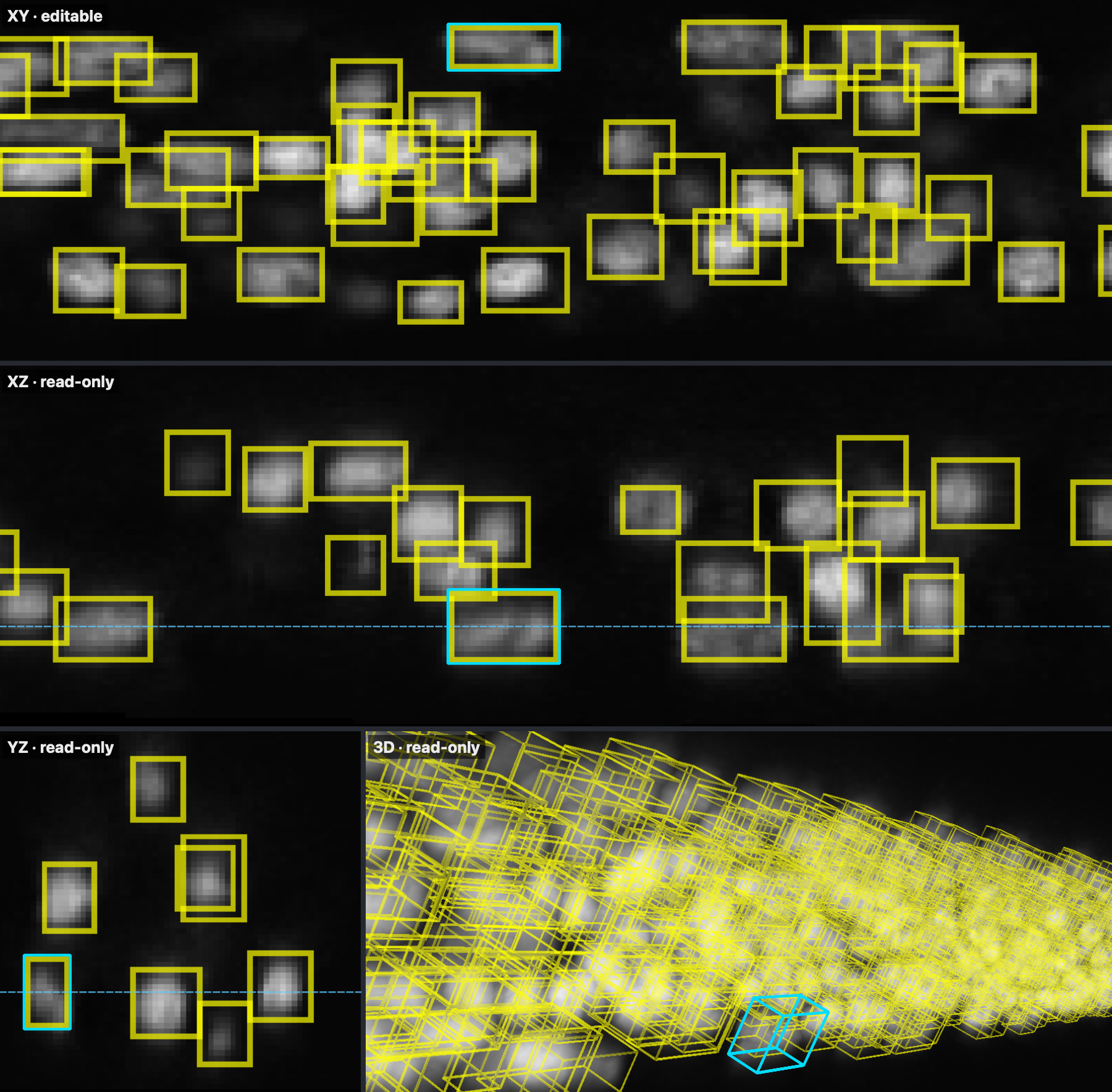
The four views of this volume with all 555 boxes, taken at the end of the demo recording (the cyan outline marks the box that was dragged onto its nucleus and fitted to it there):
Generic workflow: from instance labels to boxes
examples/labels_to_boxes.py shows the same steps for your own data: an
instance label image (background 0, one integer per object) is turned into one
axis-aligned box per label, the boxes are loaded into a box layer for review
and correction, and the result is exported with the conventions above.
Benchmark: update propagation
What is measured
The benchmark measures how long one mouse move of a drag takes to reach all
live views: the time from the move until every live 2D view has updated its
shapes and Qt has processed the pending events (QApplication.processEvents()
returns). This is the CPU-side update time of a warmed process, not the
end-to-end display latency.
- Both tools are dragged with the mouse in the editable XY view: the press,
every move and the release go through napari's own mouse dispatch
(
mouse_press_callbacks,mouse_move_callbacks,mouse_release_callbacks) into each plugin's own drag handler (--edit-view mouse). Only the hit test at the press is fixed, so that both tools drag the same box. The press is not timed; the release is timed separately (below). In both tools the dragged box stays selected and its highlight is redrawn on every move. The events are dispatched at napari's layer level on hidden canvases, so the canvas-level cursor and status-bar updates of a physical mouse are not included for either tool. - The viewers are real napari viewers with hidden windows
(
napari.Viewer(show=False), native Qt platform). No frame is rendered during the measurement, so paint, rasterization and buffer swaps are excluded for both tools. - Layer thumbnails are not redrawn during a drag but once at its end, as both
tools' own mouse drags do (TurboBox
--thumbnails off, its default; napari-bbox's synchronized views with its publicblock_thumbnail_update()). - The 3D view is updated once per drag, at the release, for both tools. The
end-of-drag update at the release (3D view, thumbnails, for TurboBox also
the undo entry) is reported separately (
commit_median_ms) and is not part of the per-update times. - The waiting time between moves (30 Hz schedule) is excluded and spent
busy-waiting (
--pacing spin): without rendering, an idle process would otherwise resume from processor idle states before every move, which a rendering napari session does not. A sensitivity run with idle waiting (--pacing sleep, k = 3 × 10 drags, panel a at N = 10 / 100 / 1,000 / 10,000 and panel b), each replicate followed by the same drags with busy-waiting as a matched control, is written topaper_results/sleep_pacing/andpaper_results/sleep_pacing_spin/and compared inpaper_results/RESULTS.md(section "Pacing sensitivity"). With idle waiting, TurboBox's median update time is 8.0–8.5 ms in the four-viewer layout (5.3–9.2 ms for 1 to 8 views in panel b), and the speed-ups shrink to 1.1–2.3× at N = 10 to 1,000 and 19× at N = 10,000 (matched busy-waiting control: 2.4–10.4× and 80×). At the sampled counts the interactive classification does not change: TurboBox is interactive at all four (99th percentile at most 13.3 ms), napari-bbox at N = 10, 100 and 1,000. N = 2,000 and 5,000 were not run with idle waiting.
Baselines
napari-bbox has no multi-viewer synchronization, so the harness
(paper_benchmarks/sync_adapter.py) keeps one napari-bbox layer per viewer.
The edited XY view is updated by napari-bbox's own drag handler; the other
views follow every move:
- per-box, quiet (main baseline,
--legacy-sync per_box_quiet): napari-bbox 0.1.1's public per-box methods (selected_data,remove_selected,add) replace the edited box in every other 2D layer. napari's layer data events are held back during the drag (layer.events.data.blocker()) and emitted once per layer at the release, as napari-bbox's own drag does; otherwise every remove and add makes the viewer recompute the layer extents. The box is selected by adding it to the empty selection set, which skips the selection setter's style and display updates; its style is passed toadd()explicitly. Together this roughly halves napari-bbox's update time compared with--legacy-sync per_box_nothumb. The napari-bbox layers are created with napari-bbox's own entry point (viewer.add_bounding_boxes). The 3D layer receives the final box at the release. - full reassignment (
--legacy-sync full --edit-view api): the whole box array is assigned to every live 2D layer, including the edited one, on every update (layer.data = boxes), the mechanism of napari's multiple-viewer example (which, driven by napari-bbox's data events, would update the other views only at the start and end of a drag); the 3D layer is reassigned at the release.
Protocol
- Volume 60 × 256 × 256 voxels (blank image), boxes of 18 × 18 × 18 voxels at seeded random positions (seed 42), identical for both tools.
- Drag protocol
xy_visible: each drag picks one box that crosses the editing XY slice (z = 30) and moves it in y and x only, alternately translating it by up to ±20 voxels and resizing it (moving its max corner) by up to ±15 voxels per axis, in 60 linearly interpolated sub-edits on a 30 Hz schedule. The drag sequence is seeded by the drag index and is identical for both tools. Each configuration starts with one untimed warm-up drag (--warmup 1), after which the boxes are restored; it is not saved. - Panel a (four-viewer layout): editable XY view, read-only YZ and XZ views (all live) and one 3D view (updated at the end of each drag), with N = 10, 50, 100, 200, 500 and 1,000 boxes.
- Panel b (view scaling): V = 1, 2, 4 and 8 identical XY views at N = 100, no 3D view.
- Main run: 50 drags × 60 sub-edits per configuration, k = 5 replicate processes per tool, the two tools interleaved per replicate.
- Large-N run: panel a with N = 2,000, 5,000 and 10,000, 50 drags per configuration, k = 5.
- Full-reassignment baseline: panel a with N <= 1,000, 10 drags, k = 3 (napari-bbox only).
- Statistics: per run, the median, 95th and 99th percentile of all sub-edit
times; per configuration, the median of the k run medians with a 95 %
percentile-bootstrap interval over the run medians (10,000 resamples; for
one tool's median with k = 3 or 5 runs, this interval equals the range of
the run medians), and the median of the k per-run 95th and 99th
percentiles. The speed-up is the ratio of the two medians, with a 95%
percentile-bootstrap interval from 10,000 ratios of resampled run medians
(
drag_session_speedup.csv, N <= 1,000); this interval is not the range of the run medians. A configuration counts as interactive when its median and its 95th and 99th percentiles (each the median over the k runs) are all at most 33 ms, the 30 Hz CPU update budget marked in the figure. - Environment (one environment for both tools): Python 3.12.13, napari 0.7.0,
napari-bbox 0.1.1, PyQt6 6.10.2, NumPy 2.4.3, vispy 0.16.1, bermuda 0.1.7;
Apple M2 Pro, macOS 27.0, native Cocoa Qt platform, display attached,
viewer windows hidden. Every run also writes a
.meta.jsonfile with the package versions, Qt binding, triangulation backend, git commit and timestamps. Exact environment file:paper_results/environment/pip_freeze_benchmark_env.txt. A local path and a private repository in it were redacted after the run. The sha256 of the file as it was during the run is5d3c862b…(seepaper_results/environment/README.md). Every drag-run sidecar records this digest and the code state at the start and end of the run; the memory and image-size sidecars record the start and end code states and the reference-environment check. Code state of the final run (25 Sep 2026, 13:00–19:42):code_state.combined_sha256a8ad8214…at the start and end of every run,src/napari_turbobox/layer.pysha256c14ade67…. The measuredsrc/,paper_benchmarks/,tests/and run scripts are archived inpaper_results/provenance/benchmarked_code_state_20260925.tgz(sha25664706c5a…, without bytecode caches and build metadata). The absolute repository path in two run scripts was redacted, before that the sha256 wasfd9e2469…. The raw snapshot (sha256e2e2a41d…) is kept by the authors. The measured code was never committed. It was the working tree on top of commit 1b2ba33 of the private development repository, andpaper_results/provenance/code_state_vs_1b2ba33.patchis its diff against that commit. The code-state digest coverssrc/andpaper_benchmarks/, and the code-state andlayer.pyhashes above belong to that archive. The plugin code in this repository differs from it in four functions (seedocs/changelog.rst):- In
TurboBoxLayer._incremental_shape_update, a newexceptbranch marks the view for a rebuild when the in-place edit raises. This function runs on every timed TurboBox update, but the new branch runs only on an error. UndoStack.get_undo_descriptionnow returns the label of the action that undo reverts.TurboBoxLayer.undoreads that label before undoing and logs it;redochanged only in its log message.
- In
- Other changes since the final run: comments and docstrings in
src/were revised.tests/test_undo.pyandtests/test_incremental_enter_leave.pygained tests.test_undo.pynow expects the corrected undo label, andtest_incremental_enter_leave.pyalso checks that the mesh vertices are finite (except in the zero-extent test, where napari's own triangulation produces NaN for flat boxes).paper_benchmarks/make_final_figures.pychanged in the panel (c) legend and y-range and the y-axis label ("CPU-side update time", panels a, b, e and f) of Figure 3 and in its docstrings and comments, and panel (e) now plots all 50 measured drags per run (before, it left out the first one). Its--update-paper-figuresoption was removed, and its default input and output directories are nowpaper_results/mainandbenchmark_results/figures. Indrag_session_benchmark.py, the module docstring, the path of the environment file in one comment and one warning message, one further comment and the default--out(nowbenchmark_results) changed, and the process-state record skipsos.niceandos.getloadavgon Windows, where they do not exist; inmemory_benchmark.py, the module docstring and two comments.sync_adapter.pyis unchanged. Five scripts of an earlier benchmark design that the final run did not use (run_benchmarks.sh,resolution_benchmark.py,generate_paper_screenshots.py,generate_gui_screenshots.py,interactive_celegans_multiview.py) andsrc/requirements/legacy.txtwere removed. The run scripts moved topaper_benchmarks/final_run/(run_final_v2.shis nowrun_final.sh).run_final.shandrun_post.shnow find the repository from their own location, require the Python inBB, take the results directory fromOUT, write their logs tobenchmark_logs/, andrun_final.shrecords the code state againstHEADand the pip freeze ofBBinOUT;run_final.shtakes its stop file frombenchmark_logs/STOPand moves invalid runs toOUT/_invalid/.with_lock.py(not in the archive, likesleep_check.py) keeps its lock file inbenchmark_logs/.memory_final.pyandresolution_final.pychanged only in their default output directory and the script path they record (resolution_final.pyalso in one docstring line).report_final.py, which is not in the archive, gained the checks against the design described under Reproducing, readspaper_results/and accepts the redacted environment file throughpaper_results/environment/freeze_redaction.json. Otherwise only docstrings, comments and descriptive strings changed (six test docstrings and two test comments, the fixture's provenance text, thesrc/requirements/modern.txtheader, the control panel's window title, now "napari-TurboBox" instead of "nD Bounding Boxes"). The plugin manifestsrc/napari_turbobox/napari.yamlgained the categories Annotation and Visualization, and the tutorial helpershow_pathkeeps local paths out of the printed output. The sidecars of the reported run still name the former locations of the run scripts and of the benchmark environment (underrecords/in the development checkout). Host names and absolute paths of the benchmark machine were redacted in the sidecars, in the environment file and in two archived run scripts before publication (seepaper_results/environment/README.md). The logs of the reported run (driver, power and lock logs) are kept by the authors.
Results
Median time per update in ms [95 % interval], panel a (four-viewer layout).
| N boxes | napari-TurboBox | napari-bbox 0.1.1, per-box quiet | Speed-up |
|---|---|---|---|
| 10 | 1.6 [1.6–1.7] | 3.9 [3.9–3.9] | 2.4× [2.4–2.4] |
| 100 | 1.7 [1.7–1.7] | 5.3 [5.2–5.3] | 3.2× [3.1–3.2] |
| 1,000 | 1.7 [1.7–1.7] | 18.0 [17.8–18.2] | 10.5× [10.4–10.6] |
| 10,000 * | 2.0 [2.0–2.0] | 158.7 [155.6–159.1] | 79.1× [77.5–80.2] |
* Large-N run (N = 2,000–10,000), same protocol: 5 runs × 50 drags.
Full-reassignment baseline (napari-bbox 0.1.1, k = 3, 10 drags, updates written without mouse events), compared with TurboBox's median from the main run:
| N boxes | napari-bbox, full reassignment | Ratio to TurboBox |
|---|---|---|
| 10 | 23.1 [23.1–23.2] | 14× |
| 100 | 112.2 [112.0–112.4] | 67× |
| 1,000 | 908.6 [907.8–909.3] | 531× |
Largest tested N at which the median, 95th and 99th percentile stay within 33 ms:
napari-TurboBox 10,000 (the largest N tested; 99th percentile 4.4 ms), napari-bbox (per-box)
1,000 (at 2,000: median 32.4 ms, 95th/99th percentile 33.5/35.1 ms). The 95th/99th percentiles,
the end-of-drag 3D update times and the view-scaling results (panel b) are in
paper_results/main/drag_session_summary.csv.
Reproducing
Create one environment for both tools. The versions above were used for the reported run; pin them to reproduce it exactly.
pip install "napari[all]==0.7.0" "napari-bbox==0.1.1" pandas matplotlib scipy
Run from the repository root (TurboBox is imported from src/, as in the
reported run; the scripts in paper_benchmarks/final_run/ also import
paper_benchmarks from the root). These are the commands of the final run
script. They write to $OUT (here benchmark_results/, which git ignores),
so the reported files in paper_results/ stay unchanged. Run them in bash: zsh, the default shell on macOS, does not split
unquoted variables such as $H into words, so the commands fail there. Start
bash first.
export PYTHONPATH="$PWD/src:$PWD"
OUT=benchmark_results
H="-m paper_benchmarks.drag_session_benchmark --drag-protocol xy_visible --ortho-follow --warmup 1 --pacing spin --edit-view mouse"
TB="--tool modern --thumbnails off"
LG="--tool legacy --legacy-sync per_box_quiet"

# 1) Large N: panel a, N = 2,000 / 5,000 / 10,000, k = 5 x 50 drags
for r in 0 1 2 3 4; do
  python $H $TB --panels a --ns 2000,5000,10000 --replicate $r --out $OUT/large_n
  python $H $LG --panels a --ns 2000,5000,10000 --replicate $r --out $OUT/large_n
done

# 2) Main run: panels a and b, k = 5 x 50 drags, tools interleaved per replicate
for r in 0 1 2 3 4; do
  python $H $TB --replicate $r --out $OUT/main
  python $H $LG --replicate $r --out $OUT/main
done

# 3) Pacing sensitivity: idle waiting between moves, k = 3 x 10 drags, each replicate followed by the
#    same drags with busy-waiting as a matched control
for r in 0 1 2; do
  python ${H/--pacing spin/--pacing sleep} $TB --ns 10,100,1000,10000 --drags 10 --replicate $r --out $OUT/sleep_pacing
  python ${H/--pacing spin/--pacing sleep} $LG --ns 10,100,1000,10000 --drags 10 --replicate $r --out $OUT/sleep_pacing
  python $H $TB --ns 10,100,1000,10000 --drags 10 --replicate $r --out $OUT/sleep_pacing_spin
  python $H $LG --ns 10,100,1000,10000 --drags 10 --replicate $r --out $OUT/sleep_pacing_spin
done

# 4) Full-reassignment baseline: panel a, N <= 1,000, k = 3 x 10 drags
for r in 0 1 2; do
  python -m paper_benchmarks.drag_session_benchmark --drag-protocol xy_visible --ortho-follow --warmup 1 \
      --pacing spin --tool legacy --legacy-sync full --edit-view api --panels a --drags 10 \
      --replicate $r --out $OUT/tutorial_full
done
paper_benchmarks/final_run/run_final.sh runs these blocks with
TB_THUMBS=off BB_SYNC=per_box_quiet PACING=spin EDIT_VIEW=mouse (stages
large main sleep post tut); it waits
for AC power, keeps the machine awake, serializes all processes with a lock
and checks the power log after every process. It runs on macOS only (pmset,
caffeinate), finds the repository from its own location, writes to OUT
(default: benchmark_results/; a relative path is taken from the repository
root) and its logs to benchmark_logs/, skips runs whose result file already
exists, and records the code state and the pip freeze of the environment in
OUT. BB must name the Python of the benchmark environment, for example
BB=$(which python) TB_THUMBS=off BB_SYNC=per_box_quiet PACING=spin EDIT_VIEW=mouse paper_benchmarks/final_run/run_final.sh.
On other systems, use the commands above.
Reported wall time on the machine above: large N 1.8 h, main run 2.9 h, pacing sensitivity with its busy-waiting control 0.9 h, memory and image size 4 min, full-reassignment baseline 1.0 h (6.7 h in total).
Each run writes drag_session_<tag>_rep<r>.csv (one row per configuration:
per-run median, 95th and 99th percentile of the sub-edit times and the median
end-of-drag 3D update time), a .meta.json provenance file and, for panel a
at N = 100 and panel b at V = 4, drag_session_dist_<tag>_rep<r>.csv with every
sub-edit time. The tags are modern-xy_visible-follow-warm1-spin-mouse,
legacy-per_box_quiet-xy_visible-follow-warm1-spin-mouse and
legacy-xy_visible-follow-warm1-spin; the runs with idle waiting
(sleep_pacing/) have the same tags without -spin.
The memory panel (c) and the image-size panel (f) come from two shorter
measurements in the same environment, run after blocks 1 to 3: memory for
both tools (paper_benchmarks/final_run/memory_final.py, which runs
paper_benchmarks/memory_benchmark.py once per plugin) and image size for
TurboBox (paper_benchmarks/final_run/resolution_final.py, the drag session
of the harness at five image sizes with the same drag protocol and thumbnail
setting). paper_benchmarks/final_run/run_post.sh runs both:
python paper_benchmarks/final_run/memory_final.py $OUT/memory
TB_THUMBS=off PACING=spin EDIT_VIEW=mouse python paper_benchmarks/final_run/resolution_final.py $OUT/resolution
Aggregation and figure: the command below writes drag_session_summary.csv,
drag_session_speedup.csv and Figure3_performance.{png,pdf} into --out.
It reads benchmark_memory*.csv and benchmark_resolution.csv from the
results directory, so they are copied there first. --large-n adds the
large-N configurations to panels (a) and (d) as open markers and also
(re)writes the large-N run's own drag_session_summary.csv and
drag_session_speedup.csv in its directory. With
paper_results in place of $OUT, the same command rebuilds the reported
tables and figure from the reported per-run files (the memory and image-size
files are already in paper_results/main/).
cp $OUT/memory/benchmark_memory*.csv $OUT/resolution/benchmark_resolution.csv $OUT/main/
python -m paper_benchmarks.make_final_figures --results $OUT/main --out $OUT/main \
    --large-n $OUT/large_n
All numbers of the tables above (including the large-N and full-reassignment
ratios and the interactive limits) are collected by
paper_benchmarks/final_run/report_final.py into paper_results/RESULTS.md and
paper_results/results_numbers.json. It aggregates each directory with the
same aggregate() function and re-seeds the bootstrap before each directory,
as a fresh process would. Before that it checks every stage against the design
above (all runs, replicates and configurations, drag counts, pacing, one code
state for all runs, the environment digest, AC power) and stops without
writing anything if a value is missing or differs. TB_RESULTS=$OUT checks
and aggregates a re-run instead; its runs must also come from the reference
environment.
python paper_benchmarks/final_run/report_final.py
For a quick functional check, run a short smoke configuration, for example
python -m paper_benchmarks.drag_session_benchmark --drag-protocol xy_visible --edit-view mouse --tool modern --panels a --ns 10,100 --drags 2 --replicate 0 --out smoke_out.
Timings depend on hardware, operating system and display; re-running the aggregation on the same per-run CSVs reproduces the tables exactly.
Limitations
- Boxes have 2 or 3 spatial axes (
D = 2or3). Time and channel axes are not supported. - The depth of a box (its extent along the axis hidden in the editing view)
cannot be dragged in the read-only orthogonal views, and new rectangles span
the full depth. To set it with the mouse, reorient the editable viewer so that
it displays the depth axis (for example
viewer.dims.order = (1, 0, 2)for an XZ view) and drag or Shift-drag the box there; or set it through the API (layer.bounding_boxes = ...) or by importing a box file. - Clamping to the image needs the image shape (
image_shape, or an image layer when the layer is added from the control panel). Without it, only the minimum extent of one voxel per axis is enforced, and a rectangle drawn with Add Rectangle is not extruded through the full depth. - A layer's update mode (every edit vs. end of edit session) is decided from
its viewer's display mode when the layer is created. If a viewer is switched
between 2D and 3D later, set
layer.sync_mode("live"or"on_commit") yourself. - The benchmark excludes rendering because the viewers are hidden. Mouse events are dispatched at the layer level into each tool's own drag handler, including selection-highlight updates; canvas-level cursor and status-bar updates are excluded. End-of-drag times include the 3D view update, thumbnails, and, for TurboBox, the undo snapshot.
- Boxes carry no class label. Per-box classes can be passed to the Python
converters (
category_ids) but are not stored with the boxes, and COCO or YOLO files cannot be imported. - A 2D box layer (
D = 2) keeps showing its rectangles when the viewer is switched to 3D display on napari >= 0.7. On napari 0.6.x, napari's Shapes layer cannot be switched back from 3D display in that case (plain Shapes has the same limitation). - Each undo snapshot is a full copy of all boxes.
- The data store is not thread-safe; modify boxes from the main (Qt) thread.
Repository layout
src/napari_turbobox/: the plugin (store, layer, multi-view factory, control panel, export, spatial index, undo)tests/: test suite (pytest, pytest-qt)examples/:celegans_workflow.pyandlabels_to_boxes.py(see above) andmulti_viewer_demo.py(three synchronized viewers on a synthetic volume)docs/: the logo (logo.svg;logo-small.svgfor 32 px and below,logo-mono.svgin one colour,logo-256.png), the README demo (demo.gif,screenshot-*.png) and its recordermake_demo.py, and the Sphinx sources: architecture (store, update path, spatial index, export), API reference, contributing guide, changelogpaper_benchmarks/: benchmark harness, synchronization adapters and aggregation/figure script;paper_benchmarks/final_run/: the scripts that ran the final benchmark and collect its numberspaper_results/: per-run records, summary tables, Figure 3 and the environment and code-state files of the benchmark described abovetutorials/: the tutorial notebooks and their recorded results
Citation
If you use napari-TurboBox, please cite it using the metadata in
CITATION.cff (GitHub's "Cite this repository" button reads this file).
An Application Note on napari-TurboBox is in preparation.
Licence
Apache License 2.0. See LICENSE and NOTICE.
1 maintainer

Metadata
1 maintainer
Release files for napari-turbobox 0.1.0
For a detailed explanation of source distributions (sdists) and built distributions (wheels), please see the package formats documentation.
Source distribution (sdist)
| File | Size | Uploaded | Provenance | Actions |
|---|---|---|---|---|
| napari_turbobox-0.1.0.tar.gz | 116.9 kB | With provenance | Details for napari_turbobox-0.1.0.tar.gz |
Built distribution (wheel)
| File | Interpreter | ABI | Platform | Actions Reset |
|---|---|---|---|---|
| napari_turbobox-0.1.0-py3-none-any.whl | Python 3 | none | any | Details for napari_turbobox-0.1.0-py3-none-any.whl |
Total release size: 205.9 kB
Release files / napari_turbobox-0.1.0.tar.gz
| Download URL | napari_turbobox-0.1.0.tar.gz |
|---|---|
| Size | 116.9 kB |
| Tags | Source |
|
SHA-256 checksum How to use checksums |
0b6635d2681625cb31e9685d5c0e3a95491c75af43f6df0f7282ae9ee4665fb9
|
|
BLAKE2b-256 checksum How to use checksums |
ec56e18d47889ddf13272f2f8a570bed2a460848883b060cbd9190e2608deb5c
|
| Upload date | |
|
Uploaded using Trusted Publishing? What is trusted publishing? |
Yes |
| Uploaded via |
twine/7.0.0 CPython/3.13.14
|
Provenance
Provenance describes where a file came from. On PyPI, provenance is shared via attestations, which provide a verifiable record of the build or publishing details. View details, limitations and caveats.


PyPI Publish Attestation
PyPI verified that this artifact, at this checksum, originated from the publisher listed below.
Signed by GitHub Actions, verified by PyPI on Oct 1, 2026.
Transparency logRelease files / napari_turbobox-0.1.0-py3-none-any.whl
| Download URL | napari_turbobox-0.1.0-py3-none-any.whl |
|---|---|
| Size | 89.0 kB |
| Tags | Python 3 |
|
SHA-256 checksum How to use checksums |
25c00568888993ff061d12c9586e8c3f158c49525f0a173e542ee690937e7752
|
|
BLAKE2b-256 checksum How to use checksums |
8aff8c3ce3192fc9db450954f92f6858bfa14ae86b16c42c4906b7c99b49d909
|
| Upload date | |
|
Uploaded using Trusted Publishing? What is trusted publishing? |
Yes |
| Uploaded via |
twine/7.0.0 CPython/3.13.14
|
Provenance
Provenance describes where a file came from. On PyPI, provenance is shared via attestations, which provide a verifiable record of the build or publishing details. View details, limitations and caveats.
PyPI Publish Attestation
PyPI verified that this artifact, at this checksum, originated from the publisher listed below.
Signed by GitHub Actions, verified by PyPI on Oct 1, 2026.
Transparency logSecurity for napari-turbobox 0.1.0
Provenance
Provenance describes where a file came from. On PyPI, provenance is shared via attestations, which provide a verifiable record of the build or publishing details. View details, limitations and caveats.
Full provenance
All 2 files in this release have been uploaded with provenance metadata.
Attestation for napari_turbobox-0.1.0.tar.gz
PyPI Publish Attestation
PyPI verified that this artifact, at this checksum, originated from the publisher listed below.
Signed by GitHub Actions, verified by PyPI on Oct 1, 2026.
Transparency logA note on package security
PyPI is a repository for distributing packages, not a service for auditing them. While third-party security researchers and our staff do their best to detect and remove malicious packages, PyPI cannot guarantee the quality, security or suitability of any given package.
To learn more about protecting yourself from malicious actors, visit our package security documentation.













