
napier
Your gear's manuals and your Eurorack rack, in one place you and your AI assistant can work from.






Look it up
napier keeps the manuals, firmware changelogs and a few community docs for your gear on your machine. Every answer tells you the document, its version and the page number printed on the page.
$ napier grep "cue the" --device m8_tracker -C 0
m8_tracker_manual p. 11
  > • [LEFT]+[PLAY] Cue the selected song row for playback.
m8_tracker_tips § Live Mode Shortcuts
  > * Hold Left and press Play to cue the whole row(Similarly smaller selections work also.)
The first hit is page 11 of the M8 Operation Manual (v6.5.2). The second comes from the community tips doc and is labeled that way.
Plan the rack
Keep your Eurorack rack as YAML next to the manuals: what's in each case, what each module is for and how much power each case can supply. Sketch what-if layouts, and napier checks each one for HP, power per rail, case seams and modules that ended up far from the ones they pair with, then draws it next to the rack you have.
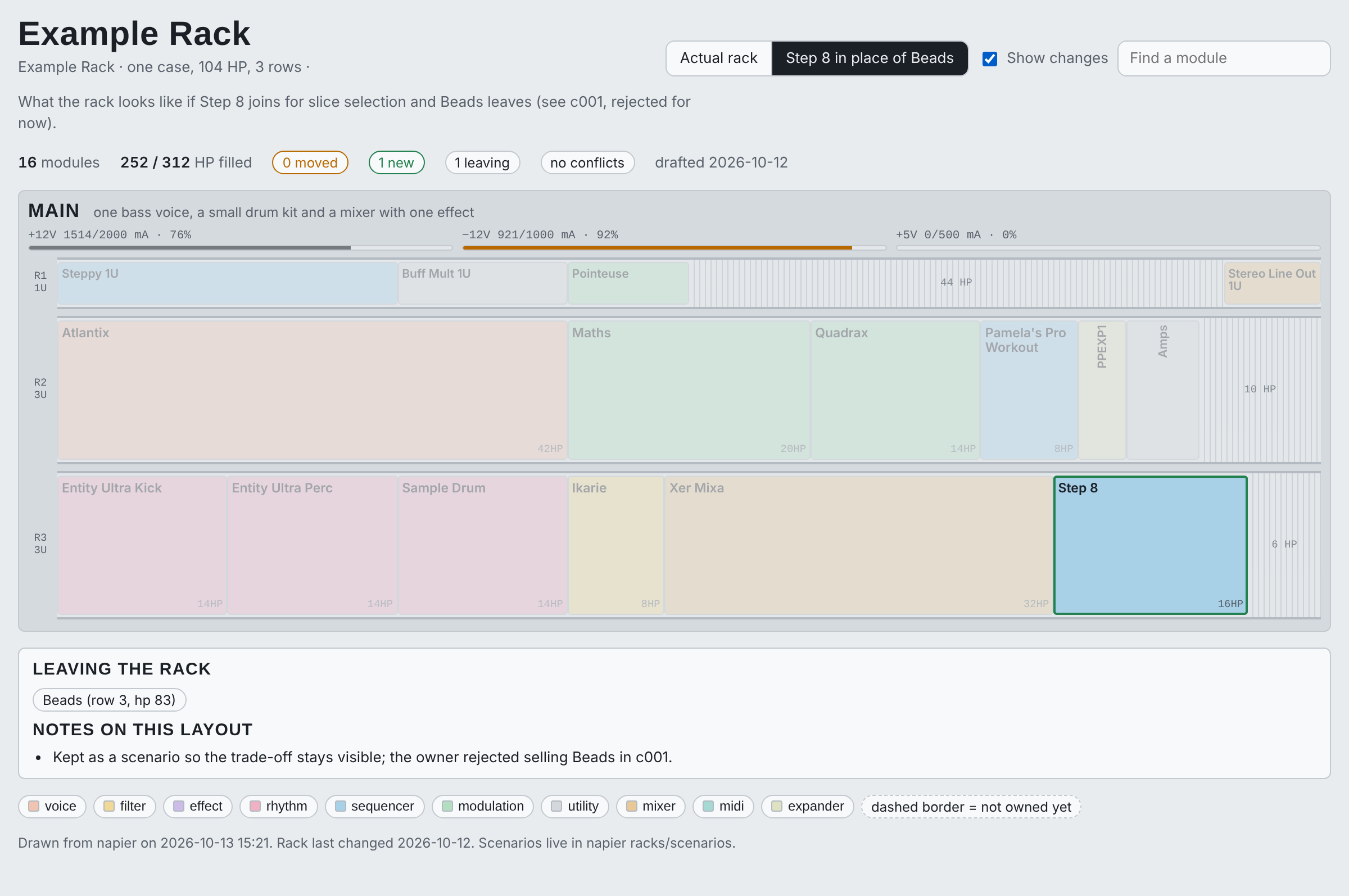
That's the example rack with Step 8 in place of Beads. The -12V rail goes from 89% to 92% of the supply, nothing overlaps, and Beads is listed as leaving. Power draw and jack lists come from the manuals, with the page they're on.
With an assistant
napier is also an MCP server, so Claude and other assistants can use both halves. Ask how to cue a song row and it quotes page 11. Ask what in your rack takes a clock and it lists the matching jacks from the manuals. Ask whether Step 8 should replace Beads and it can read what each module is for and what you decided last time, propose a layout as a scenario file, and let napier check and draw it before you move anything.
It's built for people with synths, grooveboxes and Eurorack who don't mind a terminal and git. The source list covers 100+ devices: mostly Eurorack, plus the Dirtywave M8, Elektron Digitakt II, OXI One MKII and a handful of Strymon and other pedals. Adding a manual for anything else takes one command.
Try it
You need git and uv (brew install uv, or
curl -LsSf https://astral.sh/uv/install.sh | sh).
git clone https://github.com/bvk7787/napier && cd napier
uv tool install -e .                       # the CLI, without the search models

napier fetch --device m8_tracker           # the M8 manual, changelog and community tips
napier ingest --text-only --device m8_tracker
napier grep "cue the" --device m8_tracker
napier read m8_tracker --page 11           # the whole printed page
napier facts list --device m8_tracker      # what's been checked, and how far

napier rack view --open                    # the example rack and its what-if layout, in your browser
napier rack scenarios                      # the checks behind it
The fetch downloads three files and takes 10 to 20 seconds. The rack commands need no downloads. If
your shell can't find napier, run uv tool update-shell and open a new terminal.
napier runs from its clone. The sources, facts and specs are files in the repo, and -e keeps the
installed command pointed at them.
Without uv: python3 -m venv .venv && .venv/bin/pip install -e . with Python 3.11 or later, then
run .venv/bin/napier.
Add search and the MCP server
For questions in your own words ("how do I stop the delay feeding back"), install the index extra.
The MCP server needs the mcp extra. A reinstall replaces the previous one, so list every extra you
want each time:
uv tool install -e ".[index,mcp]"
napier fetch --device m8_tracker && napier ingest --device m8_tracker
napier search "how do I cue a song row" --device m8_tracker
The first ingest downloads the embedding and layout models from Hugging Face, and the first
search downloads the reranker. That's about 4.7 GB, once. napier fetch --all gets every source:
about 150 documents and 350 MB, which takes a few minutes.
To connect Claude Code:
claude mcp add --scope user napier -- "$(which napier)" mcp
docs/mcp.md has the setup for Claude Desktop, Cursor, VS Code, Codex and Windsurf, and shows what a lookup looks like from the assistant's side.
What you get
For looking things up:
grepandreadfind exact text, like button combos and parameter names, and return whole pages or sections. There's no model involved, and a lookup takes a fraction of a second.searchhandles open questions. It combines keyword and vector search, reranks the results, and cites title, version and printed page for each hit.- Every result is labeled with its kind of source (manual, changelog, community doc, firmware source or your own notes), and you can filter on it.
- The facts ledger records claims with where they came from and how far they've
been checked. A claim that turns out wrong stays in the ledger marked
refuted. napier evaltests search against the ledger. Most facts carry a question and anchors, short phrases quoted from the page that answers it. The eval fails if fewer than 90% of the questions find their answer in the top three results. On 2026-10-13 all 681 did, 80% ranked it first, and all 549 with a cited page found it on that page. The questions were written by people who knew the answers, so treat this as a regression test.napier source checkre-downloads each source and reports what changed. After you apply an update,napier facts rechecklists the facts whose quoted text moved or disappeared.
For your rack:
napier rack view --opendraws the rack and every what-if layout as one HTML page that works offline. You can switch between layouts, highlight what changed, find a module, and see power per rail for each case.napier rack scenarioschecks the rack and each layout for overlaps, modules crossing a case seam, 1U modules in 3U rows, power per case against its supply, partner modules more than 20 cm apart, and free space split into slivers.- Power draw and jack lists come from the manuals (
specs/, with the page), andnapier rack checkshows where your rack's power figures disagree with the manual. usage.yamlrecords what each module is for and your placement rules.challenges.yamllogs each suggested change and what you decided, so a rejected idea doesn't keep coming back.- Cases can have any mix of 1U and 3U rows, and several cases can sit in a grid. The rack itself comes from a file you write or, through a plug-in, from another tool.
Compared with NotebookLM or pasting the PDF
Those work well for questions about one document.
| Upload-and-ask tools | napier | |
|---|---|---|
Exact strings like [SHIFT]+[PLAY] |
Usually found, but you can't see how | grep matches exactly, every time |
| Citations | A link into your upload | The printed page number, with title and version |
| Firmware updates | You notice and re-upload | source check finds changed documents, facts recheck the affected facts |
| Checking answers | Up to you, each time | A ledger of checked facts and an eval that catches regressions |
| Forum tips | Mixed in with everything else | Labeled community and filterable |
Nothing leaves your machine except the passages a connected assistant asks for, which go to that assistant like anything else you paste into it.
What's in it
About 150 sources covering 100 devices. That includes the Dirtywave M8, Elektron Digitakt II, OXI
One MKII and modules from Intellijel, Instruō, Make Noise, ALM, Steady State Fate, Noise
Engineering, Squarp, WMD, Joranalogue and Erica Synths, plus Strymon and a few other pedals. Most
facts come straight from a manual, with the printed page. The rest come from changelogs, community
docs and firmware source, and a few are confirmed on the hardware or still open.
napier source list, napier status and napier facts list show what's there today.
Add your own gear
mkdir -p local                             # your private overlay (see below)
napier source add https://maker.example/module-manual.pdf --id maker_module_manual \
    --device maker_module --version "v1.2" --local
napier ingest --source maker_module_manual
napier facts add maker_module "Holding SHIFT at power-up resets calibration" --status manual \
    --source maker_module_manual --pages 12
source add checks robots.txt and downloads the file. For a PDF it also pins the checksum and works
out the printed-page offset, which is worth checking against a page you know. --local puts the
entry in your private overlay, and facts for that device go there too.
For gear other people are likely to own too, send a pull request to the public list instead (CONTRIBUTING.md). docs/sources.md covers formats, page offsets, sites that don't allow automated downloads and keeping sources current.
The facts ledger
| status | meaning |
|---|---|
manual |
stated in the manual (source and printed pages) |
changelog |
stated in a firmware changelog or release notes |
community |
reported in a forum post, doc or video; cites the URL |
code |
read from firmware source pinned to one commit |
hardware |
confirmed on the device, the strongest status |
unverified |
an open question, or a claim with no source yet |
refuted |
checked and found wrong |
Record a check on your own hardware with napier facts verify ID --hardware --note "...", or mark a
claim wrong with --refute. Facts an assistant writes over MCP get a via: mcp stamp, which makes
them easy to spot in the diff.
Your rack
The rack commands show the example rack until you set up your own:
mkdir -p local && cp -r examples/racks local/racks
$EDITOR local/racks/layout.yaml            # your modules: slug, HP, power, position ("row 2, hp 43")
$EDITOR local/racks/devices.yaml           # your cases: rows, how they're arranged, off-rack modules
napier rack sync                           # writes the snapshot; reports moves and overlaps
napier rack view --open
Then describe what each module is for in usage.yaml, and write what-if layouts in scenarios/, by
hand or with your assistant.
docs/rack.md covers the file formats and
how to write a plug-in that reads your rack from another tool.
Your own data
Anything personal goes in local/, a private overlay inside your clone. Git ignores it, and it can
be its own private repo. Its sources.yaml and facts/ merge with the public ones, with yours
listed first. It also holds your rack, your notes and a napier.toml with your name.
source add --local writes there, and so does facts add for any device only your overlay knows
about. Nothing in local/ gets committed to the public repo.
Updating
cd /path/to/napier && git pull
uv tool install -e ".[index,mcp]"          # the extras you use; picks up new dependencies
napier fetch --device m8_tracker           # anything new or re-pinned for your devices
napier ingest --device m8_tracker
Restart your assistant app afterwards so it runs the new version. napier status shows what's
downloaded, extracted and indexed for each device.
Uninstall
uv tool uninstall napier
rm -rf ~/.napier                           # downloads, text layer, index, reports
If you used them, also remove:
- the clone, after copying anything you want to keep from
local/ - the models in
~/.cache/huggingface/hub: themodels--*folders for the models in docs/how-it-works.md and Docling's layout models (uv cache cleanclears uv's own download cache) - the
napierentry in your assistant's MCP config (claude mcp remove napierfor Claude Code) - any scheduled
napier refresh
FAQ
Is my gear covered? Run napier source list, or look through
sources.yaml. If it isn't there, add it
with napier source add or open a source
request.
Can I pip install napier? The PyPI package just points you to the repo. napier needs its data
files, and those live in the clone.
Does anything get uploaded? No. napier downloads the documents in its lists and the search models, and sends nothing out. An assistant you connect sees whatever its lookups return.
Do I need a GPU? No. Search runs fine on a laptop CPU, and faster on Apple Silicon or with CUDA.
Windows? Untested. CI runs on macOS and Linux.
Why are some manuals "not downloaded"? A few sites' robots.txt doesn't allow automated
downloads, and napier respects that. napier fetch prints the URL. Download the file in a browser
and run napier fetch --source ID --from FILE.
Is it OK to quote manuals in facts? The repo holds links, checksums and short quoted phrases. Each user downloads the documents from the publisher. The data policy has the details, including how publishers can ask for changes.
Limitations
grepneeds the PDF's text layer. A scanned manual only reachesreadandsearchthrough Docling's OCR (with theindexextra), and its printed page numbers can't be detected.- Each document gets one page offset. Manuals that restart numbering per chapter (3-12) or switch from roman to arabic numerals only cite correctly in the main numbered run.
- Grep is a case-insensitive substring match, so
mAalso finds "Manual" (use--caseor--regex). Brackets matter:LEFT+PLAYwon't find[LEFT]+[PLAY]. source checksees changes at the same URL. A new manual published under a new file name won't show up, so check the maker's page when new firmware comes out.- The source list reflects the gear its contributors own.
Safety
napier only downloads the URLs in its source lists. It checks robots.txt first, identifies itself
honestly, waits at least 2 seconds between requests to a site, backs off when a site asks it to and
never logs in. It doesn't open any ports or send telemetry. It only writes to ~/.napier, the
Hugging Face cache, the YAML and generated notes in your clone and overlay, and anywhere you point
--out.
Text from manuals and forums reaches your assistant marked as document content, and the MCP server
tells it not to follow instructions found in that text. The only tools that write are the two fact
tools, and their changes show up in git diff.
docs/how-it-works.md has the
details, and SECURITY.md explains how to
report a problem.
napier is provided as is under Apache-2.0. When a fact matters, like calibration or a firmware update that could brick a module, check the manual page it cites.
Requirements
- macOS or Linux with Python 3.11 or later (uv can install one for you).
- The base install is small. The
indexextra pulls in PyTorch through sentence-transformers and Docling, about 1.5 GB on macOS and several GB on Linux, where PyTorch's default wheels include CUDA. The models take another 4.7 GB. All sources together take about 350 MB in~/.napier/files, plus about 300 MB for the index and parse cache. - Parsing and indexing every source the first time takes a while on a laptop. After that,
ingestonly redoes what changed.
For maintainers
napier refresh runs the whole update pass unattended: it checks sources, syncs the rack, applies
updates, re-ingests, rechecks facts and specs, and runs the eval and tests. Then it opens a pull
request for the public changes, listing anything that needs a person to look at it. It can use a
local Ollama model to reword eval questions for sources that changed. Changes
to your overlay are committed and pushed straight to the overlay's repo.
It needs a clean clone on main (and a clean overlay), the index extra and pytest, plus the
GitHub CLI and push access to origin unless you pass --no-push. If you just use napier,
git pull gets you the maintainers' updates.
Contributing and license
Issues and pull requests are welcome, especially sources and facts for gear you own. See CONTRIBUTING.md, the code of conduct, SUPPORT.md for questions, and the changelog.
Copyright 2026 the napier authors. The code and contributors' text are Apache-2.0 (LICENSE, NOTICE). Quoted anchors remain their publishers' work (data policy), and third-party terms are in THIRD_PARTY_NOTICES.md.
Named for John Napier, whose tables of logarithms turned a hard calculation into a lookup.
Dirtywave, M8, Elektron, Digitakt, OXI, Intellijel, Instruō, Make Noise, ALM, Steady State Fate, Noise Engineering, Strymon, Squarp, WMD, Joranalogue, Erica Synths, ModularGrid, NotebookLM and the other product and company names here are trademarks of their owners. napier is an independent project and isn't affiliated with or endorsed by any of them.
1 maintainer

Metadata
1 maintainer
Release files for napier 0.1.2
For a detailed explanation of source distributions (sdists) and built distributions (wheels), please see the package formats documentation.
Source distribution (sdist)
| File | Size | Uploaded | |
|---|---|---|---|
| napier-0.1.2.tar.gz | 1.0 MB | Details |
Built distribution (wheel)
| File | Interpreter | ABI | Platform | Reset |
|---|---|---|---|---|
| napier-0.1.2-py3-none-any.whl | Python 3 | none | any | Details |
Total release size: 1.2 MB
Release files / napier-0.1.2.tar.gz
| Download URL | napier-0.1.2.tar.gz |
|---|---|
| Size | 1.0 MB |
| Tags | Source |
|
SHA-256 checksum How to use checksums |
afcea74b27217554010319019572310cd565647a9095cd12c8e0e9dfd320f33c
|
|
BLAKE2b-256 checksum How to use checksums |
51e16d90adeb9575dc7f097490465f4f86e9ff9677aee58073120f7f9f953310
|
| Upload date | |
|
Uploaded using Trusted Publishing? What is trusted publishing? |
Yes |
| Uploaded via |
twine/7.0.0 CPython/3.13.14
|
Provenance
Provenance describes where a file came from. On PyPI, provenance is shared via attestations, which provide a verifiable record of the build or publishing details. View details, limitations and caveats.


PyPI Publish Attestation
PyPI verified that this artifact, at this checksum, originated from the publisher listed below.
Signed by GitHub Actions, verified by PyPI on Oct 14, 2026.
Transparency logRelease files / napier-0.1.2-py3-none-any.whl
| Download URL | napier-0.1.2-py3-none-any.whl |
|---|---|
| Size | 107.8 kB |
| Tags | Python 3 |
|
SHA-256 checksum How to use checksums |
a1aa89db4f4878ffd386062ae8562f6556359e93bca848bdeb62347e1096918f
|
|
BLAKE2b-256 checksum How to use checksums |
e07eb6eb748b1abd7f167b5d6f19f7d64a8b225a5873ed2f4446b2602501d0e8
|
| Upload date | |
|
Uploaded using Trusted Publishing? What is trusted publishing? |
Yes |
| Uploaded via |
twine/7.0.0 CPython/3.13.14
|
Provenance
Provenance describes where a file came from. On PyPI, provenance is shared via attestations, which provide a verifiable record of the build or publishing details. View details, limitations and caveats.
PyPI Publish Attestation
PyPI verified that this artifact, at this checksum, originated from the publisher listed below.
Signed by GitHub Actions, verified by PyPI on Oct 14, 2026.
Transparency log













