
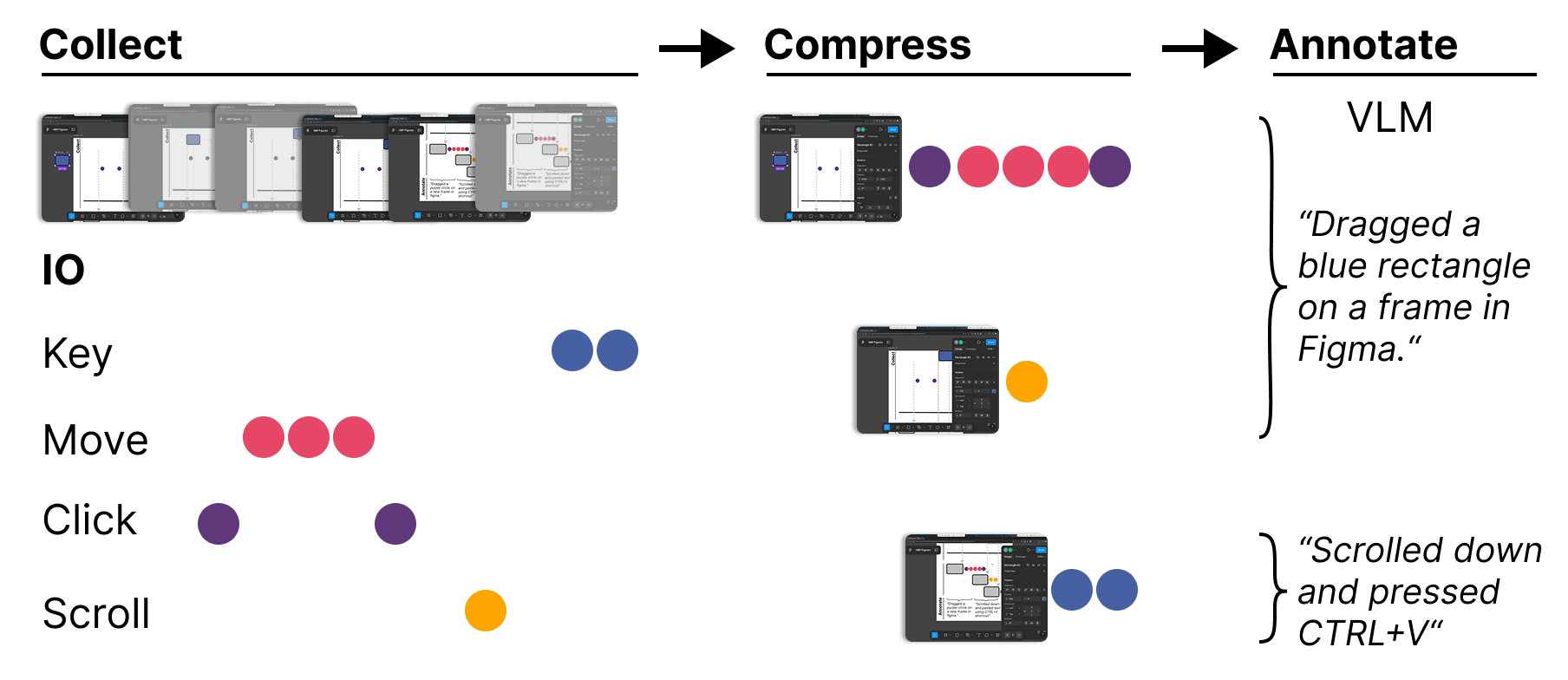
NAPsack records and aggregates your computer use — screenshots plus input events (click, keypress, scroll, cursor move). It groups activity into event bursts and uses a VLM pipeline to generate human-readable captions describing what happened.

Project description
NAPsack
NAPsack records and structures your computer use by generating natural language caption from screenshots and input events (click, keypress, scroll, cursor move).
Quickstart
Requires Python 3.11+
Install NAPsack from PyPI:
pip install napsack
Or, if you prefer not to install it, use uv to run the module commands shown below.
API Keys
NAPsack uses a VLM to generate captions. Create a .env file in the project root (or export variables in your shell):
cp .env.example .env
NAPsack uses litellm, so pass a full provider-prefixed model string via --model:
| Provider | --model example |
API key variable |
|---|---|---|
| Gemini (default) | gemini/gemini-3-flash-preview |
GEMINI_API_KEY |
| OpenAI | openai/gpt-4.1-mini |
OPENAI_API_KEY |
| Anthropic | anthropic/claude-4.6-sonnet |
ANTHROPIC_API_KEY |
| vLLM (self-hosted) | hosted_vllm/Qwen3-VL-8B + --api-base http://host/v1 |
(none required) |
| Ollama (local) | ollama/qwen3.5:4b + --api-base http://localhost:11434 (replace with yours) |
(none required) |
| Tinfoil (confidential inference) | (pass --client tinfoil) |
TINFOIL_API_KEY |
| BigQuery | (pass --client bigquery) |
Application Default Credentials — gcloud auth application-default login |
Record a session (press CTRL+C to stop)
napsack-record --session-dir ./logs/session_name --monitor
# or without installing:
uv run -m napsack.record --session-dir ./logs/session_name --monitor
Label the recorded session
napsack-label --session-dir ./logs/session_name # default model is Gemini 3.0 flash
# or without instaling
uv run -m napsack.label --session-dir ./logs/session_name
NAPsack uses litellm as its labeling backend, supporting Gemini, vLLM/self-hosted models, and any OpenAI-compatible API (OpenAI, Together, Groq, etc.). It also supports Tinfoil for confidential inference (your data never leaves a verified TEE), and integrates with BigQuery (if you're on Screenomics, this is for you :D).
To use Tinfoil, pass --client tinfoil --model <model>, e.g.:
napsack-label --session-dir ./logs/session_name --client tinfoil --model kimi-k2-5
Output
./logs/session_name
├── screenshots         # Recorded screenshots
├── aggregations.jsonl  # Recorded event bursts
├── captions.jsonl	    # All VLM-generated captions
├── annotated.mp4       # Final video showing generated captions and input events
└── data.jsonl          # Final data containing raw input events and LLM generated captions
Method
Record
NAPsack groups temporally adjacent input events of the same type into event bursts. An event is assigned to the current burst if the time since the preceding event of that type does not exceed the corresponding gap threshold and the elapsed time since the burst start remains within the max duration.
- If the gap threshold is exceeded, a new burst is started.
- If the max duration is exceeded, the first half of the current burst is finalized and saved, while the second half becomes the active burst. A burst is force-restarted when the active monitor changes.
Label
The label module:
- Loads sessions or raw screenshots and chunks.
- Uses prompts (in
label/prompts) to instruct the VLM to generate captions that describe the user's actions and context. - Produces
captions.jsonlanddata.jsonl(captions aligned to screenshots and events). - Optionally renders an annotated video (
annotated.mp4) showing captions and event visualizations overlayed on frames.
The label step performs a second layer of aggregation: it uses the bursts detected at recording time and further refines and annotates them with VLM outputs to create final human-readable summaries.
Citation
If you use NAPsack in your research, please cite:
@misc{shaikh2026learningactionpredictorshumancomputer,
      title={Learning Next Action Predictors from Human-Computer Interaction},
      author={Omar Shaikh and Valentin Teutschbein and Kanishk Gandhi and Yikun Chi and Nick Haber and Thomas Robinson and Nilam Ram and Byron Reeves and Sherry Yang and Michael S. Bernstein and Diyi Yang},
      year={2026},
      eprint={2603.05923},
      archivePrefix={arXiv},
      primaryClass={cs.CL},
      url={https://arxiv.org/abs/2603.05923},
}


Download files
Download the file for your platform. If you're not sure which to choose, learn more about installing packages.
Source Distribution
Built Distribution
Filter files by name, interpreter, ABI, and platform.
If you're not sure about the file name format, learn more about wheel file names.
Copy a direct link to the current filters
File details
Details for the file napsack-0.1.2.tar.gz.
File metadata
- Download URL: napsack-0.1.2.tar.gz
- Upload date:
- Size: 71.5 kB
- Tags: Source
- Uploaded using Trusted Publishing? No
- Uploaded via: twine/6.1.0 CPython/3.10.16
File hashes
| Algorithm | Hash digest | |
|---|---|---|
| SHA256 |
57087b3d4aa8b1c01701b8037632119a1b0cd9b9bdab2bff49c33e2ffdadbc7f
|
|
| MD5 |
0176d5e7d4cd0dff3bb8973f927fedee
|
|
| BLAKE2b-256 |
05bc6a391cbc298cf6cda5594ff44a10a5d5bce0d1373bddeab67acab801cd81
|
File details
Details for the file napsack-0.1.2-py3-none-any.whl.
File metadata
- Download URL: napsack-0.1.2-py3-none-any.whl
- Upload date:
- Size: 86.7 kB
- Tags: Python 3
- Uploaded using Trusted Publishing? No
- Uploaded via: twine/6.1.0 CPython/3.10.16
File hashes
| Algorithm | Hash digest | |
|---|---|---|
| SHA256 |
47ebf6c3eecd3302288342191502d09624224ca8382cc09335ec87d1ff1b36c5
|
|
| MD5 |
d6ef88be69e14b20972103f1aad6292a
|
|
| BLAKE2b-256 |
a82095bee857db6da75fe45401e33649fee2d00204e91a55d7677779fa31713d
|






