
Python client SDK for Narada
Project description

Computer Use for Agentic Process Automation!




The official Narada Python SDK that helps you launch browsers and run tasks with Narada UI agents.
Installation
pip install narada
Quick Start
Important: The first time Narada opens the automated browser, you will need to manually install the Narada Enterprise extension and log in to your Narada account.
After installation and login, create a Narada API Key (see this link for instructions) and set the following environment variable:
export NARADA_API_KEY=<YOUR KEY>
That's it. Now you can run the following code to spin up Narada to go and download a file for you from arxiv:
import asyncio

from narada import Narada


async def main() -> None:
    # Initialize the Narada client.
    async with Narada() as narada:
        # Open a new browser window and initialize the Narada UI agent.
        window = await narada.open_and_initialize_browser_window()

        # Run a task in this browser window.
        response = await window.agent(
            prompt='Search for "LLM Compiler" on Google and open the first arXiv paper on the results page, then open the PDF. Then download the PDF of the paper.',
            # Optionally generate a GIF of the agent's actions.
            generate_gif=True,
        )

        print("Response:", response.model_dump_json(indent=2))


if __name__ == "__main__":
    asyncio.run(main())
This would then result in the following trajectory:
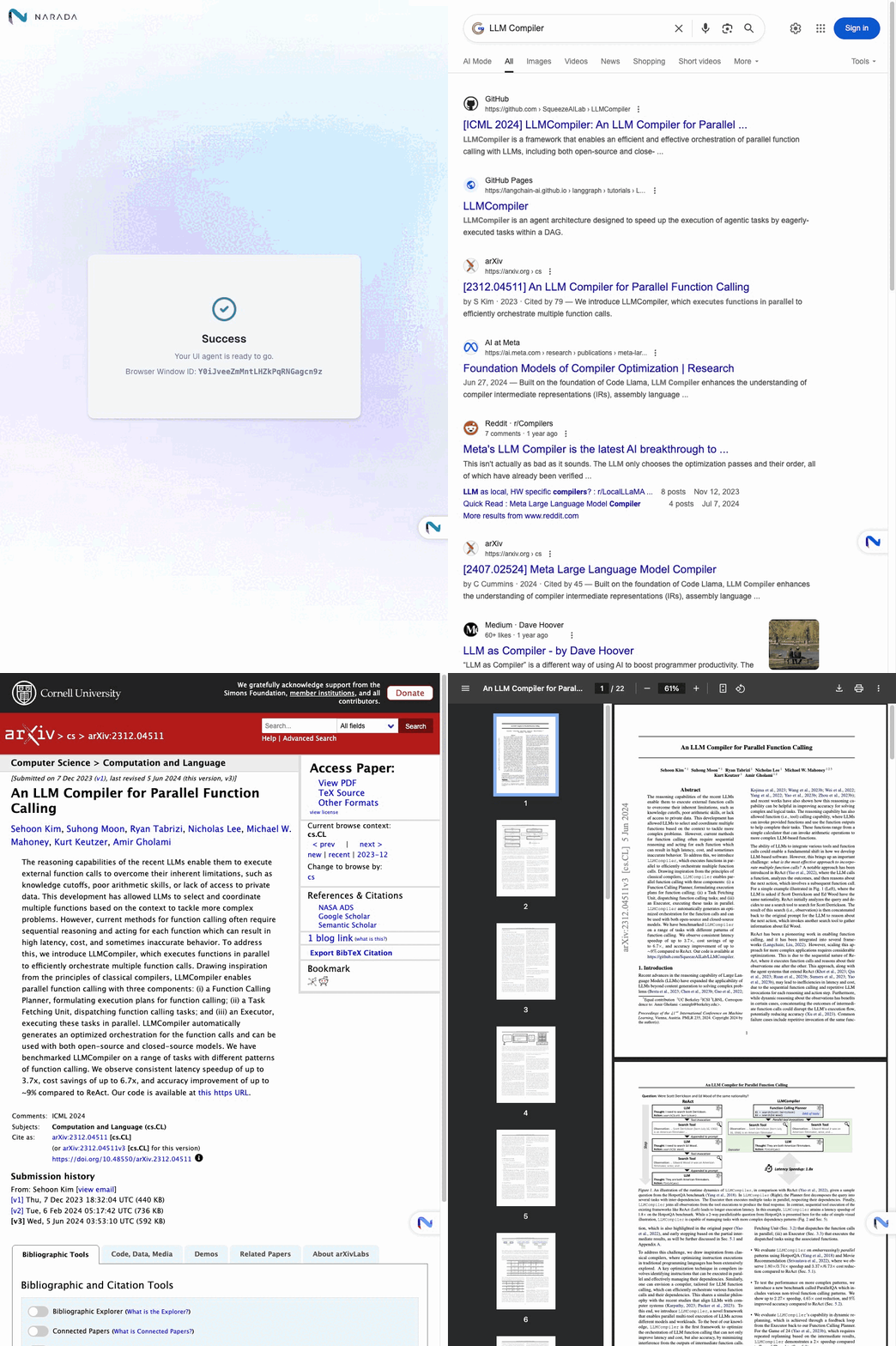
You can use the SDK to launch browsers and run automated tasks using natural language instructions. For more examples and code samples, please explore the examples/ folder in this repository.
Migration note
For releases 0.1.38 and later:
variableshas been renamed tosecret_variables.- Use
input_variablesto pass structured values (objects/arrays) into custom agents.
Features
- Natural Language Control: Send instructions in plain English to control browser actions
- Parallel Execution: Run multiple browser tasks simultaneously across different windows
- Error Handling: Built-in timeout handling and retry mechanisms
- Action Recording: Generate GIFs of agent actions for debugging and documentation
- Async Support: Full async/await support for efficient operations
Key Capabilities
- Web Search & Navigation: Automatically search, click links, and navigate websites
- Data Extraction: Extract information from web pages using AI understanding
- Form Interaction: Fill out forms and interact with web elements
- File Operations: Download files and handle web-based documents
- Multi-window Management: Coordinate tasks across multiple browser instances
License
This project is licensed under the Apache 2.0 License.
Support
For questions, issues, or support, please contact: support@narada.ai
Citation
We appreciate it if you could cite Narada if you found it useful for your project.
@software{narada_ai2025,
  author = {Narada AI},
  title = {Narada AI: Agentic Process Automation for Enterprise},
  year = {2025},
  publisher = {GitHub},
  url = {https://github.com/NaradaAI/narada-python-sdk}
}
Project details
Release history Release notifications | RSS feed


Download files
Download the file for your platform. If you're not sure which to choose, learn more about installing packages.
Source Distribution
Built Distribution
Filter files by name, interpreter, ABI, and platform.
If you're not sure about the file name format, learn more about wheel file names.
Copy a direct link to the current filters
File details
Details for the file narada-0.1.48.tar.gz.
File metadata
- Download URL: narada-0.1.48.tar.gz
- Upload date:
- Size: 19.5 kB
- Tags: Source
- Uploaded using Trusted Publishing? No
- Uploaded via: uv/0.11.8 {"installer":{"name":"uv","version":"0.11.8","subcommand":["publish"]},"python":null,"implementation":{"name":null,"version":null},"distro":{"name":"macOS","version":null,"id":null,"libc":null},"system":{"name":null,"release":null},"cpu":null,"openssl_version":null,"setuptools_version":null,"rustc_version":null,"ci":null}
File hashes
| Algorithm | Hash digest | |
|---|---|---|
| SHA256 |
47bce6d19758d80cf7489e7e1417071bee3626fc3bdef7463c418a09281e636a
|
|
| MD5 |
6582020c6f9d6ea08c53b43770a8a593
|
|
| BLAKE2b-256 |
45d63d80fd42e9a23b42310502cbee50ff641d01a117a46070bd5647b233d278
|
File details
Details for the file narada-0.1.48-py3-none-any.whl.
File metadata
- Download URL: narada-0.1.48-py3-none-any.whl
- Upload date:
- Size: 21.3 kB
- Tags: Python 3
- Uploaded using Trusted Publishing? No
- Uploaded via: uv/0.11.8 {"installer":{"name":"uv","version":"0.11.8","subcommand":["publish"]},"python":null,"implementation":{"name":null,"version":null},"distro":{"name":"macOS","version":null,"id":null,"libc":null},"system":{"name":null,"release":null},"cpu":null,"openssl_version":null,"setuptools_version":null,"rustc_version":null,"ci":null}
File hashes
| Algorithm | Hash digest | |
|---|---|---|
| SHA256 |
9a00604619fb53208931c7f6dd89ecff5c8466ce614ae00548b98ba863b5e7f8
|
|
| MD5 |
dc76005d72fe384fe3855914abf32cc1
|
|
| BLAKE2b-256 |
1856d3e827cdb7a782b0dc480665ea52cefadb42ac2084149fcf74725ac1aad0
|






