
nativeres
nativeres is a set of descale analysis tools for VapourSynth.
It combines and supersedes the following tools:
- Original getscaler by cN3rd https://gist.github.com/cN3rd/51077b6abf45b684bf9a3c657d859b43
- Original getnative by Infiziert90 https://github.com/Infiziert90/getnative
- GetFnative by YomikoR https://github.com/YomikoR/GetFnative
- getfscaler https://github.com/Jaded-Encoding-Thaumaturgy/getfscaler
The package provides:
- A CLI for frame analysis
- A Python API for VapourSynth scripts and tooling
- An optional VSView plugin
What it does
nativeres helps answer three common descale questions:
getnative: What native resolution was this frame likely upscaled from?getscaler: Which scaler most likely produced this upscale?getfreq: Does the frame's frequency distribution show likely scaling artifacts or native-resolution clues?
Installation
# Install the package with `pip`
pip install nativeres
# Or with `uv`
uv tool install nativeres
VSView plugin
This repository also contains a VSView plugin package.
pip install nativeres[plugin]
# Or with uv
uv add nativeres[plugin]
The plugin registers as a VSView tool panel and tool dock under Native Resolution.
Usage can be found in the plugin README.
Usage
CLI
nativeres accepts regular media files, images, and VapourSynth scripts (.vpy / .py). For scripts, the first VapourSynth output is used.
-
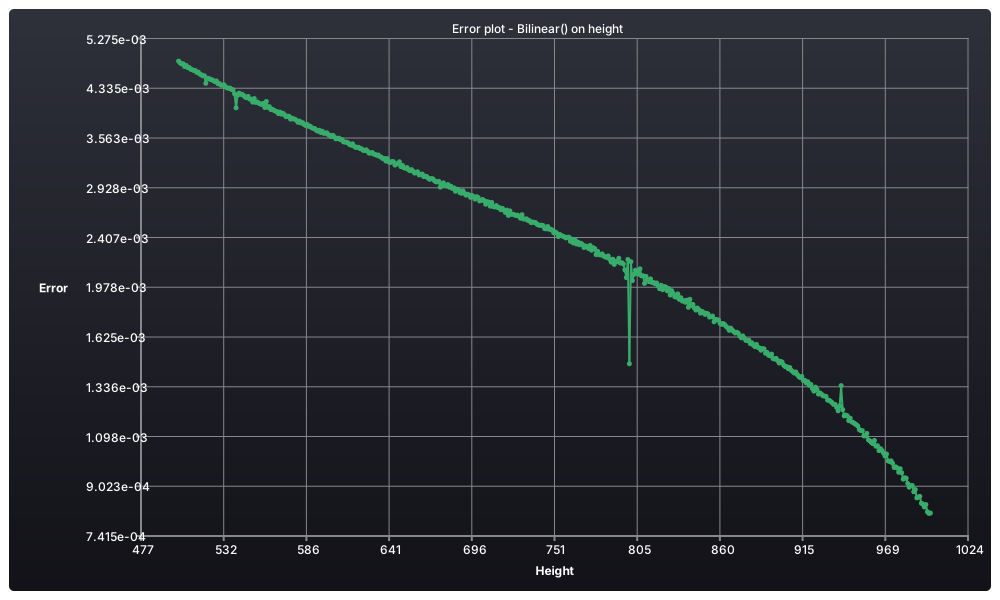
Displays a plot to determine the native resolution height for the frame 15000 with the Bilinear kernel:
nativeres getnative file.m2ts --frame 15000 --dim-mode height --kernel bilinear
Right-click the plot to open the context menu, where you can reset zoom and copy or export the plot as
PNG,SVG,JSON, orCSV. -
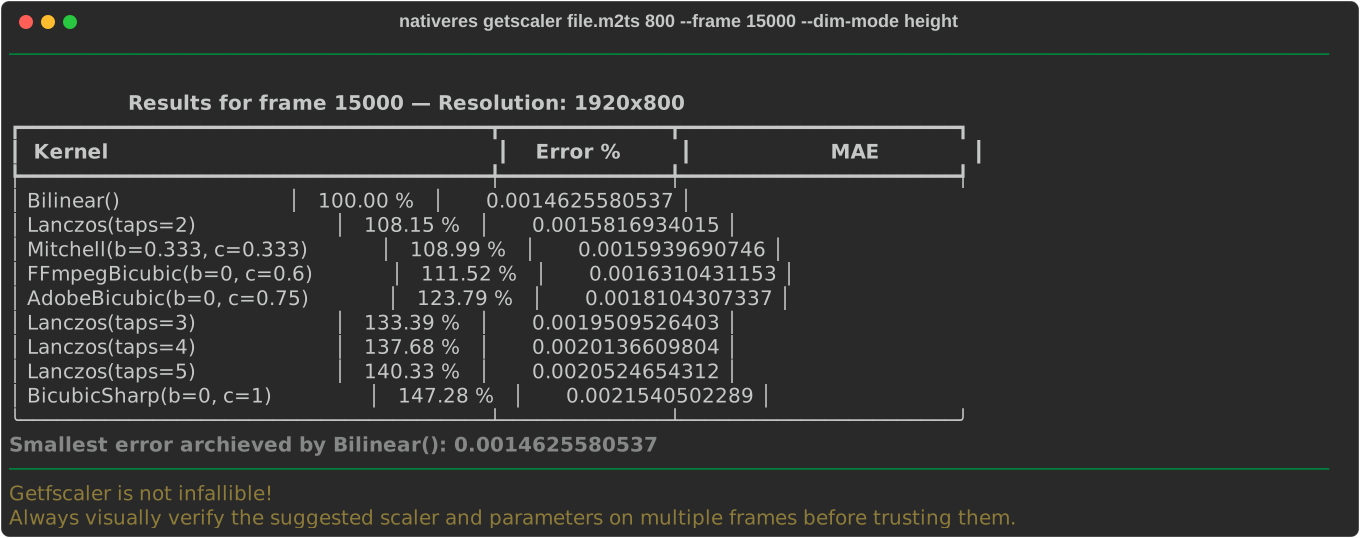
Displays a table showing the errors of the inverse scalers at height 800 for frame 15000.
nativeres getscaler file.m2ts 800 --frame 15000 --dim-mode height
-
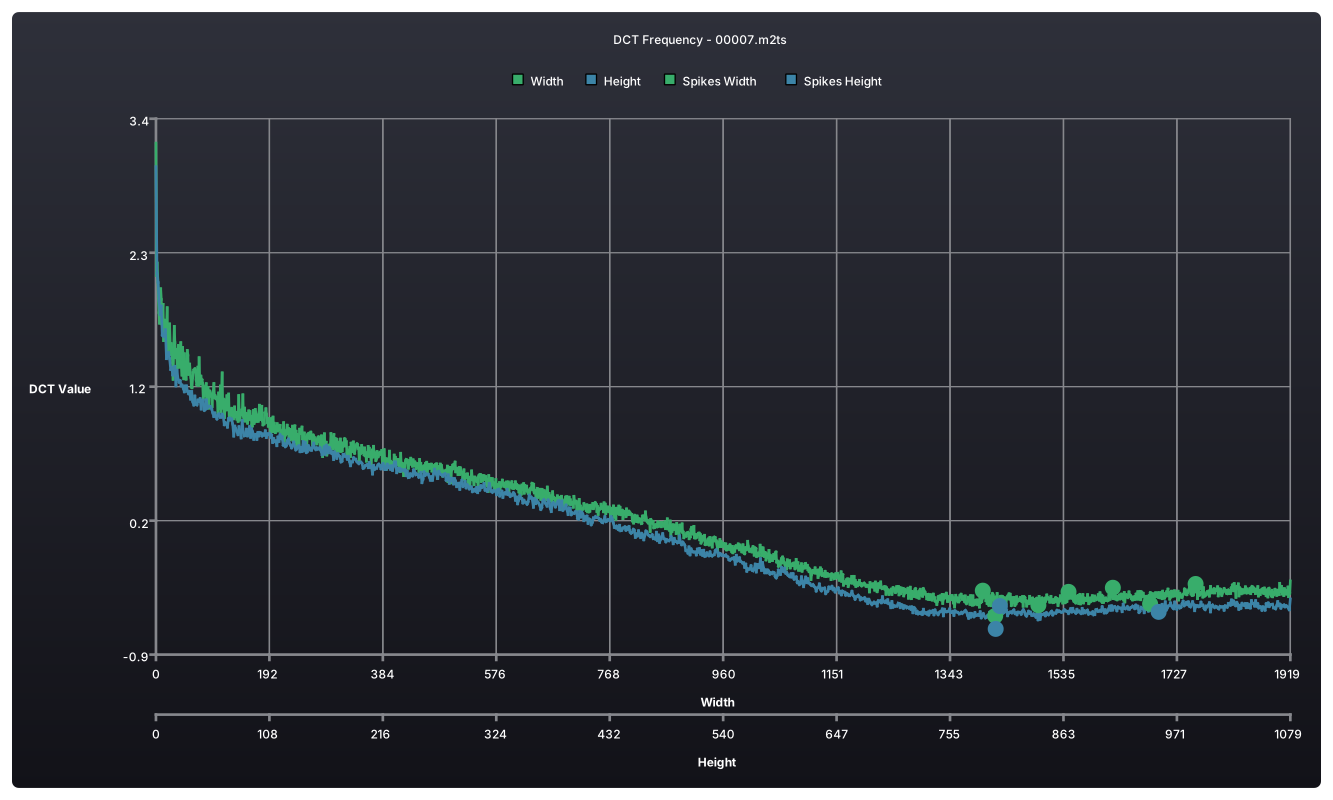
Compute and display a DCT-based frequency plot for the selected frame.
nativeres getfreq file.m2ts --frame 15000
The frequency plot uses the same right-click context menu for reset zoom plus copy/export actions.
Python
from nativeres import getnative
from vskernels import Bilinear

clip = ...  # Your VapourSynth clip

results = getnative(
    clip,
    frame_num=15000,
    dimensions=((clip.width, h) for h in range(540, 901)),
    kernel=Bilinear(),
)

best = min(results, key=lambda result: result.error)
print(best.dim.height, best.error)
CLI Reference
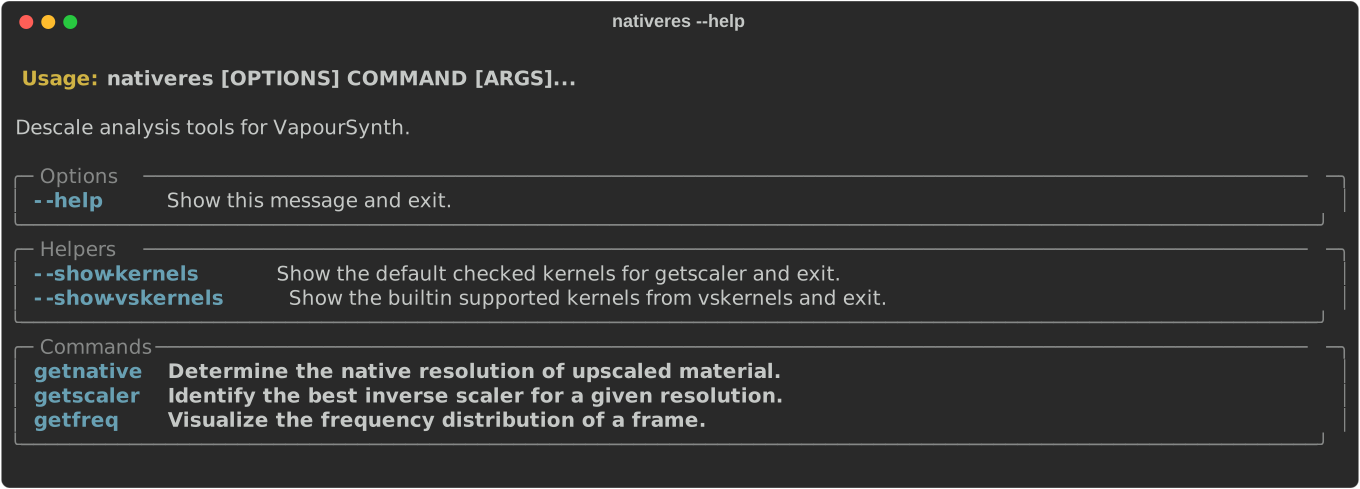
Main help:
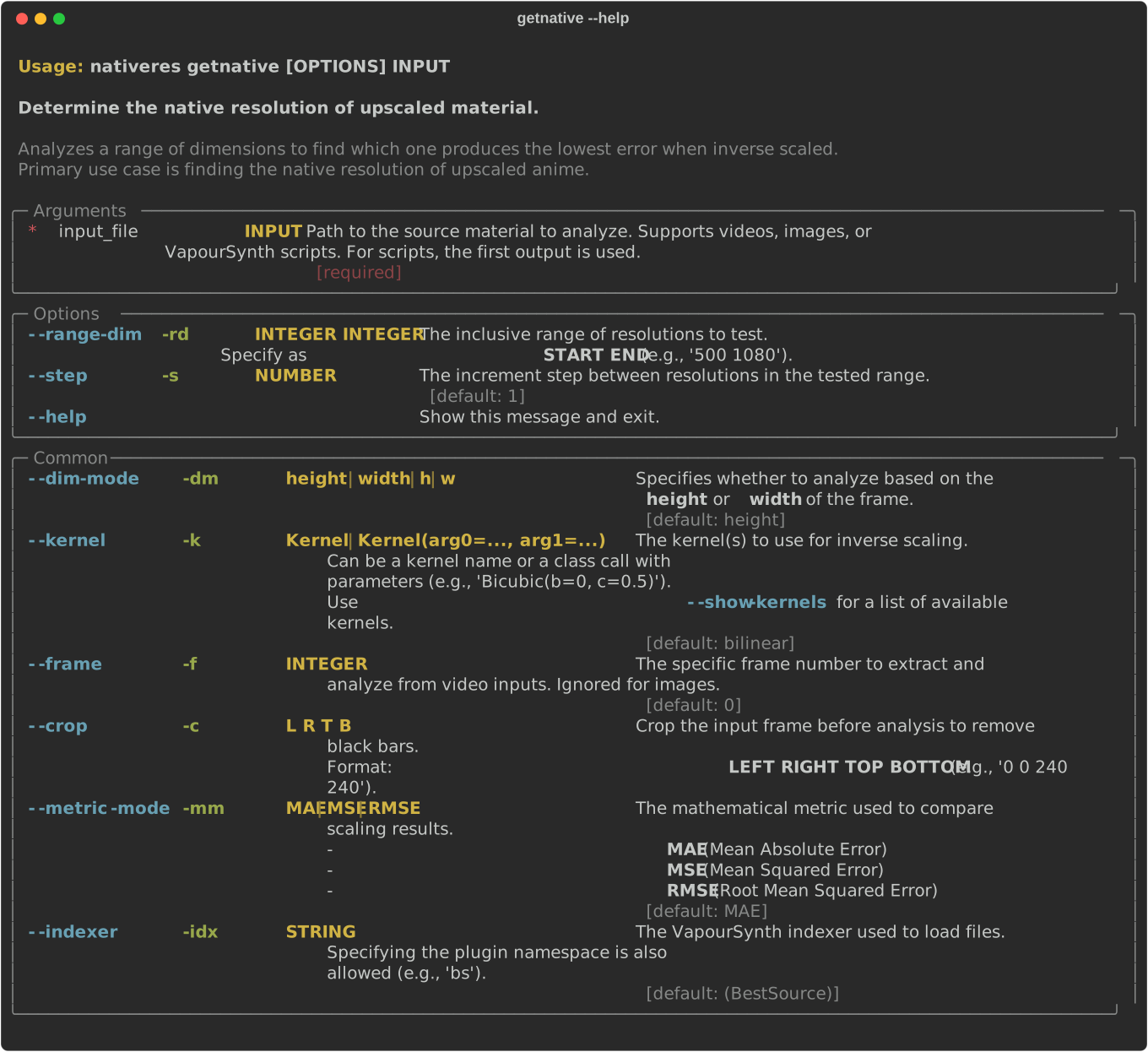
getnative help:
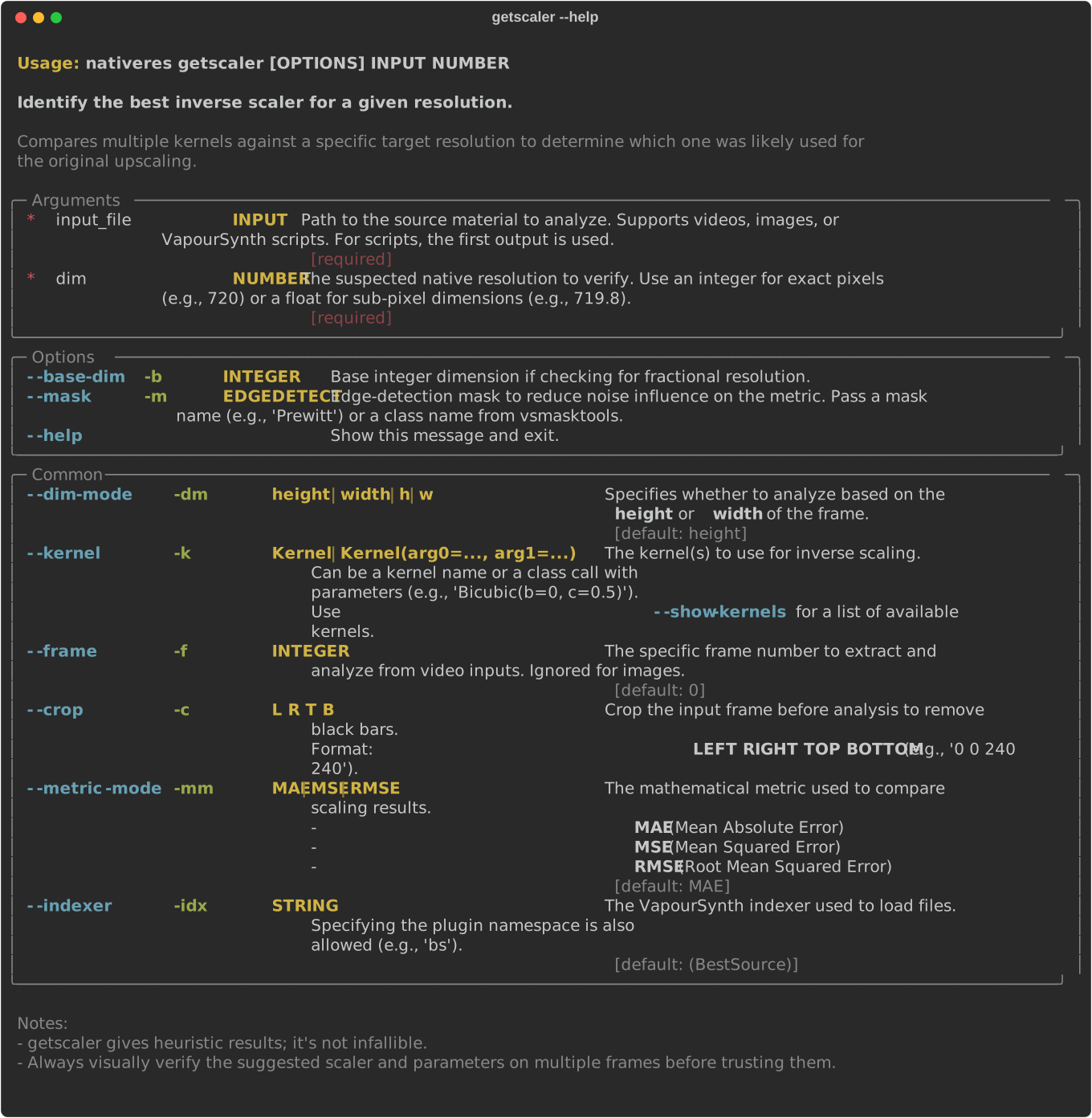
getscaler help:
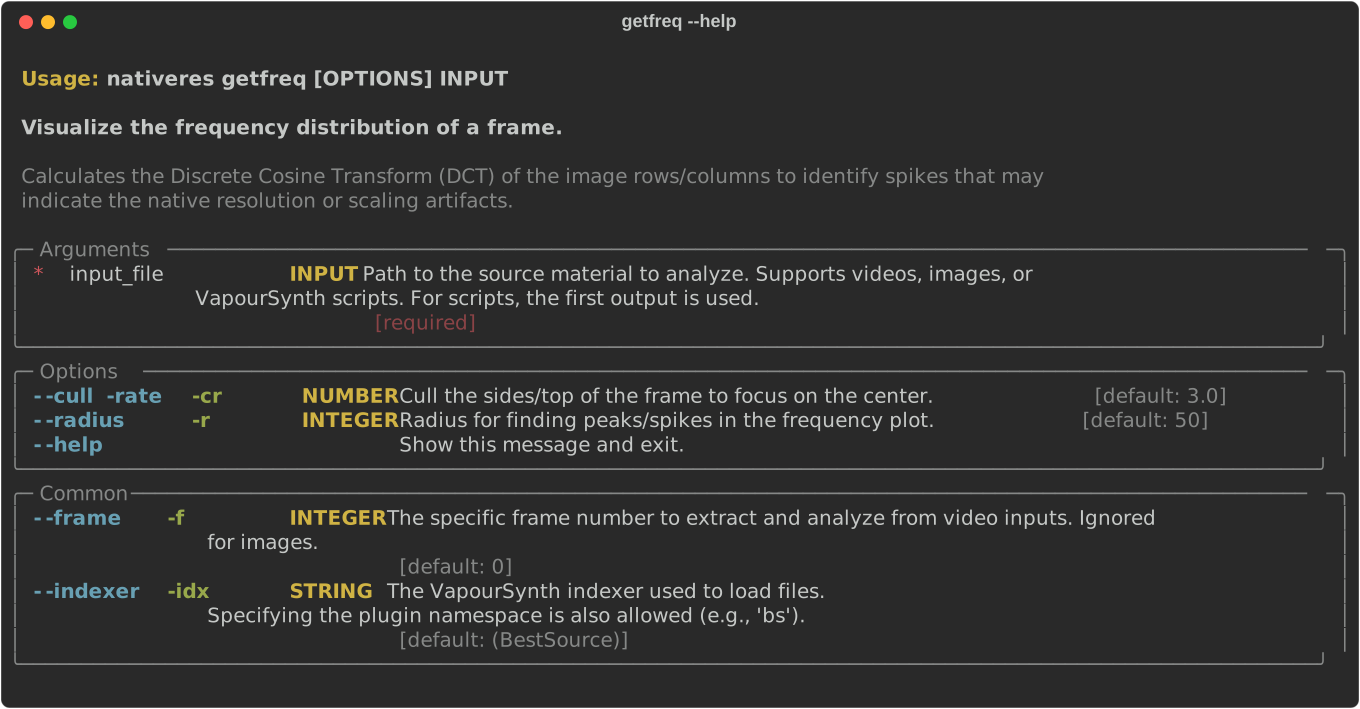
getfreq help:
Python API

function getnative
getnative(
    clip: VideoNode,
    frame_num: int,
    dimensions: Iterable[tuple[float, float]],
    kernel: ComplexKernelLike,
    crop: tuple[LeftCrop, RightCrop, TopCrop, BottomCrop] | None = None,
    shift: tuple[TopShift, LeftShift] = (0, 0),
    metric_mode: MetricMode = 'MAE',
    borders_aware: bool | int | tuple[LeftCrop, RightCrop, TopCrop, BottomCrop] = 8,
    progress_cb: Callable[[int, int], None] | None = None,
    func: FuncExcept | None = None,
    **kwargs: Any
) -> list[GetNativeResult]
Determine the best (fractional) native resolution for a selected frame.
This checks a list of candidate resolutions by descaling the selected frame using kernel and comparing the result to the source frame using metric_mode.
Args:
clip: Source clip.frame_num: Frame index inclipto evaluate.dimensions: Iterable of candidate resolutions to test. Each item may be a(width, height)tuple.kernel: Kernel used to perform each descale attempt.crop: Optional crop to apply before descaling. Aspect ratio is preserved.shift: Optional pixel shift applied during descaling:(top_shift, left_shift).metric_mode: Error metric to use:"MSE","MAE", or"RMSE".borders_aware: Amount (or crop tuple) to ignore at image borders to avoid edge noise when computing the metric.progress_cb: Optional progress callback called asprogress_cb(current, total).func: Function returned for custom error handling.kwargs: Additional arguments passed to the Rescale class.
Returns:
A list of GetNativeResult items. Each item contains the tested fractional resolution (dim) and its associated error.
function getscaler
getscaler(
    clip: VideoNode,
    frame_num: int,
    width: float,
    height: float,
    kernels: ComplexKernelLike | Sequence[ComplexKernelLike],
    base_width: int | None = None,
    base_height: int | None = None,
    crop: tuple[LeftCrop, RightCrop, TopCrop, BottomCrop] | None = None,
    shift: tuple[TopShift, LeftShift] = (0, 0),
    metric_mode: MetricMode = 'MAE',
    mask: MaskLike | None = None,
    borders_aware: bool | int | tuple[LeftCrop, RightCrop, TopCrop, BottomCrop] = 8,
    func: FuncExcept | None = None,
    **kwargs: Any
) → list[GetScalerResult]
Find the best inverse scaler (kernel) for a given frame of a clip.
Each supplied kernel is tested by descaling the selected frame to the provided (width, height) and computing an error metric.
Args:
clip: Source clip.frame_num: Frame index inclipto evaluate.width: Width to be descaled to. If passed as a float, a fractional descale is performed.height: Height to be descaled to. If passed as a float, a fractional descale is performed.kernels: A single kernel or a sequence of kernels to evaluate.base_width: Optional integer height to contain the clip within.base_height: Optional integer width to contain the clip within.crop: Optional crop to apply before descaling. Aspect ratio is preserved.shift: Pixel shifts applied during descaling:(top_shift, left_shift).metric_mode: Error metric to use:"MSE","MAE", or"RMSE".mask: Optional edge-detection mask to reduce noise influence on the metric.borders_aware: Amount (or crop tuple) to ignore at image borders to avoid edge noise when computing the metric.func: Function returned for custom error handling.kwargs: Additional arguments passed to the Rescale class.
Returns:
A list of GetScalerResult items. Each item contains the evaluated kernel and its associated error.
function get_descale_error
get_descale_error(
    clip: VideoNode,
    frame_num: int,
    width: float,
    height: float,
    kernel: ComplexKernelLike,
    base_width: int | None = None,
    base_height: int | None = None,
    crop: tuple[LeftCrop, RightCrop, TopCrop, BottomCrop] | None = None,
    shift: tuple[TopShift, LeftShift] = (0, 0),
    metric_mode: MetricMode = 'MAE',
    mask: MaskLike | None = None,
    borders_aware: bool | int | tuple[LeftCrop, RightCrop, TopCrop, BottomCrop] = 8,
    func: FuncExcept | None = None,
    **kwargs: Any
) → float
Compute the descale error for a selected frame using a specific kernel.
Args:
clip: Source clip.frame_num: Frame index inclipto evaluate.width: Width to be descaled to. If passed as a float, a fractional descale is performed.height: Height to be descaled to. If passed as a float, a fractional descale is performed.kernel: Kernel used for the descale operation.base_width: Optional integer height to contain the clip within.base_height: Optional integer width to contain the clip within.crop: Optional crop to apply before descaling. Aspect ratio is preserved.shift: Pixel shifts applied during descaling:(top_shift, left_shift).metric_mode: Error metric to use:"MSE","MAE", or"RMSE".mask: Optional edge-detection mask to reduce noise influence on the metric.borders_aware: Amount (or crop tuple) to ignore at image borders to avoid edge noise when computing the metric.func: Function returned for custom error handling.kwargs: Additional arguments passed to the Rescale class.
Returns:
The computed error as a float. Lower values indicate a better descale match.
function get_dct_distribution
get_dct_distribution(
    clip: VideoNode,
    frame_num: int,
    cull_rate: float = 3.0,
    func: FuncExcept | None = None
) → tuple[NpFloatArray1D, NpFloatArray1D]
Calculate DCT frequency distribution for both horizontal and vertical dimensions of a selected frame.
Args:
clip: Source clip.frame_num: Frame index inclipto analyze.cull_rate: Cull rate for DCT coefficients.func: Function returned for custom error handling.
Returns: A tuple of (dct_h, dct_v).
class GetNativeResult
Result for getnative, pairing a fractional resolution with an error metric.
class GetScalerResult
Result for getscaler, pairing a kernel with its error.
class ResolutionFrac
Fractional resolution expressed as floating-point width and height.
Notes
- You should always visually verify the results on multiple frames before committing to a descale setup.
2 maintainers


Metadata
2 maintainers
Release files for nativeres 0.4.1
For a detailed explanation of source distributions (sdists) and built distributions (wheels), please see the package formats documentation.
Source distribution (sdist)
| File | Size | Uploaded | |
|---|---|---|---|
| nativeres-0.4.1.tar.gz | 39.7 kB | Details |
Built distribution (wheel)
| File | Interpreter | ABI | Platform | Reset |
|---|---|---|---|---|
| nativeres-0.4.1-py3-none-any.whl | Python 3 | none | any | Details |
Total release size: 64.9 kB
Release files / nativeres-0.4.1.tar.gz
| Download URL | nativeres-0.4.1.tar.gz |
|---|---|
| Size | 39.7 kB |
| Tags | Source |
|
SHA-256 checksum How to use checksums |
8fb83f77fe5d7e7ae804a4e4fcdb318d90007046daf9519ed2c3009f374283e4
|
|
BLAKE2b-256 checksum How to use checksums |
b382aa2d66315fbb21332d99ec69c9af5c5c3fc9b7a3a020ef18ab6e56ad9b2f
|
| Upload date | |
|
Uploaded using Trusted Publishing? What is trusted publishing? |
Yes |
| Uploaded via |
twine/7.0.0 CPython/3.13.14
|
Provenance
Provenance describes where a file came from. On PyPI, provenance is shared via attestations, which provide a verifiable record of the build or publishing details. View details, limitations and caveats.


PyPI Publish Attestation
PyPI verified that this artifact, at this checksum, originated from the publisher listed below.
Signed by GitHub Actions, verified by PyPI on Oct 4, 2026.
Transparency logRelease files / nativeres-0.4.1-py3-none-any.whl
| Download URL | nativeres-0.4.1-py3-none-any.whl |
|---|---|
| Size | 25.1 kB |
| Tags | Python 3 |
|
SHA-256 checksum How to use checksums |
e67df11ce5ee579e7ef7dc4dca5356f2b69b282ee34581afcec62f8f2faa032d
|
|
BLAKE2b-256 checksum How to use checksums |
72ddc131d571baddacdcdee30cfbe5379763d39cee9ebd84594e76e16e6c7f8f
|
| Upload date | |
|
Uploaded using Trusted Publishing? What is trusted publishing? |
Yes |
| Uploaded via |
twine/7.0.0 CPython/3.13.14
|
Provenance
Provenance describes where a file came from. On PyPI, provenance is shared via attestations, which provide a verifiable record of the build or publishing details. View details, limitations and caveats.
PyPI Publish Attestation
PyPI verified that this artifact, at this checksum, originated from the publisher listed below.
Signed by GitHub Actions, verified by PyPI on Oct 4, 2026.
Transparency log













