
The repository or configuration that created this release differ from a previous release. View details.








| Branch | Version | Status |
|---|---|---|
master |
 |
 |
nightly |
 |
 |
develop |
 |
 |
| Platform | Rust | Python |
|---|---|---|
Linux (x86_64) |
1.97.1 | 3.12-3.14 |
Linux (ARM64) |
1.97.1 | 3.12-3.14 |
macOS (ARM64) |
1.97.1 | 3.12-3.14 |
Windows (x86_64) |
1.97.1 | 3.12-3.14 |
- Docs: https://nautilustrader.io/docs/
- Website: https://nautilustrader.io
- Support: support@nautilustrader.io
Introduction
NautilusTrader is an open-source, production-grade, Rust-native engine for multi-asset, multi-venue trading systems.
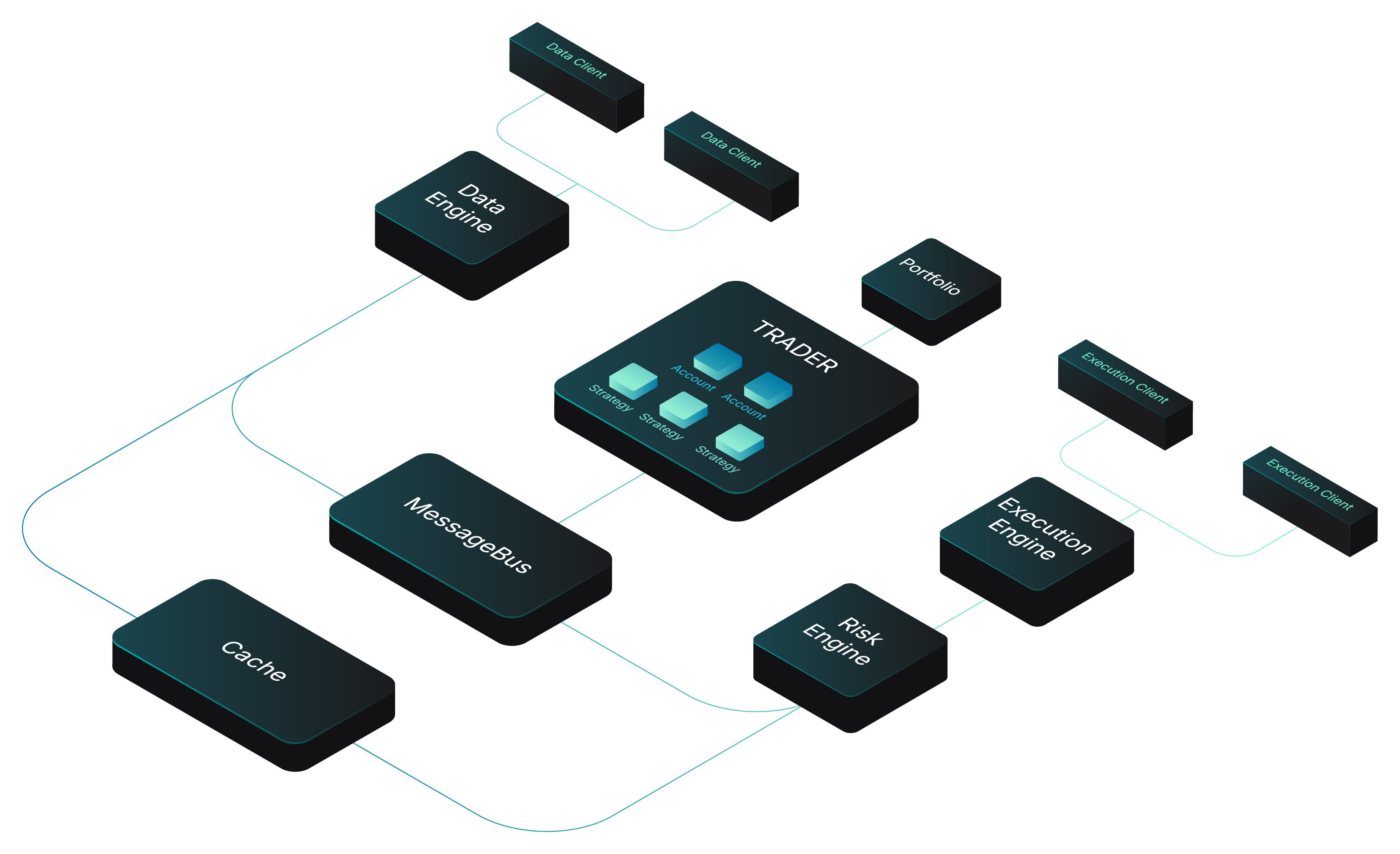
The system spans research, deterministic simulation, and live execution within a single event-driven architecture, with Python serving as the control plane for strategy logic, configuration, and orchestration.
This separation provides the performance and safety of a compiled trading engine with the flexibility of Python for system composition and strategy development. Trading systems can also be written entirely in Rust for mission-critical workloads.
The same execution semantics and deterministic time model operate in both research and live systems. Strategies deploy from research to production with no code changes, providing research-to-live parity and reducing the divergence that typically introduces deployment risk.
NautilusTrader is asset-class-agnostic. Any venue with a REST API or WebSocket feed can be integrated through modular adapters. Current integrations span crypto exchanges (CEX and DEX), traditional markets (FX, equities, futures, options), and betting exchanges.
Features
- Fast: Rust core with the mimalloc allocator and asynchronous networking using tokio.
- Reliable: Type- and thread-safety backed by Rust, with optional Redis-backed state persistence.
- Portable: Runs on Linux, macOS, and Windows. Deploy using Docker.
- Flexible: Modular adapters integrate any REST API or WebSocket feed.
- Advanced: Time in force
IOC,FOK,GTC,GTD,DAY,AT_THE_OPEN,AT_THE_CLOSE, advanced order types and conditional triggers. Execution instructionspost-only,reduce-only, and icebergs. Contingency orders includingOCO,OUO,OTO. - Customizable: User-defined components, or assemble entire systems from scratch using the cache and message bus.
- Backtesting: Multiple venues, instruments, and strategies simultaneously using historical quote tick, trade tick, bar, order book, and custom data with nanosecond resolution.
- Live: Identical strategy implementations between research and live deployment.
- Multi-venue: Run market-making and cross-venue strategies across multiple venues simultaneously.
- AI Training: Engine fast enough to train AI trading agents (RL/ES).

nautilus - from ancient Greek 'sailor' and naus 'ship'.
The nautilus shell consists of modular chambers with a growth factor which approximates a logarithmic spiral. The idea is that this can be translated to the aesthetics of design and architecture.
Why NautilusTrader?
Trading strategy research is often conducted in Python using vectorized approaches, while production trading systems are implemented separately using event-driven architectures in compiled languages.
NautilusTrader removes this separation.
A Rust-native core provides a deterministic event-driven runtime for both research and live execution, while Python serves as the control plane. The same architecture, execution semantics, and time model operate across both environments, allowing strategies to move from research to production without reimplementation.
Python bindings are provided via PyO3 for the Rust-native v2 runtime. The legacy Cython v1 core remains supported during the v2 release-candidate phase. No Rust toolchain is required at install time.
This project makes the Soundness Pledge:
"The intent of this project is to be free of soundness bugs. The developers will do their best to avoid them, and welcome help in analyzing and fixing them."
[!NOTE]
MSRV: NautilusTrader relies heavily on improvements in the Rust language and compiler. As a result, the Minimum Supported Rust Version (MSRV) is generally equal to the latest stable release of Rust.
Integrations
NautilusTrader is modularly designed to work with adapters, enabling connectivity to trading venues and data providers by translating their raw APIs into a unified interface and normalized domain model.
The following integrations are currently supported; see docs/integrations/ for details:
| Name | ID | Type | Status | Docs |
|---|---|---|---|---|
| AX Exchange | AX |
Perpetuals Exchange |  |
Guide |
| Betfair | BETFAIR |
Sports Betting Exchange | |
Guide |
| Binance | BINANCE |
Crypto Exchange (CEX) | |
Guide |
| BitMEX | BITMEX |
Crypto Exchange (CEX) | |
Guide |
| Bybit | BYBIT |
Crypto Exchange (CEX) | |
Guide |
| Coinbase | COINBASE |
Crypto Exchange (CEX) | |
Guide |
| Databento | DATABENTO |
Data Provider | |
Guide |
| Deribit | DERIBIT |
Crypto Exchange (CEX) | |
Guide |
| Derive | DERIVE |
Crypto Exchange (DEX) | |
Guide |
| dYdX | DYDX |
Crypto Exchange (DEX) | |
Guide |
| Hyperliquid | HYPERLIQUID |
Crypto Exchange (DEX) | |
Guide |
| Interactive Brokers | INTERACTIVE_BROKERS |
Brokerage (multi-venue) | |
Guide |
| Kraken | KRAKEN |
Crypto Exchange (CEX) | |
Guide |
| Lighter | LIGHTER |
Crypto Exchange (DEX) | |
Guide |
| OKX | OKX |
Crypto Exchange (CEX) | |
Guide |
| Polymarket | POLYMARKET |
Prediction Market (DEX) | |
Guide |
| Tardis | TARDIS |
Crypto Data Provider | |
Guide |
- ID: The default client ID for the integrations adapter clients.
- Type: The type of integration (often the venue type).
Status
planned: Planned for future development.building: Under construction and likely not in a usable state.beta: Completed to a minimally working state and in a beta testing phase.stable: Stabilized feature set and API, the integration has been tested by both developers and users to a reasonable level (some bugs may still remain).
See the Integrations documentation for further details.
Roadmap
The Roadmap outlines NautilusTrader's strategic direction. Current priorities include completing the Rust-native core, improving documentation, and enhancing code ergonomics.
The open-source project focuses on single-node backtesting and live trading for individual and small-team quantitative traders. UI dashboards, distributed orchestration, and built-in AI/ML tooling are out of scope to maintain focus on the core engine and ecosystem sustainability.
New integration proposals should start with an RFC issue to discuss suitability before submitting a PR. See Community-contributed integrations for guidelines.
Security

Security is a priority for the NautilusTrader project, and we value the work of those who help identify and resolve vulnerabilities. We apply layered controls across the development and release lifecycle, with signed releases, continuous vulnerability management, and transparent development practices:
- Source and review controls: CODEOWNERS gate critical infrastructure, dependency manifests, and lock files; protected branches require signed commits and passing CI; release tags are immutable; and Rust dependencies are sourced only from crates.io.
- Dependency intake: lock files pin every dependency with cryptographic checksums, third-party Python packages install from wheels only, new dependency and tooling versions observe a publication cooldown before adoption, cargo-vet audits Rust provenance, and license checks enforce LGPL-3.0-or-later compatibility.
- Scanning and fuzzing: Gitleaks secret screening and Zizmor Actions auditing run pre-commit;
CodeQL runs on PRs to
masterand pushes tonightly; cargo-audit, cargo-deny, cargo-vet, OSV Scanner, and pip-audit run on audit-relevant PRs and daily schedules; cargo-fuzz targets cover selected adapter and signing surfaces. - Build and release integrity: GitHub Actions are pinned to commit SHAs, CI runners are hardened
with egress allow-listing, Python artifacts carry SLSA build provenance, container images are
Sigstore-signed with attested SPDX SBOMs, and PyPI and crates.io publishing uses OIDC Trusted
Publishing gated to a protected
releaseenvironment that never runs pull request or fork code. - Runtime cryptography: TLS and most runtime cryptography use aws-lc-rs, the Rust binding for AWS-LC, with Ed25519 signing via ed25519-dalek.
The OpenSSF Scorecard badge above is one automated repository-health signal; it complements manual review, CI hardening, and security audits rather than replacing them.
Reporting a vulnerability
Report privately through GitHub Security Advisories, or email security@nautechsystems.io (PGP key available on request). We acknowledge reports within 48 hours and patch critical vulnerabilities within 30 days.
A careful vulnerability report takes real time and effort. We appreciate that, and unless you prefer to remain anonymous, we credit reporters in the relevant security advisory and release notes.
The Security Policy details scope, coordinated disclosure, and step-by-step release verification. The Release Security Architecture describes the release supply chain end-to-end. For the full policies, see the Responsible Disclosure and Supply Chain Security policies; CI/CD security is documented in .github/OVERVIEW.md.
Versioning and releases
[!WARNING]
NautilusTrader is still under active development. Some features may be incomplete, and while the API is becoming more stable, breaking changes can occur between releases. We strive to document these changes in the release notes on a best-effort basis.
We aim to follow a bi-weekly release schedule, though experimental or larger features may cause delays.
Branches
We aim to maintain a stable, passing build across all branches.
master: Reflects the source code for the latest released version; recommended for production use.nightly: Daily snapshots of thedevelopbranch for early testing; merged at 14:00 UTC and as required.develop: Active development branch for contributors and feature work.
[!NOTE]
The v2 release-candidate line is the transition toward a stable API for version 2.x. Once this milestone is reached, we plan to implement a formal deprecation process for any API changes. This approach allows us to maintain a rapid development pace for now.
Precision mode
NautilusTrader supports two precision modes for its core value types (Price, Quantity, Money),
which differ in their internal bit-width and maximum decimal precision.
- High-precision: 128-bit integers with up to 16 decimals of precision, and a larger value range.
- Standard-precision: 64-bit integers with up to 9 decimals of precision, and a smaller value range.
[!NOTE]
By default, the official Python wheels ship in high-precision (128-bit) mode on Linux and macOS. On Windows, only standard-precision (64-bit) Python wheels are available because MSVC's C/C++ frontend does not support
__int128, preventing the Cython/FFI layer from handling 128-bit integers.For pure Rust crates, high-precision works on all platforms (including Windows) since Rust handles
i128/u128via software emulation. The default is standard-precision unless you explicitly enable thehigh-precisionfeature flag.
See the Installation Guide for further details.
Rust feature flag: To enable high-precision mode in Rust, add the high-precision feature to your Cargo.toml:
[dependencies]
nautilus_model = { version = "*", features = ["high-precision"] }
Installation
We recommend using the latest supported version of Python and installing nautilus_trader inside a virtual environment to isolate dependencies.
There are two supported ways to install:
- Pre-built binary wheel from PyPI or the Nautech Systems package index.
- Build from source.
[!TIP]
We highly recommend installing using the uv package manager with a "vanilla" CPython.
Conda and other Python distributions may work but aren't officially supported.
From PyPI
To install the latest binary wheel (or sdist package) from PyPI using Python's pip package manager:
pip install -U nautilus_trader
To test the v2 release-candidate wheels from PyPI:
pip install -U nautilus_trader --pre
The v2 release-candidate wheels use 2.0.0rcN versions and are intended for community testing
before the final 2.0.0 release. We do not recommend using release candidates in production
environments, such as live trading controlling real capital.
Install optional dependencies as 'extras' for specific integrations (e.g., betfair, docker,
ib, polymarket, visualization):
pip install -U "nautilus_trader[docker,ib]"
See the Installation Guide for the full list of available extras.
From the Nautech Systems package index
The Nautech Systems package index (packages.nautechsystems.io) complies with PEP-503 and hosts both stable and development binary wheels for nautilus_trader.
This enables users to install either the latest stable release or pre-release versions for testing.
Stable wheels
Stable wheels correspond to official releases of nautilus_trader on PyPI, and use standard versioning.
To install the latest stable release:
pip install -U nautilus_trader --index-url=https://packages.nautechsystems.io/simple
[!TIP]
Use
--extra-index-urlinstead of--index-urlif you want pip to fall back to PyPI automatically.
Development wheels
The main package index publishes v1 development wheels from both the nightly and develop
branches, allowing users to test features and fixes ahead of stable releases.
This process also helps preserve compute resources and provides easy access to the exact binaries tested in CI pipelines, while adhering to PEP-440 versioning standards:
developwheels use the version formatdev{date}+{build_number}(e.g.,1.208.0.dev20241212+7001).nightlywheels use the version formata{date}(alpha) (e.g.,1.208.0a20241212).
| Platform | v1 Nightly | v1 Develop |
|---|---|---|
Linux (x86_64) |
✓ | ✓ |
Linux (ARM64) |
✓ | - |
macOS (ARM64) |
✓ | - |
Windows (x86_64) |
✓ | - |
Note: The nightly merge publishes v1 and v2 wheels for all listed platforms, while develop
publishes Linux x86_64 wheels only. Outside those publication builds, cross-platform nightly
validation is v2-only; the scheduled nightly test workflow does not repeat the v1 platform matrix.
[!WARNING]
We do not recommend using development wheels in production environments, such as live trading controlling real capital.
Installation commands
By default, pip will install the latest stable release. Adding the --pre flag ensures that pre-release versions, including development wheels, are considered.
To install the latest available pre-release (including development wheels):
pip install -U nautilus_trader --pre --index-url=https://packages.nautechsystems.io/simple
To install a specific development wheel (e.g., 1.221.0a20251026 for October 26, 2025):
pip install nautilus_trader==1.221.0a20251026 --index-url=https://packages.nautechsystems.io/simple
Available versions
You can view all available versions of nautilus_trader on the package index.
To programmatically fetch and list available versions:
curl -s https://packages.nautechsystems.io/simple/nautilus-trader/index.html | sed -n 's/.*<a href="\([^"]*\)".*/\1/p' | awk -F'#' '{print $1}' | sort
[!NOTE]
On Linux, confirm your glibc version with
ldd --versionand ensure it reports 2.35 or newer before installing binary wheels.
Branch updates
developbranch wheels (.dev): Build and publish continuously with every merged commit.nightlybranch wheels (a): Build and publish daily when we automatically merge thedevelopbranch at 14:00 UTC (if there are changes).
Retention policies
developbranch wheels (.dev): We retain only the most recent wheel build.nightlybranch wheels (a): We retain only the 30 most recent wheel builds.
Verifying build provenance
All release artifacts published by the project carry cryptographic attestations generated by the CI/CD pipeline:
- Python wheels and source distribution (PyPI, GitHub Releases, Nautech Systems package index): SLSA build provenance.
- Docker images (
ghcr.io/nautechsystems/nautilus_trader,ghcr.io/nautechsystems/jupyterlab): keyless cosign signatures plus SPDX SBOM attestations.
Both are issued via Sigstore and bound to a specific commit SHA, so verification ensures the artifact was produced by the official NautilusTrader GitHub Actions workflow and has not been tampered with since.
For step-by-step verification commands, see Verifying releases in SECURITY.md.
[!NOTE]
Verification requires the GitHub CLI (
gh) for Python artifacts and cosign for Docker images. Development wheels fromdevelopandnightlybranches are also attested.
From source
It's possible to install from source using pip if you first install the build dependencies as specified in the pyproject.toml.
-
Install rustup (the Rust toolchain installer):
-
Linux and macOS:
curl https://sh.rustup.rs -sSf | sh
-
Windows:
- Download and install
rustup-init.exe - Install "Desktop development with C++" using Build Tools for Visual Studio 2022
- Download and install
-
Verify (any system): from a terminal session run:
rustc --version
-
-
Enable
cargoin the current shell:-
Linux and macOS:
source $HOME/.cargo/env
-
Windows:
- Start a new PowerShell
-
-
Install clang (a C language frontend for LLVM):
-
Linux (also installs lld, used as the Rust linker for faster builds):
sudo apt-get install clang lld
-
macOS:
xcode-select --install -
Windows:
-
Add Clang to your Build Tools for Visual Studio 2022:
- Start | Visual Studio Installer | Modify | C++ Clang tools for Windows (latest) = checked | Modify
-
Enable
clangin the current shell:[System.Environment]::SetEnvironmentVariable('path', "C:\Program Files\Microsoft Visual Studio\2022\BuildTools\VC\Tools\Llvm\x64\bin\;" + $env:Path,"User")
-
-
Verify (any system): from a terminal session run:
clang --version
-
-
Install uv (see the uv installation guide for more details):
-
Linux and macOS:
curl -LsSf https://astral.sh/uv/install.sh | sh
-
Windows (PowerShell):
irm https://astral.sh/uv/install.ps1 | iex
-
-
Clone the source with
git, and install from the project's root directory:git clone --branch develop --depth 1 https://github.com/nautechsystems/nautilus_trader cd nautilus_trader uv sync --all-extras
[!NOTE]
The
--depth 1flag fetches just the latest commit for a faster, lightweight clone.
-
Set environment variables for PyO3 compilation (Linux and macOS only). Run these commands from the repository root after
uv sync:# Set the Python executable path for PyO3 export PYO3_PYTHON="$PWD/.venv/bin/python" # Linux only: Set the library path for the uv-managed Python runtime PYTHON_LIB_DIR="$("$PYO3_PYTHON" -c 'import sysconfig; print(sysconfig.get_config_var("LIBDIR"))')" export LD_LIBRARY_PATH="$PYTHON_LIB_DIR${LD_LIBRARY_PATH:+:$LD_LIBRARY_PATH}" # Required for Rust tests when using uv-installed Python export PYTHONHOME="$("$PYO3_PYTHON" -c 'import sys; print(sys.base_prefix)')"
[!NOTE]
The
LD_LIBRARY_PATHexport is Linux-specific and not needed on macOS.The
PYTHONHOMEvariable is required when runningmake cargo-testwith auv-installed Python. Without it, tests that depend on PyO3 may fail to locate the Python runtime.
See the Installation Guide for other options and further details.
Redis
Using Redis with NautilusTrader is optional and only required if configured as the backend for a cache database or message bus. See the Redis section of the Installation Guide for further details.
Makefile
A Makefile is provided to automate most installation and build tasks for development. Some of the targets include:
make install: Installs inreleasebuild mode with all dependency groups and extras.make install-debug: Same asmake installbut withdebugbuild mode.make install-deps: Installs Python dependencies without building the package.make build: Runs the build script inreleasebuild mode (default).make build-debug: Runs the build script indebugbuild mode.make build-wheel: Runs uv build with a wheel format inreleasemode.make build-wheel-debug: Runs uv build with a wheel format indebugmode.make cargo-test: Runs all Rust crate tests usingcargo-nextest.make clean: Deletes build artifacts, caches, and build directories.make distclean: CAUTION Removes all artifacts not in the git index when run withFORCE=1. This includes source files which have not beengit added.make docs: Builds the documentation HTML using Sphinx.make pre-commit: Runs the pre-commit checks over all files.make ruff: Runs ruff over all files using thepyproject.tomlconfig (with autofix).make pytest: Runs all tests withpytest.make test-performance: Runs performance tests with codspeed.
[!TIP]
Run
make helpfor documentation on all available make targets.
[!TIP]
See the crates/infrastructure/TESTS.md file for running the infrastructure integration tests.
Examples
Indicators and strategies can be developed in Python, Cython, or Rust. For performance and latency-sensitive applications, we recommend Rust. Below are some examples:
- indicator example written in Python.
- indicator implementations written in Cython.
- strategy examples written in Python.
- backtest examples using a
BacktestEnginedirectly.
Docker
Docker containers are built with the following variant tags:
nautilus_trader:latesthas the latest release version installed.nautilus_trader:nightlyhas the head of thenightlybranch installed.jupyterlab:latesthas the latest release version installed along withjupyterlaband an example backtest notebook with accompanying data.jupyterlab:nightlyhas the head of thenightlybranch installed along withjupyterlaband an example backtest notebook with accompanying data.
You can pull the container images as follows:
docker pull ghcr.io/nautechsystems/<image_variant_tag> --platform linux/amd64
You can launch the backtest example container by running:
docker pull ghcr.io/nautechsystems/jupyterlab:nightly --platform linux/amd64
docker run -p 8888:8888 ghcr.io/nautechsystems/jupyterlab:nightly
Then open your browser at the following address:
http://127.0.0.1:8888/lab
[!WARNING]
Examples use
log_level="ERROR"because Nautilus logging exceeds Jupyter's stdout rate limit, causing notebooks to hang at lower log levels.
Development
We aim to provide the most pleasant developer experience possible for this hybrid codebase of Rust, Python, and Cython. See the Developer Guide for helpful information.
[!TIP]
Run
make build-debugto compile after changes to Rust or Cython code for the most efficient development workflow.
After changes to v2 PyO3 bindings, stub annotations, or wrapped Rust docs, regenerate the generated Python artifacts from the repository root:
make py-stubs-v2
Commit the generated .pyi files and PyO3 wrapper doc comments changed by this target. See
Generated Python artifacts for details.
Testing with Rust
cargo-nextest is the standard Rust test runner for NautilusTrader. Its key benefit is isolating each test in its own process, ensuring test reliability by avoiding interference.
You can install cargo-nextest by running:
cargo install cargo-nextest
[!TIP]
Run Rust tests with
make cargo-test, which uses cargo-nextest with an efficient profile.
Contributing
Thank you for considering contributing to NautilusTrader! We welcome any and all help to improve the project. If you have an idea for an enhancement or a bug fix, the first step is to open an issue on GitHub to discuss it with the team. This helps to ensure that your contribution will be well-aligned with the goals of the project and avoids duplication of effort.
Before getting started, be sure to review the open-source scope outlined in the project's roadmap to understand what's in and out of scope.
Once you're ready to start working on your contribution, make sure to follow the guidelines outlined in the CONTRIBUTING.md file. This includes signing a Contributor License Agreement (CLA) to ensure that your contributions can be included in the project.
[!NOTE]
Pull requests should target the
developbranch (the default branch). This is where new features and improvements are integrated before release.
Thank you again for your interest in NautilusTrader! We look forward to reviewing your contributions and working with you to improve the project.
Community
Join our community of users and contributors on Discord to chat and stay up-to-date with the latest announcements and features of NautilusTrader. Whether you're a developer looking to contribute or just want to learn more about the platform, all are welcome on our Discord server.
[!WARNING]
NautilusTrader does not issue, promote, or endorse any cryptocurrency tokens. Any claims or communications suggesting otherwise are unauthorized and false.
All official updates and communications from NautilusTrader will be shared exclusively through https://nautilustrader.io, our GitHub, our Discord server, or our verified X (Twitter) account: @NautilusTrader.
If you encounter any suspicious activity, please report it to the appropriate platform and contact us at info@nautechsystems.io.
License
The source code for NautilusTrader is available on GitHub under the GNU Lesser General Public License v3.0. Contributions to the project are welcome and require the completion of a standard Contributor License Agreement (CLA).
NautilusTrader™ is developed and maintained by Nautech Systems, a technology company specializing in the development of high-performance trading systems. For more information, visit https://nautilustrader.io.
Use of this software is subject to the Disclaimer.
© 2015-2026 Nautech Systems Pty Ltd. All rights reserved.


1 maintainer

Metadata
1 maintainer
Release files for nautilus-trader 1.231.0
For a detailed explanation of source distributions (sdists) and built distributions (wheels), please see the package formats documentation.
Change of provenance
The repository or configuration that created these release files differ from that of a previous release.
We recommend inspecting the repository and configuration before proceeding. View details.
Source distribution (sdist)
| File | Size | Uploaded | Provenance | |
|---|---|---|---|---|
| nautilus_trader-1.231.0.tar.gz | 10.3 MB | With provenance | Details |
Built distributions (wheels)
Total release size: 1.9 GB
Release files / nautilus_trader-1.231.0.tar.gz
Change of provenance
This file belongs to a release with changed provenance: the repository or configuration that created the release files differ from that of a previous release.
We recommend inspecting the repository and configuration before proceeding. View details.
| Download URL | nautilus_trader-1.231.0.tar.gz |
|---|---|
| Size | 10.3 MB |
| Tags | Source |
|
SHA-256 checksum How to use checksums |
142dde40e77339745aa5fe6bcbb3de5624cee087f526879da00f127df077530f
|
|
BLAKE2b-256 checksum How to use checksums |
22b7a899df9daa2d84b9bb546a982b951f9336c814014c8545466d3eb138993b
|
| Upload date | |
|
Uploaded using Trusted Publishing? What is trusted publishing? |
Yes |
| Uploaded via |
uv/0.11.33 {"installer":{"name":"uv","version":"0.11.33","subcommand":["publish"]},"python":null,"implementation":{"name":null,"version":null},"distro":{"name":"Ubuntu","version":"24.04","id":"noble","libc":null},"system":{"name":null,"release":null},"cpu":null,"openssl_version":null,"setuptools_version":null,"rustc_version":null,"ci":true}
|
Provenance
Provenance describes where a file came from. On PyPI, provenance is shared via attestations, which provide a verifiable record of the build or publishing details. View details, limitations and caveats.


PyPI Publish Attestation
PyPI verified that this artifact, at this checksum, originated from the publisher listed below.
Signed by GitHub Actions, verified by PyPI on Aug 2, 2026.
Transparency logRelease files / nautilus_trader-1.231.0-cp314-cp314-win_amd64.whl
Change of provenance
This file belongs to a release with changed provenance: the repository or configuration that created the release files differ from that of a previous release.
We recommend inspecting the repository and configuration before proceeding. View details.
| Download URL | nautilus_trader-1.231.0-cp314-cp314-win_amd64.whl |
|---|---|
| Size | 115.3 MB |
| Tags | CPython 3.14 Windows x86-64 |
|
SHA-256 checksum How to use checksums |
295b67b127f67429ebb9d937bd11448f930bee697fca6a8e0ec1de343ad3c68c
|
|
BLAKE2b-256 checksum How to use checksums |
cf97094a2ef10ef7a17f00433742d998ad1d2ce191b490f253b5c0d92724db60
|
| Upload date | |
|
Uploaded using Trusted Publishing? What is trusted publishing? |
Yes |
| Uploaded via |
uv/0.11.33 {"installer":{"name":"uv","version":"0.11.33","subcommand":["publish"]},"python":null,"implementation":{"name":null,"version":null},"distro":{"name":"Ubuntu","version":"24.04","id":"noble","libc":null},"system":{"name":null,"release":null},"cpu":null,"openssl_version":null,"setuptools_version":null,"rustc_version":null,"ci":true}
|
Provenance
Provenance describes where a file came from. On PyPI, provenance is shared via attestations, which provide a verifiable record of the build or publishing details. View details, limitations and caveats.
PyPI Publish Attestation
PyPI verified that this artifact, at this checksum, originated from the publisher listed below.
Signed by GitHub Actions, verified by PyPI on Aug 2, 2026.
Transparency logRelease files / nautilus_trader-1.231.0-cp314-cp314-manylinux_2_35_x86_64.whl
Change of provenance
This file belongs to a release with changed provenance: the repository or configuration that created the release files differ from that of a previous release.
We recommend inspecting the repository and configuration before proceeding. View details.
| Download URL | nautilus_trader-1.231.0-cp314-cp314-manylinux_2_35_x86_64.whl |
|---|---|
| Size | 189.0 MB |
| Tags | CPython 3.14 Linux glibc 2.35+ x86-64 |
|
SHA-256 checksum How to use checksums |
fc0aa9ea14628a30afdcce216e8cb94f11e733d83edb3e1883fdb30b6ca35586
|
|
BLAKE2b-256 checksum How to use checksums |
120fa1c65fce7f94f6b74acaff4f659471e512c1071af3adccfda8d30de328ab
|
| Upload date | |
|
Uploaded using Trusted Publishing? What is trusted publishing? |
Yes |
| Uploaded via |
uv/0.11.33 {"installer":{"name":"uv","version":"0.11.33","subcommand":["publish"]},"python":null,"implementation":{"name":null,"version":null},"distro":{"name":"Ubuntu","version":"24.04","id":"noble","libc":null},"system":{"name":null,"release":null},"cpu":null,"openssl_version":null,"setuptools_version":null,"rustc_version":null,"ci":true}
|
Provenance
Provenance describes where a file came from. On PyPI, provenance is shared via attestations, which provide a verifiable record of the build or publishing details. View details, limitations and caveats.
PyPI Publish Attestation
PyPI verified that this artifact, at this checksum, originated from the publisher listed below.
Signed by GitHub Actions, verified by PyPI on Aug 2, 2026.
Transparency logRelease files / nautilus_trader-1.231.0-cp314-cp314-manylinux_2_35_aarch64.whl
Change of provenance
This file belongs to a release with changed provenance: the repository or configuration that created the release files differ from that of a previous release.
We recommend inspecting the repository and configuration before proceeding. View details.
| Download URL | nautilus_trader-1.231.0-cp314-cp314-manylinux_2_35_aarch64.whl |
|---|---|
| Size | 170.6 MB |
| Tags | CPython 3.14 Linux glibc 2.35+ ARM64 |
|
SHA-256 checksum How to use checksums |
310d6c085dd0786d1aef257c9426a13a879ea8ed2b275b1bb3b9384bea3b5130
|
|
BLAKE2b-256 checksum How to use checksums |
eca03930ded06a9e23aa98ea7b20e6e59e0ec818a02fc12437e668d83071edb0
|
| Upload date | |
|
Uploaded using Trusted Publishing? What is trusted publishing? |
Yes |
| Uploaded via |
uv/0.11.33 {"installer":{"name":"uv","version":"0.11.33","subcommand":["publish"]},"python":null,"implementation":{"name":null,"version":null},"distro":{"name":"Ubuntu","version":"24.04","id":"noble","libc":null},"system":{"name":null,"release":null},"cpu":null,"openssl_version":null,"setuptools_version":null,"rustc_version":null,"ci":true}
|
Provenance
Provenance describes where a file came from. On PyPI, provenance is shared via attestations, which provide a verifiable record of the build or publishing details. View details, limitations and caveats.
PyPI Publish Attestation
PyPI verified that this artifact, at this checksum, originated from the publisher listed below.
Signed by GitHub Actions, verified by PyPI on Aug 2, 2026.
Transparency logRelease files / nautilus_trader-1.231.0-cp314-cp314-macosx_26_0_arm64.whl
Change of provenance
This file belongs to a release with changed provenance: the repository or configuration that created the release files differ from that of a previous release.
We recommend inspecting the repository and configuration before proceeding. View details.
| Download URL | nautilus_trader-1.231.0-cp314-cp314-macosx_26_0_arm64.whl |
|---|---|
| Size | 156.3 MB |
| Tags | CPython 3.14 macOS 26.0+ ARM64 |
|
SHA-256 checksum How to use checksums |
eddfa3379e394cdfa1a513722c75cbd083341ecc87a26a9734038c647b27ae6b
|
|
BLAKE2b-256 checksum How to use checksums |
e030fa2a432a2540dea06332b0a316257bcde60b9a8044603d79d522c0ec8be6
|
| Upload date | |
|
Uploaded using Trusted Publishing? What is trusted publishing? |
Yes |
| Uploaded via |
uv/0.11.33 {"installer":{"name":"uv","version":"0.11.33","subcommand":["publish"]},"python":null,"implementation":{"name":null,"version":null},"distro":{"name":"Ubuntu","version":"24.04","id":"noble","libc":null},"system":{"name":null,"release":null},"cpu":null,"openssl_version":null,"setuptools_version":null,"rustc_version":null,"ci":true}
|
Provenance
Provenance describes where a file came from. On PyPI, provenance is shared via attestations, which provide a verifiable record of the build or publishing details. View details, limitations and caveats.
PyPI Publish Attestation
PyPI verified that this artifact, at this checksum, originated from the publisher listed below.
Signed by GitHub Actions, verified by PyPI on Aug 2, 2026.
Transparency logRelease files / nautilus_trader-1.231.0-cp313-cp313-win_amd64.whl
Change of provenance
This file belongs to a release with changed provenance: the repository or configuration that created the release files differ from that of a previous release.
We recommend inspecting the repository and configuration before proceeding. View details.
| Download URL | nautilus_trader-1.231.0-cp313-cp313-win_amd64.whl |
|---|---|
| Size | 112.7 MB |
| Tags | CPython 3.13 Windows x86-64 |
|
SHA-256 checksum How to use checksums |
5fc8e08e98b6a47a5f0104c12ac6d8d3cefa0fd9dd2bb0d211c1b14517ff9aaf
|
|
BLAKE2b-256 checksum How to use checksums |
b89d5b85148ef24c185c53f2cf582f21398787297b088c6ee0c7021c7659692b
|
| Upload date | |
|
Uploaded using Trusted Publishing? What is trusted publishing? |
Yes |
| Uploaded via |
uv/0.11.33 {"installer":{"name":"uv","version":"0.11.33","subcommand":["publish"]},"python":null,"implementation":{"name":null,"version":null},"distro":{"name":"Ubuntu","version":"24.04","id":"noble","libc":null},"system":{"name":null,"release":null},"cpu":null,"openssl_version":null,"setuptools_version":null,"rustc_version":null,"ci":true}
|
Provenance
Provenance describes where a file came from. On PyPI, provenance is shared via attestations, which provide a verifiable record of the build or publishing details. View details, limitations and caveats.
PyPI Publish Attestation
PyPI verified that this artifact, at this checksum, originated from the publisher listed below.
Signed by GitHub Actions, verified by PyPI on Aug 2, 2026.
Transparency logRelease files / nautilus_trader-1.231.0-cp313-cp313-manylinux_2_35_x86_64.whl
Change of provenance
This file belongs to a release with changed provenance: the repository or configuration that created the release files differ from that of a previous release.
We recommend inspecting the repository and configuration before proceeding. View details.
| Download URL | nautilus_trader-1.231.0-cp313-cp313-manylinux_2_35_x86_64.whl |
|---|---|
| Size | 189.0 MB |
| Tags | CPython 3.13 Linux glibc 2.35+ x86-64 |
|
SHA-256 checksum How to use checksums |
429ea61c33a32cd8498d39e0ea95ebaa12b8dbfc25c71fbaba845f2b05e8ab91
|
|
BLAKE2b-256 checksum How to use checksums |
2951a887526a76891c67370622aace657b6a9d7bfee02ea52e005ed2fb8c5285
|
| Upload date | |
|
Uploaded using Trusted Publishing? What is trusted publishing? |
Yes |
| Uploaded via |
uv/0.11.33 {"installer":{"name":"uv","version":"0.11.33","subcommand":["publish"]},"python":null,"implementation":{"name":null,"version":null},"distro":{"name":"Ubuntu","version":"24.04","id":"noble","libc":null},"system":{"name":null,"release":null},"cpu":null,"openssl_version":null,"setuptools_version":null,"rustc_version":null,"ci":true}
|
Provenance
Provenance describes where a file came from. On PyPI, provenance is shared via attestations, which provide a verifiable record of the build or publishing details. View details, limitations and caveats.
PyPI Publish Attestation
PyPI verified that this artifact, at this checksum, originated from the publisher listed below.
Signed by GitHub Actions, verified by PyPI on Aug 2, 2026.
Transparency logRelease files / nautilus_trader-1.231.0-cp313-cp313-manylinux_2_35_aarch64.whl
Change of provenance
This file belongs to a release with changed provenance: the repository or configuration that created the release files differ from that of a previous release.
We recommend inspecting the repository and configuration before proceeding. View details.
| Download URL | nautilus_trader-1.231.0-cp313-cp313-manylinux_2_35_aarch64.whl |
|---|---|
| Size | 170.5 MB |
| Tags | CPython 3.13 Linux glibc 2.35+ ARM64 |
|
SHA-256 checksum How to use checksums |
e536d7c925b3c475bef4f3f8e75196944f6b8758710e41da1109b8b837001690
|
|
BLAKE2b-256 checksum How to use checksums |
2492ceb4259a47fba17abe43f34dec3268124aadd38a288280cb044770fb30ed
|
| Upload date | |
|
Uploaded using Trusted Publishing? What is trusted publishing? |
Yes |
| Uploaded via |
uv/0.11.33 {"installer":{"name":"uv","version":"0.11.33","subcommand":["publish"]},"python":null,"implementation":{"name":null,"version":null},"distro":{"name":"Ubuntu","version":"24.04","id":"noble","libc":null},"system":{"name":null,"release":null},"cpu":null,"openssl_version":null,"setuptools_version":null,"rustc_version":null,"ci":true}
|
Provenance
Provenance describes where a file came from. On PyPI, provenance is shared via attestations, which provide a verifiable record of the build or publishing details. View details, limitations and caveats.
PyPI Publish Attestation
PyPI verified that this artifact, at this checksum, originated from the publisher listed below.
Signed by GitHub Actions, verified by PyPI on Aug 2, 2026.
Transparency logRelease files / nautilus_trader-1.231.0-cp313-cp313-macosx_26_0_arm64.whl
Change of provenance
This file belongs to a release with changed provenance: the repository or configuration that created the release files differ from that of a previous release.
We recommend inspecting the repository and configuration before proceeding. View details.
| Download URL | nautilus_trader-1.231.0-cp313-cp313-macosx_26_0_arm64.whl |
|---|---|
| Size | 156.1 MB |
| Tags | CPython 3.13 macOS 26.0+ ARM64 |
|
SHA-256 checksum How to use checksums |
b9312bd17cb068bd9407cf360103f7b23c09aaf6118a6321da3def2fe8edaa3d
|
|
BLAKE2b-256 checksum How to use checksums |
09784b6a2cc523ad7f527e0ab8a65c78ae1f31d1fbaa12efe752b70f1bcea39d
|
| Upload date | |
|
Uploaded using Trusted Publishing? What is trusted publishing? |
Yes |
| Uploaded via |
uv/0.11.33 {"installer":{"name":"uv","version":"0.11.33","subcommand":["publish"]},"python":null,"implementation":{"name":null,"version":null},"distro":{"name":"Ubuntu","version":"24.04","id":"noble","libc":null},"system":{"name":null,"release":null},"cpu":null,"openssl_version":null,"setuptools_version":null,"rustc_version":null,"ci":true}
|
Provenance
Provenance describes where a file came from. On PyPI, provenance is shared via attestations, which provide a verifiable record of the build or publishing details. View details, limitations and caveats.
PyPI Publish Attestation
PyPI verified that this artifact, at this checksum, originated from the publisher listed below.
Signed by GitHub Actions, verified by PyPI on Aug 2, 2026.
Transparency logRelease files / nautilus_trader-1.231.0-cp312-cp312-win_amd64.whl
Change of provenance
This file belongs to a release with changed provenance: the repository or configuration that created the release files differ from that of a previous release.
We recommend inspecting the repository and configuration before proceeding. View details.
| Download URL | nautilus_trader-1.231.0-cp312-cp312-win_amd64.whl |
|---|---|
| Size | 112.8 MB |
| Tags | CPython 3.12 Windows x86-64 |
|
SHA-256 checksum How to use checksums |
0697f51e9143f9d8d040f75d2e6a45218003cc34f7ea5b0eb2f9cda6935427de
|
|
BLAKE2b-256 checksum How to use checksums |
cc6b9e9e55e75754c61ebeb8fe0e37997169a5d08fcb8849eb8fd245acb04d1c
|
| Upload date | |
|
Uploaded using Trusted Publishing? What is trusted publishing? |
Yes |
| Uploaded via |
uv/0.11.33 {"installer":{"name":"uv","version":"0.11.33","subcommand":["publish"]},"python":null,"implementation":{"name":null,"version":null},"distro":{"name":"Ubuntu","version":"24.04","id":"noble","libc":null},"system":{"name":null,"release":null},"cpu":null,"openssl_version":null,"setuptools_version":null,"rustc_version":null,"ci":true}
|
Provenance
Provenance describes where a file came from. On PyPI, provenance is shared via attestations, which provide a verifiable record of the build or publishing details. View details, limitations and caveats.
PyPI Publish Attestation
PyPI verified that this artifact, at this checksum, originated from the publisher listed below.
Signed by GitHub Actions, verified by PyPI on Aug 2, 2026.
Transparency logRelease files / nautilus_trader-1.231.0-cp312-cp312-manylinux_2_35_x86_64.whl
Change of provenance
This file belongs to a release with changed provenance: the repository or configuration that created the release files differ from that of a previous release.
We recommend inspecting the repository and configuration before proceeding. View details.
| Download URL | nautilus_trader-1.231.0-cp312-cp312-manylinux_2_35_x86_64.whl |
|---|---|
| Size | 189.0 MB |
| Tags | CPython 3.12 Linux glibc 2.35+ x86-64 |
|
SHA-256 checksum How to use checksums |
8c438e95c275a13df0c0ddb7012c462708b5e99ff3612e36a1b7bd49ab39c216
|
|
BLAKE2b-256 checksum How to use checksums |
06168862b5ab63b81d21b3b12a138e8c64cd8702927973a2892cc1452aaf883c
|
| Upload date | |
|
Uploaded using Trusted Publishing? What is trusted publishing? |
Yes |
| Uploaded via |
uv/0.11.33 {"installer":{"name":"uv","version":"0.11.33","subcommand":["publish"]},"python":null,"implementation":{"name":null,"version":null},"distro":{"name":"Ubuntu","version":"24.04","id":"noble","libc":null},"system":{"name":null,"release":null},"cpu":null,"openssl_version":null,"setuptools_version":null,"rustc_version":null,"ci":true}
|
Provenance
Provenance describes where a file came from. On PyPI, provenance is shared via attestations, which provide a verifiable record of the build or publishing details. View details, limitations and caveats.
PyPI Publish Attestation
PyPI verified that this artifact, at this checksum, originated from the publisher listed below.
Signed by GitHub Actions, verified by PyPI on Aug 2, 2026.
Transparency logRelease files / nautilus_trader-1.231.0-cp312-cp312-manylinux_2_35_aarch64.whl
Change of provenance
This file belongs to a release with changed provenance: the repository or configuration that created the release files differ from that of a previous release.
We recommend inspecting the repository and configuration before proceeding. View details.
| Download URL | nautilus_trader-1.231.0-cp312-cp312-manylinux_2_35_aarch64.whl |
|---|---|
| Size | 170.4 MB |
| Tags | CPython 3.12 Linux glibc 2.35+ ARM64 |
|
SHA-256 checksum How to use checksums |
cae3d3b0dd26e88ce44b75d7696bd0193af62846c22cf6b19d93928643089b83
|
|
BLAKE2b-256 checksum How to use checksums |
2404caa9e6a138440d728ef63af23212cdaf02714c5072451d72dd2382c89c3c
|
| Upload date | |
|
Uploaded using Trusted Publishing? What is trusted publishing? |
Yes |
| Uploaded via |
uv/0.11.33 {"installer":{"name":"uv","version":"0.11.33","subcommand":["publish"]},"python":null,"implementation":{"name":null,"version":null},"distro":{"name":"Ubuntu","version":"24.04","id":"noble","libc":null},"system":{"name":null,"release":null},"cpu":null,"openssl_version":null,"setuptools_version":null,"rustc_version":null,"ci":true}
|
Provenance
Provenance describes where a file came from. On PyPI, provenance is shared via attestations, which provide a verifiable record of the build or publishing details. View details, limitations and caveats.
PyPI Publish Attestation
PyPI verified that this artifact, at this checksum, originated from the publisher listed below.
Signed by GitHub Actions, verified by PyPI on Aug 2, 2026.
Transparency logRelease files / nautilus_trader-1.231.0-cp312-cp312-macosx_26_0_arm64.whl
Change of provenance
This file belongs to a release with changed provenance: the repository or configuration that created the release files differ from that of a previous release.
We recommend inspecting the repository and configuration before proceeding. View details.
| Download URL | nautilus_trader-1.231.0-cp312-cp312-macosx_26_0_arm64.whl |
|---|---|
| Size | 156.0 MB |
| Tags | CPython 3.12 macOS 26.0+ ARM64 |
|
SHA-256 checksum How to use checksums |
ed9304cbedeccd03e157c89b1e9acc3c9c35785f3bc2a114e4ea2e262a051890
|
|
BLAKE2b-256 checksum How to use checksums |
2dccd0898a1311e39278b8b92667d487dd636e698020b5736ac73e6d0f3f1976
|
| Upload date | |
|
Uploaded using Trusted Publishing? What is trusted publishing? |
Yes |
| Uploaded via |
uv/0.11.33 {"installer":{"name":"uv","version":"0.11.33","subcommand":["publish"]},"python":null,"implementation":{"name":null,"version":null},"distro":{"name":"Ubuntu","version":"24.04","id":"noble","libc":null},"system":{"name":null,"release":null},"cpu":null,"openssl_version":null,"setuptools_version":null,"rustc_version":null,"ci":true}
|
Provenance
Provenance describes where a file came from. On PyPI, provenance is shared via attestations, which provide a verifiable record of the build or publishing details. View details, limitations and caveats.
PyPI Publish Attestation
PyPI verified that this artifact, at this checksum, originated from the publisher listed below.
Signed by GitHub Actions, verified by PyPI on Aug 2, 2026.
Transparency logSecurity for nautilus-trader 1.231.0
Provenance
Provenance describes where a file came from. On PyPI, provenance is shared via attestations, which provide a verifiable record of the build or publishing details. View details, limitations and caveats.
Change of provenance
The configuration that created this release differs from a previous release.
While this could reflect a routine change by the project maintainers, it may also indicate that the release files have been compromised.
Configuration
- Removed 2.0.0rc2 build-v2.yml
- Added 1.231.0 build.yml
Attestation for nautilus_trader-1.231.0.tar.gz
PyPI Publish Attestation
PyPI verified that this artifact, at this checksum, originated from the publisher listed below.
Signed by GitHub Actions, verified by PyPI on Aug 2, 2026.
Transparency logA note on package security
PyPI is a repository for distributing packages, not a service for auditing them. While third-party security researchers and our staff do their best to detect and remove malicious packages, PyPI cannot guarantee the quality, security or suitability of any given package.
To learn more about protecting yourself from malicious actors, visit our package security documentation.














