
Intent Networking

Project description
Intent Networking




Overview
Intent Networking is a Nautobot 3.x app that brings Intent-Based Networking as a Service (IBNaaS) into your existing Nautobot instance. Instead of managing individual device configurations, engineers declare what the network should do in a simple YAML file — the plugin handles everything from there: translating the intent into vendor-neutral primitives, allocating BGP resources atomically, rendering platform-specific configuration via Jinja2 templates, pushing to devices through Nornir, and verifying the intent is satisfied on the wire.
The app integrates natively with Nautobot's GitRepository framework — point Nautobot at your network-as-code repo and it will automatically discover, parse, and sync intent YAML files on every pull. No custom CI scripts required. For teams that prefer a push-based workflow, a legacy REST API endpoint is also available for CI pipeline integration.
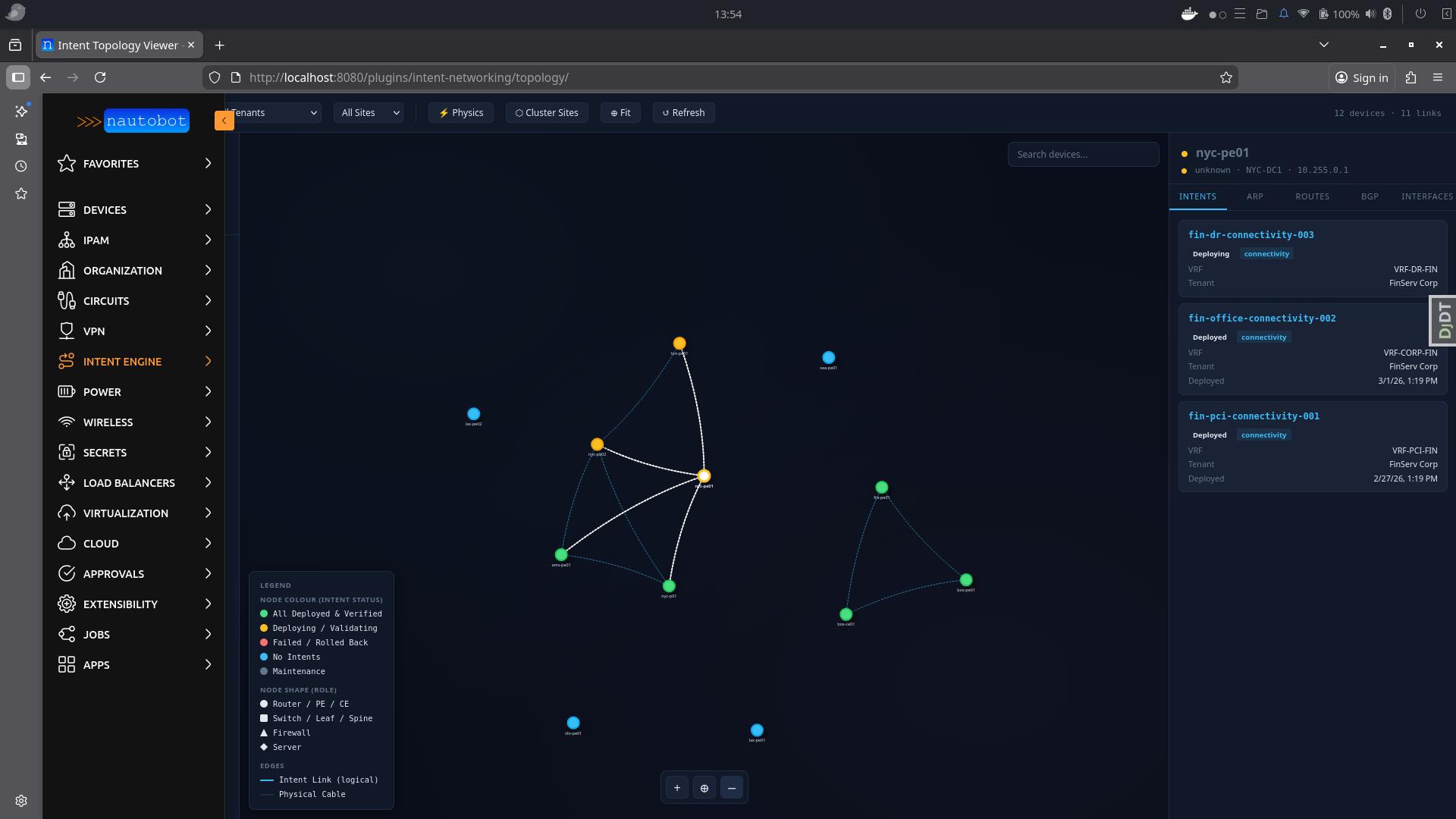
Beyond day-one deployment, the plugin runs a continuous reconciliation job that compares the desired state captured in each intent against the live state collected from devices. Drift is either auto-remediated (with OPA approval) or escalated as a GitHub issue for human review. A built-in real-time topology viewer shows the full network graph, with nodes colour-coded by intent status, expandable interface detail cards, synthesised intent-based edges, and on-hover panels that surface live ARP tables, routing tables, BGP neighbour states, and the exact intents deployed to each device — all without leaving Nautobot.
Architecture
Git Repository (YAML intents)
  │
  ├── Nautobot GitRepository Sync (native pull — recommended)
  │     └── datasources.py callback discovers intents/*.yaml
  │         and creates/updates Intent records automatically
  │
  ├── OR: GitHub Actions CI (legacy push)
  │     ├── pykwalify schema validation
  │     ├── OPA policy check
  │     ├── POST /api/plugins/intent-networking/intents/sync-from-git/
  │     ├── Config rendering + diff (Nautobot Golden Config)
  │     └── Batfish simulation (reachability proof)
  │
  └── Nautobot Jobs (async via Celery)
        ├── IntentResolutionJob   (RD/RT allocation, plan generation)
        ├── IntentDeploymentJob   (Nornir push to devices)
        ├── IntentVerificationJob (BGP / VRF / latency checks)
        ├── IntentRollbackJob     (revert to previous version)
        └── IntentReconciliationJob (scheduled drift detection)
Key Features
- Native Nautobot Git integration — configure a GitRepository with the "intent definitions" content type; Nautobot auto-syncs intent YAML files on every pull (no CI scripts needed)
- Firewall rule intents — declarative firewall policies that render to device ACLs and can be pushed to centralized firewall controllers (Panorama, FortiManager, generic REST)
- 141 intent types across 14 network domains — L2/L3, MPLS, EVPN/VXLAN, Security, WAN, Wireless, Cloud, QoS, Multicast, Management, and more
- YAML-first intent authoring — engineers write what they want, not how to configure it
- Atomic resource allocation — route distinguishers and route targets allocated from pools using
select_for_update(), preventing duplicates even under concurrent deployments - Multi-vendor rendering — Jinja2 templates per platform (Cisco IOS-XE, IOS-XR, Juniper JunOS, Aruba AOS-CX); swap the router, keep the intent
- Policy enforcement — OPA Rego policies checked at PR time and again before each deployment; PCI-DSS, HIPAA, SOC2 compliance built in
- Dry-run deployment —
IntentDeploymentJobaccepts acommit=Falseflag to render and store device configs without pushing to devices; useful for lab testing and pre-change review - Batfish pre-deployment simulation — reachability and isolation proven mathematically before any device is touched
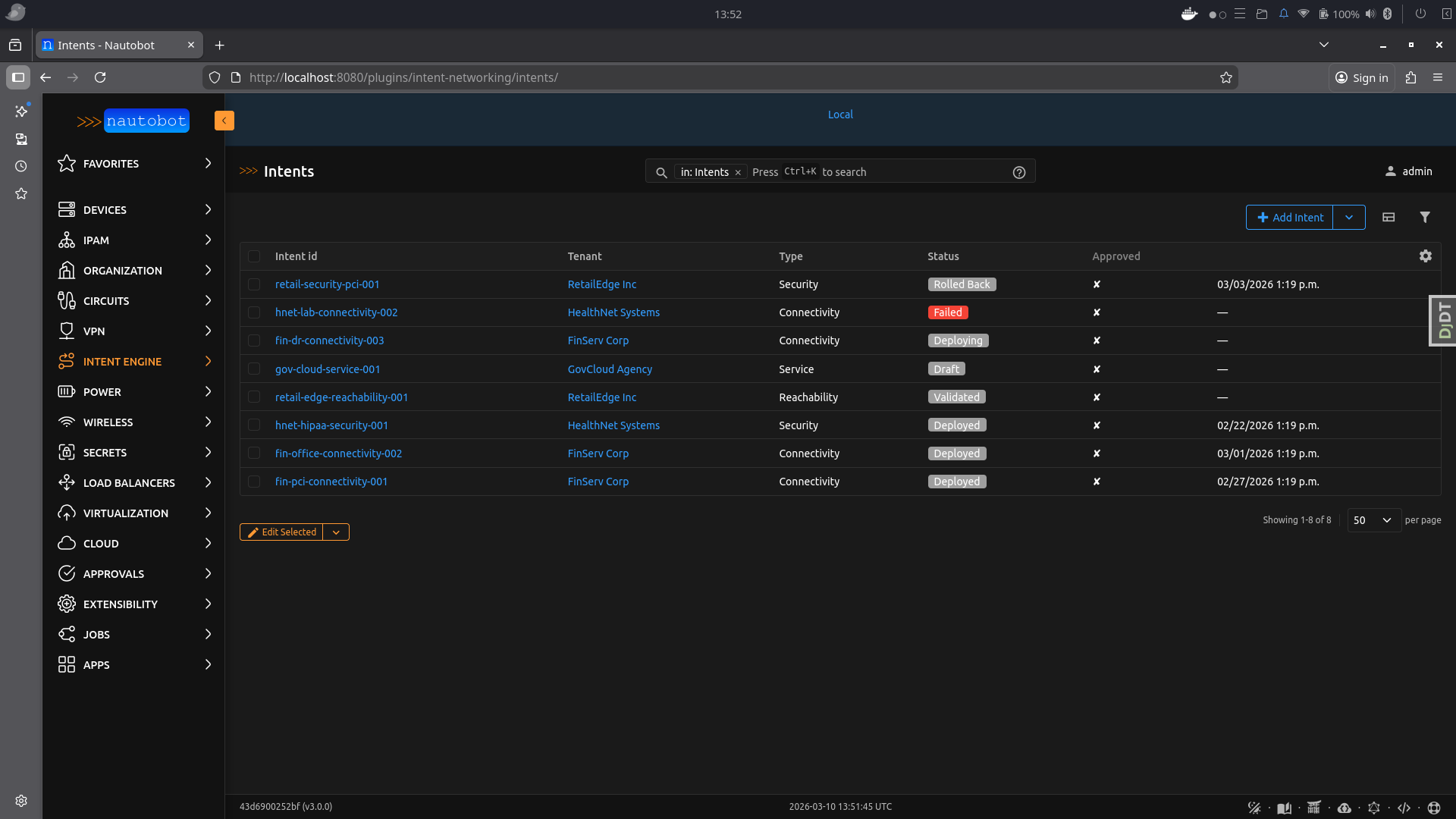
- Full lifecycle tracking — intent status (draft → validated → deploying → deployed → failed → rolled_back → deprecated → retired), every verification result, and all resource allocations stored in Nautobot's database
- Real-time topology viewer — vis.js network graph with:
- Nodes colour-coded by intent status (green = deployed, amber = deploying, red = failed)
- Node shapes by device role (diamond = PE, square = CE, circle = other)
- Synthesised intent-based edges (dashed blue) alongside physical cable connections
- Click-to-expand interface detail cards showing status, type, speed, MTU, MAC, VRF, description and cable peer
- Interactive floating legend/key overlay
- Intent path highlighting with device + edge selection
- Per-device live ARP, routing table, and BGP neighbour data
- Continuous reconciliation — scheduled job detects drift, auto-remediates or raises GitHub issues for manual review
- Automated rollback — failed deployments trigger automatic re-deployment of the previous intent version
- NUTS verification — optional two-tier verification (basic → NUTS) using the Network Unit Testing System with NAPALM/Netmiko for multi-vendor device-state validation supporting 20+ test classes (BGP, OSPF, interfaces, VLANs, VRFs, ARP, LLDP/CDP, ping, users, config drift)
- Dashboard NUTS panel — last 15 NUTS/escalated verification results displayed on the dashboard with pass/fail, engine label, and escalation details
- Git-backed verification reports — per-intent toggle to commit Markdown verification reports to Git, similar to golden-config backup
- Slack + GitHub notifications — deployment events notify via Slack webhook; non-remediable drift automatically creates GitHub issues with full context
Screenshots
Intent Topology Viewer — full-screen network graph with live device data, expandable interface cards, intent path highlighting, and floating legend:
Intent List View — filterable table of all intents with lifecycle status:
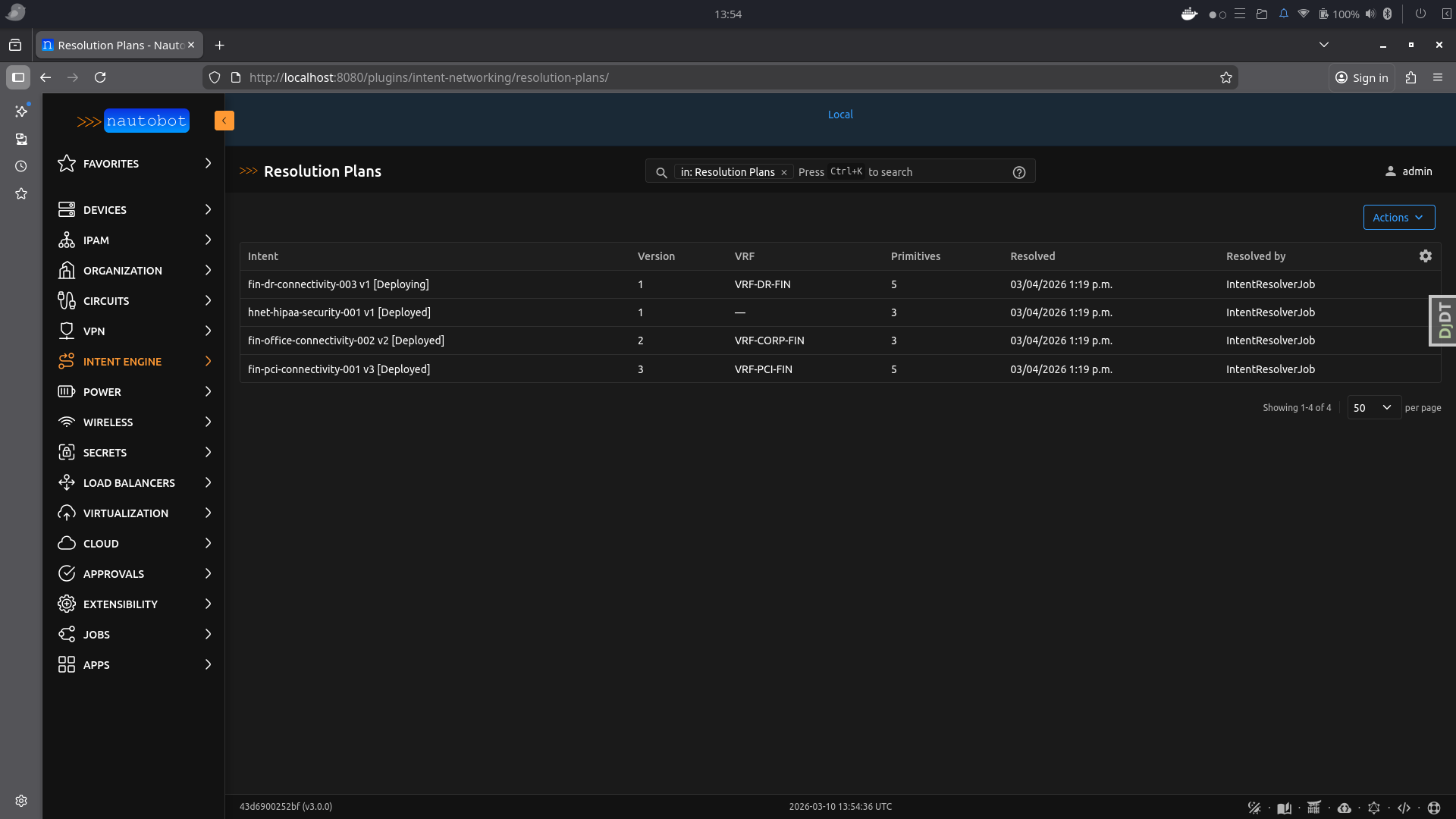
Resolution Plan Detail — vendor-neutral primitives generated for each device, with allocated RD/RT values:
Requirements
| Dependency | Minimum version | Purpose |
|---|---|---|
| Nautobot | 3.0.0 | Platform (Nautobot 3.x required) |
| Python | 3.10–3.12 | Runtime |
| nautobot-golden-config | 2.0.0 | Config rendering and compliance |
| Nornir | 3.3.0 | Device connection and config push |
| nornir-nautobot | 3.0.0 | Nautobot inventory plugin for Nornir |
| nornir-netmiko | 1.0.0 | SSH transport |
| Jinja2 | 3.1.0 | Config template rendering |
| PyYAML | 6.0 | YAML parsing for Git datasource |
| OPA | Any | Policy evaluation (separate service) |
| N8N | Any | Workflow orchestration (optional, separate service) |
Quick Start (Development)
Clone the repo, spin up the full stack, and you're ready to load intents:
git clone https://github.com/dashton956-alt/nautobot-intent-network-app.git
cd nautobot-intent-network-app

# 1. Create creds file (edit before using in any non-local environment)
cp development/creds.example.env development/creds.env

# 2. Build the dev container
invoke build

# 3. Start all services (Nautobot, Celery worker, PostgreSQL, Redis)
invoke start

# 4. Run DB migrations and register Nautobot core data
invoke post_upgrade

# 5. (Optional) Start OPA for policy enforcement — runs on http://localhost:8181
cd development && docker compose -f docker-compose.opa.yml up -d && cd ..
Nautobot is now available at http://localhost:8080 (admin / admin).
To load intents, either:
- Point a Nautobot GitRepository at your network-as-code repo with the "intent definitions" content type selected, then click Sync — intents are discovered and created automatically.
- Or use the REST API:
POST /api/plugins/intent-networking/intents/sync-from-git/.
Installation
1. Install the package
# Core only (Nornir/SSH devices, no Cisco controllers)
poetry add nautobot-app-intent-networking

# With Catalyst Center support
poetry add nautobot-app-intent-networking[catalyst]

# With Meraki support
poetry add nautobot-app-intent-networking[meraki]

# With both Cisco controllers
poetry add nautobot-app-intent-networking[cisco]

# With NUTS verification (multi-vendor device-state testing)
poetry add nautobot-app-intent-networking[nuts]

# Everything
poetry add nautobot-app-intent-networking[all]
Or install from source during development:
git clone https://github.com/dashton956-alt/nautobot-intent-network-app.git
cd nautobot-intent-network-app
poetry install --with dev
2. Add to nautobot_config.py
PLUGINS = [
    "intent_networking",
]

PLUGINS_CONFIG = {
    "intent_networking": {
        # --- Required ---
        "vrf_namespace": "Global",       # must match an existing Nautobot Namespace
        "default_bgp_asn": 65000,        # used when BGP ASN is not specified in an intent
        "vni_pool_name": "my-vni-pool",  # name of a VxlanVniPool you create in the UI

        # --- Secrets Groups (recommended — avoids plaintext credentials) ---
        # Create each group in Nautobot: Secrets → Secrets Groups
        # Device credentials are resolved per device first (see Credential Lookup Order below),
        # then this group is used as the global fallback.
        "device_secrets_group": "Network Device Credentials",
        "nautobot_api_secrets_group": "Nautobot API Token",
        # "servicenow_secrets_group": "ServiceNow Credentials",
        # "github_secrets_group": "GitHub Token",
        # "slack_secrets_group": "Slack Webhook",

        # --- Optional (shown with defaults) ---
        "max_vrfs_per_tenant": 50,
        "max_prefixes_per_vrf": 5000,
        "reconciliation_interval_hours": 1,
        "auto_remediation_enabled": True,

        # --- OPA (leave unset to use defaults) ---
        "opa_verify_ssl": True,
        "opa_ca_bundle": None,       # e.g. "/etc/ssl/opa-ca.pem" for self-signed certs
        "opa_custom_packages": [],   # e.g. ["network.internal.change_freeze"]

        # --- Notifications (leave empty/None to disable) ---
        "slack_webhook_url": None,
        "github_repo": None,         # e.g. "your-org/network-as-code"
    },
}
See development/nautobot_config.py for the full reference with all available settings.
3. Run database migrations
nautobot-server migrate intent_networking
4. Create required Nautobot objects
Intent lifecycle statuses — create in Extras → Statuses (assign to the Intent content type):
| Name | Colour | Description |
|---|---|---|
| Draft | Grey | Newly synced from Git, not yet validated |
| Validated | Blue | Schema + OPA checks passed |
| Deploying | Amber | Deployment in progress |
| Deployed | Green | Successfully deployed and verified |
| Failed | Red | Deployment or verification failed |
| Rolled Back | Orange | Reverted to previous version |
| Deprecated | Grey | Removed from Git repo or superseded |
| Retired | Grey | Non-actionable — remains in Git, reconciliation skips |
Namespace — verify in IPAM → Namespaces that the configured namespace exists (default: "Global"). VRFs and Route Targets are allocated using Nautobot's native IPAM models within this namespace.
VNI Pool — create at least one pool if you deploy any VXLAN/EVPN intents: navigate to Plugins → Intent Engine → VNI Pools → + Add, enter a name (must match vni_pool_name in PLUGINS_CONFIG) and one or more VNI ranges (e.g. 10000-19999). The engine allocates VNIs automatically from this pool.
5. Configure Git integration (recommended)
The preferred way to sync intents is via Nautobot's native Git integration:
- Navigate to Extensibility → Git Repositories → Add
- Enter the repository URL (e.g.
https://github.com/your-org/network-as-code.git) - Select the branch (e.g.
main) - Configure credentials via a Secrets Group if the repo is private
- In Provided Contents, tick "intent definitions"
- Click Create then Sync
Nautobot will clone the repo and scan these directories for intent YAML files:
intents/intent_definitions/intent-definitions/
All .yaml, .yml, and .json files found are parsed and created as Intent records. On subsequent syncs, existing intents are updated and files removed from the repo are automatically deprecated.
Tip: Configure a webhook on your Git hosting provider to trigger a Nautobot sync on every push — this gives you continuous intent delivery.
6. Schedule the reconciliation job (optional)
Via the Nautobot API or admin:
curl -X POST https://nautobot/api/extras/job-schedules/ \
  -H "Authorization: Token $NAUTOBOT_TOKEN" \
  -H "Content-Type: application/json" \
  -d '{
    "name": "Intent Reconciliation - Hourly",
    "job": "intent_networking.jobs.IntentReconciliationJob",
    "interval": "hourly",
    "start_time": "2024-01-01T02:00:00Z"
  }'
Writing an Intent
Intents live in your network-as-code Git repository as YAML files.
network-as-code/
  intents/
    connectivity/
      fin-pci-connectivity-001.yaml
    security/
      corp-segmentation-001.yaml
    reachability/
      branch-wan-001.yaml
Example — connectivity intent:
intent:
  id: fin-pci-connectivity-001
  type: connectivity
  version: 1
  tenant: acme-corp
  change_ticket: CHG0012345
  description: "Finance servers to Stripe payment gateway — PCI-DSS"

  source:
    group: finance-servers
    sites: [dc-east, dc-west]

  destination:
    external: true
    provider: stripe
    prefixes: ["52.84.0.0/14", "54.182.0.0/16"]

  policy:
    compliance: PCI-DSS
    encryption: required
    max_latency_ms: 20
    tenant_asn: 64612

  isolation:
    deny_groups: [employee-lan, guest-wifi]
    deny_protocols: [telnet, http, ftp, snmpv1, snmpv2]
With native Git integration (recommended): commit this file to your repo, push, and trigger a Nautobot GitRepository sync. The intent is automatically created in Nautobot with status "Draft".
With CI pipeline (legacy push): your pipeline parses the YAML and POSTs it to the /intents/sync-from-git/ API endpoint.
After the intent is created, the lifecycle continues through resolution → OPA validation → deployment → verification.
Git Integration
The plugin supports two modes for syncing intents from Git:
Native GitRepository (recommended)
Uses Nautobot's built-in GitRepository datasource framework. Nautobot clones and pulls the repo; the plugin's datasources.py callback auto-discovers intent YAML files and creates/updates records.
| Feature | Detail |
|---|---|
| Configuration | Extensibility → Git Repositories → tick "intent definitions" |
| Trigger | Manual sync, scheduled sync, or webhook-triggered |
| Directories searched | intents/, intent_definitions/, intent-definitions/ |
| File formats | .yaml, .yml, .json |
| Orphan handling | Files removed from repo → intents deprecated automatically |
| Provenance | git_commit_sha, git_branch, git_repository FK stored on each Intent |
Legacy Push API
A CI pipeline (e.g. GitHub Actions) parses the YAML and POSTs to the REST endpoint. Useful when you need pre-merge validation (OPA, Batfish) before the intent reaches Nautobot.
curl -X POST https://nautobot/api/plugins/intent-networking/intents/sync-from-git/ \
  -H "Authorization: Token $NAUTOBOT_TOKEN" \
  -H "Content-Type: application/json" \
  -d '{
    "intent_data": { ... },
    "git_commit_sha": "abc123",
    "git_branch": "main",
    "git_pr_number": 42
  }'
Both modes can coexist — the native GitRepository is the source of truth for intent definitions, while the CI pipeline can additionally run pre-merge checks.
OPA Policy Enforcement
The app integrates with Open Policy Agent (OPA) at two points in the intent lifecycle:
| Check point | When | OPA package queried |
|---|---|---|
| Pre-resolution | Before primitives are generated (status → Validated) | network.common, network.compliance, network.capacity, plus per-tenant and per-type packages |
| Auto-remediation approval | During reconciliation, before drift is remediated | network.remediation |
If OPA returns any deny decisions the intent is blocked and the reasons are surfaced on the Intent detail page. Auto-remediation decisions are evaluated separately — if the remediation package returns auto_remediate = false the drift is left for manual review and a GitHub issue is created.
Setting up OPA
Option A — use an existing OPA instance
Set OPA_URL to the URL of your existing OPA service (see Environment Variables).
Option B — run the development OPA container
A ready-made Docker Compose file is provided for local development and testing.
# Start OPA with hot-reload watching ./development/opa/policies/
docker compose -f development/docker-compose.opa.yml up -d
OPA loads all .rego files from development/opa/policies/ on start and reloads automatically when files change.
App Configuration
Add these keys to PLUGINS_CONFIG["intent_networking"] in nautobot_config.py:
PLUGINS_CONFIG = {
    "intent_networking": {
        # ... other settings ...

        # --- OPA (all optional) ---
        # Toggle auto-remediation globally (default: True).
        # When False, drift is always left for manual intervention.
        "auto_remediation_enabled": True,

        # Verify the OPA server's TLS certificate (default: True).
        # Set to False for self-signed certs in dev, or supply a CA bundle.
        "opa_verify_ssl": True,

        # Path to a custom CA bundle PEM file for OPA TLS (default: None).
        "opa_ca_bundle": None,  # e.g. "/etc/ssl/opa-ca.pem"

        # Additional Rego package paths to query for every intent,
        # beyond the built-in common/compliance/capacity checks (default: []).
        "opa_custom_packages": [],  # e.g. ["network.internal.change_freeze"]
    },
}
Built-in Policy Packages
| Package | What it enforces |
|---|---|
network.common |
Required fields: change_ticket format, positive version, description ≥ 10 chars, tenant present; approved_by required for high-impact intent types |
network.compliance |
PCI-DSS (encryption, protocol, IPSec strength), HIPAA (wireless/cloud controls), SOC2 (SNMPv3), blocks open Wi-Fi and cloud security group rules permitting SSH/RDP from 0.0.0.0/0 |
network.capacity |
BGP peer limits (8 eBGP, 64 iBGP per intent), VLAN ID range 1–4094, scope.devices 1–50 |
network.remediation |
Auto-remediation: low-risk types approved for simple/missing drift; high-risk types always blocked |
network.customers.<tenant_slug> |
Per-tenant rules queried when a matching tenant slug package exists |
network.intent_types.<type> |
Per-intent-type rules queried when a matching type package exists |
Running the Integration Tests
A test suite exercises both the OPA HTTP API directly and the opa_client.py module layer.
cd development

# Start OPA, run 61 tests, then stop OPA
bash run_opa_tests.sh

# Leave the OPA container running after tests finish
KEEP_OPA=1 bash run_opa_tests.sh

# Run tests against an already-running OPA container
pytest test_opa_integration.py -v
Writing Custom Policies
Add .rego files under development/opa/policies/network/ (or any path mounted into OPA). Use the deny[msg] pattern:
package network.internal.change_freeze

# Block all deployments during a maintenance window
deny[msg] {
    input.metadata.tenant == "acme-corp"
    msg := "Change freeze active for acme-corp until 2025-02-01"
}
Then register the package in PLUGINS_CONFIG:
"opa_custom_packages": ["network.internal.change_freeze"]
REST API
All endpoints are under /api/plugins/intent-networking/.
Authentication: Authorization: Token <nautobot-token>
Intent Lifecycle
| Method | Endpoint | Description |
|---|---|---|
GET |
/intents/ |
List all intents (filterable by tenant, type, status, git_repository) |
POST |
/intents/ |
Create a new intent |
GET |
/intents/{id}/ |
Intent detail |
PUT/PATCH |
/intents/{id}/ |
Update an intent |
DELETE |
/intents/{id}/ |
Delete an intent |
POST |
/intents/sync-from-git/ |
Create/update intent from CI pipeline (legacy push) |
POST |
/intents/{id}/resolve/ |
Trigger intent resolution job |
POST |
/intents/{id}/deploy/ |
Trigger deployment (requires deploy_intent permission) |
GET |
/intents/{id}/status/ |
Poll lifecycle status + latest verification |
POST |
/intents/{id}/rollback/ |
Trigger rollback (requires rollback_intent permission) |
GET |
/intents/{id}/verifications/ |
Verification history |
Topology Viewer
| Method | Endpoint | Description |
|---|---|---|
GET |
/topology/ |
Full topology graph (nodes + edges) |
GET |
/topology/filters/ |
Available filter values (tenants, sites, intents) |
GET |
/topology/device/<name>/live/ |
Live device data: interfaces, ARP, routing, BGP |
GET |
/topology/intent/<id>/highlight/ |
Devices + edges for intent path highlighting |
Read-Only Resources
| Method | Endpoint | Description |
|---|---|---|
GET |
/resolution-plans/ |
List resolution plans |
GET |
/resolution-plans/{id}/ |
Plan detail with affected devices and primitives |
GET |
/verification-results/ |
List verification results |
GET |
/verification-results/{id}/ |
Verification detail with per-check breakdown |
Topology Viewer
The topology viewer is accessible at /plugins/intent-networking/topology/ and provides a full-screen interactive network graph.
Features
- Node colouring — green (deployed), amber (deploying), red (failed), grey (other)
- Node shapes — diamond (PE router), square (CE router), circle (other roles)
- Edge types — solid lines for physical cable connections, dashed blue lines for intent-based logical connections
- Interactive legend — floating key in the bottom-left showing all node colours, shapes, and edge types
- Click-to-select — click a device node to open the right-hand detail panel
- Expandable interface cards — each interface row expands to show: status, type, speed, duplex, MTU, MAC address, mode, VRF, LAG, cable peer, IP addresses, and description
- Interface summary — count of total interfaces with up/down breakdown
- Intent highlighting — click an intent in the left panel to highlight its path (affected devices + edges glow)
- Live data tabs — ARP table, routing table, BGP neighbours collected via Nornir
- Filtering — filter the graph by tenant, site, or deployed intent
- Physics simulation — force-directed layout with configurable repulsion, spring length, and overlap avoidance
Permissions
Three custom permissions are defined beyond the standard Nautobot CRUD permissions:
| Permission | Who should have it |
|---|---|
approve_intent |
Senior engineers / network leads |
deploy_intent |
Senior engineers (or service account used by N8N) |
rollback_intent |
Senior engineers / on-call engineers |
Standard view_intent, add_intent, change_intent permissions are auto-generated and should be granted to all network engineers.
Environment Variables
Required on the Nautobot worker container:
NAUTOBOT_TOKEN          # Nautobot API token for internal job calls
NAUTOBOT_URL            # Nautobot base URL (default: http://localhost:8080)
OPA_URL                 # OPA service URL (default: http://opa:8181)
TEMPLATES_DIR           # Path to Jinja2 templates directory
DEVICE_USERNAME         # SSH username — last-resort fallback (see Credential Lookup Order)
DEVICE_PASSWORD         # SSH password — last-resort fallback (see Credential Lookup Order)
Optional:
SLACK_WEBHOOK_URL       # Slack notifications on deploy/fail/rollback
GITHUB_TOKEN            # GitHub issue creation for non-auto-remediable drift
Credential Lookup Order
Device SSH credentials are resolved in this order for every deployment and verification job:
- Per-device SecretsGroup — if the device record in Nautobot has a SecretsGroup assigned directly (Device detail → Secrets Group field), those credentials are used first.
- Global
device_secrets_group— the SecretsGroup named byPLUGINS_CONFIG["intent_networking"]["device_secrets_group"]is used as a fallback for devices without their own group. - Environment variables —
DEVICE_USERNAME/DEVICE_PASSWORDare used as a last resort if neither a per-device nor a global SecretsGroup is configured.
Using per-device or global SecretsGroups is strongly recommended over plaintext environment variables, especially in production.
Running the Tests
# Run all tests inside the development Docker environment
invoke tests

# Run with verbose output
docker compose exec nautobot nautobot-server test intent_networking --verbosity=2

# Run only a specific test class
docker compose exec nautobot nautobot-server test intent_networking.tests.test_models

# Lint
invoke ruff --fix

# Pylint
invoke pylint
OPA Rego unit tests (no running container needed):
docker run --rm \
  -v "$(pwd)/development/opa/policies:/policies:ro" \
  -v "$(pwd)/development/opa/tests:/tests:ro" \
  openpolicyagent/opa:latest test /policies /tests --v0-compatible -v
Or use the helper script (starts OPA, runs tests, stops OPA):
cd development
bash run_opa_tests.sh           # run Rego unit tests, then stop OPA
KEEP_OPA=1 bash run_opa_tests.sh        # leave OPA running after tests
ATTACH_NETWORK=1 bash run_opa_tests.sh  # also connect OPA to the nautobot stack network
For full development environment setup including Docker Compose, see the developer documentation.
Models
| Model | Purpose |
|---|---|
Intent |
Central record for a network intent — one row per YAML file. Stores intent data, lifecycle status, Git provenance, rendered configs (dry-run output), and links to its GitRepository |
ResolutionPlan |
Resolved vendor-neutral primitives for a specific intent version, with affected device list |
VerificationResult |
Result of each verification/reconciliation check, including per-device checks, SLA measurements, drift details, and GitHub issue URL |
VxlanVniPool |
Named pool of VXLAN Network Identifier ranges. The engine allocates VNIs atomically from these ranges when deploying VXLAN/EVPN intents. Managed via Plugins → Intent Engine → VNI Pools |
Nautobot ipam.VRF |
VRF with auto-generated RD — replaces custom RD pools (native model) |
Nautobot ipam.RouteTarget |
Route Target with description-based tracking (native model) |
Nautobot ipam.Namespace |
Organisational boundary for VRFs (native model) |
Documentation
- App Overview — Architecture, models, and design decisions
- Getting Started — Installation and first steps
- Intent Types Reference — All 134 supported intent types across 14 domains
- Use Cases — Real-world examples for each domain
- Extending the App — Add custom intent types, adapters, templates, and policies
- Developer Guide — Local development environment setup
Project Structure
intent_networking/
├── __init__.py            App registration (NautobotAppConfig), settings, metadata
├── models.py              Intent, lifecycle models, resource pool models (VNI, Tunnel, Loopback, VLAN)
├── datasources.py         Nautobot GitRepository datasource — auto-syncs intent YAML files
├── resolver.py            Intent → vendor-neutral primitives (Nautobot ORM queries)
├── allocations.py         Atomic VRF/RT/VNI/Tunnel/Loopback/VLAN allocation via native IPAM
├── jobs.py                Seven Nautobot Jobs (sync, resolve, preview, deploy, verify, rollback, reconcile)
├── controller_adapters.py Vendor-specific configuration generation
├── events.py              Internal event bus for lifecycle event dispatch
├── topology_api.py        REST endpoints for topology graph, live device data, intent highlighting
├── topology_view.py       Django view serving the topology viewer page
├── notifications.py       Slack, GitHub, PagerDuty, ServiceNow notifications
├── opa_client.py          OPA HTTP client for policy and auto-remediation decisions
├── metrics.py             Prometheus metrics and dashboard counters
├── secrets.py             Nautobot Secrets Group integration for credentials
├── views.py               Nautobot UI views (Intent CRUD, dashboard, detail pages)
├── tables.py              django-tables2 table definitions for list views
├── forms.py               Django model forms + filter forms
├── filters.py             FilterSet definitions (tenant, type, status, git_repository)
├── graphql.py             GraphQL type definitions for all models
├── navigation.py          Nautobot navigation menu items
├── urls.py                UI URL routing
├── api/
│   ├── serializers.py     DRF serializers for all models + sync-from-git input
│   ├── views.py           REST API viewsets + custom lifecycle actions
│   └── urls.py            API URL routing including topology endpoints
├── templates/
│   └── intent_networking/
│       ├── dashboard.html         Main dashboard with status tiles and charts
│       └── topology_viewer.html   Full-screen vis.js topology viewer with legend
├── jinja_templates/       Vendor-specific config templates (Jinja2)
├── migrations/
│   ├── 0001_initial.py
│   ├── 0002–0005           Model evolution and Git repository FK
│   └── 0006_native_ipam.py Replace custom RD/RT pools with native IPAM
└── tests/
    ├── fixtures.py        Shared test data factories
    ├── test_models.py     Model unit tests
    ├── test_api.py        API endpoint tests
    ├── test_views.py      UI view tests
    ├── test_forms.py      Form validation tests
    └── test_filters.py    FilterSet tests

development/
├── nautobot_config.py     Full development config with all plugin settings
├── seed_data.py           Seed script: tenants, locations, devices, intents, plans, verifications
├── seed_interfaces.py     Seed script: interfaces, IPs, MAC addresses for all devices
├── docker-compose.*.yml   Docker Compose files for local development
└── Dockerfile             Development container image
Contributing
Pull requests are welcome. For significant changes, please open an issue first to discuss the approach.
Before submitting a PR:
invoke ruff --fix   # Must pass
invoke pylint       # Must pass
invoke tests        # Must pass
Questions
For questions or issues, please open a GitHub issue or reach out on the Network to Code Slack in the #nautobot channel. Sign up here if you don't have an account.
Release history Release notifications | RSS feed


Download files
Download the file for your platform. If you're not sure which to choose, learn more about installing packages.
Source Distribution
Built Distribution
Filter files by name, interpreter, ABI, and platform.
If you're not sure about the file name format, learn more about wheel file names.
Copy a direct link to the current filters
File details
Details for the file nautobot_app_intent_networking-2.0.8.tar.gz.
File metadata
- Download URL: nautobot_app_intent_networking-2.0.8.tar.gz
- Upload date:
- Size: 2.4 MB
- Tags: Source
- Uploaded using Trusted Publishing? Yes
- Uploaded via: twine/6.1.0 CPython/3.13.7
File hashes
| Algorithm | Hash digest | |
|---|---|---|
| SHA256 |
ca2443fed253fa2e3fd62f78f4f8ad46154a01f172f4204a75e71501caef5cf4
|
|
| MD5 |
61d37c617b1ce5d50910ab948a464a94
|
|
| BLAKE2b-256 |
e7fb491cc429f64fbf00f01414ac559e49bc4e815d0d898164c0d4ecd991c802
|
Provenance
The following attestation bundles were made for nautobot_app_intent_networking-2.0.8.tar.gz:
Publisher:
release.yml on dashton956-alt/nautobot-intent-network-app
-
Statement:
-
Statement type:
https://in-toto.io/Statement/v1 -
Predicate type:
https://docs.pypi.org/attestations/publish/v1 -
Subject name:
nautobot_app_intent_networking-2.0.8.tar.gz -
Subject digest:
ca2443fed253fa2e3fd62f78f4f8ad46154a01f172f4204a75e71501caef5cf4 - Sigstore transparency entry: 1349802716
- Sigstore integration time:
-
Permalink:
dashton956-alt/nautobot-intent-network-app@bdcef064b4192450cee4b1868dd61e2987da852d -
Branch / Tag:
refs/tags/v2.0.8 - Owner: https://github.com/dashton956-alt
-
Access:
public
-
Token Issuer:
https://token.actions.githubusercontent.com -
Runner Environment:
github-hosted -
Publication workflow:
release.yml@bdcef064b4192450cee4b1868dd61e2987da852d -
Trigger Event:
release
-
Statement type:
File details
Details for the file nautobot_app_intent_networking-2.0.8-py3-none-any.whl.
File metadata
- Download URL: nautobot_app_intent_networking-2.0.8-py3-none-any.whl
- Upload date:
- Size: 2.8 MB
- Tags: Python 3
- Uploaded using Trusted Publishing? Yes
- Uploaded via: twine/6.1.0 CPython/3.13.7
File hashes
| Algorithm | Hash digest | |
|---|---|---|
| SHA256 |
5c470a3f480e2f88aeee4cb10bb8ab2d0e601627b0e063a1a08221c4e82cd241
|
|
| MD5 |
4293ffa2939022a12dd5b3437b775fe2
|
|
| BLAKE2b-256 |
1b14ee6a05d742dc6457567ac8508748cca195e10a7624d11fc82fecd7b69c2c
|
Provenance
The following attestation bundles were made for nautobot_app_intent_networking-2.0.8-py3-none-any.whl:
Publisher:
release.yml on dashton956-alt/nautobot-intent-network-app
-
Statement:
-
Statement type:
https://in-toto.io/Statement/v1 -
Predicate type:
https://docs.pypi.org/attestations/publish/v1 -
Subject name:
nautobot_app_intent_networking-2.0.8-py3-none-any.whl -
Subject digest:
5c470a3f480e2f88aeee4cb10bb8ab2d0e601627b0e063a1a08221c4e82cd241 - Sigstore transparency entry: 1349802767
- Sigstore integration time:
-
Permalink:
dashton956-alt/nautobot-intent-network-app@bdcef064b4192450cee4b1868dd61e2987da852d -
Branch / Tag:
refs/tags/v2.0.8 - Owner: https://github.com/dashton956-alt
-
Access:
public
-
Token Issuer:
https://token.actions.githubusercontent.com -
Runner Environment:
github-hosted -
Publication workflow:
release.yml@bdcef064b4192450cee4b1868dd61e2987da852d -
Trigger Event:
release
-
Statement type:






