
Nautobot Device Onboarding




Overview
The nautobot-device-onboarding plugin is using the netmiko and NAPALM libraries to simplify the onboarding process of a new device into Nautobot down to, in many cases, an IP Address and a Location. In some cases, the user may also have to specify a specific Device Platform and Device Port.
Regardless, the Onboarding App greatly simplifies the onboarding process by allowing the user to specify a small amount of info and having the app populate a much larger amount of device data in Nautobot.
Support Matrix (Sync Devices From Network)
| Data Attribute | Cisco IOS | Cisco XE | Cisco NXOS | Cisco XR | Cisco WLC | Juniper Junos | Arista EOS | F5 | HP Comware | Palo Alto Panos | Aruba AOSCX | Aruba OS | Brocade/Ruckus Fastiron | HP Procurve |
|---|---|---|---|---|---|---|---|---|---|---|---|---|---|---|
| Hostname | ✅ | ✅ | ✅ | 🧪 | ✅ | ✅ | ✅ | 🧪 | 🧪 | 🧪 | ✅ | 🧪 | 🧪 | 🧪 |
| Platform | ✅ | ✅ | ✅ | 🧪 | ✅ | ✅ | ✅ | 🧪 | 🧪 | 🧪 | ✅ | 🧪 | 🧪 | 🧪 |
| Manufacturer | ✅ | ✅ | ✅ | 🧪 | ✅ | ✅ | ✅ | 🧪 | 🧪 | 🧪 | ✅ | 🧪 | 🧪 | 🧪 |
| Serial Number | ✅ | ✅ | ✅ | 🧪 | ✅ | ✅ | ✅ | 🧪 | 🧪 | 🧪 | ✅ | 🧪 | 🧪 | 🧪 |
| Device Type | ✅ | ✅ | ✅ | 🧪 | ✅ | ✅ | ✅ | 🧪 | 🧪 | 🧪 | ✅ | 🧪 | 🧪 | 🧪 |
| Mgmt Interface | ✅ | ✅ | ✅ | 🧪 | ✅ | ✅ | ✅ | 🧪 | 🧪 | 🧪 | ✅ | 🧪 | 🧪 | 🧪 |
| Mgmt IP Address | ✅ | ✅ | ✅ | 🧪 | ✅ | ✅ | ✅ | 🧪 | 🧪 | 🧪 | ✅ | 🧪 | 🧪 | 🧪 |
| Virtual Chassis (Stacks) | ✅ | ✅ | ❌ | ❌ | ❌ | ❌ | ❌ | ❌ | ❌ | ❌ | ✅ | ❌ | ❌ | ❌ |
Support Matrix (Sync Data From Network)
| Interfaces | Cisco IOS | Cisco XE | Cisco NXOS | Cisco XR | Cisco WLC | Juniper Junos | Arista EOS | F5 | Palo Alto Panos | Aruba AOSCX | Aruba OS | Brocade/Ruckus Fastiron | HP Procurve |
|---|---|---|---|---|---|---|---|---|---|---|---|---|---|
| Name | ✅ | ✅ | ✅ | 🧪 | ❌ | ✅ | ✅ | 🧪 | 🧪 | ✅ | 🧪 | 🧪 | 🧪 |
| IP Address | ✅ | ✅ | ✅ | 🧪 | ❌ | ✅ | ✅ | 🧪 | 🧪 | ✅ | 🧪 | 🧪 | 🧪 |
| Type | ✅ | ✅ | ✅ | 🧪 | ❌ | ✅ | ✅ | 🧪 | 🧪 | ✅ | 🧪 | 🧪 | 🧪 |
| MTU | ✅ | ✅ | ✅ | 🧪 | ❌ | ✅ | ✅ | 🧪 | 🧪 | ✅ | 🧪 | 🧪 | 🧪 |
| Description | ✅ | ✅ | ✅ | 🧪 | ❌ | ✅ | ✅ | 🧪 | ❌ | ✅ | 🧪 | 🧪 | 🧪 |
| Mac Address | ✅ | ✅ | ✅ | 🧪 | ❌ | ✅ | ✅ | 🧪 | 🧪 | ✅ | 🧪 | 🧪 | 🧪 |
| Link Status | ✅ | ✅ | ✅ | 🧪 | ❌ | ✅ | ✅ | 🧪 | 🧪 | ✅ | 🧪 | 🧪 | 🧪 |
| 802.1Q mode | ✅ | ✅ | ✅ | 🧪 | ❌ | ✅ | ✅ | 🧪 | 🧪 | ✅ | 🧪 | 🧪 | 🧪 |
| Lag Member | ✅ | ✅ | ✅ | 🧪 | ❌ | ✅ | ✅ | 🧪 | 🧪 | ✅ | 🧪 | 🧪 | 🧪 |
| Vrf Membership | ✅ | ✅ | ✅ | 🧪 | ❌ | ✅ | ✅ | 🧪 | 🧪 | ✅ | 🧪 | 🧪 | 🧪 |
| Software Version | ✅ | ✅ | ✅ | 🧪 | ❌ | ✅ | ✅ | 🧪 | 🧪 | ✅ | 🧪 | 🧪 | 🧪 |
| VLANS | Cisco IOS | Cisco XE | Cisco XR | Cisco NXOS | Cisco WLC | Juniper Junos | Arista EOS | F5 | Palo Alto Panos | Aruba AOSCX | Aruba OS | Brocade/Ruckus Fastiron | HP Procurve |
|---|---|---|---|---|---|---|---|---|---|---|---|---|---|
| Untagged VLANs | ✅ | ✅ | ❌ | ✅ | ❌ | ✅ | ✅ | 🧪 | ❌ | ✅ | 🧪 | 🧪 | 🧪 |
| Tagged VLANs | ✅ | ✅ | ❌ | ✅ | ❌ | ✅ | ✅ | 🧪 | 🧪 | ✅ | 🧪 | 🧪 | 🧪 |
| Cabling | Cisco IOS | Cisco XE | Cisco XR | Cisco NXOS | Cisco WLC | Juniper Junos | Arista EOS | F5 | Palo Alto Panos | Aruba AOSCX | Aruba OS | Brocade/Ruckus Fastiron | HP Procurve |
|---|---|---|---|---|---|---|---|---|---|---|---|---|---|
| Terminations A | 🧪 | 🧪 | ❌ | 🧪 | ❌ | 🧪 | ❌ | 🧪 | ❌ | 🧪 | 🧪 | 🧪 | 🧪 |
| Terminations B | 🧪 | 🧪 | ❌ | 🧪 | ❌ | 🧪 | ❌ | 🧪 | ❌ | 🧪 | 🧪 | 🧪 | 🧪 |
| Legend |
|---|
| ✅ - Supported and stable. |
| ❌ - No current support. |
| 🧪 - Supported, but has limited testing. |
Screenshots
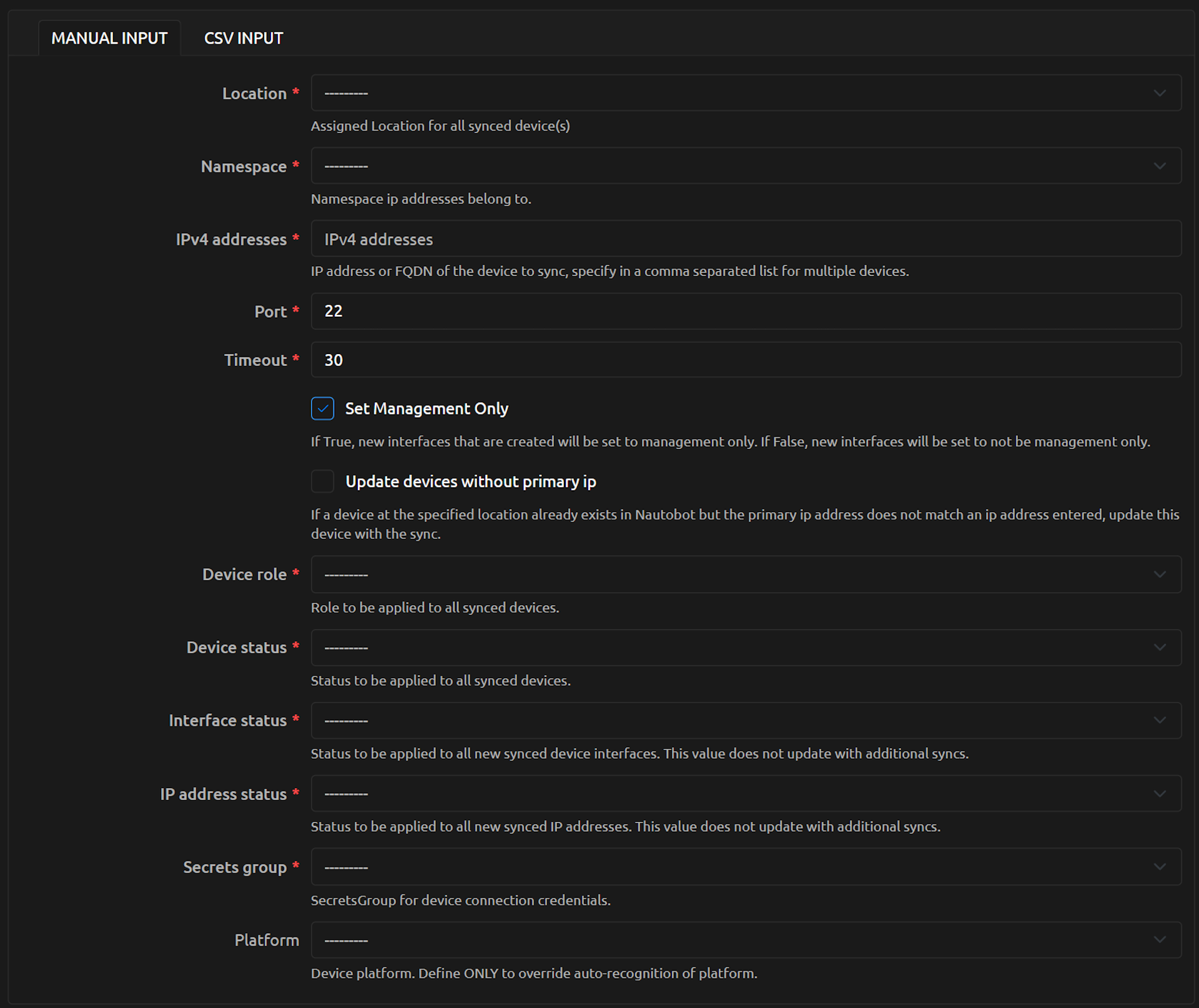
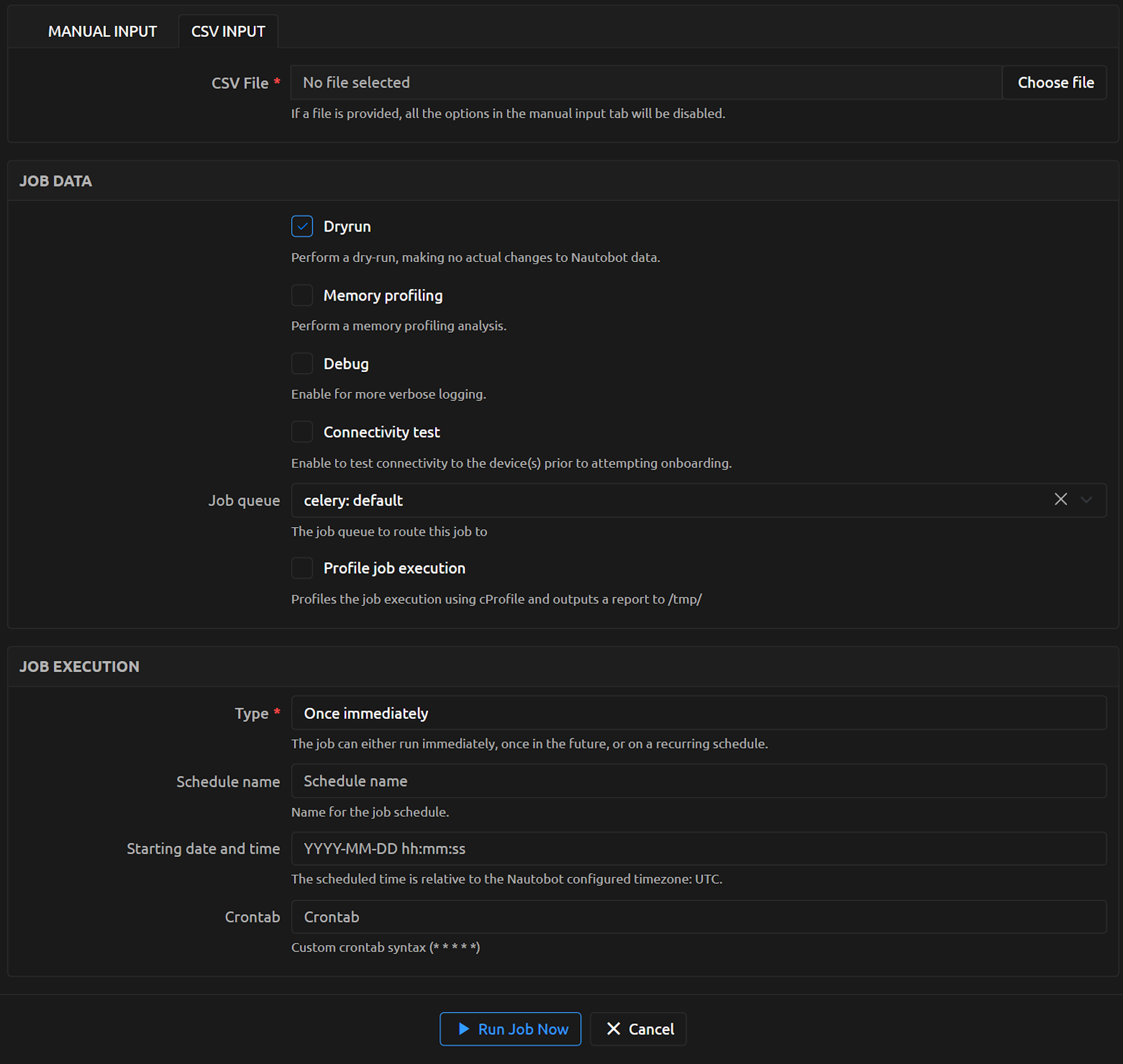
Device Onboarding is a Job that allows you to provide a few required pieces of information and onboard the device.
As Job data and Job execution will be same for both Manual Input and CSV Input.
Manual Input:
CSV Input:
Try it out!
This App is installed in the Nautobot Community Sandbox found over at demo.nautobot.com!
For a full list of all the available always-on sandbox environments, head over to the main page on networktocode.com.
Documentation
Full web-based HTML documentation for this app can be found over on the Nautobot Docs website:
- User Guide - Overview, Using the App, Getting Started.
- Administrator Guide - How to Install, Configure, Upgrade, or Uninstall the App.
- Developer Guide - Extending the App, Code Reference, Contribution Guide.
- Release Notes / Changelog.
- Frequently Asked Questions.
Contributing to the Docs
You can find all the Markdown source for the App documentation under the docs folder in this repository. For simple edits, a Markdown capable editor is sufficient: clone the repository and edit away.
If you need to view the fully generated documentation site, you can build it with mkdocs. A container hosting the docs will be started using the invoke commands (details in the Development Environment Guide) on http://localhost:8001. As your changes are saved, the live docs will be automatically reloaded.
Any PRs with fixes or improvements are very welcome!
Questions
For any questions or comments, please check the FAQ first. Feel free to also swing by the Network to Code Slack (channel #nautobot), sign up here if you don't have an account.
1 maintainer

Release files for nautobot-device-onboarding 5.6.0
For a detailed explanation of source distributions (sdists) and built distributions (wheels), please see the package formats documentation.
Source distribution (sdist)
| File | Size | Uploaded | |
|---|---|---|---|
| nautobot_device_onboarding-5.6.0.tar.gz | 4.1 MB | Details |
Built distribution (wheel)
| File | Interpreter | ABI | Platform | Reset |
|---|---|---|---|---|
| nautobot_device_onboarding-5.6.0-py3-none-any.whl | Python 3 | none | any | Details |
Total release size: 8.4 MB
Release files / nautobot_device_onboarding-5.6.0.tar.gz
| Download URL | nautobot_device_onboarding-5.6.0.tar.gz |
|---|---|
| Size | 4.1 MB |
| Tags | Source |
|
SHA-256 checksum How to use checksums |
5a3415e2fb4c2609c34b98e051a20c86246c48a5995e2e80dfd32354f3e3817d
|
|
BLAKE2b-256 checksum How to use checksums |
9add45d978cdcf5dcc5dd720590651cd54f71372e249a879bf9c0be938a814cc
|
| Upload date | |
|
Uploaded using Trusted Publishing? What is trusted publishing? |
Yes |
| Uploaded via |
twine/6.1.0 CPython/3.13.7
|
Provenance
Provenance describes where a file came from. On PyPI, provenance is shared via attestations, which provide a verifiable record of the build or publishing details. View details, limitations and caveats.


PyPI Publish Attestation
PyPI verified that this artifact, at this checksum, originated from the publisher listed below.
Signed by GitHub Actions, verified by PyPI on Sep 25, 2026.
Transparency logRelease files / nautobot_device_onboarding-5.6.0-py3-none-any.whl
| Download URL | nautobot_device_onboarding-5.6.0-py3-none-any.whl |
|---|---|
| Size | 4.3 MB |
| Tags | Python 3 |
|
SHA-256 checksum How to use checksums |
d900a4f54686de2f9cee1d34a55187b3de06815f539c1874e5e23a7f96ea6f10
|
|
BLAKE2b-256 checksum How to use checksums |
53f3a8495d9e0f19d03d5381737fdbcebf6e594dee1db2b89c7f28d903fba087
|
| Upload date | |
|
Uploaded using Trusted Publishing? What is trusted publishing? |
Yes |
| Uploaded via |
twine/6.1.0 CPython/3.13.7
|
Provenance
Provenance describes where a file came from. On PyPI, provenance is shared via attestations, which provide a verifiable record of the build or publishing details. View details, limitations and caveats.
PyPI Publish Attestation
PyPI verified that this artifact, at this checksum, originated from the publisher listed below.
Signed by GitHub Actions, verified by PyPI on Sep 25, 2026.
Transparency log













