
Nautobot Plugin Nornir




Overview
A plugin for Nautobot, that intends to be a small shim layer between nornir-nautobot and other plugins. The primary abilities that the plugin provides is a native Nornir ORM based inventory and a credential manager.
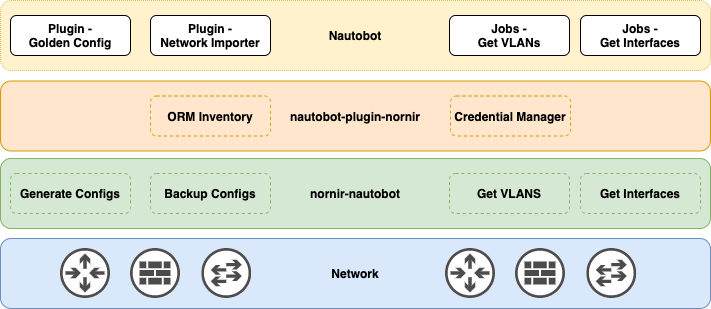
As of the writing of this readme, the only plugin leveraging this plugin is the golden-config. However, future plugins are planned, such as the "network importer".
That being said, there is currently little reason to install this plugin by itself, without an enabler, which can be seen represented as the white rectangles inside the yellow rectangle in the diagram above. An enabler could be a Plugin, Job, or another piece of code like a Chatops command.
Screenshots
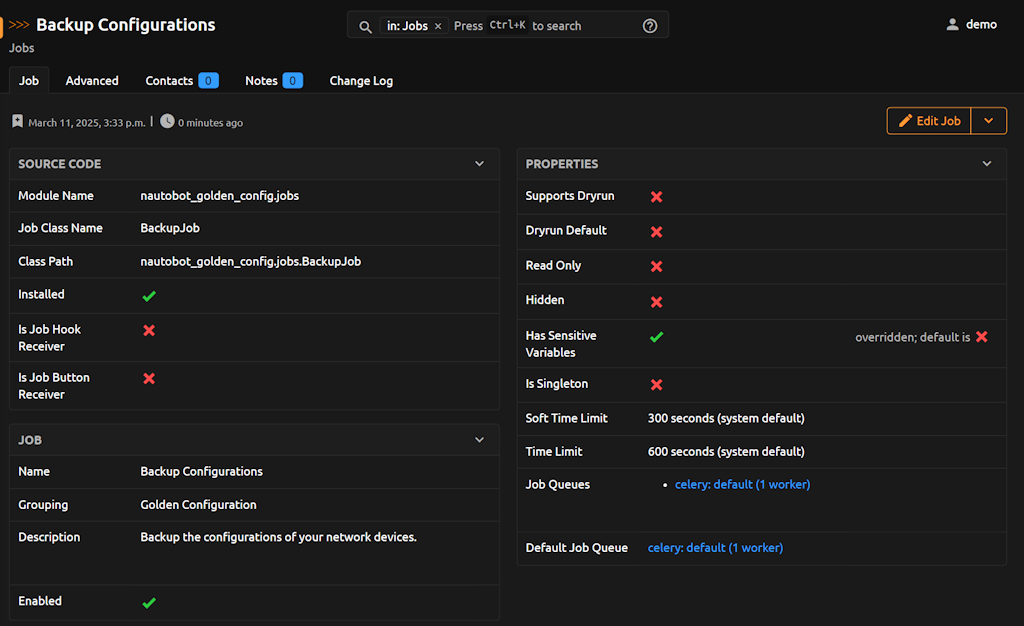
As previously mentioned, the plugin is mostly a shim layer, here is an example of how Nautobot Golden Config uses a Nornir Job.
Try it out!
This App is installed in the Nautobot Community Sandbox found over at demo.nautobot.com! This is used within the Nautobot Golden Config plugin, when the tasks of generating config, running backup of configs, or comparing configs.
For a full list of all the available always-on sandbox environments, head over to the main page on networktocode.com.
Documentation
Full web-based HTML documentation for this app can be found over on the Nautobot Docs website:
- User Guide - Overview, Using the App, Getting Started.
- Administrator Guide - How to Install, Configure, Upgrade, or Uninstall the App.
- Developer Guide - Extending the App, Code Reference, Contribution Guide.
- Release Notes / Changelog.
- Frequently Asked Questions.
Contributing to the Docs
You can find all the Markdown source for the App documentation under the docs folder in this repository. For simple edits, a Markdown capable editor is sufficient: clone the repository and edit away.
If you need to view the fully generated documentation site, you can build it with mkdocs. A container hosting the docs will be started using the invoke commands (details in the Development Environment Guide) on http://localhost:8001. As your changes are saved, the live docs will be automatically reloaded.
Any PRs with fixes or improvements are very welcome!
Questions
For any questions or comments, please check the FAQ first. Feel free to also swing by the Network to Code Slack (channel #nautobot), sign up here if you don't have an account.
1 maintainer

Metadata
1 maintainer
Release files for nautobot-plugin-nornir 3.3.0
For a detailed explanation of source distributions (sdists) and built distributions (wheels), please see the package formats documentation.
Source distribution (sdist)
| File | Size | Uploaded | Provenance | Actions |
|---|---|---|---|---|
| nautobot_plugin_nornir-3.3.0.tar.gz | 1.5 MB | With provenance | Details for nautobot_plugin_nornir-3.3.0.tar.gz |
Built distribution (wheel)
| File | Interpreter | ABI | Platform | Actions Reset |
|---|---|---|---|---|
| nautobot_plugin_nornir-3.3.0-py3-none-any.whl | Python 3 | none | any | Details for nautobot_plugin_nornir-3.3.0-py3-none-any.whl |
Total release size: 3.1 MB
Release files / nautobot_plugin_nornir-3.3.0.tar.gz
| Download URL | nautobot_plugin_nornir-3.3.0.tar.gz |
|---|---|
| Size | 1.5 MB |
| Tags | Source |
|
SHA-256 checksum How to use checksums |
0b4cfc6abef55de5e7c96be20078721406cee88d65fa37946c11c80904dc94ce
|
|
BLAKE2b-256 checksum How to use checksums |
cb1f4540e559da975abe17be853eb2f0e789ec19f65b73679d23ff886860704d
|
| Upload date | |
|
Uploaded using Trusted Publishing? What is trusted publishing? |
Yes |
| Uploaded via |
twine/6.1.0 CPython/3.13.7
|
Provenance
Provenance describes where a file came from. On PyPI, provenance is shared via attestations, which provide a verifiable record of the build or publishing details. View details, limitations and caveats.


PyPI Publish Attestation
PyPI verified that this artifact, at this checksum, originated from the publisher listed below.
Signed by GitHub Actions, verified by PyPI on Oct 22, 2026.
Transparency logRelease files / nautobot_plugin_nornir-3.3.0-py3-none-any.whl
| Download URL | nautobot_plugin_nornir-3.3.0-py3-none-any.whl |
|---|---|
| Size | 1.6 MB |
| Tags | Python 3 |
|
SHA-256 checksum How to use checksums |
e16738683dd6a3945ac778116739989bd38f7110a5fb71868400e4e6e3d41bf0
|
|
BLAKE2b-256 checksum How to use checksums |
8630e0d147b8566d2069ff3ee30a7f7b5ec154f60ce11bfa8d8e59fd8a82a0f6
|
| Upload date | |
|
Uploaded using Trusted Publishing? What is trusted publishing? |
Yes |
| Uploaded via |
twine/6.1.0 CPython/3.13.7
|
Provenance
Provenance describes where a file came from. On PyPI, provenance is shared via attestations, which provide a verifiable record of the build or publishing details. View details, limitations and caveats.
PyPI Publish Attestation
PyPI verified that this artifact, at this checksum, originated from the publisher listed below.
Signed by GitHub Actions, verified by PyPI on Oct 22, 2026.
Transparency logSecurity for nautobot-plugin-nornir 3.3.0
Provenance
Provenance describes where a file came from. On PyPI, provenance is shared via attestations, which provide a verifiable record of the build or publishing details. View details, limitations and caveats.
Full provenance
Both files in this release have been uploaded with provenance metadata.
Attestation for nautobot_plugin_nornir-3.3.0.tar.gz
PyPI Publish Attestation
PyPI verified that this artifact, at this checksum, originated from the publisher listed below.
Signed by GitHub Actions, verified by PyPI on Oct 22, 2026.
Transparency logA note on package security
PyPI is a repository for distributing packages, not a service for auditing them. While third-party security researchers and our staff do their best to detect and remove malicious packages, PyPI cannot guarantee the quality, security or suitability of any given package.
To learn more about protecting yourself from malicious actors, visit our package security documentation.














