
Nautobot Single Source of Truth -- ServiceNow Data Target
A plugin for Nautobot, building atop the nautobot-ssot plugin.
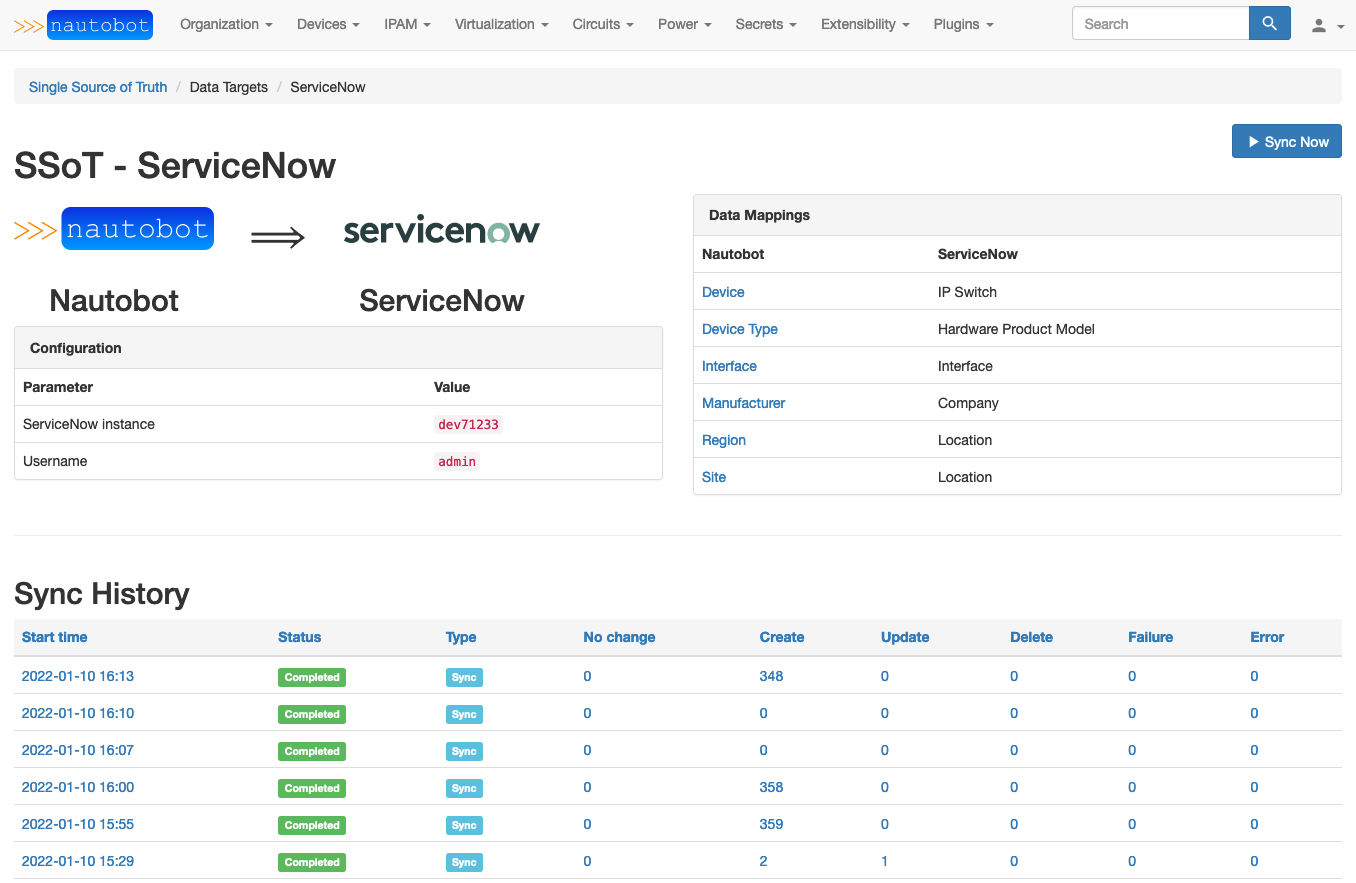
This plugin provides the ability to synchronize basic data from Nautobot into ServiceNow. Currently the following data is mapped and synchronized:
- Nautobot Manufacturer table to ServiceNow Company table
- Nautobot DeviceType table to ServiceNow Hardware Product Model table
- Nautobot Region and Site tables to ServiceNow Location table
- Nautobot Device table to ServiceNow IP Switch table
- Nautobot Interface table to ServiceNow Interface table
For more information about general usage of the Nautobot SSoT plugin, refer to its documentation.
Installation and Configuration
The plugin is available as a Python package in PyPI and can be installed with pip into an existing Nautobot installation:
pip install nautobot-ssot-servicenow
The plugin is compatible with Nautobot 1.2.0 and higher
Once installed, the plugin needs to be enabled in your nautobot_config.py and configured appropriately:
# nautobot_config.py
PLUGINS = [
    "nautobot_ssot",
    "nautobot_ssot_servicenow",
]

PLUGINS_CONFIG = {
    "nautobot_ssot": {
        "hide_example_jobs": True,
    },
    "nautobot_ssot_servicenow": {
        "instance": os.getenv("SERVICENOW_INSTANCE"),
        "username": os.getenv("SERVICENOW_USERNAME"),
        "password": os.getenv("SERVICENOW_PASSWORD"),
    },
}
The plugin behavior can be controlled with the following list of settings:
instance: The ServiceNow instance to point to (as in<instance>.servicenow.com)username: Username to access this instancepassword: Password to access this instance
There is also the option of omitting these settings from PLUGINS_CONFIG and instead defining them through the UI at /plugins/ssot-servicenow/config/ (reachable by navigating to Plugins > Installed Plugins then clicking the "gear" icon next to the Nautobot SSoT ServiceNow entry) using Nautobot's standard UI and secrets functionality.
If you configure the plugin's settings in
PLUGINS_CONFIG, those values will take precedence over any configuration in the UI.
Depending on the amount of data involved, and the performance of your ServiceNow instance, you may need to increase the Nautobot job execution time limits (CELERY_TASK_SOFT_TIME_LIMIT and CELERY_TASK_TIME_LIMIT) so that the job can execute to completion without timing out.
Questions
For any questions or comments, please check the FAQ first and feel free to swing by the Network to Code slack channel (channel #networktocode). Sign up here
Usage
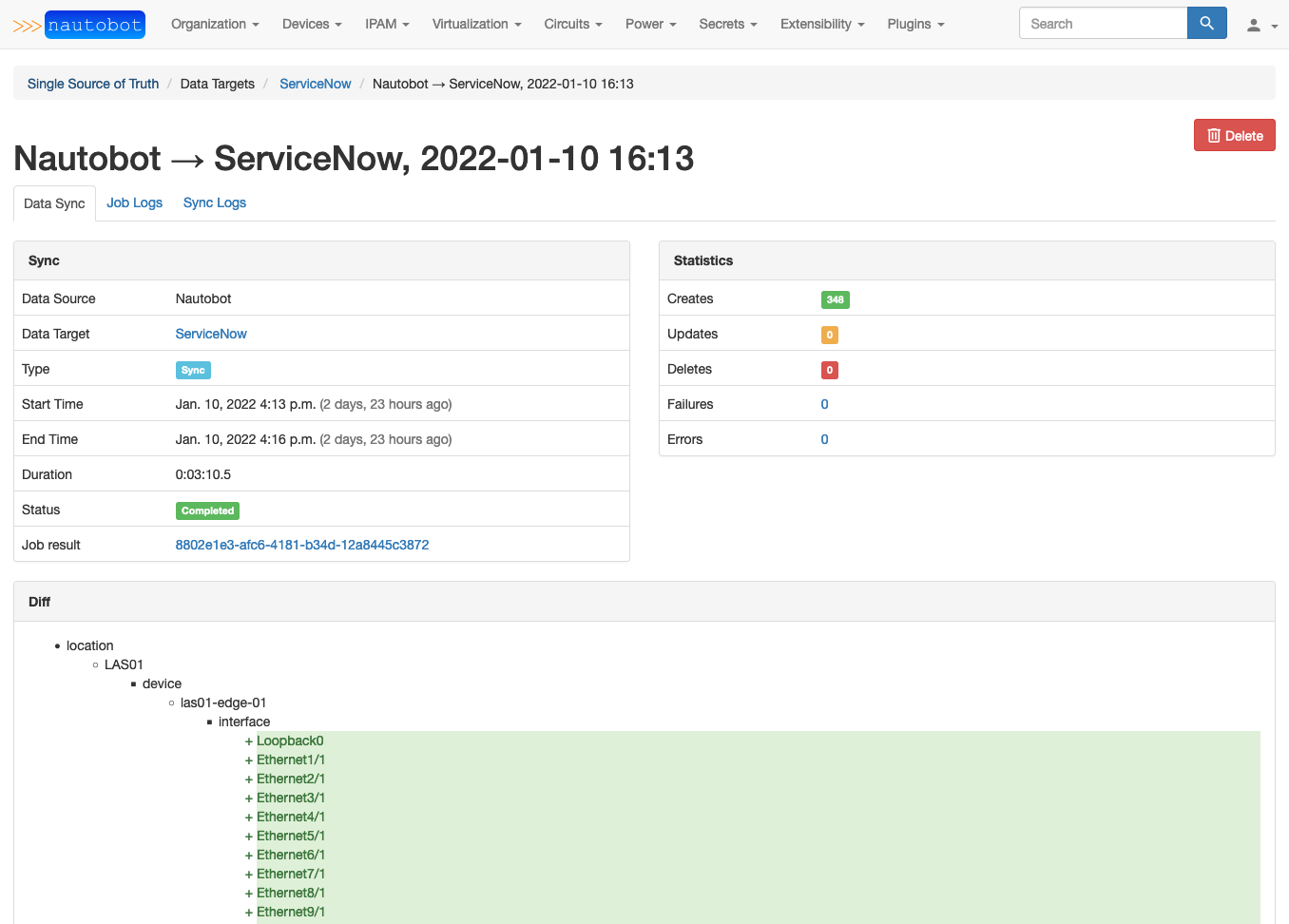
Once the plugin is installed and configured, from the Nautobot SSoT dashboard view (/plugins/ssot/), ServiceNow will be shown as a Data Target. You can click the Sync button to access a form view from which you can run the Nautobot-to-ServiceNow synchronization Job. Running the job will redirect you to a Nautobot Job Result view, from which you can access the SSoT Sync Details view to see detailed information about the outcome of the sync Job.
1 maintainer

Metadata
1 maintainer
Release files for nautobot-ssot-servicenow 0.9.2
For a detailed explanation of source distributions (sdists) and built distributions (wheels), please see the package formats documentation.
Source distribution (sdist)
| File | Size | Uploaded | Provenance | |
|---|---|---|---|---|
| nautobot-ssot-servicenow-0.9.2.tar.gz | 46.3 kB | Without provenance | Details |
Built distribution (wheel)
| File | Interpreter | ABI | Platform | Reset |
|---|---|---|---|---|
| nautobot_ssot_servicenow-0.9.2-py3-none-any.whl | Python 3 | none | any | Details |
Total release size: 107.2 kB
Release files / nautobot-ssot-servicenow-0.9.2.tar.gz
| Download URL | nautobot-ssot-servicenow-0.9.2.tar.gz |
|---|---|
| Size | 46.3 kB |
| Tags | Source |
|
SHA-256 checksum How to use checksums |
4dfc3a51354df6208c04d720eead902f0d0d793ef5901339c0f730e7a3fd0c95
|
|
BLAKE2b-256 checksum How to use checksums |
a5969fac8940d8d8583f6c2cc17f0f69deb4c9565211bcf473fb1e1168d6fc33
|
| Upload date | |
|
Uploaded using Trusted Publishing? What is trusted publishing? |
No |
| Uploaded via |
twine/4.0.0 CPython/3.9.13
|
Release files / nautobot_ssot_servicenow-0.9.2-py3-none-any.whl
| Download URL | nautobot_ssot_servicenow-0.9.2-py3-none-any.whl |
|---|---|
| Size | 60.9 kB |
| Tags | Python 3 |
|
SHA-256 checksum How to use checksums |
1cb94e180980ea2abf738c020a095c9285ff9789322cce4d1b5603c82f202fb6
|
|
BLAKE2b-256 checksum How to use checksums |
9d2ff5c5785f4a49e7fbc62cbd2e6d45499aa411e4057e06e3542a9b24e8dda6
|
| Upload date | |
|
Uploaded using Trusted Publishing? What is trusted publishing? |
No |
| Uploaded via |
twine/4.0.0 CPython/3.9.13
|
Security for nautobot-ssot-servicenow 0.9.2
Provenance
Provenance describes where a file came from. On PyPI, provenance is shared via attestations, which provide a verifiable record of the build or publishing details. View details, limitations and caveats.
No provenance found
None of the files in this release were uploaded with provenance metadata.
A note on package security
PyPI is a repository for distributing packages, not a service for auditing them. While third-party security researchers and our staff do their best to detect and remove malicious packages, PyPI cannot guarantee the quality, security or suitability of any given package.
To learn more about protecting yourself from malicious actors, visit our package security documentation.














