
nav2_doctor



Why isn't my robot moving? Attach to a running Nav2 stack and get a one-line cause. It is read-only: it subscribes to topics and asks lifecycle nodes for their state, and never publishes or changes anything.
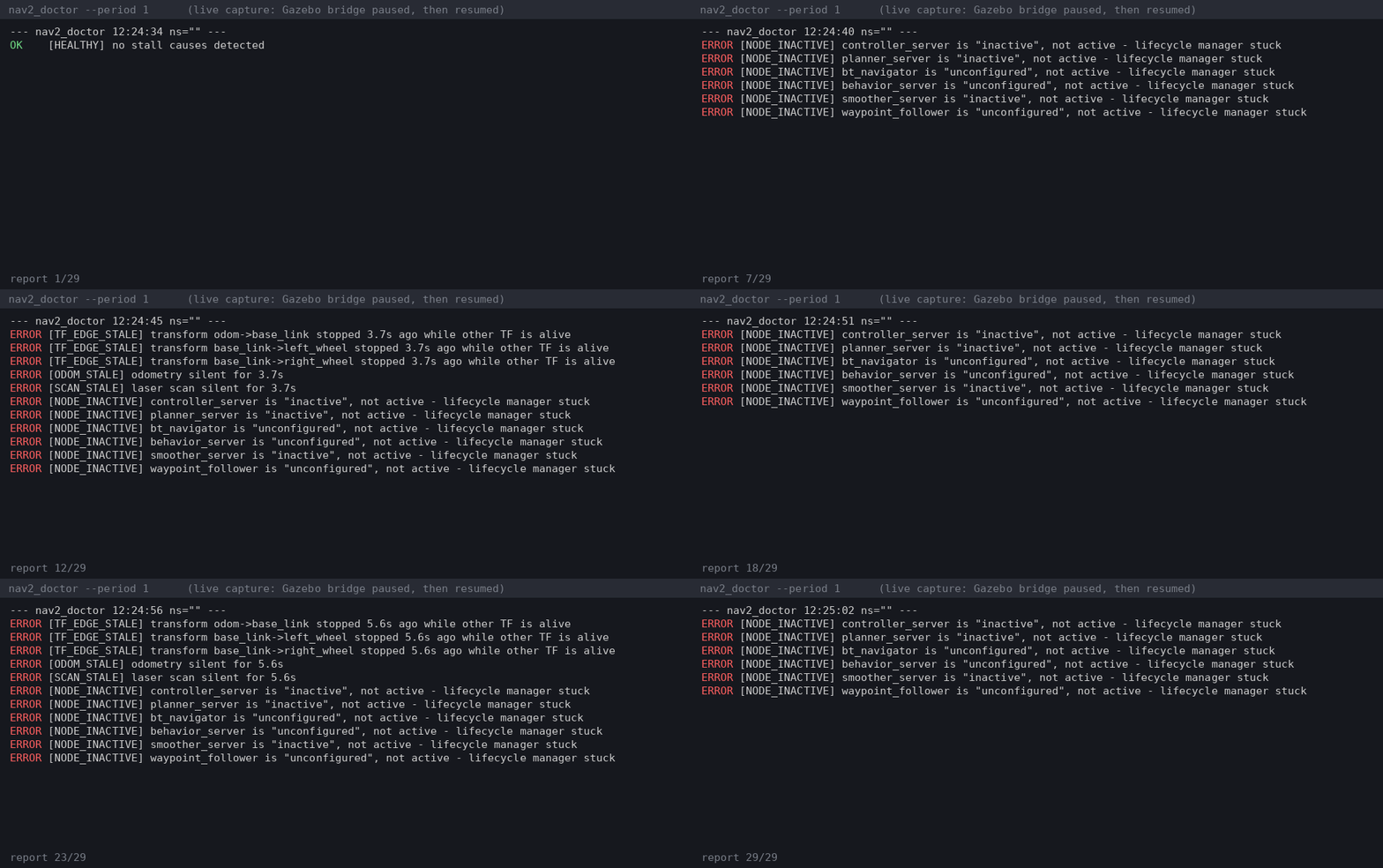
Rendered from real output captured on a Gazebo maze sim: healthy, then the bridge is paused and the doctor names the dead TF edges, odom and scan, and the Nav2 nodes that never activated. Source: docs/demo_raw.txt, docs/make_demo_gif.py.
Born in rosnav, a ROS 2 Nav2 stack with SLAM, frontier exploration and multi-robot fleets; rosnav ships this as scripts/nav2_doctor.py and tested it on its live Gazebo maze sim.
Part of ros2-doctor-tools, an index of my ROS 2 diagnosis, fault injection and evaluation tools.
Try it in 30 seconds
With your robot or sim running, in a terminal:
source /opt/ros/$ROS_DISTRO/setup.bash          # or your distro's path
python3 -m venv --system-site-packages ~/doctor-venv && source ~/doctor-venv/bin/activate
pip install nav2_doctor
nav2_doctor --once 10                          # watch for 10 s, then one report
It only reads from the running system. Exit code 1 means it found an error.
How it compares
| Tool | Use it when |
|---|---|
| nav2_doctor | a Nav2 robot is not moving and you want a likely cause, from outside, with no code changes |
ros2 doctor |
you want to check the ROS 2 installation and system setup |
| ros/diagnostics | your own nodes report their health on /diagnostics and you want it collected |
| ros2_medkit | you want a diagnostics REST API with tracked faults, history and rosbag snapshots |
nav2_doctor is a small command-line check, tested mostly in simulation and on fake graphs. It keeps no fault history, and a report with no errors does not prove the robot is healthy. It can publish to /diagnostics if you ask (--diagnostics), so it can be used alongside the tools above. |
Install
nav2_doctor needs a ROS 2 environment (Humble, Jazzy or Lyrical; on Lyrical it is checked by CI only): rclpy comes from the ROS install, not from PyPI. Source ROS first (source /opt/ros/<distro>/setup.bash), then either install it with pip into that same environment or build it in a colcon workspace. Without ROS the command prints a short message and exits with code 2.
# ROS 2 sourced; if you use a venv, create it with --system-site-packages
pip install nav2_doctor      # latest main instead: pip install git+https://github.com/darshmenon/nav2_doctor
nav2_doctor --help
A pip install puts the nav2_doctor command on your PATH; run it directly. The ros2 run form needs the colcon build.
Or with colcon:
cd ~/ros2_ws/src && git clone https://github.com/darshmenon/nav2_doctor.git
cd .. && colcon build --packages-select nav2_doctor && source install/setup.bash
Quick start
ros2 run nav2_doctor nav2_doctor                 # live, a report every 2 s
ros2 run nav2_doctor nav2_doctor --ns robot1     # a namespaced robot
ros2 run nav2_doctor nav2_doctor --once 5        # watch 5 s, print one report, exit 1 if any ERROR (for CI)
ros2 run nav2_doctor nav2_doctor --ready            # pre-flight: hints + READY / NOT READY verdict, exit 1 if not ready
A real report, 3.5 s after the sim bridge was frozen:
ERROR [TF_EDGE_STALE] transform odom->base_link stopped 3.5s ago while other TF is alive
ERROR [ODOM_STALE] odometry silent for 3.5s
ERROR [SCAN_STALE] laser scan silent for 3.5s
ERROR [COSTMAP_STALE] local costmap not updating (3.8s) - usually a TF or scan problem upstream
What it checks
| Code | Level | Means |
|---|---|---|
TF_NONE / TF_FREEZE |
error | no /tf at all, or /tf silent for more than 2 s |
TF_EDGE_STALE |
error | one transform stopped while other TF is alive (a dead publisher) |
CLOCK_STALLED |
error | /clock was publishing and has gone silent (simulator paused or its bridge stopped) |
NO_MAP_ODOM |
warn | no map->odom, so SLAM or AMCL isn't localising |
ODOM_STALE / SCAN_STALE |
error | odometry or laser scan went silent (*_NONE warns when never seen) |
COSTMAP_STALE |
error | the local costmap stopped updating |
NODE_INACTIVE |
error | a Nav2 server is not active after the startup grace (60 s, --startup-grace) |
NODE_STARTING / NODE_MISSING |
warn | still inside the grace period, or the lifecycle service is not there |
NODE_UNRESPONSIVE |
error | a Nav2 server has not answered get_state for 6 s (hung, paused or overloaded); a warning during the startup grace |
GOAL_FLAPPING |
warn | 4 or more goals cancelled or aborted within 30 s (an oscillating goal source) |
AMCL_UNCERTAIN |
warn | /amcl_pose covariance above 0.5 m^2, so the robot is poorly localised |
NO_PROGRESS |
warn | a goal is active but odometry shows the robot hasn't moved (15 s, 0.1 m by default) |
RATE_DROP / RATE_SPIKE |
warn | with --baseline: a stream runs below half or above double the rate learned by --learn |
MIN_RATE / MIN_RATE_SILENT |
warn / error | with --min-rate: a topic runs more than 5% under its floor, or sends nothing (a warning during the startup grace) |
FILTER_BAD_LIMIT / FILTER_MOSTLY_SLOW |
warn | a speed mask has cells Nav2 reads as no limit, or half of it is below 25% speed (often an inverted mask) |
SPEED_LIMIT_UNHEARD |
warn | a speed limit is published on a topic controller_server does not subscribe to, so speed zones have no effect |
FILTER_BELOW_MIN_SPEED |
warn | a speed mask can limit DWB's max speed under its minimum speed, so motions (or all samples) are rejected |
CMD_ZERO / NO_CMD_VEL |
error | a goal is active but cmd_vel is zero or absent |
Checked servers: controller_server, planner_server, bt_navigator, behavior_server, smoother_server, waypoint_follower. Verified on Humble against a live Gazebo sim (a frozen bridge is caught within about 3 s and clears on recovery) and in CI on Humble and Jazzy against a fake Nav2 graph.
Simulation
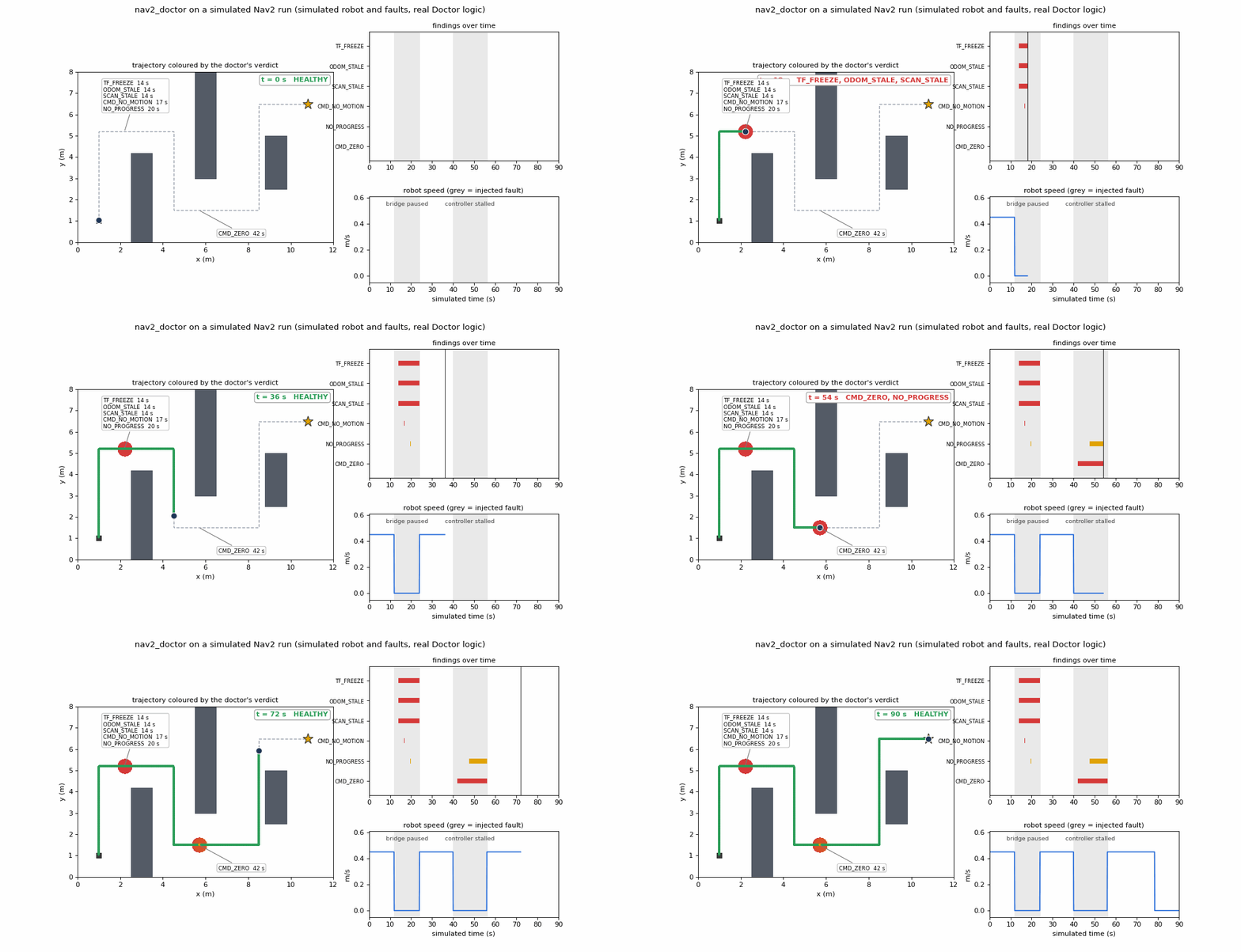
A matplotlib replay of a robot driving a planned path while two faults are injected: a paused bridge (TF, odom and scan stop, 12 to 24 s) and a stalled controller (cmd_vel is zero, 40 to 56 s). The trail is coloured by the doctor's verdict at each moment, and the timeline shows which finding fires when. The robot, obstacles and faults are simulated; the verdicts come from the real Doctor class (here with --progress-time 8 so the run stays short). Regenerate with python3 docs/nav_sim.py (needs matplotlib and pillow).
What the doctor sees
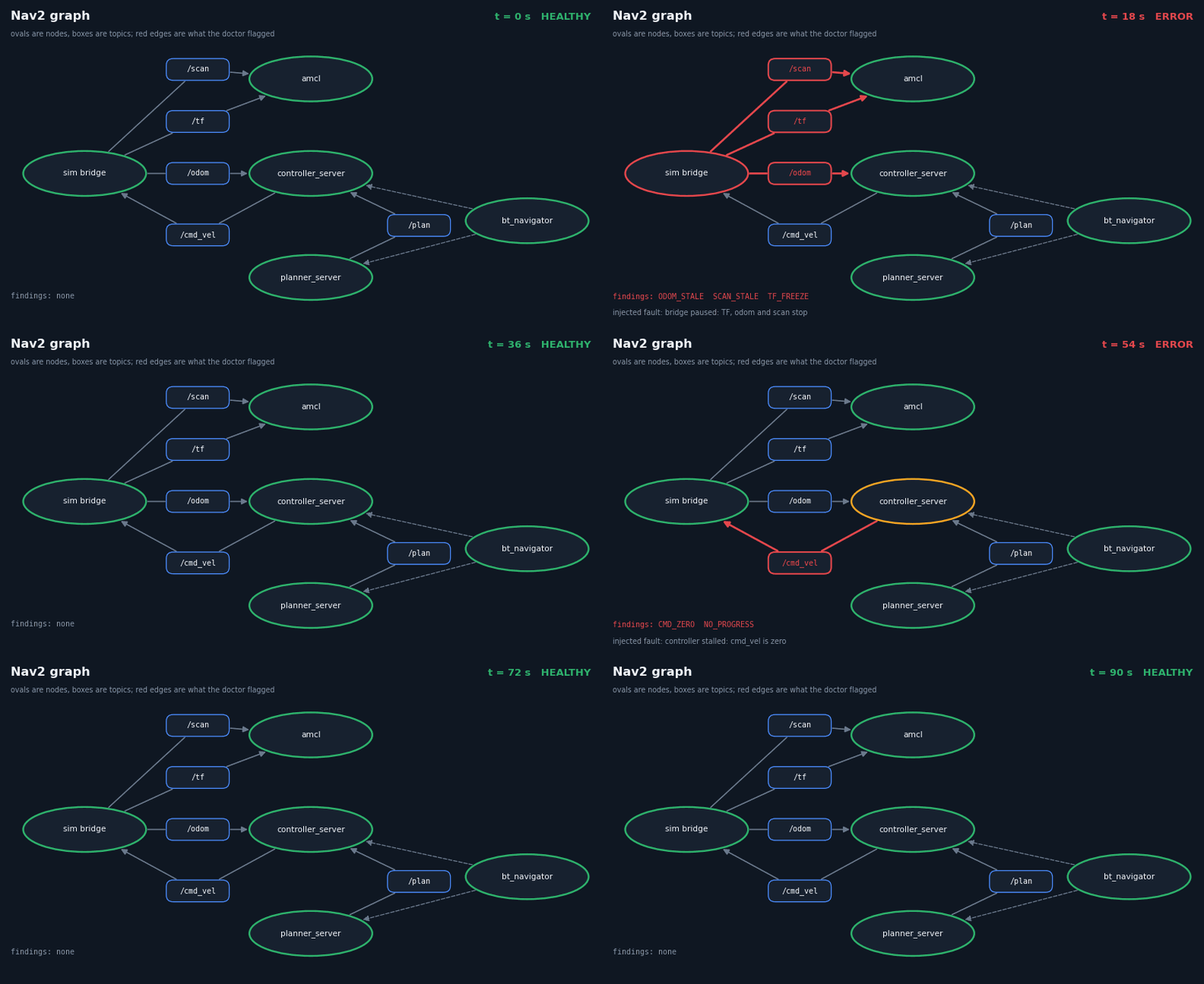
The same run as a graph: ovals are nodes, boxes are topics, and an edge turns red when a finding covers it (/scan, /tf and /odom for a frozen bridge, /cmd_vel for a zero command). The layout is hand-placed for clarity, not read from a live ros2 node list.
Per-robot baselines
Fixed thresholds do not fit every robot: a 5 Hz lidar is healthy on one machine and broken on another. Record what normal looks like once, then get warned when a stream drifts from it:
nav2_doctor --expect scan:10 --expect odom:20             # no learning: state the normal rate, flag drops/spikes
nav2_doctor --learn 60 --baseline-file my_robot.json      # on a healthy robot: writes the normal rate of each stream
nav2_doctor --baseline --baseline-file my_robot.json      # later: RATE_DROP / RATE_SPIKE when a stream is below half or above double normal
For a hard floor on any topic, use --min-rate instead:
nav2_doctor --min-rate /scan:10 --min-rate /camera/image_raw:15
It subscribes to the named topic whatever its type, and reports only after one full window (6 s, or five periods for slow topics), so give --once more than that. The count is what this Python node receives, so large or very fast topics can read low: in a test, a 0.9 MB image published best-effort at 15 Hz read 11.6 to 14.2 Hz and was flagged. Set the floor with that margin, or check such topics with ros2 topic hz.
The rate is the median messages per second (so bursts and a few stalls do not skew it); there is no model and no training data, and each finding states the learned number it is compared with. A silent stream is still reported by the stale checks, not here. Re-learn after you change a driver or a bridge setting on purpose.
Fault-injection scoreboard
Measured with nav2_fault_inject: one headless single-robot maze sim, nine injected pauses (parameter_bridge for SCAN_STALE, controller_server for NO_CMD_VEL, slam_toolbox for TF_EDGE_STALE, three each), a finding must appear within 10 s.
| run | doctor | detected |
|---|---|---|
| 1 | before any fix (6 s controller pause, longer than Nav2's 4 s bond timeout, so not comparable) | 6/9 |
| 2 | after the CMD_ZERO vs NO_CMD_VEL fix |
6/9 (all three NO_CMD_VEL missed) |
| 4 | after also watching /cmd_vel_nav |
9/9 |
The run 2 misses were measured: a 3 s controller_server pause leaves /cmd_vel silent for only 1.25 to 1.75 s (the velocity smoother keeps repeating), under the 2.0 s threshold, while /cmd_vel_nav is silent for 2.5 to 2.75 s. Caveat: the /cmd_vel_nav fix was tuned on data from this same scenario, so 9/9 is not a fresh benchmark.
Held-out run (2026-11-23, cafe world, other pause lengths, two new targets, nothing tuned on it): 7/9. slam_toolbox and parameter_bridge 4/4, velocity_smoother and ekf_filter_node 3/3, the 2.5 s controller_server pauses 0/2. The 200 s no-fault control before it gave no errors or warnings in 199 reports (a small sample).
Since then the controller check expects /cmd_vel_nav only while the behaviour tree says FollowPath is running, because recovery behaviours publish straight to /cmd_vel (the earlier check would have called that a hung controller), and uses a 1.0 s threshold then (2.0 s if no BT log is seen). That change is unit-tested; since it was motivated by the 7/9 misses it needs a fresh scenario before any new score is quoted.
Why
When Nav2 sits still, finding the cause means juggling ros2 topic hz, tf2_echo, ros2 lifecycle get and the logs. nav2_doctor runs those checks together. Pair it with nav2_fault_inject to break a stack on purpose and watch the doctor name the cause.
Limits
- Thresholds are tunable with
--stale,--flap-count,--flap-window,--progress-time,--progress-dist,--progress-yaw(turning in place counts as movement). - The costmap check needs
/local_costmap/costmap; the goal checks neednavigate_to_pose. - One robot per run; use
--nsonce per robot. - Reports to the terminal (text or
--json);--diagnosticsalso publishes aDiagnosticArrayon/diagnostics(/<ns>/diagnosticswith--ns).
Roadmap
- repeating recovery behaviours; AMCL covariance too high
- a map-distortion check (
map->odomyaw ramp); inert costmap filters are done (FILTER_NO_MASK,FILTER_NO_INFO) - multi-robot auto-discovery; ERROR lines from
/rosouttied to the cause - a live Jazzy test
Build: colcon build --packages-select nav2_doctor. Tests: python3 -m pytest test (unit tests need no ROS; the integration tests run the real CLI against a fake Nav2 graph when ROS 2 is sourced).
1 maintainer

Metadata
1 maintainer
Release files for nav2-doctor 0.8.1
For a detailed explanation of source distributions (sdists) and built distributions (wheels), please see the package formats documentation.
Source distribution (sdist)
| File | Size | Uploaded | Provenance | Actions |
|---|---|---|---|---|
| nav2_doctor-0.8.1.tar.gz | 50.9 kB | With provenance | Details for nav2_doctor-0.8.1.tar.gz |
Built distribution (wheel)
| File | Interpreter | ABI | Platform | Actions Reset |
|---|---|---|---|---|
| nav2_doctor-0.8.1-py3-none-any.whl | Python 3 | none | any | Details for nav2_doctor-0.8.1-py3-none-any.whl |
Total release size: 84.5 kB
Release files / nav2_doctor-0.8.1.tar.gz
| Download URL | nav2_doctor-0.8.1.tar.gz |
|---|---|
| Size | 50.9 kB |
| Tags | Source |
|
SHA-256 checksum How to use checksums |
9ca29b6a4009bcb3013761e2186435b5c04538a9b3e793074331301ede8579dc
|
|
BLAKE2b-256 checksum How to use checksums |
75f3bd86a68008fc40c7d21439a747bbd76a7cd8e7ec7bd8410f49c2ce4b3919
|
| Upload date | |
|
Uploaded using Trusted Publishing? What is trusted publishing? |
Yes |
| Uploaded via |
twine/7.0.0 CPython/3.13.16
|
Provenance
Provenance describes where a file came from. On PyPI, provenance is shared via attestations, which provide a verifiable record of the build or publishing details. View details, limitations and caveats.


PyPI Publish Attestation
PyPI verified that this artifact, at this checksum, originated from the publisher listed below.
Signed by GitHub Actions, verified by PyPI on Nov 29, 2026.
Transparency logRelease files / nav2_doctor-0.8.1-py3-none-any.whl
| Download URL | nav2_doctor-0.8.1-py3-none-any.whl |
|---|---|
| Size | 33.6 kB |
| Tags | Python 3 |
|
SHA-256 checksum How to use checksums |
38b25821e44f081f9eff13f7edd4014610169e787764ca59c90601d23d265e2e
|
|
BLAKE2b-256 checksum How to use checksums |
4430acab01297f8824bef645521ad5d14ce36cec3387b0f967692408524fbeb6
|
| Upload date | |
|
Uploaded using Trusted Publishing? What is trusted publishing? |
Yes |
| Uploaded via |
twine/7.0.0 CPython/3.13.16
|
Provenance
Provenance describes where a file came from. On PyPI, provenance is shared via attestations, which provide a verifiable record of the build or publishing details. View details, limitations and caveats.
PyPI Publish Attestation
PyPI verified that this artifact, at this checksum, originated from the publisher listed below.
Signed by GitHub Actions, verified by PyPI on Nov 29, 2026.
Transparency logSecurity for nav2-doctor 0.8.1
Provenance
Provenance describes where a file came from. On PyPI, provenance is shared via attestations, which provide a verifiable record of the build or publishing details. View details, limitations and caveats.
Full provenance
Both files in this release have been uploaded with provenance metadata.
Attestation for nav2_doctor-0.8.1.tar.gz
PyPI Publish Attestation
PyPI verified that this artifact, at this checksum, originated from the publisher listed below.
Signed by GitHub Actions, verified by PyPI on Nov 29, 2026.
Transparency logA note on package security
PyPI is a repository for distributing packages, not a service for auditing them. While third-party security researchers and our staff do their best to detect and remove malicious packages, PyPI cannot guarantee the quality, security or suitability of any given package.
To learn more about protecting yourself from malicious actors, visit our package security documentation.














