



1. 💡 为什么选择 nb_aiohttp?
在 Python HTTP 客户端的世界里,我们常常面临一个艰难的选择:
- 选择 requests?简单易用,但性能受限于同步阻塞
- 选择 httpx?同步异步通吃,但性能平平
- 选择 aiohttp?性能卓越,但 API 复杂,不能全局实例化
nb_aiohttp 横空出世,打破这个困局!
我们在 aiohttp 的强大性能基础上,重新设计了更友好的 API,让你既能享受极致性能,又能拥有极简体验。
-
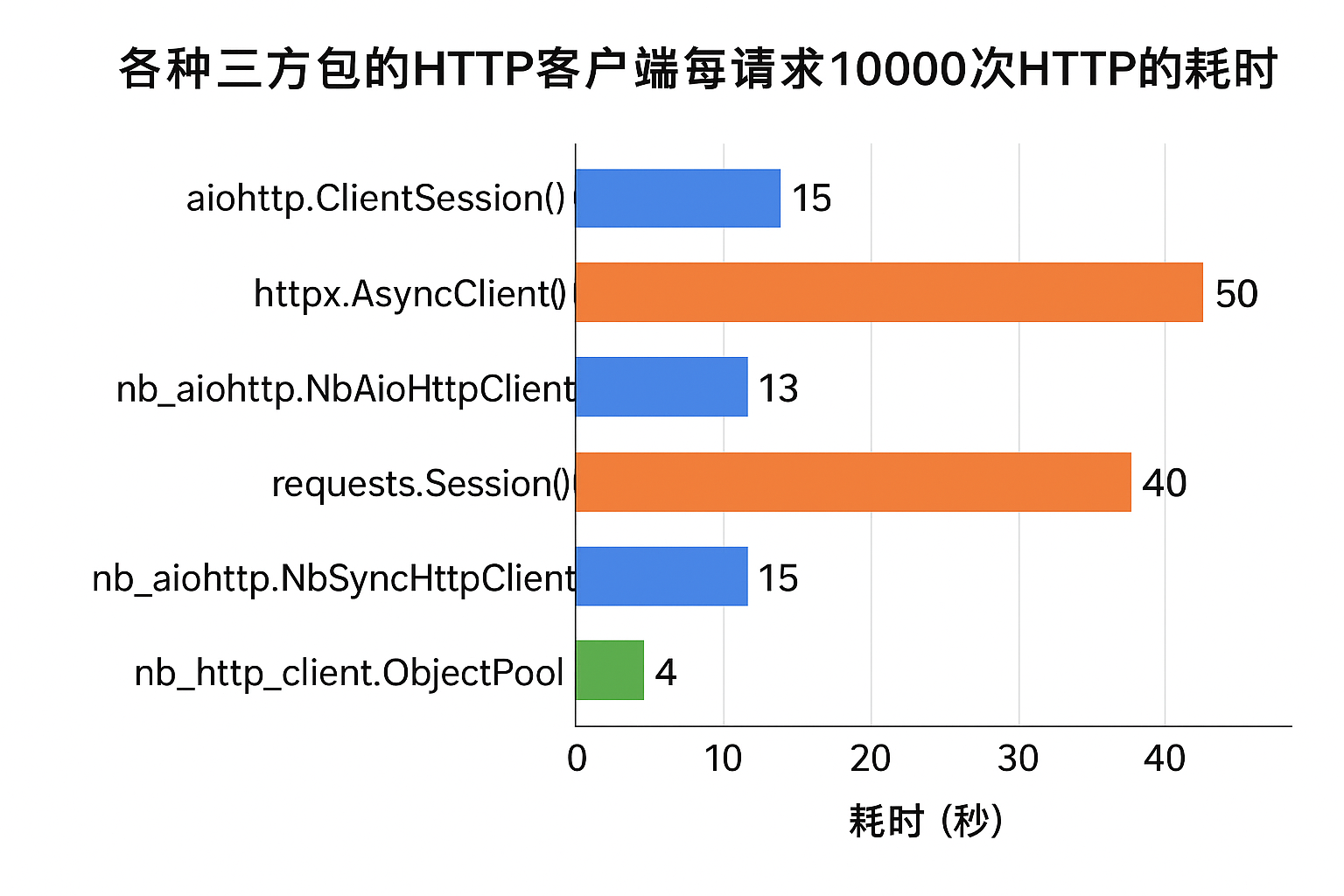
各个http客户端性能对比,包括同步和异步:
- 可以看出 nb_http_client 性能是神中神,nb_http_client 也是我基于 万能对象池 开发的 http 连接池。
- nb_aiohttp 性能和 aiohttp 并列第二, 但是 nb_aiohttp 的 API 更简单,更易用,可以同步和异步双世界使用。
-
具体对比代码可以看 benchmark.md
-
对比文档总结,见文档第 20章节。
2. 🚀 核心特性
2.1 🏆 性能王者
- 异步性能: 比
httpx快 4倍,完全释放aiohttp的性能潜力 - 同步性能: 比
requests快 3倍,同步代码也能享受异步性能 - 海量并发: 内置连接池管理,轻松应对数万级并发请求
2.2 🎯 极简设计
# 一行实例化,全局可用
http = NbAioHttpClient()

# 一行请求,优雅简洁
resp = await http.get('https://api.github.com')
2.3 🧩 懒加载机制
彻底解决 aiohttp.ClientSession 无法在模块级别实例化的痛点:
# ✅ nb_aiohttp - 随处实例化
from nb_aiohttp import NbAioHttpClient
http = NbAioHttpClient()  # 在全局作用域直接创建

# ❌ aiohttp - 必须在 async 函数内
import aiohttp
async def func():
    async with aiohttp.ClientSession() as session:  # 每次都要重新创建
        ...
2.4 🔄 同步/异步双支持
一套代码,两种模式,适配各种应用场景:
-
用途
- NbAioHttpClient: 异步高性能,适合高并发服务
- NbSyncHttpClient: 同步调用,适合非asyncio编程生态的传统应用、脚本
-
原理
- NbAioHttpClient的原理: 是调用
aiohttp的ClientSession的异步方法 ,但使用方式被大幅简化,支持全局变量创建NbAioHttpClient,原生aiohttp的2次async with加 3次await,被简化为 1次await - NbSyncHttpClient的原理: 是通过
asyncio.run_coroutine_threadsafe调用NbAioHttpClient的异步request方法,然后通过future.result()获取结果,所以本质也是在loop中运行aiohttp,性能远超requests
- NbAioHttpClient的原理: 是调用
2.5 💪 企业级特性
- ✅ 自动重试: 智能重试机制,提升请求成功率
- ✅ 统一响应: 封装
NbHttpResp对象,API 一致性强 - ✅ JSON 转换:
.dict属性直接获取 JSON 数据 - ✅ 智能日志: 集成
nb_log,自动记录错误和慢请求 - ✅ 灵活配置: 超时、重试、连接池等参数随心定制
3. 📦 安装
pip install nb_aiohttp
4. ⚡ 快速开始
4.1 🔹 异步模式 - 性能巅峰
完美适配 FastAPI、异步爬虫、高并发服务等场景:
import asyncio
from nb_aiohttp import NbAioHttpClient

# 🎯 在模块顶层直接实例化 - 这是最大的创新!
http = NbAioHttpClient(
    timeout=10,              # 超时时间
    connector_limit=100,     # 连接池大小
    max_retries=3,           # 最大重试次数
)

async def main():
    # 🚀 发起 GET 请求 - 仅需一次 await
    resp = await http.get('https://api.github.com/events')
    print(f"状态码: {resp.status}")
    print(f"响应内容: {resp.text[:100]}")

    # 📤 发起 POST json数据请求 - API 简洁直观
    resp = await http.post(
        'https://httpbin.org/post',
        json={'username': 'admin', 'password': '123456'}
    )

    # 🎁 直接获取 JSON 数据
    print(f"响应数据: {resp.dict}")

    # 🔐 使用 context manager 自动管理资源
    async with NbAioHttpClient() as client:
        resp = await client.get('https://www.python.org')
        print(f"Python 官网: {resp.ok}")

    # 🛑 手动关闭连接
    await http.close()

if __name__ == '__main__':
    asyncio.run(main())
4.2 🔹 同步模式 - 简单易用
完美适配传统 Django、Flask、爬虫脚本等同步场景:
from nb_aiohttp import NbSyncHttpClient

# 🎯 实例化同步客户端
http = NbSyncHttpClient(
    timeout=10,
    connector_limit=100,
    max_retries=3,
)


# 🚀 像使用 requests 一样简单
resp = http.get('https://api.github.com/events')
print(f"状态码: {resp.status}")
print(f"响应内容: {resp.text[:100]}")

# 📤 POST 请求
resp = http.post(
    'https://httpbin.org/post',
    json={'key': 'value'}
)
print(f"响应数据: {resp.dict}")

# 🎯 无需手动关闭,自动管理生命周期
4.3 🔹 高级用法
4.3.1 错误处理与重试
from nb_aiohttp import NbAioHttpClient

http = NbAioHttpClient(
    max_retries=5,              # 失败后重试 5 次
    is_raise_for_status=True,   # 状态码异常时抛出错误
    is_log_error=True,          # 记录错误日志
)

async def robust_request():
    try:
        resp = await http.get('https://unstable-api.com/data')
        return resp.dict
    except Exception as e:
        print(f"请求失败: {e}")
        return None
4.3.2 性能监控
http = NbAioHttpClient(
    log_timeout_seconds=2.0,  # 超过 2 秒的请求将被记录
)

async def monitor_slow_requests():
    # 慢请求会自动被记录到日志
    resp = await http.get('https://slow-api.com/data')
4.3.3 自定义请求头和 Cookies
http = NbAioHttpClient(
    headers={
        'User-Agent': 'MyApp/1.0',
        'Authorization': 'Bearer YOUR_TOKEN',
    },
    cookies={
        'session_id': 'abc123',
    }
)

async def custom_request():
    # 使用全局配置的 headers 和 cookies
    resp = await http.get('https://api.example.com/user')

    # 或者临时覆盖
    resp = await http.get(
        'https://api.example.com/admin',
        headers={'Authorization': 'Bearer ADMIN_TOKEN'}
    )
4.3.4 完整的 HTTP 方法支持
http = NbAioHttpClient()

# 支持所有常用 HTTP 方法
await http.get(url)
await http.post(url, json=data)
await http.put(url, json=data)
await http.delete(url)
await http.patch(url, json=data)
await http.head(url)
await http.options(url)
5. 📊 性能对比
更多benchmark细节见文档第 20 章节
5.1 实测数据
基于真实压测场景(200 并发,20万次请求):
| HTTP 客户端 | 异步性能 | 同步性能 | 易用性 | 全局实例化 |
|---|---|---|---|---|
| nb_aiohttp (异步) | ⚡⚡⚡⚡⚡ | - | ⭐⭐⭐⭐⭐ | ✅ |
| nb_aiohttp (同步) | - | ⚡⚡⚡⚡ | ⭐⭐⭐⭐⭐ | ✅ |
| aiohttp (原生) | ⚡⚡⚡⚡⚡ | - | ⭐⭐ | ❌ |
| httpx (异步) | ⚡ | - | ⭐⭐⭐⭐ | ✅ |
| httpx (同步) | - | ⚡⚡ | ⭐⭐⭐⭐ | ✅ |
| requests | - | ⚡ | ⭐⭐⭐⭐⭐ | ✅ |
5.2 性能结论
- 🏆 异步场景:
nb_aiohttp≈ 原生aiohttp>httpx(4倍) - 🏆 同步场景:
nb_aiohttp>httpx(4倍) >requests(3倍) - 🎯 易用性:
nb_aiohttp=requests>httpx> 原生aiohttp
5.3 代码对比
5.3.1 原生 aiohttp - 繁琐冗长
import aiohttp
import asyncio

async def fetch():
    # ❌ 不能全局实例化
    # ❌ 需要 2 次 async with
    # ❌ 需要 3 次 await
    async with aiohttp.ClientSession() as session:
        async with session.get('https://api.github.com') as response:
            if response.status == 200:
                text = await response.text()
                data = await response.json()
                print(data)
5.3.2 nb_aiohttp - 极致简洁
from nb_aiohttp import NbAioHttpClient
import asyncio

# ✅ 全局实例化
http = NbAioHttpClient()

async def fetch():
    # ✅ 仅需 1 次 await
    # ✅ 自动处理状态码
    # ✅ 直接获取数据
    resp = await http.get('https://api.github.com')
    print(resp.dict)
代码量减少 70%,可读性提升 300%!
6. 📚 API 文档
6.1 NbAioHttpClient (异步客户端)
6.1.1 构造函数
NbAioHttpClient(
    *,
    timeout: int | float = 30,
    connector_limit: int = 100,
    max_retries: int = 3,
    is_raise_for_status: bool = True,
    log_timeout_seconds: int | float | None = None,
    is_log_error: bool = True,
    connector: BaseConnector = None,
    headers: dict = None,
    cookies: dict = None,
    **kwargs
)
参数说明:
| 参数 | 类型 | 默认值 | 说明 |
|---|---|---|---|
timeout |
int/float | 30 | 请求超时时间(秒) |
connector_limit |
int | 100 | TCP 连接池大小 |
max_retries |
int | 3 | 失败重试次数 |
is_raise_for_status |
bool | True | 4xx/5xx 状态码是否抛异常 |
log_timeout_seconds |
int/float | None | 慢请求记录阈值(秒) |
is_log_error |
bool | True | 是否记录错误日志 |
connector |
BaseConnector | None | 自定义连接器 |
headers |
dict | None | 默认请求头 |
cookies |
dict | None | 默认 Cookies |
6.1.2 主要方法
# HTTP 请求方法
await http.get(url, **kwargs) -> NbHttpResp
await http.post(url, **kwargs) -> NbHttpResp
await http.put(url, **kwargs) -> NbHttpResp
await http.delete(url, **kwargs) -> NbHttpResp
await http.patch(url, **kwargs) -> NbHttpResp
await http.head(url, **kwargs) -> NbHttpResp
await http.options(url, **kwargs) -> NbHttpResp

# 通用请求方法
await http.request(method, url, **kwargs) -> NbHttpResp

# 生命周期管理
await http.ensure_session()  # 确保 session 已创建
await http.close()           # 关闭 session

# Context Manager 支持
async with NbAioHttpClient() as client:
    resp = await client.get(url)
6.2 NbSyncHttpClient (同步客户端)
6.2.1 构造函数
NbSyncHttpClient(**kwargs) # 参数与 NbAioHttpClient 相同
6.2.2 主要方法
# HTTP 请求方法(同步调用)
http.get(url, **kwargs) -> NbHttpResp
http.post(url, **kwargs) -> NbHttpResp
http.put(url, **kwargs) -> NbHttpResp
http.delete(url, **kwargs) -> NbHttpResp
http.patch(url, **kwargs) -> NbHttpResp
http.head(url, **kwargs) -> NbHttpResp
http.options(url, **kwargs) -> NbHttpResp

# 通用请求方法
http.request(method, url, **kwargs) -> NbHttpResp
6.3 NbHttpResp (响应对象)
统一封装的响应对象,提供便捷的数据访问接口:
class NbHttpResp:
    text: str          # 响应文本内容
    status: int        # HTTP 状态码
    headers: dict      # 响应头
    url: str           # 请求的 URL

    @property
    def dict(self) -> dict:
        """将 JSON 响应解析为字典"""

    @property
    def ok(self) -> bool:
        """状态码是否为 2xx"""
6.3.1 使用示例
resp = await http.get('https://api.github.com/users/github')

print(resp.status)        # 200
print(resp.ok)            # True
print(resp.text[:100])    # 响应文本前 100 字符
print(resp.dict['name'])  # 直接访问 JSON 数据
print(resp.headers)       # 响应头字典
print(resp.url)           # 实际请求的 URL
7. 🎯 使用场景
7.1 🔹 高并发 Web 服务
from fastapi import FastAPI
from nb_aiohttp import NbAioHttpClient

app = FastAPI()
http = NbAioHttpClient(connector_limit=500)  # 全局实例

@app.get("/proxy")
async def proxy_request():
    # 超高并发下依然稳定
    resp = await http.get('https://api.example.com/data')
    return resp.dict
7.2 🔹 异步爬虫
from nb_aiohttp import NbAioHttpClient
import asyncio

http = NbAioHttpClient(
    timeout=30,
    max_retries=5,
    connector_limit=200,
)

async def crawl(url):
    try:
        resp = await http.get(url)
        # 处理数据
        return resp.text
    except Exception as e:
        print(f"爬取失败: {url}, 错误: {e}")

async def main():
    urls = ['https://example.com/page' + str(i) for i in range(1000)]
    tasks = [crawl(url) for url in urls]
    results = await asyncio.gather(*tasks)
    print(f"完成 {len(results)} 个页面的爬取")

asyncio.run(main())
7.3 🔹 微服务调用
from nb_aiohttp import NbAioHttpClient

# 不同服务的客户端
user_service = NbAioHttpClient(timeout=5)
order_service = NbAioHttpClient(timeout=10)
payment_service = NbAioHttpClient(timeout=15)

async def create_order(user_id, product_id):
    # 并发调用多个服务
    user_resp, product_resp = await asyncio.gather(
        user_service.get(f'http://user-service/users/{user_id}'),
        order_service.get(f'http://product-service/products/{product_id}')
    )

    # 创建订单
    order_resp = await order_service.post(
        'http://order-service/orders',
        json={
            'user': user_resp.dict,
            'product': product_resp.dict,
        }
    )

    return order_resp.dict
7.4 🔹 同步脚本
from nb_aiohttp import NbSyncHttpClient

http = NbSyncHttpClient()

# 在任何同步代码中使用
def batch_process():
    urls = ['https://api.example.com/item/' + str(i) for i in range(100)]

    for url in urls:
        resp = http.get(url)
        if resp.ok:
            print(f"处理成功: {resp.dict}")
        else:
            print(f"处理失败: {resp.status}")

batch_process()
8. 🔧 高级配置
8.1 自定义 Connector
import aiohttp
from nb_aiohttp import NbAioHttpClient

# 自定义 SSL 和 DNS 配置
connector = aiohttp.TCPConnector(
    limit=200,
    ttl_dns_cache=300,
    ssl=False,
)

http = NbAioHttpClient(connector=connector)
8.2 代理设置
http = NbAioHttpClient()

# 使用代理
resp = await http.get(
    'https://api.example.com',
    proxy='http://proxy.example.com:8080'
)
8.3 上传文件
http = NbAioHttpClient()

# 上传文件
with open('file.txt', 'rb') as f:
    resp = await http.post(
        'https://api.example.com/upload',
        data={'file': f}
    )
8.4 流式下载
http = NbAioHttpClient()

# 访问底层 aiohttp session 进行流式操作
await http.ensure_session()
async with http.session.get('https://example.com/large-file.zip') as response:
    with open('downloaded.zip', 'wb') as f:
        async for chunk in response.content.iter_chunked(1024):
            f.write(chunk)
9. 🤔 常见问题
9.1 Q: 为什么不直接使用 aiohttp?
A: 原生 aiohttp 虽然性能卓越,但 API 设计复杂:
- ❌ 不能在全局作用域实例化
ClientSession - ❌ 需要 2 次
async with和多次await - ❌ 缺少自动重试等企业级特性
nb_aiohttp 保留了 aiohttp 的性能优势,同时提供了更友好的 API。
9.2 Q: 与 httpx 相比有什么优势?
A:
- ⚡ 性能: 异步性能是 httpx 的 4 倍
- 🎯 简洁: API 设计更加简洁直观
- 🔄 灵活: 同时提供异步和同步两种模式
9.3 Q: NbSyncHttpClient 的性能为什么比 requests 好?
A: NbSyncHttpClient 底层使用 aiohttp 异步引擎,通过事件循环转换为同步接口,性能远超传统的同步阻塞模型。
9.4 Q: 是否支持 HTTP/2?
A: 目前基于 aiohttp,暂不支持 HTTP/2。如果你的场景强依赖 HTTP/2,建议使用 httpx。
9.5 Q: 如何处理请求失败?
A:
http = NbAioHttpClient(
    max_retries=5,           # 自动重试 5 次
    is_raise_for_status=True # 失败时抛出异常
)

try:
    resp = await http.get(url)
except Exception as e:
    # 处理异常
    print(f"请求失败: {e}")
20 各种三方包的http客户端每请求 10000次 http的 耗时
20.1.0 benchmark环境
win11 + python3.9 + amd r7 5800
20.1.1 实测对比依赖的三方包说明
-
pip install nb_libs
thread_show_process_cpu_usage 需要用这个函数监控当前进程的cpu,通过当前进程cpu使用率的打印,让你清清楚楚到底是服务端性能不行还是客户端性能不行?让你清清楚楚知道是客户端cpu达到100%了,所以请求次数无法往上突破 -
pip install nb_aiopool 异步并发池,比无脑 asyncio.create_task 10万任务 + asyncio.Semaphore(100) 限制并发, 内存和cpu好太多
-
pip install threadpool_executor_shrink_able 同步并发池,主要是有界队列,也可以用 concurrent.futures.ThreadPoolExecutor ,但是它是无界队列,。
20.1.2 运行 benchmark 说明
-
先启动 benchmark/fastapi_server1.py 和 benchmark/fastapi_server2.py fastapi服务端(启动2个脚本是保障服务端性能不会成为压测瓶颈,自带cpu使用率打印,可以证明。)
-
再逐个测试启动
- benchmark/req_aiohttp.py
- benchmark/req_httpx.py
- benchmark/req_nb_aiohttp.py
- benchmark/req_nb_httpclient.py
- benchmark/req_nb_synchttp.py
- benchmark/req_requests.py
20.2 通过代码实测 benchmark
通过控制台的 日志观察得到
例如:
第 20000 次 响应时间:  10:29:20 {"message":"欢迎来到aio1 示例 API!"}
第 30000 次 响应时间:  10:29:35 {"message":"欢迎来到aio1 示例 API!"}
20.2.1 aiohttp.ClientSession()
- 耗时15秒
第 1000 次 响应时间: 10:37:07 {"message":"欢迎来到aio1 示例 API!"}
第 11000 次 响应时间: 10:37:22 {"message":"欢迎来到aio1 示例 API!"}
20.2.2 httpx.AsyncClient()
- 耗时50秒
第 1000 次 响应时间: 10:44:17 {"message":"欢迎来到aio1 示例 API!"} 第 11000 次 响应时间: 10:45:07 {"message":"欢迎来到aio1 示例 API!"}
20.2.3 nb_aiohttp.NbAioHttpClient
- 耗时13秒
第 1000 次 响应时间: 10:58:32 {"message":"欢迎来到aio1 示例 API!"} 第 11000 次 响应时间: 10:58:45 {"message":"欢迎来到aio1 示例 API!"}
20.2.4 requests.Session()
- 耗时40秒
第 2000 次 响应时间: 10:34:25 {"message":"欢迎来到aio1 示例 API!"} 第 12000 次 响应时间: 10:35:05 {"message":"欢迎来到aio1 示例 API!"}
20.2.5 nb_aiohttp.NbSyncHttpClient
- 耗时 15秒
第 20000 次 响应时间: 10:29:20 {"message":"欢迎来到aio1 示例 API!"}
第 30000 次 响应时间: 10:29:35 {"message":"欢迎来到aio1 示例 API!"}
20.2.6 nb_http_client.ObjectPool
- 耗时4秒
第 11000 次 响应时间: 11:07:49 {"message":"欢迎来到aio1 示例 API!"} 第 21000 次 响应时间: 11:07:53 {"message":"欢迎来到aio1 示例 API!"}
20.10 小结
20.10.1 nb_http_client:
nb_http_client 和 nb_aiohttp 是同一个作者。
nb_http_client 性能吊打python同步和异步编程世界的 任何http客户端请求三方包,是真正的 王中王,神中神。
nb_http_client 性能强悍是因为基于我的 万能对象池 universal_object_pool + python 内置的非常底层的 http 模块 打造的 http连接池。
-
nb_http_client是 ydf0509的 python万能对象池的universal_object_pool演示的一个附属品而已。
nb_http_client是用来显示universal_object_pool这个万能对象池如何神通广大的万能,可以实现任何连接池,包括数据库连接池和http连接池以及python对象池 -
nb_http_client没有过于精心打磨成人性化好用,难用是难用了一点。
但是用在公司内部的http服务间调用足够了,你可以再对他二次封装成一个你自己的请求函数 utils/my_request ,性能吊打requests 10倍,给你的服务器节约大量cpu -
优点:
- 性能好,在同步包里面 nb_http_client.ObjectPool 是神中神级别,python 有史以来的http请求包,性能的王中王。
- 连接池绑定了host和port,以及发送请求相对于封装完善的requests 和 aiohttp httpx们,不够人性化
-
缺点:
- 不太好用,连接池绑定了host和port,不能张冠李戴对别的域名发请求;
- 不够人性化,发送请求相对于封装完善的高级包,requests 和 aiohttp httpx们,使用没那么方便,但你可以二次封装成你的 utils/my_request 函数。
20.10.2 nb_aiohttp
-
nb_aiohttp 有 NbAioHttpClient 和 NbSyncHttpClient 两个类, 如同httpx.AsyncClient() 和 httpx.Client() 一样,两个类分别用于同步编程和异步编程。
-
nb_aiohttp的好处是 使用方便程度和httpx/requests一样, 性能程度和aiohttp一样。 -
httpx使用比aiohttp方便
-
aiohttp 性能吊打 httpx
20.11 有的人不做测试信口开河乱说 python 性能
-
有的人压根不做测试,说 python 每秒可以请求 2万次 http服务,(不启动多进程,只开协程或线程情况下),简直是信口开河,写个benchmark测试很难吗?
-
python之父要是听到你把python玩得这么厉害,他要尊称你一声亲爹了,
Guido van Rossum对你说你行你来,让你来做python之爷爷,以后python 内核性能升级靠你了。 -
只要你不用我开发的 nb_http_client ,在单进程情况下,你每秒请求次数破1000都难,还想破20000,离了个大谱。
31. 🙏 致谢
32. 📮 联系方式
33. 📄 开源协议
本项目采用 MIT 协议 开源。
⭐ 如果这个项目对你有帮助,请给我们一个 Star!⭐
让 HTTP 请求更快、更简单、更优雅!
Made with ❤️ by ydf0509
1 maintainer

Metadata
1 maintainer
Release files for nb-aiohttp 1.4
For a detailed explanation of source distributions (sdists) and built distributions (wheels), please see the package formats documentation.
Source distribution (sdist)
| File | Size | Uploaded | |
|---|---|---|---|
| nb_aiohttp-1.4.tar.gz | 975.4 kB | Details |
Built distribution (wheel)
| File | Interpreter | ABI | Platform | Reset |
|---|---|---|---|---|
| nb_aiohttp-1.4-py3-none-any.whl | Python 3 | none | any | Details |
Total release size: 989.1 kB
Release files / nb_aiohttp-1.4.tar.gz
| Download URL | nb_aiohttp-1.4.tar.gz |
|---|---|
| Size | 975.4 kB |
| Tags | Source |
|
SHA-256 checksum How to use checksums |
4aab6c30a03b3d836c5d6840d66321d0ea1022c8f6139e02cd674987e15bac9d
|
|
BLAKE2b-256 checksum How to use checksums |
1a0d47a5330122b2a4741164a42c65fbb16956b12764ab18e8a4c5572cc33f9e
|
| Upload date | |
|
Uploaded using Trusted Publishing? What is trusted publishing? |
No |
| Uploaded via |
twine/6.2.0 CPython/3.9.0
|
Release files / nb_aiohttp-1.4-py3-none-any.whl
| Download URL | nb_aiohttp-1.4-py3-none-any.whl |
|---|---|
| Size | 13.7 kB |
| Tags | Python 3 |
|
SHA-256 checksum How to use checksums |
cf9787bce807c77377928e00ca49a348314ca8b7e73e0f3f0b36b315e94f8055
|
|
BLAKE2b-256 checksum How to use checksums |
a5ed07f59f9896b32bf590237faca5f64373bc8b9105931ae0fee7309a2c83c5
|
| Upload date | |
|
Uploaded using Trusted Publishing? What is trusted publishing? |
No |
| Uploaded via |
twine/6.2.0 CPython/3.9.0
|














