
Nomad Backup (nbkp)







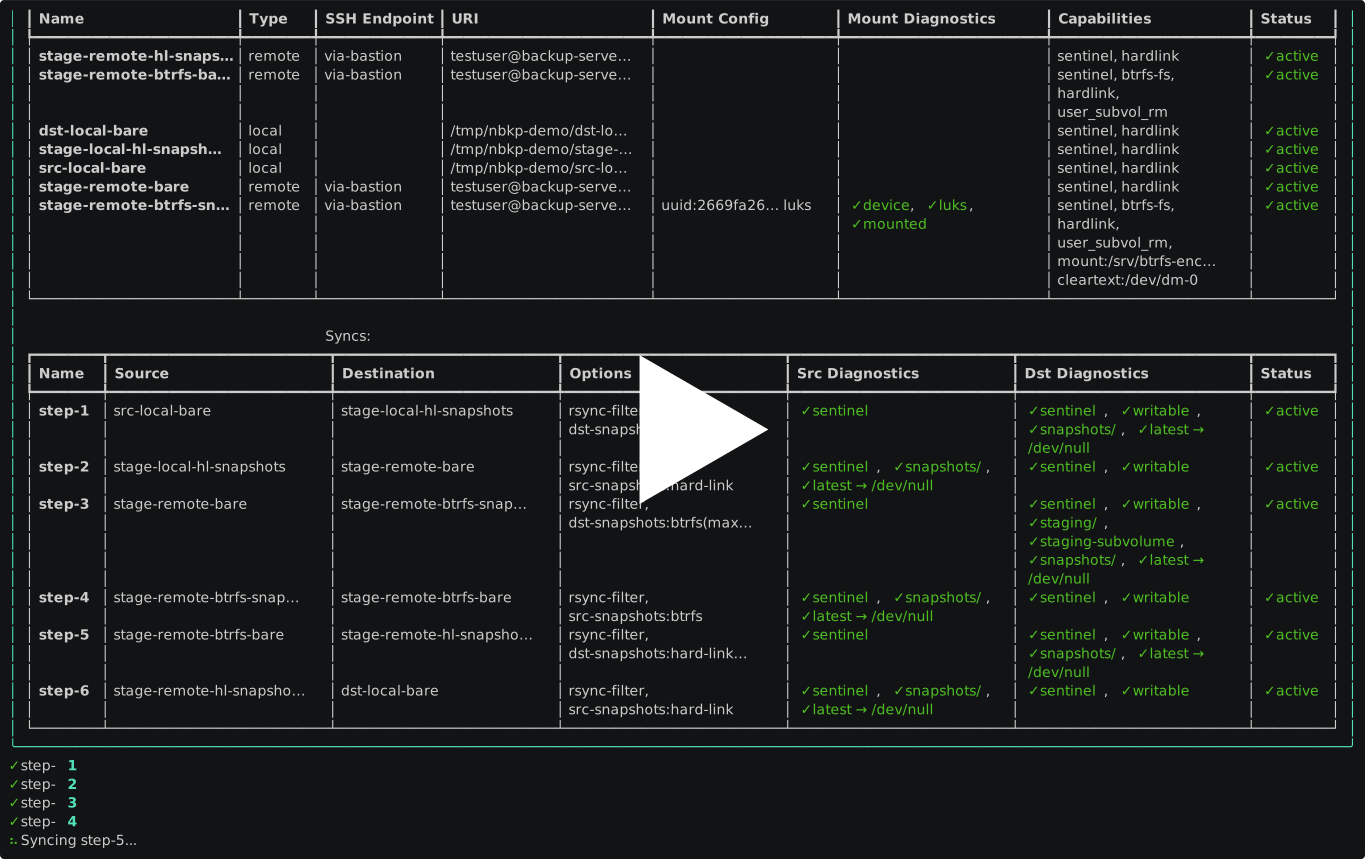
A Linux-and-macOS-compatible rsync-based backup tool for nomadic setups where sources and destinations aren't always available — laptops on the move, removable drives, home servers behind changing networks.
Sentinel files ensure backups only run when volumes are genuinely present, with optional btrfs or hard-link snapshots for point-in-time recovery.
Files are backed up as-is in plain directories: no obscure storage formats and restoring is just a copy.
Installation
See docs/installation.md.
Usage
See docs/usage.md.
Tutorial
For a complete end-to-end walkthrough — backing up a laptop to a Raspberry Pi backup hub with LUKS-encrypted btrfs drives, a relay drive that fans data out to the rest of them, snapshots, automatic mount management, and keyring-stored passphrases — see docs/tutorial.md.
Main Use Cases
The tool is primarily designed for the following backup scenarios:
- Laptop to Server — back up to your home server whenever you're on the home network
- Laptop to External Drive — back up to an external drive whenever it's connected
- External Drive to Server — replicate an external drive to your home server when both are available
- Server to External Drive — back up your home server to an external drive
- Easy Setup - pilot the backups from your laptop, minimal setup on the server (
rsync,btrfs)
It replaces the rsync shell scripts you'd normally maintain, adding:
- Volume detection (through sentinel files) — only runs when sources and destinations are actually available
- Btrfs and hard-link snapshots — keeps point-in-time copies so a bad sync can't wipe good backups
- Declarative config — one YAML file describes all your backup pairs
- Structured output — human-readable for convenience and JSON output for scripting and automation
- Automatic LUKS and volume activation — automatically mount and unlock volumes before syncs, and unmount and lock them afterward, using credentials from the system keyring on your laptop.
Full feature list: docs/features.md.
Also check Why I wrote Nomad Backup (nbkp) to replace my rsync shell scripts for additional context.
Non-Goals
nbkp is designed around a single orchestrator (typically a laptop) that initiates all syncs. It intentionally does not support multi-server topologies where data flows directly between remote servers, for several reasons:
- SSH credentials are local. Keys, proxy-jump chains, and connection options in the config describe how the orchestrator reaches each server — not how servers reach each other. Forwarding credentials between servers adds security risk and configuration complexity.
- Checks and transfers take different paths. Pre-flight checks (sentinel files, rsync availability, btrfs detection) run from the orchestrator to each server independently, but a server-to-server transfer would bypass the orchestrator entirely — meaning checks can pass while the actual sync fails.
- Post-sync operations (snapshots, pruning) assume orchestrator access. Btrfs and hard-link snapshot management connects from the orchestrator to the destination, not from the source server.
If you need server-to-server replication:
- Install nbkp on one of the servers and configure separate syncs from there, treating that server as the orchestrator.
- Compile a standalone script with
nbkp shand deploy it to the server — no Python or nbkp installation required on the target server. - Use tools designed for multi-server topologies: check the Similar Tools section for options that support enterpris-y / multi-host setups.
Known Limitations
- No Windows support -- Haven't used it for decades, so no idea wether Cygwin is still a thing, if WSL could work, or if there is a completely different rsync-like ecosystem that's the preferred way of performing backups.
- No cloud backends -- local and SSH only. Might explore rclone integration down the road.
- No bidirectional sync -- one-way rsync, on purpose. It could be interesting to explore unison integration for bidirectional syncs, but I don't have a use case for it for now.
- Not designed for always-on server-to-server replication (though you can deploy a generated shell script on a server for that).
Philosophy
Design Principles
- Laptop-centric workflows
- Changing networks
- Drives being plugged/unplugged
- Backups happening when possible
- Not always-on infrastructure
- Personal homelab / Raspberry Pi setups
Implementation Principles
No custom storage format, protocol, or encryption — just proven tools composed together:
- rsync + SSH — handles the actual file transfer, locally or remotely
- Plain directories — no obscure storage formats; files are stored as-is and restoring is just a copy
- Btrfs snapshots (optional) — space-efficient point-in-time copies via copy-on-write, with automatic pruning. Each snapshot is a read-only subvolume exposing a plain directory tree
- Hard-link snapshots (optional) — alternative to btrfs snapshots, works on any filesystem that supports hard links, but less efficient and more fragile
- cryptsetup (optional) — full-volume encryption for backup destinations
Nomad backup metaphor
A nomad:
- Moves between places
- Sets up temporary camp
- Carries essential belongings
- Adapts to environment
- Relies on what is present
Which maps to:
- Laptop
- External drive
- Home server
- Network availability
- Mount detection
Contribute
Practical information:
- docs/setup-development-environment.md — development setup
- docs/building-and-testing.md — running tests and checks
- docs/releasing-and-publishing.md — releases and PyPI publishing
- docs/guidelines.md — project-specific guidelines
- common-guidelines — shared coding guidelines
Conceptual information:
- docs/concepts.md — domain model and configuration reference
- docs/internals.md — runtime behavior, design decisions, and external commands
- docs/architecture.md — module dependency graph
Resources
Related Projects
Dependencies
- rsync — the underlying file synchronization tool
- btrfs — for space-efficient point-in-time copies via copy-on-write
- cryptsetup — for full-volume encryption
- typer — for building the CLI interface
- pydantic — for data modeling and validation
Similar Tools
There are a number of open source backup tools that use rsync, btrfs, or similar principles. This section describes how nbkp compares to some of the popular ones.
If you believe that the representation is inaccurate or if there are other tools that should be included in this list, please submit an issue or PR to update this section.
Rsync-related
- rsnapshot — periodic snapshots via rsync + hard links (hourly/daily/weekly/monthly). Designed for server/cron use with no awareness of removable or intermittent targets. Files stored as plain directories.
- Back In Time — GUI/CLI tool using rsync + hard links with scheduling and encfs encryption. Provides a Qt interface; uses hard links instead of btrfs snapshots; no sentinel-file mechanism for removable drives.
- rsync-time-backup — Time Machine-style shell script using rsync
--link-dest. Single script, no config file; uses hard links instead of btrfs snapshots; no volume detection. - rdiff-backup — keeps the latest backup as a plain mirror, stores reverse diffs for older versions. Older versions require the tool to reconstruct; no removable-drive awareness.
- Dirvish — rotating network backup system using rsync + hard links. Oriented toward server-pull workflows; no removable-drive detection or btrfs support.
- VaultSync — cross-platform desktop and CLI backup tool using rsync (macOS/Linux) and robocopy (Windows). Provides a GUI, scheduled backups, snapshot history, encryption, and retention policies. Stores backups as plain directories; no btrfs integration or sentinel-file mechanism.
- BmuS — bash-based backup tool using rsync + hard-link snapshots with GFS retention, gocryptfs/GPG encryption, MySQL/MariaDB dumps, and rclone cloud uploads. Stores backups as plain directories; generates an HTML dashboard; no btrfs integration or sentinel-file mechanism.
- Duplicity — GPG-encrypted tar volumes with librsync incremental transfers. Not browsable as plain directories; full+incremental chain model; no btrfs integration.
Deduplicating
- BorgBackup — chunk-level deduplication with compression and authenticated encryption. Proprietary repository format (not plain directories); requires
borgon the remote side; no removable-drive detection. - borgmatic — configuration-driven wrapper around BorgBackup that adds YAML config, scheduling, database dumps (PostgreSQL, MySQL, SQLite, etc.), monitoring integrations, and credential management. Same proprietary Borg format underneath; no rsync or removable-drive support.
- Restic — content-addressable backups with encryption by default, supporting many backends (local, S3, SFTP, B2). Proprietary format; restoring requires the restic tool; no volume detection.
- Backrest — web-based backup orchestrator built on restic, distributed as a single Go binary. Provides a web UI for cron-scheduled backups, snapshot browsing, and file restoration across all restic backends (local, SFTP, S3, B2, rclone). Proprietary restic format; no rsync, btrfs, or removable-drive support.
- Kopia — content-addressable storage with encryption, compression, and both CLI/GUI. Proprietary format; includes an optional scheduling server; no removable-drive or btrfs support.
- Vykar — fast, encrypted, deduplicated backup tool written in Rust with content-defined chunking. Supports local, S3, SFTP, and a dedicated REST server; includes a desktop GUI and built-in WebDAV for browsing snapshots. Proprietary repository format; no rsync, btrfs, or removable-drive support.
Btrfs / snapshot-focused
- btrbk — btrfs-native snapshot management with send/receive for remote transfers. Btrfs-only (no rsync); more sophisticated retention policies (hourly/daily/weekly/monthly); no non-btrfs filesystem support.
- Snapper — automated btrfs snapshot creation with timeline-based retention and rollback. Local snapshot management only; no rsync or remote transfer; no external backup targets.
- Timeshift — system restore via rsync + hard links or btrfs snapshots. Targets root filesystem for system-level rollback; excludes user data by default; no remote backup.
Continuous / real-time
- Syncthing — continuous peer-to-peer file synchronization across devices. Decentralized (no central server); syncs bidirectionally in real time; no snapshots or point-in-time recovery; designed for keeping folders in sync rather than creating backups.
- Lsyncd — monitors directories via inotify and triggers rsync (or other tools) on changes. Daemon-based, continuous replication; designed for server-to-server mirroring; no snapshot management or removable-drive awareness.
Cloud / multi-backend
- Rclone — syncs files to and between 70+ cloud and remote backends (S3, SFTP, Google Drive, etc.). Can transfer server-to-server directly; not rsync-based; no btrfs integration or volume detection.
Bidirectional sync
- Unison — bidirectional file synchronization between two hosts. Detects conflicts; requires Unison on both sides with matching versions; no snapshots or removable-drive awareness.
Enterprise / multi-host
- Bacula / Bareos — enterprise client-server backup with a director, storage daemons, and file daemons across multiple hosts. Full multi-server topology; proprietary catalog and storage format; significant setup complexity.
- Amanda — network backup orchestrating multiple clients from a central server. Designed for tape and disk pools; uses native dump/tar; heavier infrastructure than nbkp targets.
- UrBackup — client-server backup system with a web UI for managing image and file backups across multiple machines. Requires a dedicated server process; proprietary transfer protocol; no rsync or btrfs integration.
- Velero — backup and disaster recovery for Kubernetes clusters, snapshotting persistent volumes and cluster resources. Kubernetes-specific; not applicable to general-purpose file backups.
Community
- r/Backup — Reddit community for discussing backup strategies, tools, and best practices.
License
This project is licensed under the Apache License 2.0 - see the LICENSE file for details.
1 maintainer

Release files for nbkp 1.1.0
For a detailed explanation of source distributions (sdists) and built distributions (wheels), please see the package formats documentation.
Source distribution (sdist)
| File | Size | Uploaded | |
|---|---|---|---|
| nbkp-1.1.0.tar.gz | 153.3 kB | Details |
Built distribution (wheel)
| File | Interpreter | ABI | Platform | Reset |
|---|---|---|---|---|
| nbkp-1.1.0-py3-none-any.whl | Python 3 | none | any | Details |
Total release size: 355.8 kB
Release files / nbkp-1.1.0.tar.gz
| Download URL | nbkp-1.1.0.tar.gz |
|---|---|
| Size | 153.3 kB |
| Tags | Source |
|
SHA-256 checksum How to use checksums |
59cbd780a1bd09d912621002d8e75452f8d3b0db9fde7e10f3bb22ed6360b51a
|
|
BLAKE2b-256 checksum How to use checksums |
601d43d7de0f765930466945490d2094dbe90274a8e419efdac09d64dddb8719
|
| Upload date | |
|
Uploaded using Trusted Publishing? What is trusted publishing? |
Yes |
| Uploaded via |
twine/7.0.0 CPython/3.13.14
|
Provenance
Provenance describes where a file came from. On PyPI, provenance is shared via attestations, which provide a verifiable record of the build or publishing details. View details, limitations and caveats.


PyPI Publish Attestation
PyPI verified that this artifact, at this checksum, originated from the publisher listed below.
Signed by GitHub Actions, verified by PyPI on Aug 21, 2026.
Transparency logRelease files / nbkp-1.1.0-py3-none-any.whl
| Download URL | nbkp-1.1.0-py3-none-any.whl |
|---|---|
| Size | 202.6 kB |
| Tags | Python 3 |
|
SHA-256 checksum How to use checksums |
36f3ac09c221b7bb193bd52876147d992e0d9085e5b08c4a72d85b979c1914c9
|
|
BLAKE2b-256 checksum How to use checksums |
da45ee5263858899e2ef60efeba8cd168b85ec599e23ded4818171021f45cd9e
|
| Upload date | |
|
Uploaded using Trusted Publishing? What is trusted publishing? |
Yes |
| Uploaded via |
twine/7.0.0 CPython/3.13.14
|
Provenance
Provenance describes where a file came from. On PyPI, provenance is shared via attestations, which provide a verifiable record of the build or publishing details. View details, limitations and caveats.
PyPI Publish Attestation
PyPI verified that this artifact, at this checksum, originated from the publisher listed below.
Signed by GitHub Actions, verified by PyPI on Aug 21, 2026.
Transparency log













