
nbmorph


A small, Numba-accelerated Python package for morphological operations on 3D labeled images.
nbmorph provides a set of common morphological operations optimized for performance using Numba. It is designed to work with 3D NumPy arrays representing labeled image data, where different integer labels correspond to different objects.
Features
-
Numba-accelerated and multithreaded: Operations are just-in-time compiled with Numba for high performance on CPUs.
-
3D Label Image Support: All operations are designed for 3D labeled images (integer NumPy arrays).
-
Quasi-Spherical Structuring Elements: Approximates spherical structuring elements by alternating between box and diamond kernels for dilation and erosion.
-
Core Morphological Operations:
-
dilate_labels_spherical: Expands the boundaries of labeled regions by assigning the mode of the neighborhood to background voxels. -
erode_labels_spherical: Shrinks the boundaries of labeled regions. -
open_labels_spherical: Removes small noise and thin protrusions (erosion followed by dilation). -
close_labels_spherical: Fills small holes within objects (dilation followed by erosion). -
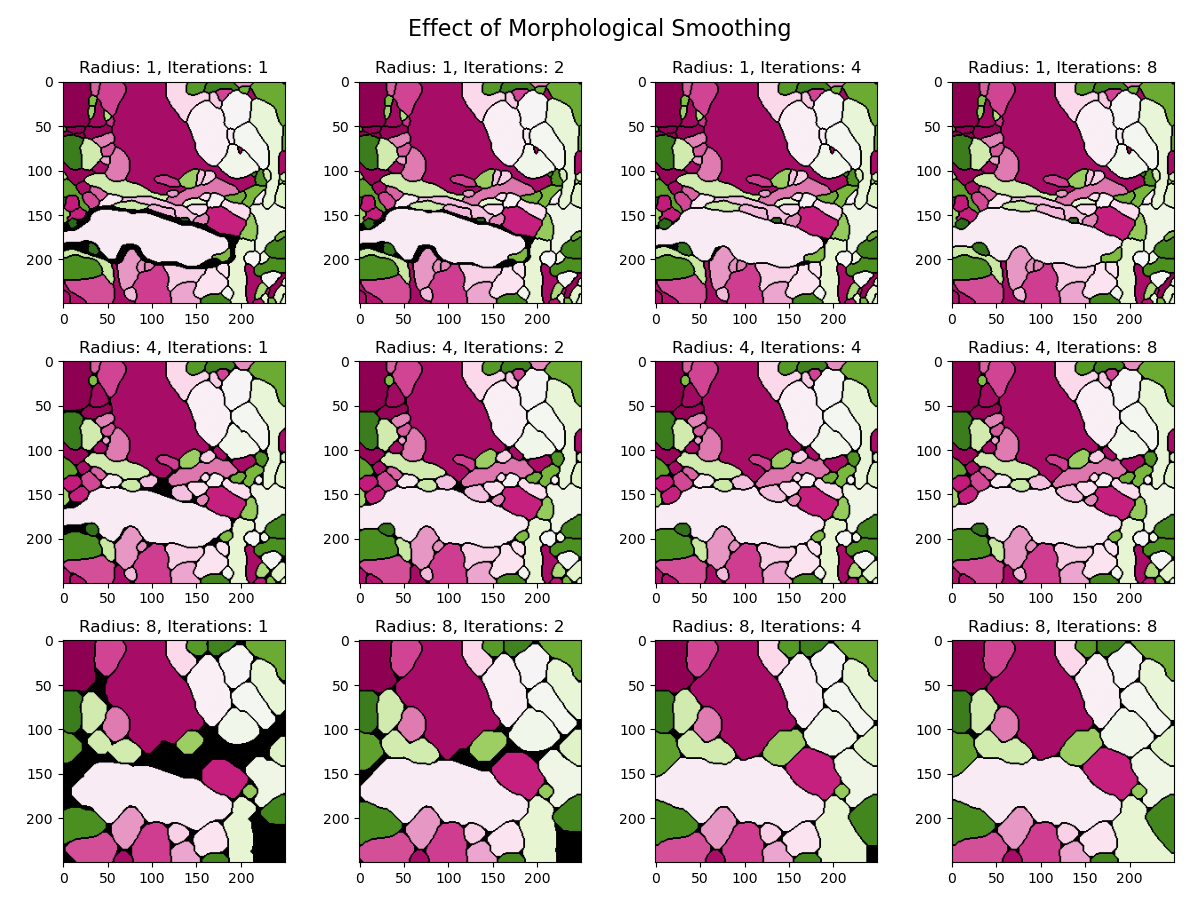
smooth_labels_spherical: Smoothes object boundaries by performing an opening followed by a closing.
-
-
Mode (majority) filters: Stencil-based mode filters built on top of compile-time sorting networks for fast, fixed-size neighborhoods. Each comes in two variants:
-
onlyzero_mode_box/onlyzero_mode_diamond: Fill only background (zero) voxels with the mode of their 3x3x3 box or 6-connected diamond neighborhood, leaving labeled voxels unchanged. -
mode_box/mode_diamond: Replace every voxel with the mode of its neighborhood (including the center), useful for denoising labeled volumes.
-
Installation
You can install nbmorph directly from pypi using pip:
pip install nbmorph
Usage
Here is a basic example of how to use nbmorph to apply operations to a 3D labeled image.
import numpy as np
import nbmorph
import numba

numba.set_num_threads(4)

# Create a sample 3D labeled image
# For example, a 5x5x5 cube of two different labels in a 10x10x10 volume
labels = np.zeros((10, 10, 10), dtype=np.uint16)
labels[2:7, 2:7, 2:5] = 1
labels[2:7, 2:7, 5:7] = 2

# First execution may take a while due to numba compilation
# Apply morphological erosion with a radius of 1
eroded_labels = nbmorph.erode_labels_spherical(labels, radius=1)

# Apply morphological dilation with a radius of 1
dilated_labels = nbmorph.dilate_labels_spherical(labels, radius=1)

# Apply morphological opening with a radius of 1
opened_labels = nbmorph.open_labels_spherical(labels, radius=1)

# Apply morphological closing with a radius of 1
closed_labels = nbmorph.close_labels_spherical(labels, radius=1)

# Apply morphological smoothing with a radius of 1
smoothed_labels = nbmorph.smooth_labels_spherical(labels, radius=1)
Testing
Tests are written using pytest. To run the tests, first install the test dependencies and then run pytest:
pip install .[test]
pytest
Benchmarking
A benchmark script is included in the scripts directory:
python scripts/benchmark.py
License
This project is licensed under the MIT License - see the LICENSE file for details.
1 maintainer

Metadata
1 maintainer
Release files for nbmorph 0.3.2
For a detailed explanation of source distributions (sdists) and built distributions (wheels), please see the package formats documentation.
Source distribution (sdist)
| File | Size | Uploaded | |
|---|---|---|---|
| nbmorph-0.3.2.tar.gz | 20.7 kB | Details |
Built distribution (wheel)
| File | Interpreter | ABI | Platform | Reset |
|---|---|---|---|---|
| nbmorph-0.3.2-py3-none-any.whl | Python 3 | none | any | Details |
Total release size: 39.0 kB
Release files / nbmorph-0.3.2.tar.gz
| Download URL | nbmorph-0.3.2.tar.gz |
|---|---|
| Size | 20.7 kB |
| Tags | Source |
|
SHA-256 checksum How to use checksums |
e0b608aea8a14e5dc7cd767608aeedafd1897b850807997b90be5174f88dd741
|
|
BLAKE2b-256 checksum How to use checksums |
f83c6e3d2a87c453f37951b9f56b29c55e2ef38e58bb5646e84d29817eac830d
|
| Upload date | |
|
Uploaded using Trusted Publishing? What is trusted publishing? |
Yes |
| Uploaded via |
twine/7.0.0 CPython/3.13.14
|
Provenance
Provenance describes where a file came from. On PyPI, provenance is shared via attestations, which provide a verifiable record of the build or publishing details. View details, limitations and caveats.


PyPI Publish Attestation
PyPI verified that this artifact, at this checksum, originated from the publisher listed below.
Signed by GitHub Actions, verified by PyPI on Oct 3, 2026.
Transparency logRelease files / nbmorph-0.3.2-py3-none-any.whl
| Download URL | nbmorph-0.3.2-py3-none-any.whl |
|---|---|
| Size | 18.3 kB |
| Tags | Python 3 |
|
SHA-256 checksum How to use checksums |
267694e72f8daf0754f76c052e9958568520eb407ad23a4c367f8dfc09986483
|
|
BLAKE2b-256 checksum How to use checksums |
1d307bf3a3699034177e6641480cf1f12e53ae2c01540f376393bd12d61f5405
|
| Upload date | |
|
Uploaded using Trusted Publishing? What is trusted publishing? |
Yes |
| Uploaded via |
twine/7.0.0 CPython/3.13.14
|
Provenance
Provenance describes where a file came from. On PyPI, provenance is shared via attestations, which provide a verifiable record of the build or publishing details. View details, limitations and caveats.
PyPI Publish Attestation
PyPI verified that this artifact, at this checksum, originated from the publisher listed below.
Signed by GitHub Actions, verified by PyPI on Oct 3, 2026.
Transparency log













