
nbpreview

Project description


nbpreview











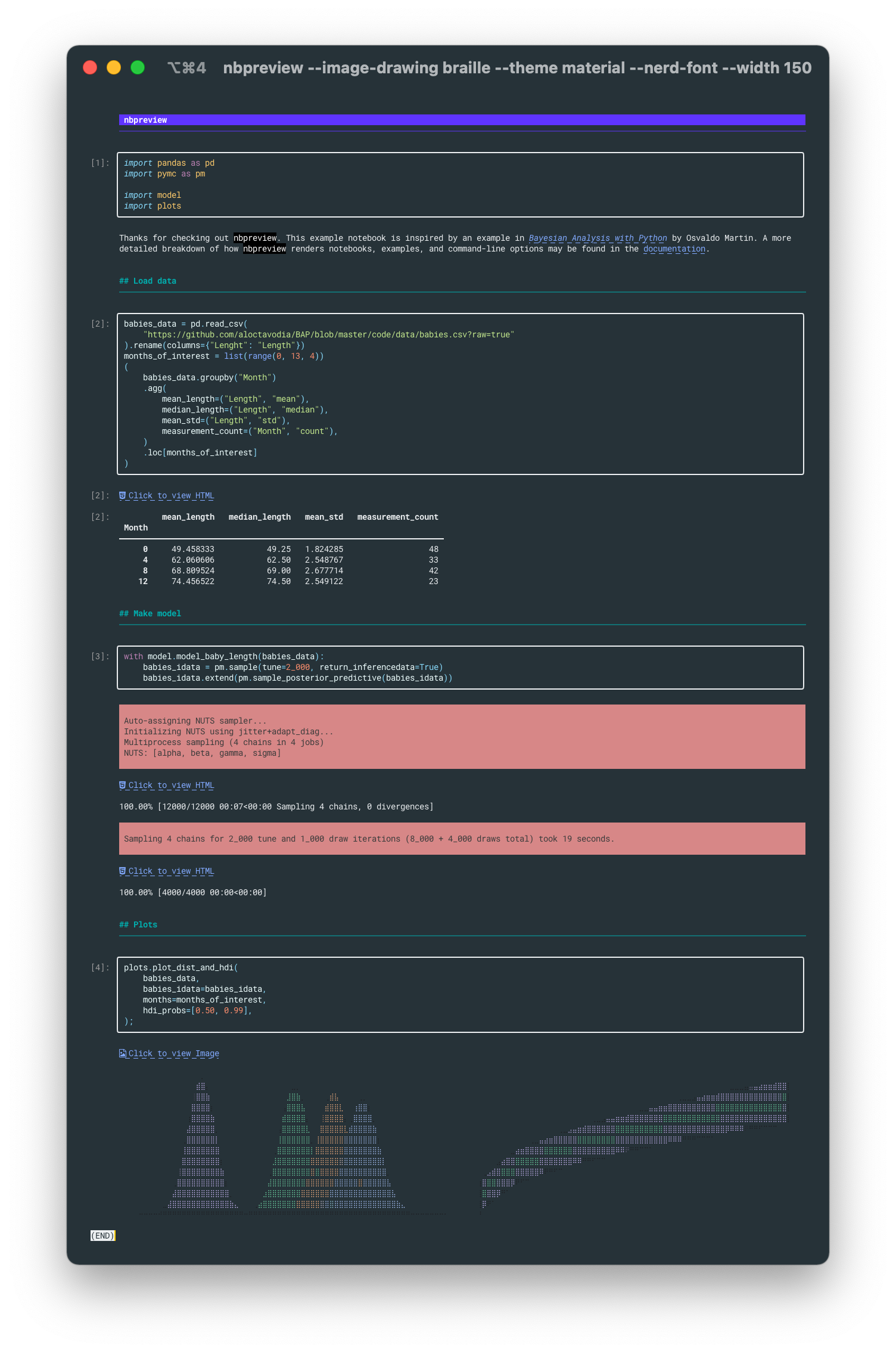
A terminal viewer for Jupyter notebooks. It's like cat for ipynb files.
Documentation
nbpreview's documentation contains a detailed breakdown of its features, command-line usage, and instructions on how to configure the tool.
Quick look
Want to just see how nbpreview would render an output on your terminal? Use uv to get a preview. The snippet below installs uv (if not already in your system) and uses it to render a notebook stored in this repository.
% curl -LsSf https://astral.sh/uv/install.sh | sh
% curl https://raw.githubusercontent.com/paw-lu/nbpreview/refs/heads/main/docs/example_notebook_cells/hero_notebook.ipynb | uvx nbpreview
Installation
nbpreview can be installed through any of the major python package managers (eg uv, pipx, or pip from PyPI).
uv is the easiest way to get started, there are multiple ways to install it. (Such as the example snippet above using curl).
% uv tool install nbpreview
nbpreview may also be installed via pip if you prefer:
% python -m pip install nbpreview
Features
Syntax highlight code cells

Render markdown

Draw images

Render DataFrame

Create previews for Vega charts

Render LaTeX

Parse HTML

Create hyperlinks for complex content

Render stderr output

Render tracebacks

Use Nerd Font icons
Try it out
Assuming curl and pipx are installed, nbpreview may be tried out on the terminal by running:
% curl https://raw.githubusercontent.com/paw-lu/nbpreview/main/docs/example_notebook_cells/hero_notebook.ipynb | pipx run nbpreview
Usage
To use nbpreview,
type nbpreview into your terminal followed by the path of the notebook you wish to view.
% nbpreview notebook.ipynb
See the command-line reference for details on options.
Contributing
Contributions are very welcome. To learn more, see the contributor guide.
License
Distributed under the terms of the MIT license, nbpreview is free and open source software.
Issues
If you encounter any problems, please file an issue along with a detailed description.
Prior art
Similar tools
Thanks to @joouha for maintaining a list of these tools. Many of the projects here were found directly on their page.
Complimentary tools
If you're interested in complimentary tools that help improve the terminal experience for notebooks, there are many amazing projects out there.
- bat is not a tool for notebooks specifically. But similar to nbpreview, it provides a rich output for many types of files on the terminal, and is the primary inspiration for nbpreview.
- euporie is a really exciting project that allows you to edit and run Jupyter notebooks on the terminal.
- nbclient is a library for executing notebooks from the command line.
- nbpreview is another project that coincidentally shares a name with this one. It allows for Jupyter notebooks to be rendered without running a notebook server.
- nbqa allows the use of linters and formatters on notebooks. It's also used by this project.
- jpterm is and up-and-coming successor to nbterm which will be accompanied by a web client. Looking forward to seeing this develop.
- nbtermix is an actively-developed fork of nbterm.
- nbterm lets you edit and execute Jupyter Notebooks on the terminal.
- papermill allows the parameterization and execution of Jupyter Notebooks.
Credits
nbpreview relies on a lot of fantastic projects. Check out the dependencies for a complete list of libraries that are leveraged.
Besides the direct dependencies, there are some other projects that directly enabled the development of nbpreview.
- bat is not explicitly used in this project, but served as the primary inspiration. This projects strives to be bat—but for notebooks. Many of nbpreview's features and command-line options are directly adopted from bat.
- Hypermodern Python Cookiecutter is the template this project was generated on. It is a fantastic project that integrates Poetry, Nox, and pre-commit. It's responsible for most of this project's CI.
- justcharts is directly used by this project to generate the Vega and Vega-Lite charts.
Release history Release notifications | RSS feed


Download files
Download the file for your platform. If you're not sure which to choose, learn more about installing packages.
Source Distribution
Built Distribution
Filter files by name, interpreter, ABI, and platform.
If you're not sure about the file name format, learn more about wheel file names.
Copy a direct link to the current filters
File details
Details for the file nbpreview-0.10.0.tar.gz.
File metadata
- Download URL: nbpreview-0.10.0.tar.gz
- Upload date:
- Size: 37.3 kB
- Tags: Source
- Uploaded using Trusted Publishing? No
- Uploaded via: twine/6.1.0 CPython/3.13.7
File hashes
| Algorithm | Hash digest | |
|---|---|---|
| SHA256 |
6144f2c0315fff6f83e7ba526949d372080ac77853cc24c985149a04ef5e59aa
|
|
| MD5 |
e5cc743695613e8bc8f11a3960895c17
|
|
| BLAKE2b-256 |
566b39e6ef5710968b8d8776a14df32f676b2fab2f5a24e1426975007bfc4807
|
File details
Details for the file nbpreview-0.10.0-py3-none-any.whl.
File metadata
- Download URL: nbpreview-0.10.0-py3-none-any.whl
- Upload date:
- Size: 44.5 kB
- Tags: Python 3
- Uploaded using Trusted Publishing? No
- Uploaded via: twine/6.1.0 CPython/3.13.7
File hashes
| Algorithm | Hash digest | |
|---|---|---|
| SHA256 |
1ce1d3c7710a99a16990aa704a2c72194106269fcc9e52eedec515037db61c77
|
|
| MD5 |
71139788a854021b90e33f7a7f176f4d
|
|
| BLAKE2b-256 |
3f7c41e46612604785edf5026558a45b73410e85aed6a5d598ced25cffae64a4
|






