
A framework for customizing NBConvert templates and building reports

Project description


A framework for building print media with nbconvert.





Installation
Install with pip:
pip install nbprint
Install with conda
conda install nbprint -c conda-forge
Background
Jupyter Notebooks are widely used for reports via nbconvert. Most efforts focus on building web reports / websites from notebooks, including Voilà and Jupyter Book.
Despite being the primary goal of early notebook conversion efforts, in recent years much less focus has been spent on print media - PDFs for reports, academic papers, newspapers, etc. There are many examples of nbconvert templates for academic papers, as well as projects like ipypublish. Most of these efforts focus on $\LaTeX$, and indeed nbprint itself started as convenience framework for formatting charts and tables similarly between html and pdf outputs.
However, with recent releases to nbconvert, which now supports webpdf (printing as pdf from within a headless web browser), and with advances to the @media print CSS directive spearheaded by the lovely folks at pagedjs, it is now much easier to build publication ready print-oriented media on the web.
This is the goal of nbprint. Using pagedjs, nbprint provides templates and utilities for building web reports targetting print media. Beyong that, it provides infrastructure for parameterizing and configuring documents via pydantic, which makes designing and generating reports a breeze, even without knowledge of Python. Documents are modular and can be easily composed via hydra.
Quickstart
nbprint can be used purely via notebook metadata, but it also provides a yaml-based framework for configuration (via pydantic, hydra, and omegaconf). This is particularly convenient when generating parameterized reports, for example when configuring a large number of hyperparameters for a model's evaluation report. This configuration also allows for easier iteration on a report's design and content.
Configuration
Let's take a simple placeholder report.
---
debug: false
outputs:
  _target_: nbprint:NBConvertOutputs
  path_root: ./examples/output
  target: "html"

content:
  - _target_: nbprint:ContentMarkdown
    content: |
      # A Generic Report
      ## A Subtitle
    css: ":scope { text-align: center; }"

  - _target_: nbprint:ContentPageBreak

  - _target_: nbprint:ContentTableOfContents

  - _target_: nbprint:ContentPageBreak

  - _target_: nbprint:ContentMarkdown
    content: |
      # Section One
      Lorem ipsum dolor sit amet.
      ## Subsection One
      Consectetur adipiscing elit, sed do eiusmod tempor incididunt.
      ## Subsection Two
      Ut labore et dolore magna aliqua.

  - _target_: nbprint:ContentPageBreak

  - _target_: nbprint:ContentFlexRowLayout
    sizes: [1, 1]
    content:
      - _target_: nbprint:ContentFlexColumnLayout
        content:
          - _target_: nbprint:ContentMarkdown
            content: |
              # Section Two
              Lorem ipsum dolor sit amet.
              ## Subsection One
              Consectetur adipiscing elit, sed do eiusmod tempor incididunt.

      - _target_: nbprint:ContentFlexColumnLayout
        content:
          - _target_: nbprint:ContentMarkdown
            content: |
              # Section Three
              Ut labore et dolore magna aliqua.
              ## Subsection One
              Ut enim ad minim veniam, quis nostrud.
Let's break this down step by step.
First, we configure debug: false. This tells nbprint to run pagedjs print preview. We also set the output to run nbconvert and configure the folder for outputs to be placed.
Next we fill in some content. Here we use a few components:
ContentMarkdownto generate Markdown cellsContentPageBreakto split onto a new page in our pdfContentTableOfContentsto create a table of contents. Note that this will work in both html preview, and pdf form!ContentFlexRowLayoutandContentFlexColumnLayoutto create some layout structure for our document.
Run
We can now generate the report by running the CLI:
nbprint run examples/basic.yaml basic
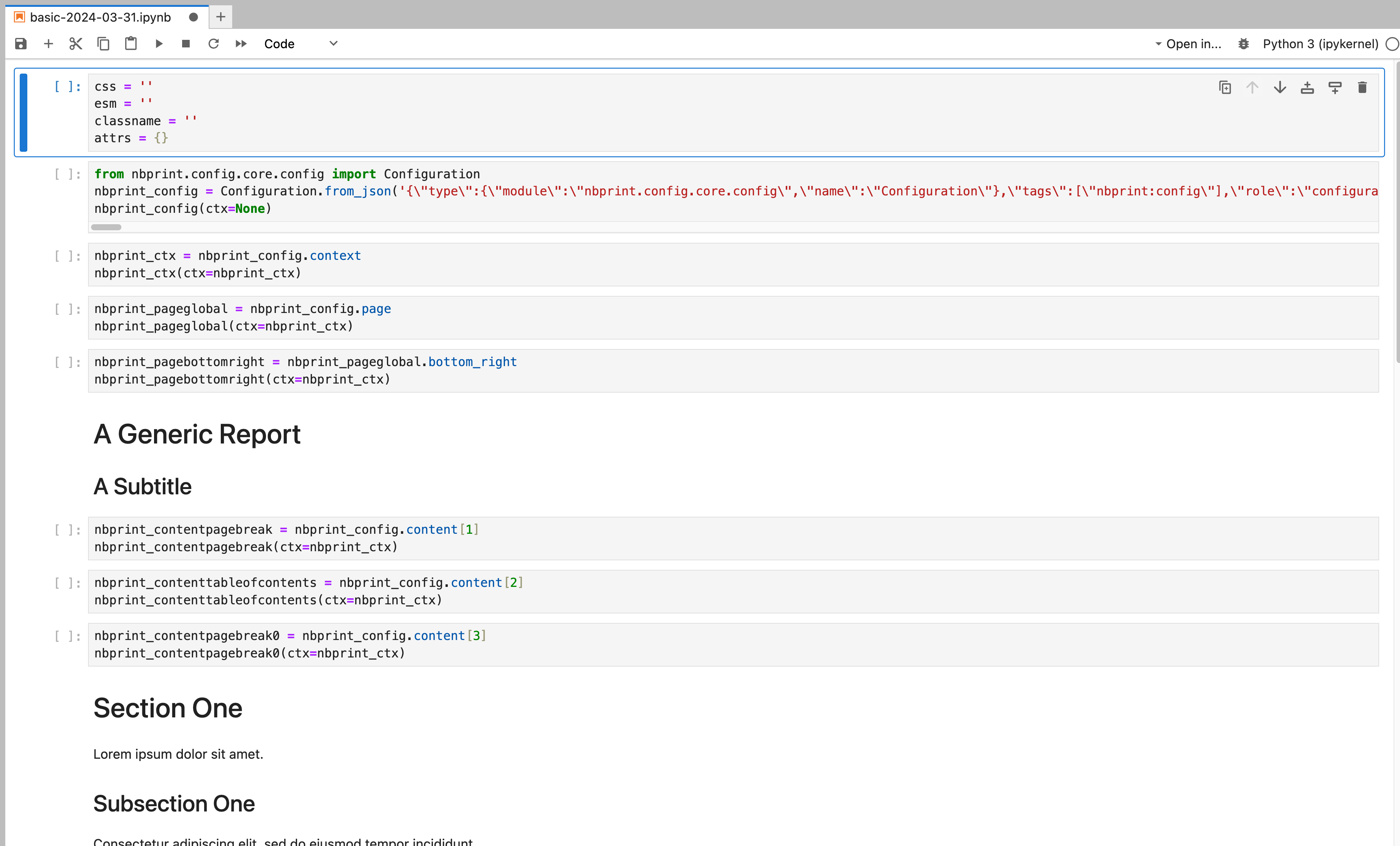
This will create a Notebook output in our specified folder examples/output, as well as an html asset (since that is what we specified in the yaml file). Both will have the date as a suffix, which is also configureable in our yaml. We see the generated report notebook, which we can open and use for further experimentation or to investigate the report itself.
We also see the html document itself, which will be rendered via pagedjs print preview.
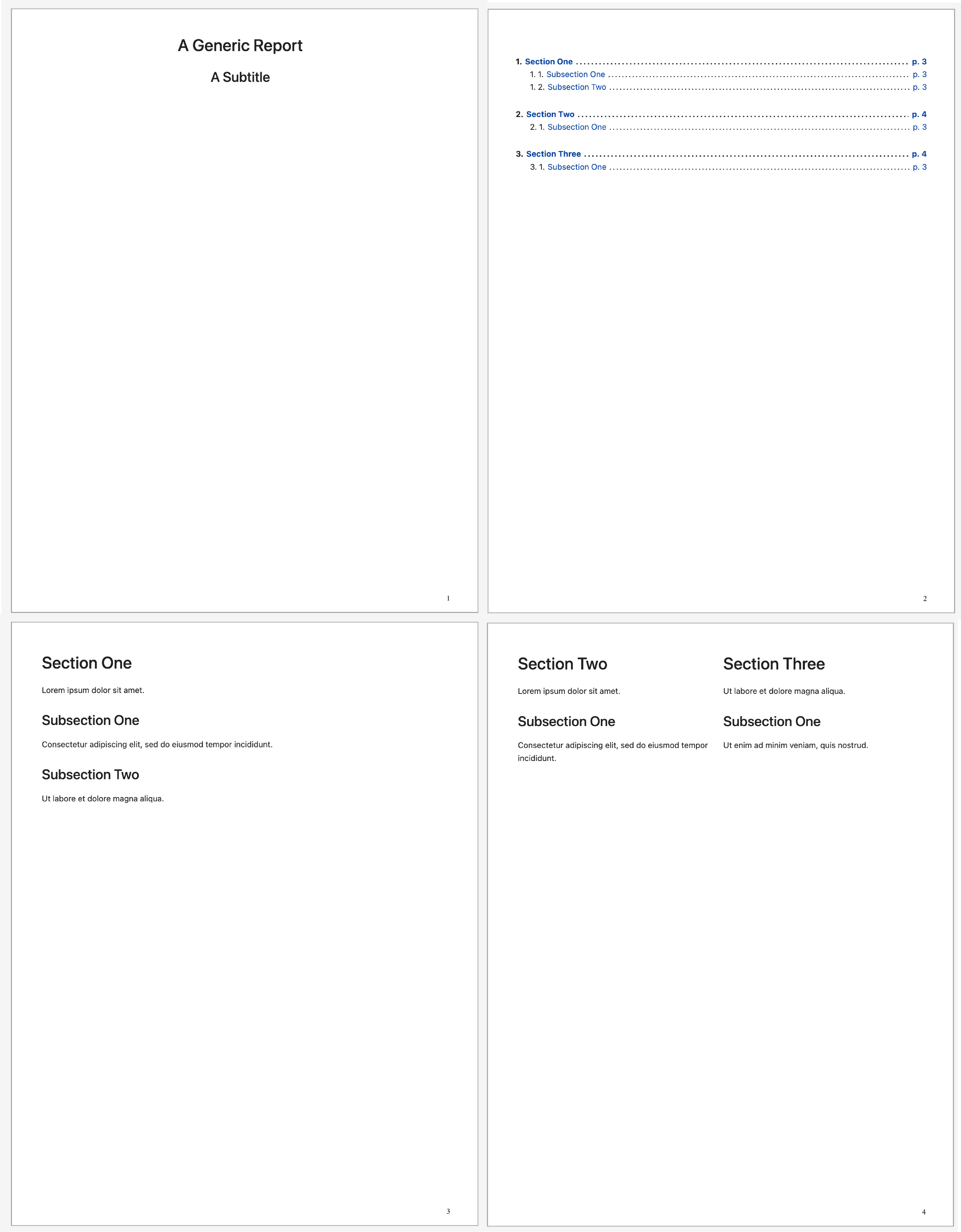
You can find a pdf form of this document here.
Development
Warning: This project is under active development, so all APIs are subject to change!
Related Projects
- nbconvert: Convert Notebooks to other formats
- pagedjs: Paged.js is a free and open-source library that paginates any HTML content to produce beautiful print-ready PDF
- Voilà: Voilà turns Jupyter notebooks into standalone web applications
- Jupyter Book: Build beautiful, publication-quality books and documents from computational content
- ipypublish: A workflow for creating and editing publication ready scientific reports and presentations, from one or more Jupyter Notebooks, without leaving the browser!
Additionally, this project relies heavily on:
- pydantic: Pydantic is the most widely used data validation library for Python.
- hydra: Hydra is a framework for dynamically creating hierarchical configuration by composition, with the ability to override through config files and the command line
- omegaconf: OmegaConf is a hierarchical configuration system, with support for merging configurations from multiple sources
- typer: Typer is a library for building CLI applications based on Python type hints
License
This software is licensed under the Apache 2.0 license. See the LICENSE file for details.
Release history Release notifications | RSS feed


Download files
Download the file for your platform. If you're not sure which to choose, learn more about installing packages.
Source Distribution
Built Distribution
Filter files by name, interpreter, ABI, and platform.
If you're not sure about the file name format, learn more about wheel file names.
Copy a direct link to the current filters
File details
Details for the file nbprint-0.4.4.tar.gz.
File metadata
- Download URL: nbprint-0.4.4.tar.gz
- Upload date:
- Size: 3.2 MB
- Tags: Source
- Uploaded using Trusted Publishing? No
- Uploaded via: twine/6.0.1 CPython/3.11.11
File hashes
| Algorithm | Hash digest | |
|---|---|---|
| SHA256 |
7eb5b24e8f55f4a0335a9662328c4ebedef0b291eef0f35738bc44d029d009cf
|
|
| MD5 |
6773271f09c9c545d6e31a07c47db633
|
|
| BLAKE2b-256 |
43eb6df0982d9ec66c22ca48e4e277519095e7a6f9cc1da4d7f2ffe00a9def1e
|
File details
Details for the file nbprint-0.4.4-py3-none-any.whl.
File metadata
- Download URL: nbprint-0.4.4-py3-none-any.whl
- Upload date:
- Size: 6.5 MB
- Tags: Python 3
- Uploaded using Trusted Publishing? No
- Uploaded via: twine/6.0.1 CPython/3.11.11
File hashes
| Algorithm | Hash digest | |
|---|---|---|
| SHA256 |
551bdb32fedbe390357b36c783289d684b31227d3cfa9d6ba0dbbf5b56e72bf6
|
|
| MD5 |
62c997869a8364c163407f1745c9e942
|
|
| BLAKE2b-256 |
6b949925babdea16488364afec50d158287420e6fd4e3fa3eb3a832333fe1201
|






