
An automation tool to refactor Jupyter Notebooks to Python modules, with code dependency analysis.

Project description






An automation tool to refactor Jupyter Notebooks to Python packages and modules.
Overview
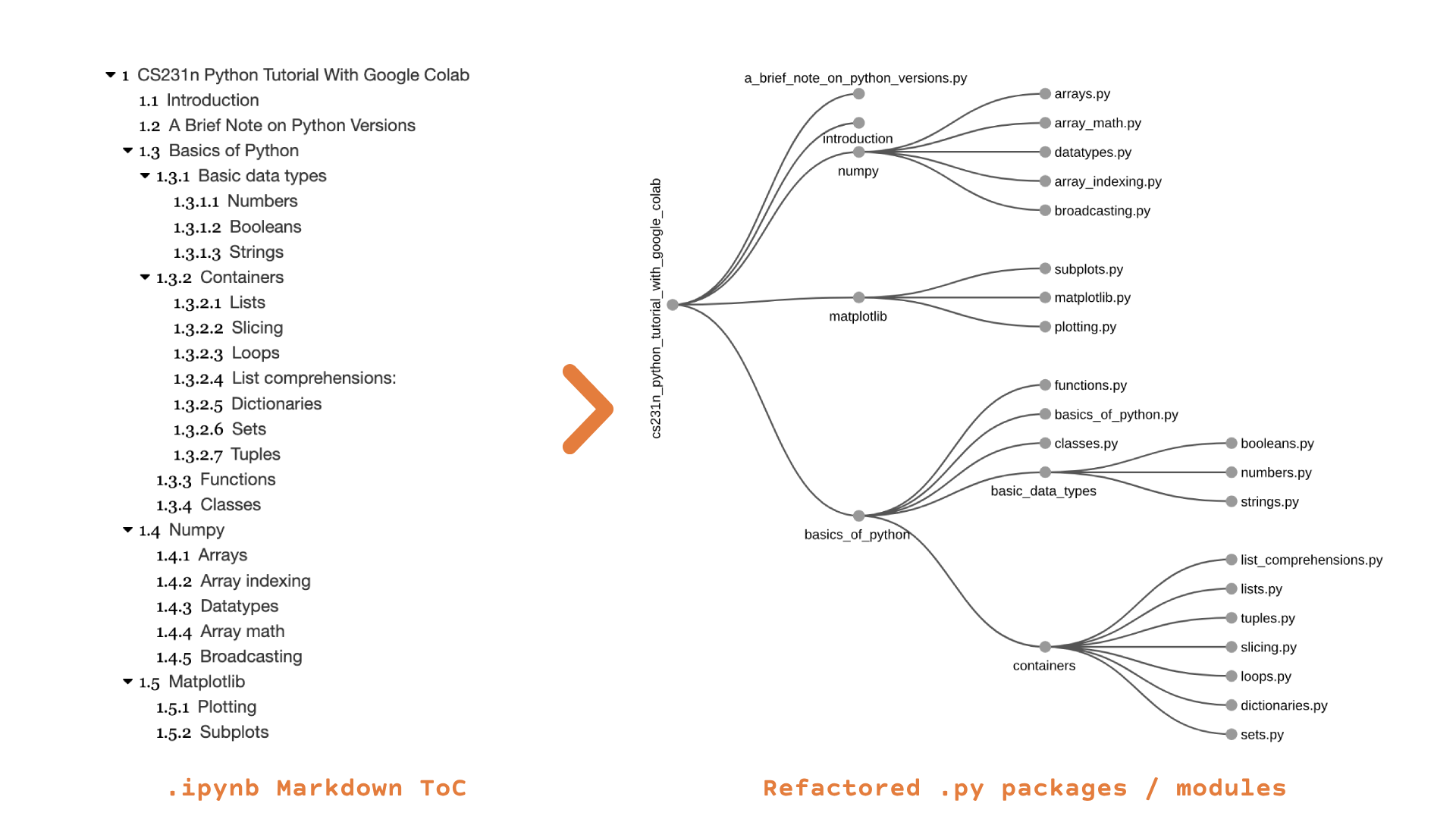
nbrefactor is designed to refactor Jupyter Notebooks into structured Python packages and modules. Using Markdown Headers and/or custom commands in a notebook's Markdown/text cells, nbrefactor creates a hierarchical module structure that reflects the notebook's content autonomously.
Motivation
With the growing dependence on cloud-based IPython platforms (Google Colab, primarily), developing projects directly in-browser has become more prominent. Having suffered through the pain of refactoring entire projects from Jupyter Notebooks into Python packages/modules to facilitate PyPI publication (and proper source control), this tool was developed to automate the refactoring process.
Implementation
This project does not just create a hierarchy based on the level of Markdown headers (how many # there are); this is just a single step in the refactoring process.
Since we are generating modules that potentially depend on context from previous cells in the notebook, dependency-analysis is required. Furthermore, we also need track the generated modules and all globally-accessible identifiers throughout the notebook to generate relative import statements as needed.
For instance, if a class is refactored to a generated module ./package/sub_package/module.py, this definition and module path need to be tracked so we can relatively import it as needed if it appears in successive cells or modules. Scope-Awareness and Identifier-Shadowing posed a challenge as well, and are also handled in the dependency analysis phase of the refactoring.
Module Hierarchy Generation
Convert markdown headers in notebooks into a corresponding folder and file structure.
Code Dependency Analyzer (CDA)
The core of nbrefactor's functionality lies in the Code Dependency Analyzer (CDA). The CDA is responsible for parsing code cells, tracking declared definitions, and analyzing dependencies across the generated modules. This module tackles challenges that were raised during the inception of the refactoring-automation process (primarily handling relative imports dynamically as we generate the modules, identifier shadowing, and non-redundant dependency injection).
- IPython Magic Command Removal: clean the source code by omitting IPython magic commands (to ensure that the code can be parsed by Python's
ast). - AST Parsing: parse the sanitized code into an Abstract Syntax Tree
- Import Statement Stripping: extract and strip import statements from the parsed code, and add them to a global (across all cells) tracker.
- Global Definition Tracking: track all encountered definitions (declared functions and classes) globally. This inherently handles identifier shadowing.
- Dependency Analysis: analyze identifier usages in a given code block.
- Dynamic Relative Import Resolution: resolve local import statements dynamically depending on the current and target modules' positions in the tree.
- Dependency Generation and Resolution: generate the respective import statements (given the definitions' analysis in step 5 & 6) to be injected during the file-writing phase.
Installation
PyPI (recommended)
The Python package is hosted on the Python Package Index (PyPI).
The latest published version of nbrefactor can be installed using
pip install nbrefactor
Manual Installation
Simply clone the repo and extract the files in the nbrefactor folder,
then run:
pip install -r requirements.txt
pip install -e .
Or use one of the scripts below:
GIT
cdinto your project directory- Use
sparse-checkoutto pull the library files only into your project directorygit init nbrefactor cd nbrefactor git remote add -f origin https://github.com/ThunderStruct/nbrefactor.git git config core.sparseCheckout true echo "nbrefactor/*" >> .git/info/sparse-checkout git pull --depth=1 origin master pip install -r requirements.txt pip install -e .
SVN
cdinto your project directorycheckoutthe library filessvn checkout https://github.com/ThunderStruct/nbrefactor/trunk/nbrefactor pip install -r requirements.txt pip install -e .
Usage
Refer to the documentation for the comprehensive commands' reference. Some basic usages are provided below.
Command Line Interface
nbrefactor provides a CLI to easily refactor notebooks into a structured project hierarchy.
Basic CLI Usage
To use the CLI, run the following command:
jupyter nbrefactor <notebook_path> <output_path> [OPTIONS]
<notebook_path>: Path to the Jupyter notebook file you want to refactor.<output_path>: Directory where the refactored Python modules will be saved.
Markdown Commands
The following table lists the currently implemented Markdown commands and their functions.
| Command | Description |
|---|---|
$ignore-package |
Ignores all modules/packages until a header with a depth less than or equal to the current one is reached. |
$ignore-module |
Ignores a single module (may consist of multiple code cells). |
$ignore-cell |
Ignores the next code cell regardless of type. |
$ignore-markdown |
Ignores the current Markdown cell (e.g., when used for instructions only). |
$package=<name> |
Renames the current package and asserts the node type as 'package'. |
$module=<name> |
Renames the current module and asserts the node type as 'module'. |
$node=<name> |
Renames the current node generically, regardless of type. |
$declare-package=<name> |
Declares a new node and asserts its type as 'package'. |
$declare-module=<name> |
Declares a new node and asserts its type as 'module'. |
$declare-node=<name> |
Declares a new node with no type (type will be inferred). |
Demo
There are several example notebooks provided to showcase nbrefactor's capabilities.
- Primary Demo Notebook: this notebook contains several examples of the core nbrefactor features, including all Markdown commands.
- CS231n Notebook: the official CS231n Colab notebook.
- HiveNAS Notebook: a larger project with a more complex folder structure.
- Markdown-only Notebook: a Markdown-only notebook to illustrate the directory-refactoring abilities of nbrefactor.
Interactive Demo
An interactive Notebook-based demo can be found here, which can be used to run the example projects discussed above.
Change Log
Consult the CHANGELOG for the latest updates.
Contributing
All contributions are welcome (and encouraged)! Even incremental PRs that just add minor features or corrections to the docs will be considered :)
If you'd like to contribute to nbrefactor, please read the CONTRIBUTING guidelines.
The TODO list delineates some potential future implementations and improvements.
PR Submission
In addition to following the contribution guidelines, please ensure the steps below are adhered to prior to submitting a PR:
- The CHANGELOG is updated according to the given structure
- The README and TODO are updated (if applicable)
License
nbrefactor is licensed under the MIT License. See the LICENSE file for more details.


Download files
Download the file for your platform. If you're not sure which to choose, learn more about installing packages.
Source Distribution
Built Distribution
Filter files by name, interpreter, ABI, and platform.
If you're not sure about the file name format, learn more about wheel file names.
Copy a direct link to the current filters
File details
Details for the file nbrefactor-0.1.3.tar.gz.
File metadata
- Download URL: nbrefactor-0.1.3.tar.gz
- Upload date:
- Size: 27.1 kB
- Tags: Source
- Uploaded using Trusted Publishing? No
- Uploaded via: twine/6.1.0 CPython/3.9.21
File hashes
| Algorithm | Hash digest | |
|---|---|---|
| SHA256 |
4a423eef22eff68839e621c603e68d386e748a0e2e3243353cd4561edb8fa736
|
|
| MD5 |
23d4191ad5eada868efe6208dc56798e
|
|
| BLAKE2b-256 |
1838c57ad8871dd64bb428372d826ea4a7123c09af6815ed893b91fa7b2997e1
|
File details
Details for the file nbrefactor-0.1.3-py3-none-any.whl.
File metadata
- Download URL: nbrefactor-0.1.3-py3-none-any.whl
- Upload date:
- Size: 28.9 kB
- Tags: Python 3
- Uploaded using Trusted Publishing? No
- Uploaded via: twine/6.1.0 CPython/3.9.21
File hashes
| Algorithm | Hash digest | |
|---|---|---|
| SHA256 |
65f3e87f73814b38b1f2f794180fb186c9fdc765f4ecc2284b1aa1ec1d2d226d
|
|
| MD5 |
a19971154625458ecfda400528aba368
|
|
| BLAKE2b-256 |
0beb696c18c9721921d4b137feb69e1003fc49eff9a4d160ecfe16d580ca4650
|






