
A tool to make your notebook sexier than before.

Project description
nbsexy:
nbsexy is a little tool to check whether your notebook is clean and readable (and also, sexy). You can use it either as a CLI tool or pre-commit hook.
Install (for now):
pip install nbsexy
Checks:
Currently, there are five check flags available:
-
--cell_count: Check number of cell in notebook doesnot exceed certain number (default 20). Too many cells means you proability do too many thing in a single notebook, you can consider split it to several files. -
--is_ascending: Check the cell number(execution_counts) is in ascending order. Notebook should be able to restart and run again without any error. If the cell number is not in ascending order, error may happend when you try to run it. -
--has_md: Check notebook has at least one markdown cell. You should use markdown cell to tell everyone the story about this notebook. Otherwise, it just a bunch of unoriginazed codes. -
--line_in_cell: Check all code cell in notebook have lines less than certain number. Cells with too many lines, just like script with too many lines, make me sick :confounded: . -
--total_line_in_nbcheck sum of lines in all code cells doesnot exceed certain number. Like I said, too many line make me sick.
experimental: execute notebook with (or without) parameter.
Usage:
With flag --execute, you can execute your notebook, if there's any error raised in any cell, nbsexy will exit with return code 1, and label as failed.
By default, nbsexy will try to find parameters in notebook (explain below), and execute notebook with these parameters. If you want to execute without using these parameter, you can set flag: --execute_without_parameters.
Parameter Execution:
* Why Parameter Execution:
Often, your notebook may have some cells, that will take you hours or even days to execute. It may not be practical to simply re-run these cells when you use nbsexy to execute notebooks.
In this case, you can set some parameters, which can ease or control the cost of computation in your notebook.
Take deep learning training loop as an example, below is a code snippet:
N_EPOCH = 50
for epoch in range(N_EPOCH):
    train_a_epoch() # cost a lot of time!!
By setting N_EPOCH=1, you can limit this training loop run only once when execute. Or you can also set other parameter to control the size of model or amount of training data you load.
* How to set parameter:
with the help of papermill, we can parameterize jupyter notebook and then execute it.
To parameterize your notebook, you need to create at least two cell, one with tag parameters and one with tag nbsexy-parameters. The nbsexy-parameters cell should be on top of parameters cell.
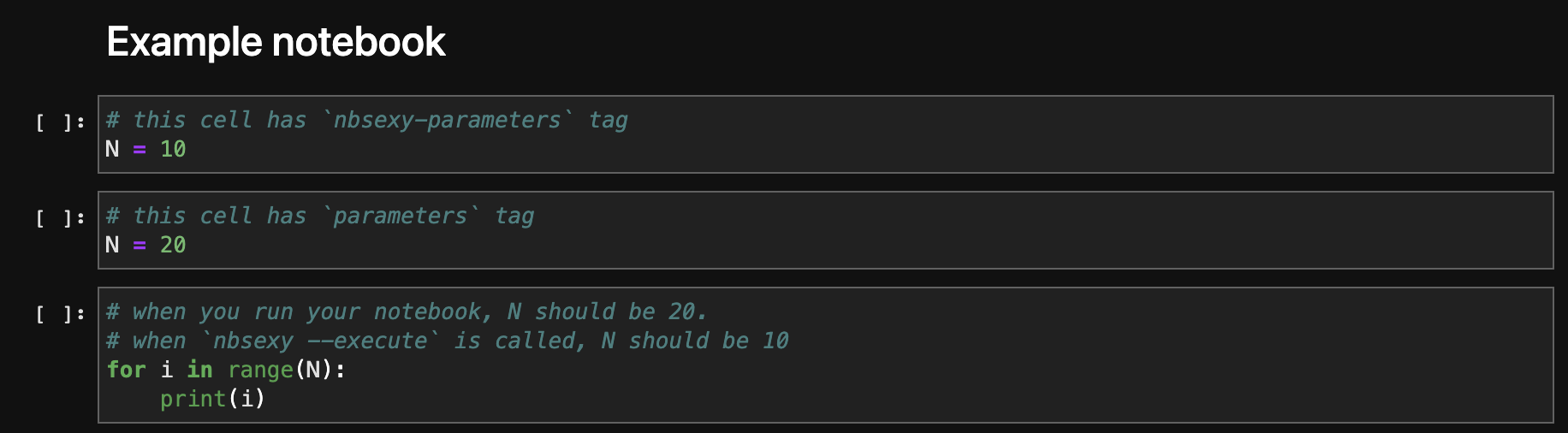
You can specify parameters you want to use in the nbsexy-parameters cell. When nbsexy is called with flag --execute, it will replace the "parameters in parameters cell" with "parameters in nbsexy-parameters", and then execute.
* How to Add Tags:
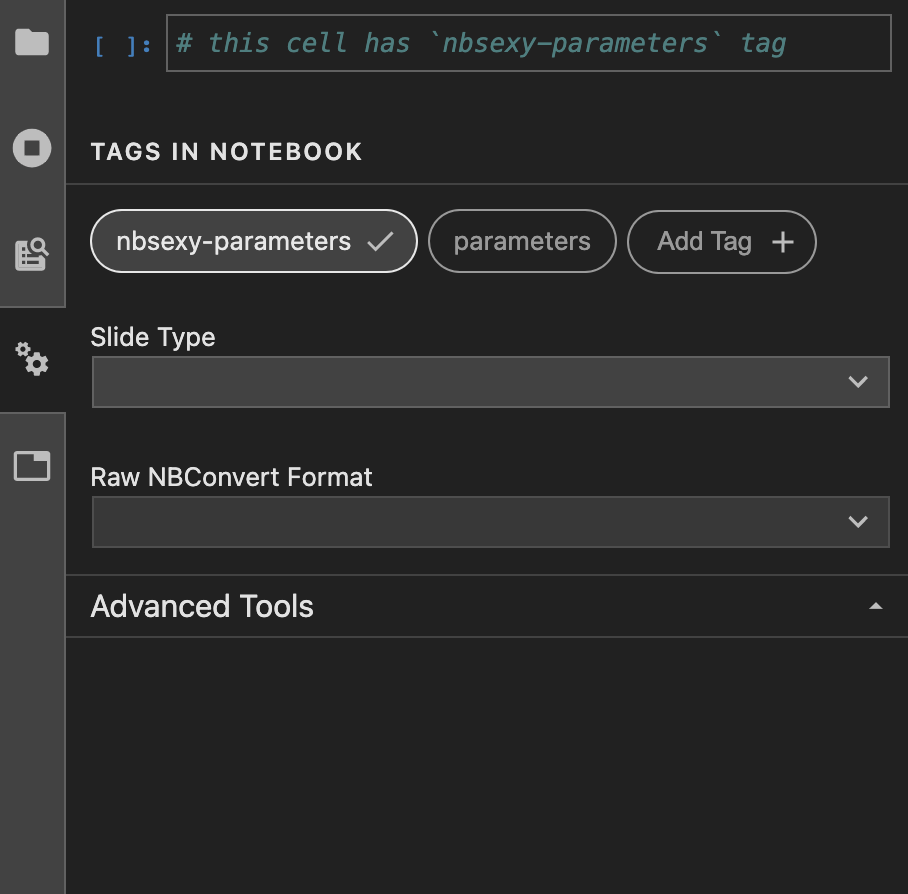
You can find the tag function in the toolbar, it maybe on the left or right base on your jupyterlab's version.
Limitation:
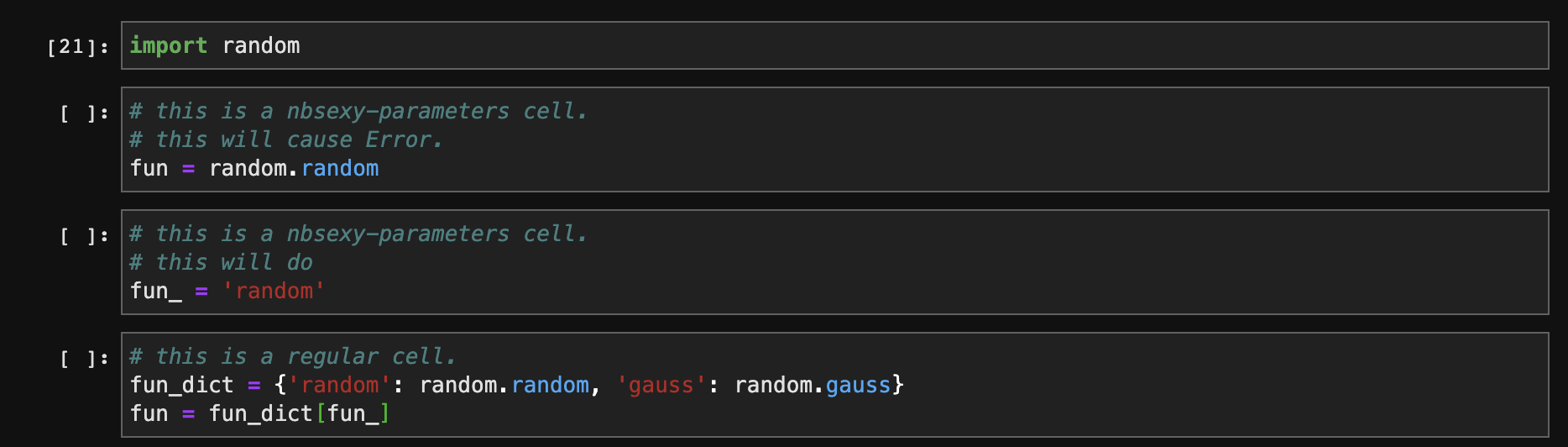
- The parameters must be basic types like int, float, str, list, dict, tuple, set. To pass function or object as parameters, you can create a dict mapping and use key as a parameter to select your object. Like this:
- You can create as many cells with
nbsexy-parameterstag as you like, but you can create only oneparameterscell. And all thenbsexy-parameterscell should be on top ofparameterscells.
Use nbsexy as pre-commit hook:
- install pre-commit
pip install pre-commit
- edit your
.pre-commit-config.yamlfile, something like...
default_language_version:
  python: python3.6
repos:
  - repo: https://github.com/hyades910739/nbsexy
    rev: 0.0.3
    hooks:
      - id: nbsexy-cell-count
        verbose: true
        args: [--max_cell_count=15]
      - id: nbsexy-is-ascending
        verbose: true
      - id: nbsexy-has-md
        verbose: true
      - id: nbsexy-line-in-cell
        verbose: true
      - id: nbsexy-total-line-in-nb
        verbose: true
- install hooks:
pre-commit install
- try to run your hook with:
pre-commit run --all-files
Release history Release notifications | RSS feed


Download files
Download the file for your platform. If you're not sure which to choose, learn more about installing packages.
Source Distribution
Built Distribution
Filter files by name, interpreter, ABI, and platform.
If you're not sure about the file name format, learn more about wheel file names.
Copy a direct link to the current filters
File details
Details for the file nbsexy-0.0.6.tar.gz.
File metadata
- Download URL: nbsexy-0.0.6.tar.gz
- Upload date:
- Size: 14.1 kB
- Tags: Source
- Uploaded using Trusted Publishing? No
- Uploaded via: twine/3.8.0 pkginfo/1.8.2 readme-renderer/33.0 requests/2.27.1 requests-toolbelt/0.9.1 urllib3/1.26.8 tqdm/4.63.0 importlib-metadata/4.8.3 keyring/23.4.1 rfc3986/1.5.0 colorama/0.4.4 CPython/3.6.10
File hashes
| Algorithm | Hash digest | |
|---|---|---|
| SHA256 |
798067a4be8186ec817da89448739a0ffebaed3ddaf663f9281663c094ab7a7c
|
|
| MD5 |
8f0fca0415468a955a3c3741c5a2b9d4
|
|
| BLAKE2b-256 |
49a3d6f2e038c18532134836c726904f8ea7a519461e0855fcb1d231b83df5da
|
File details
Details for the file nbsexy-0.0.6-py3-none-any.whl.
File metadata
- Download URL: nbsexy-0.0.6-py3-none-any.whl
- Upload date:
- Size: 24.7 kB
- Tags: Python 3
- Uploaded using Trusted Publishing? No
- Uploaded via: twine/3.8.0 pkginfo/1.8.2 readme-renderer/33.0 requests/2.27.1 requests-toolbelt/0.9.1 urllib3/1.26.8 tqdm/4.63.0 importlib-metadata/4.8.3 keyring/23.4.1 rfc3986/1.5.0 colorama/0.4.4 CPython/3.6.10
File hashes
| Algorithm | Hash digest | |
|---|---|---|
| SHA256 |
d7d2698811107a40b59463325b4b4f5d2826cee19f8050071be26cad43b2d410
|
|
| MD5 |
71a20414340f889f4619f34d4a0ed8d7
|
|
| BLAKE2b-256 |
b194b7057ee67cf851927b63adb98d95a08bf39607d87f2eefb818515c1694ea
|






