
NC² NetCDF viewer

Project description
Welcome To NC²

What are NetCDF Files?
NetCDF (Network Common Data Form) is a set of software libraries and self-describing, machine-independent data formats that support the creation, access, and sharing of array-oriented scientific data. NetCDF files are widely used in climate science, meteorology, oceanography, and other fields to store and distribute large datasets. These files are valuable for their ability to store multi-dimensional data (such as temperature, humidity, and wind speed) efficiently, making them essential for researchers and scientists dealing with complex environmental data.
NCview and Panoply
Programs such as NCview and Panoply have become indispensable tools for scientists working with NetCDF files.
NCview: NCview is a simple yet powerful visual browser for NetCDF files. It allows users to quickly view the data stored in these files through various plotting options. NCview is particularly useful for scientists who need to quickly check the contents of their datasets.

Panoply: Panoply, developed by NASA, is another powerful tool that provides more advanced features than NCview. It allows users to visualize georeferenced and other arrays from NetCDF, HDF, and GRIB datasets. Panoply offers a range of plotting options, including latitude-longitude, latitude-vertical, and time-latitude plots, making it a versatile tool for in-depth data analysis.
Both NCview and Panoply are essential for scientists who need to visualize and analyze their data quickly. However, these tools come with limitations, such as less intuitive user interfaces and a lack of customization options for publication-quality plots.
What is NC²?

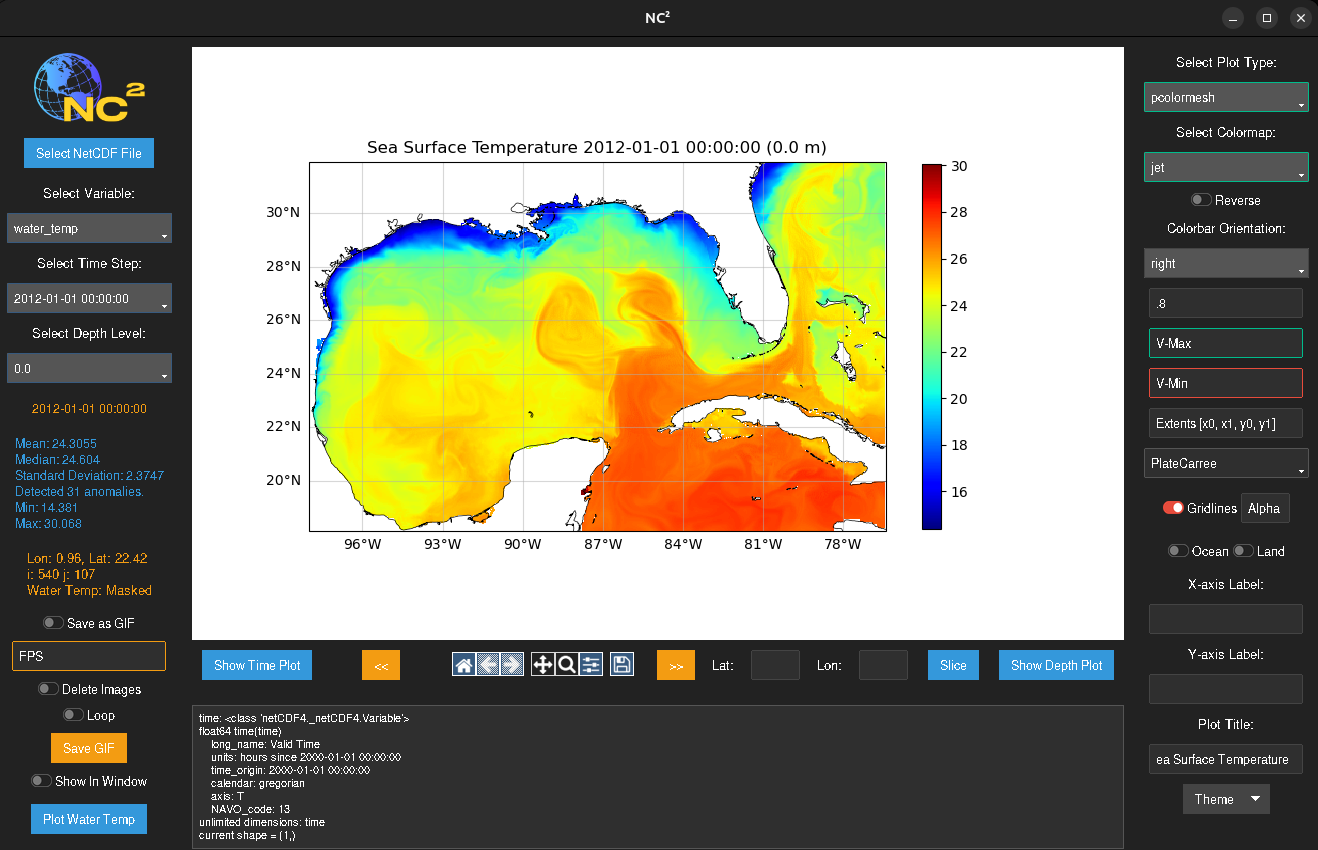
NC² is a next-generation NetCDF viewer designed to overcome the limitations of traditional tools like NCview and Panoply. Built with CartoPy and Matplotlib, NC² offers a versatile and user-friendly platform for visualizing and analyzing NetCDF data. Here’s what NC² brings to the table:
Modern GUI: NC² features a clean and intuitive graphical user interface (GUI) that significantly reduces the learning curve for new users.

Familiar Tools: NC² is built with familiar scientific Python libraries, including CartoPy for cartographic projections and Matplotlib for plotting. This makes it easy for users who are already familiar with these tools to extend and customize their data visualizations.

Publication-Quality Plots: One of the standout features of NC² is its ability to produce publication-quality plots. Users can create highly customizable plots that meet standards required for scientific publications, ensuring that their visualizations are both accurate and aesthetically pleasing.

Versatility: NC² is designed to handle a wide range of NetCDF data types. Whether you are working with atmospheric data, oceanographic measurements, or climate model outputs, NC² provides the tools you need to visualize and analyze your data effectively.

Easy Customization: NC² offers a variety of customization options, allowing users to tailor their plots to their specific needs. From adjusting color maps and scales to adding annotations and labels, NC² makes it easy to create detailed and informative visualizations.

Advanced Features: In addition to basic plotting functionalities, NC² provides advanced features such as time series analysis, depth profiling, and GIF generations. These features enable users to gain deeper insights into their data and conduct more comprehensive analyses.
Explore the features and capabilities of NC², and see how it can enhance your research and data analysis workflows.
Installation
To install NC², run the following command:
pip install nc2
After installation, you can run NC² from the command line as follows:
nc2 path/to/your/file.nc
Contact Me!
Rhett R. Adam 7/25/24
VU Undergrad EES
License
NC² is distributed under the GPL-3.0 License. See the LICENSE file for details.
Copyright (c) 2024 Rhett R. Adam


Download files
Download the file for your platform. If you're not sure which to choose, learn more about installing packages.
Source Distribution
Built Distribution
Filter files by name, interpreter, ABI, and platform.
If you're not sure about the file name format, learn more about wheel file names.
Copy a direct link to the current filters
File details
Details for the file nc2-0.2.1.tar.gz.
File metadata
- Download URL: nc2-0.2.1.tar.gz
- Upload date:
- Size: 38.4 kB
- Tags: Source
- Uploaded using Trusted Publishing? No
- Uploaded via: twine/6.1.0 CPython/3.12.2
File hashes
| Algorithm | Hash digest | |
|---|---|---|
| SHA256 |
0e7179bb3780041fb1fe2ee80b63f166bffe3b0d3833b7066064c6b91b3c8cd6
|
|
| MD5 |
60bd7b819563d8599b3559a2b5b4dee0
|
|
| BLAKE2b-256 |
4524b16eb4195c227aa82a79e6181f52e2c7281e952233ddab508cc03d211dcf
|
File details
Details for the file nc2-0.2.1-py3-none-any.whl.
File metadata
- Download URL: nc2-0.2.1-py3-none-any.whl
- Upload date:
- Size: 34.7 kB
- Tags: Python 3
- Uploaded using Trusted Publishing? No
- Uploaded via: twine/6.1.0 CPython/3.12.2
File hashes
| Algorithm | Hash digest | |
|---|---|---|
| SHA256 |
eb8d5c03b48d725b6c48fb26aeefa1d525d9f4e14f4c9749ba6569971e686d2b
|
|
| MD5 |
6b7d5a9f3257f94e58350c3eff71561c
|
|
| BLAKE2b-256 |
720afd180bbed11e2e33b8ffc5a8d1a6d106036e5b12e624a6c491202df90576
|






