
netCDF Diff Comparison tool - ncpare
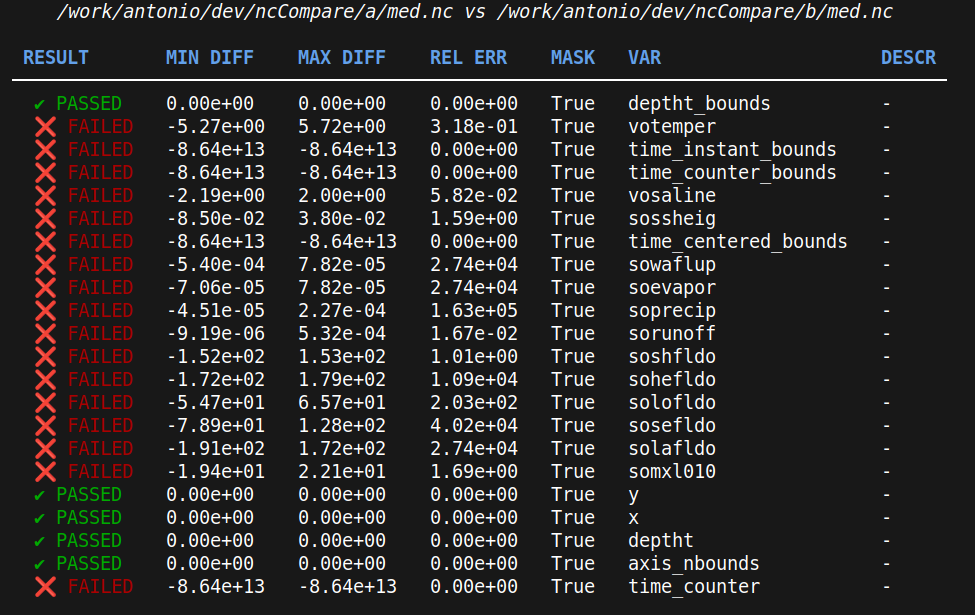
ncpare is a tool for comparing netCDF files, providing a detailed diff of their contents. It is designed to help users
identify differences between datasets stored in netCDF format.







Installation
Via PIP
pip install nccompare
Usage
ncpare [-h] [-f--filter FILTER_NAME] [--common_pattern COMMON_PATTERN] [--variables VARIABLES [VARIABLES ...]] [--last_time_step] [-V] folder1 folder2

netCDF Comparison Tool

positional arguments:
  folder1               Path of first folder to compare
  folder2               Path of second folder to compare

options:
  -h, --help            show this help message and exit
  -f--filter FILTER_NAME
                        Filter to select files to compare. Examples: *.nc, *_grid_*
  --common_pattern COMMON_PATTERN
                        Common file pattern in two files to compareEs mfsX_date.nc and expX_date.nc -> date.nc is the common part
  -v, --variables VARIABLES [VARIABLES ...]
                        Variable to compare
  --last_time_step      If True, compare only the last time step available in each file
  -V, --version         Print version and exit
Select Variables
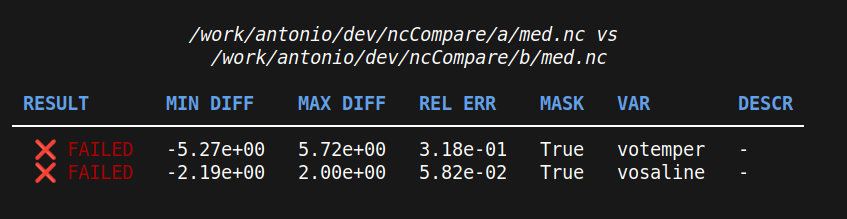
It is possible to choose which parameter to compare:
ncpare folder1 folder2 -v "votemper" "vosaline"
Filter files
As default ncpare read iterate over all files in folder1 and expect to find them in folder2. Using filters, it is possible to select only a subset of input files. For example:
ncpare folder1 folder2 -f "*_grid_T.nc"
Compare files with different filenames
It is possible to compare two files also if the filenames are slightly different if they have a common pattern. For example, if we have:
a/my-simu_19820101_grid_T.ncb/another-exp_19820101_grid_T.nc
It is still possible to compare the file with:
ncpare folder1 folder2 --commom-pattern ".+_19820101_grid_T.nc"
Notice the regex syntax .+ to match any pattern before _19820101
Author
- Antonio Mariani (antonio.mariani@cmcc.it)
Contributing
Contributions are welcome! Please open an issue or submit a pull request for any improvements or bug fixes.
Contact
For any questions or suggestions, please open an issue on the project's GitHub repository.
1 maintainer

Metadata
1 maintainer
Release files for ncCompare 0.2.5
For a detailed explanation of source distributions (sdists) and built distributions (wheels), please see the package formats documentation.
Source distribution (sdist)
| File | Size | Uploaded | |
|---|---|---|---|
| nccompare-0.2.5.tar.gz | 10.4 kB | Details |
Built distribution (wheel)
| File | Interpreter | ABI | Platform | Reset |
|---|---|---|---|---|
| nccompare-0.2.5-py3-none-any.whl | Python 3 | none | any | Details |
Total release size: 24.7 kB
Release files / nccompare-0.2.5.tar.gz
| Download URL | nccompare-0.2.5.tar.gz |
|---|---|
| Size | 10.4 kB |
| Tags | Source |
|
SHA-256 checksum How to use checksums |
75aabe4d2ec010ecd9da273181e1b84b1012ceb882a1c6975df13787ca7f95c6
|
|
BLAKE2b-256 checksum How to use checksums |
e53dc9d24310502eaeb79e9a2d2d6d88eae5bd44d34b16abc79983bc352a55dc
|
| Upload date | |
|
Uploaded using Trusted Publishing? What is trusted publishing? |
No |
| Uploaded via |
poetry/1.8.3 CPython/3.10.14 Linux/6.14.0-27-generic
|
Release files / nccompare-0.2.5-py3-none-any.whl
| Download URL | nccompare-0.2.5-py3-none-any.whl |
|---|---|
| Size | 14.2 kB |
| Tags | Python 3 |
|
SHA-256 checksum How to use checksums |
49eba5413ad7b30f925f6f6b055720fec9e2fbd83739f45e0a2abb1136814cdf
|
|
BLAKE2b-256 checksum How to use checksums |
cc7182e12c7213a781a044ddf89ce3b4c5f0fc59964b4c6e65c8ce7c8860ccd4
|
| Upload date | |
|
Uploaded using Trusted Publishing? What is trusted publishing? |
No |
| Uploaded via |
poetry/1.8.3 CPython/3.10.14 Linux/6.14.0-27-generic
|














