
NcatBot, NapCat Python SDK

Project description
🚀 ncatbot






NcatBot 是基于 OneBot11 协议的 Python SDK/Framework,提供开箱即用的 QQ 机器人开发体验。
它深度考虑了 AI 时代的开发者需求,工作区内置丰富的 Skills 能力,Agent 可自主完成插件编写、调试与测试。
只需要一句话,就能写出你的 QBot!
快速开始
1. 安装
pip install ncatbot5
2. 获取 AI 参考资料(推荐)
ncatbot ref              # 交互式选择 IDE
ncatbot ref --vscode     # VSCode + Copilot / Cursor
ncatbot ref --trae       # Trae
一键从 GitHub Releases 下载最新版 user-reference.zip 并自动解压到当前目录(自动使用 GitHub 代理加速)。也可以手动前往 GitHub Releases 页面下载。解压后目录结构如下:
your-project/
├── .agents/skills/          ← AI Agent 技能文件(framework-usage / testing 等)
├── docs/
│   └── docs/
│       ├── examples/        ← 示例代码(qq / github / cross_platform …)
│       └── notes/
│           ├── guide/       ← 使用指南(快速开始 → 多平台开发,共 11 章)
│           └── reference/   ← API 参考(Bot API / 事件类型 / 插件系统 等)
├── config.yaml
└── plugins/
这些文件让 AI Agent(如 VS Code 中的 Copilot Chat)理解 NcatBot 的 API 和用法,从而提供精准的代码建议。
3. 初始化项目
ncatbot init
按提示输入机器人 QQ 号和管理员 QQ 号,CLI 会自动生成 config.yaml 和一个以你计算机用户名命名的模板插件。该模板插件的功能是:在群聊或私聊中发送 hello 时,机器人回复 hi。
4. 启动
ncatbot run
AI Agent 开发
工作区中预置了领域专有技能(Skills),在 VS Code 中使用 Copilot Chat 即可获得定制化辅助:
- 开发插件:Agent 利用
framework-usage技能提供消息发送、事件注册、Hook/过滤器等建议 - 框架开发:
codebase-nav(代码定位)、framework-dev(框架开发)、testing(测试)、release(发版)
直接用自然语言描述你要实现的功能,Agent 会自主编写插件代码。
其它资源
- 容器化部署:推荐使用 Docker 部署环境
- 官方文档:docs.ncatbot.xyz
交流群体
获取帮助
遇到问题时,请按以下顺序尝试:
使用限制
- 严禁将本项目以任何形式用于传播淫秽、反动或暴力等信息。
- 未经授权,禁止将本项目以任何形式用于盈利。
致谢
感谢 NapCat 提供底层接口 | IppClub 的宣传支持 | Fcatbot 提供代码和灵感。
感谢 林枫云 提供服务器支持。
参与贡献
欢迎给本 Repo 贡献代码!请先阅读 贡献指南。
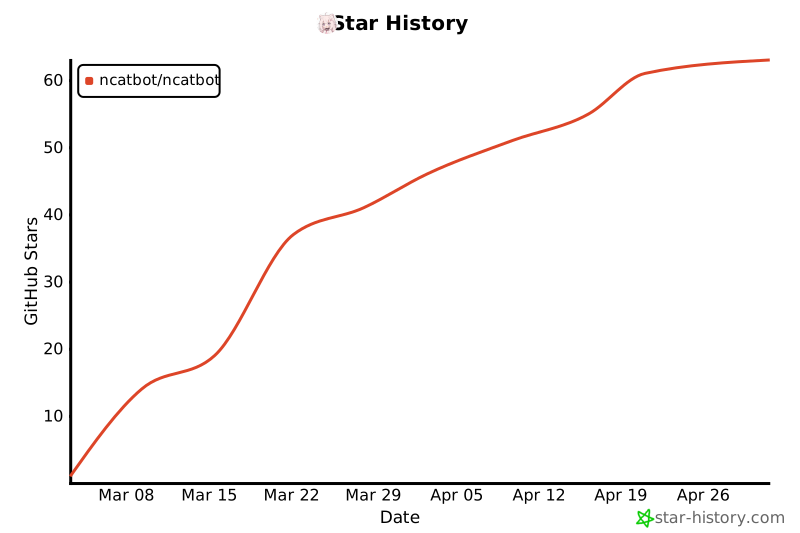
Star History
贡献者们

Release history Release notifications | RSS feed


Download files
Download the file for your platform. If you're not sure which to choose, learn more about installing packages.
Source Distribution
Built Distribution
Filter files by name, interpreter, ABI, and platform.
If you're not sure about the file name format, learn more about wheel file names.
Copy a direct link to the current filters
File details
Details for the file ncatbot5-5.3.2.tar.gz.
File metadata
- Download URL: ncatbot5-5.3.2.tar.gz
- Upload date:
- Size: 255.6 kB
- Tags: Source
- Uploaded using Trusted Publishing? No
- Uploaded via: twine/6.1.0 CPython/3.13.7
File hashes
| Algorithm | Hash digest | |
|---|---|---|
| SHA256 |
9ed372752b5397072c6f0e230493d9acb8d5ffed68f498eede4c3acf8cba67fc
|
|
| MD5 |
192f51446e4ab7073e275f0aa3c3e9eb
|
|
| BLAKE2b-256 |
76a503d0b702f84bba2540b647725bbe57e9c8aabdf4aad8b6017a8048e3072d
|
File details
Details for the file ncatbot5-5.3.2-py3-none-any.whl.
File metadata
- Download URL: ncatbot5-5.3.2-py3-none-any.whl
- Upload date:
- Size: 371.1 kB
- Tags: Python 3
- Uploaded using Trusted Publishing? No
- Uploaded via: twine/6.1.0 CPython/3.13.7
File hashes
| Algorithm | Hash digest | |
|---|---|---|
| SHA256 |
a6d874b041b1a2998438bca4aca90eeb9d7ab2926532a3795198128da863c152
|
|
| MD5 |
1747705f59eba1aed37a8552ff4be977
|
|
| BLAKE2b-256 |
84c2839a7994a41c8efae68c857ba628835233a50c29440d4c1492d2b4ce3662
|






