
ncompare










Compare the structure of two netCDF files
at the command line or via Python. ncompare generates a view of the matching and
non-matching groups and variables between two netCDF datasets.
Allthough tailored for netCDF files, ncompare
also works with some HDF5 files
(see notes and known limitations).
Installing
The latest release of ncompare can be installed with mamba, conda or pip:
mamba install -c conda-forge ncompare
conda install -c conda-forge ncompare
pip install ncompare
Usage Examples
At a command line:
To compare two netCDF files, pass the filepaths for each of the two netCDF files directly to ncompare, as follows:
ncompare <netcdf file #1> <netcdf file #2>
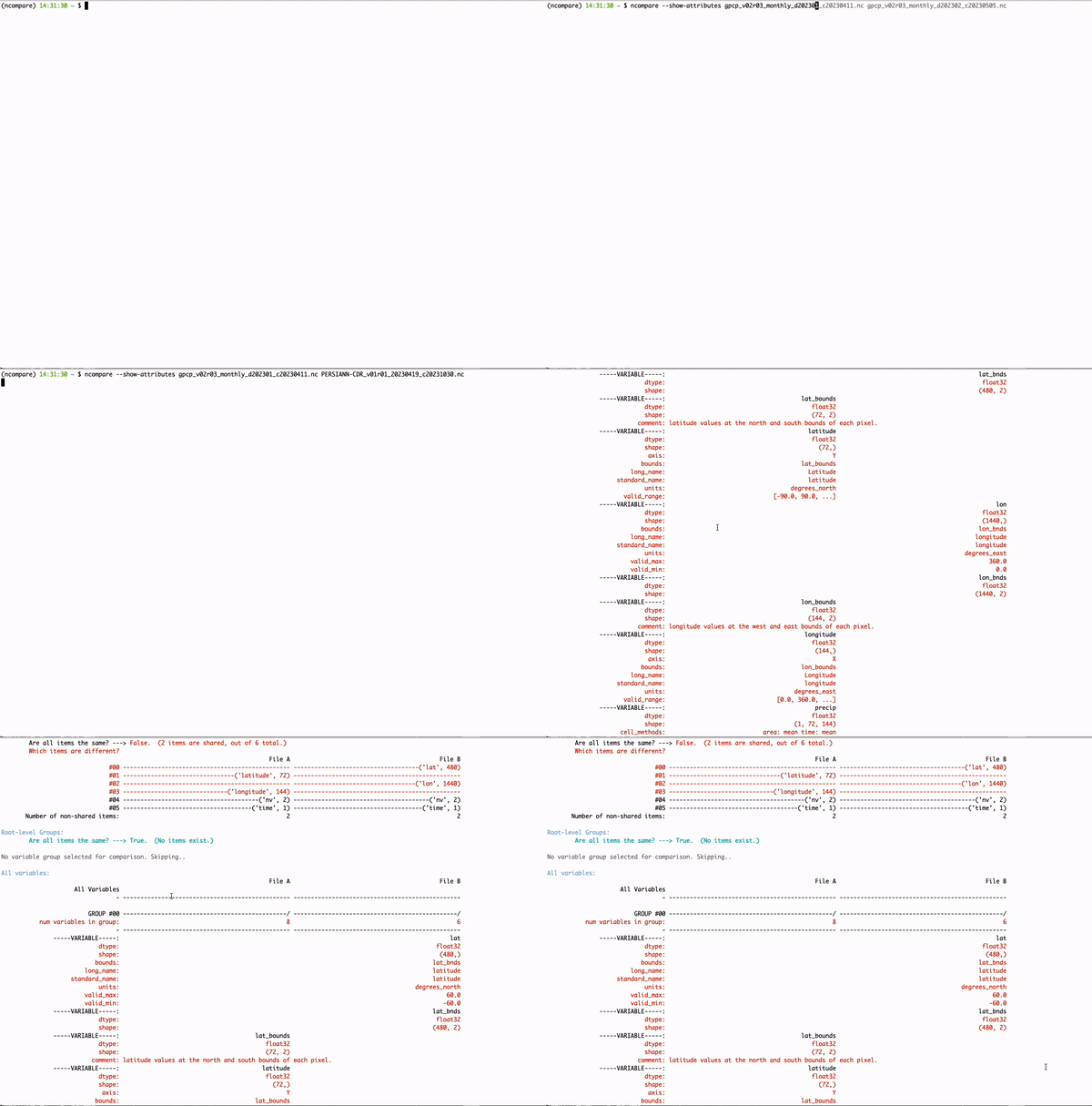
With an additional --file-text argument specified,
a common use of ncompare may look like this example:
ncompare S001G01.nc S001G01_SUBSET.nc --file-text subset_comparison.txt
In a Python kernel:
from ncompare import compare

total_number_of_differences = compare("<netcdf file 1>", "<netcdf file 2>", only_diffs=True,
                                      show_chunks=True, show_attributes=True)
More complete usage demonstrations, with example output, are shown in this example notebook.
Contributing
Contributions are welcome! For more information, see CONTRIBUTING.md. ncompare is licensed under the Apache License 2.0, which is included in the LICENSE file.
Developing
Development within this repository should occur on a feature branch.
Pull Requests (PRs) are created with a target of the develop branch before being reviewed and merged.
Installing locally
For local development, one can clone the repository and then use uv or pip from the local directory:
git clone https://github.com/nasa/ncompare.git
(Option A) using uv:
ii) Follow the instructions for installing uv here.
iii) Run uv sync from the repository directory.
(Option B) using pip:
ii) Run pip install . from the repository directory.
Testing locally
If installed using a uv environment, the tests can be run with:
uv run pytest tests
Or from another virtual environment, one can use:
pytest tests
To run as a locally installed uv module
uv run ncompare <netcdf file #1> <netcdf file #2>
Why ncompare?
The cdo (climate data operators) tool
does not support netCDF4 groups.
Moreover, nco operators' ncdiff function computes value differences, but
--- as far as the developers of this tool are aware ---
nco does not have a simple function to show structural differences between NetCDF4 datasets.
Note that h5diff, provided in the HDF5 software, can also be used to find differences.
In comparison to h5diff, ncompare is written and runnable in Python; ncompare provides aligned and
colorized difference report for quicker assessments of groups, variable names, types, shapes, and attributes;
and can generate report files formatted for other applications. However, note that
h5diff provides comparison of some otherwise "hidden" hdf5 properties, such as _Netcdf4Dimid or _Netcdf4Coordinates,
which are not currently assessed by ncompare.
Notes and known limitations
ncompareworks successfully with select HDF5 files, although it has not been tested extensively; therefore, it would not be surprising to find additional limitations with other HDF files.ncompareusesxarrayto access the root-level dimensions. In some cases,xarraywill miss dimensions whose names do not also exist as variable names in the dataset (also known as non-coordinate dimensions).- Some underlying HDF5 properties, such as _Netcdf4Dimid or _Netcdf4Coordinates, are not currently assesssed by
ncompare.
Notices:
Copyright 2023 United States Government as represented by the Administrator of the National Aeronautics and Space Administration. All Rights Reserved.
This software calls the following third-party software, which is subject to the terms and conditions of its licensor, as applicable at the time of licensing. The third-party software is not bundled with this software but may be available from the licensor.
License hyperlinks are provided here for information purposes only.
| Title | license | link |
|---|---|---|
| colorama | BSD-3-Clause | https://opensource.org/licenses/BSD-3-Clause |
| netCDF4 | MIT License | https://opensource.org/licenses/MIT |
| numpy | BSD-3-Clause | https://opensource.org/licenses/BSD-3-Clause |
| openpyxl | MIT License | https://opensource.org/licenses/MIT |
| xarray | Apache License, version 2.0 | https://www.apache.org/licenses/LICENSE-2.0 |
| Python | Standard Library Python Software Foundation (PSF) License Agreement | https://docs.python.org/3/license.html#psf-licenseDisclaimers |
The ncompare: NetCDF structural comparison tool framework is licensed under the Apache License, Version 2.0 (the "License"); you may not use this application except in compliance with the License. You may obtain a copy of the License at http://www.apache.org/licenses/LICENSE-2.0.
Unless required by applicable law or agreed to in writing, software distributed under the License is distributed on an "AS IS" BASIS, WITHOUT WARRANTIES OR CONDITIONS OF ANY KIND, either express or implied. See the License for the specific language governing permissions and limitations under the License.
This package is NASA Software Release Authorization (SRA) # LAR-20274-1
1 maintainer

Metadata
1 maintainer
Release files for ncompare 1.14.1
For a detailed explanation of source distributions (sdists) and built distributions (wheels), please see the package formats documentation.
Source distribution (sdist)
| File | Size | Uploaded | |
|---|---|---|---|
| ncompare-1.14.1.tar.gz | 232.0 kB | Details |
Built distribution (wheel)
| File | Interpreter | ABI | Platform | Reset |
|---|---|---|---|---|
| ncompare-1.14.1-py3-none-any.whl | Python 3 | none | any | Details |
Total release size: 260.4 kB
Release files / ncompare-1.14.1.tar.gz
| Download URL | ncompare-1.14.1.tar.gz |
|---|---|
| Size | 232.0 kB |
| Tags | Source |
|
SHA-256 checksum How to use checksums |
9449ceedb677dbadf8a9ca7cbda1ea51ed20fead2e041623b1fe4120bacfb9d9
|
|
BLAKE2b-256 checksum How to use checksums |
f7b0cdc4390bebb48f36cf9b5c40da0d7ebb874cd381d50668f00af70e176ec1
|
| Upload date | |
|
Uploaded using Trusted Publishing? What is trusted publishing? |
Yes |
| Uploaded via |
uv/0.9.21 {"installer":{"name":"uv","version":"0.9.21","subcommand":["publish"]},"python":null,"implementation":{"name":null,"version":null},"distro":{"name":"Ubuntu","version":"24.04","id":"noble","libc":null},"system":{"name":null,"release":null},"cpu":null,"openssl_version":null,"setuptools_version":null,"rustc_version":null,"ci":true}
|
Release files / ncompare-1.14.1-py3-none-any.whl
| Download URL | ncompare-1.14.1-py3-none-any.whl |
|---|---|
| Size | 28.4 kB |
| Tags | Python 3 |
|
SHA-256 checksum How to use checksums |
e0fa35f5718bca3dffebabcee30e07250a34fe77e0e603040c3f416237781a79
|
|
BLAKE2b-256 checksum How to use checksums |
67576637fb45e71e340e0e9b5e7bd2c218205bfd12beb58443f383ff944218f4
|
| Upload date | |
|
Uploaded using Trusted Publishing? What is trusted publishing? |
Yes |
| Uploaded via |
uv/0.9.21 {"installer":{"name":"uv","version":"0.9.21","subcommand":["publish"]},"python":null,"implementation":{"name":null,"version":null},"distro":{"name":"Ubuntu","version":"24.04","id":"noble","libc":null},"system":{"name":null,"release":null},"cpu":null,"openssl_version":null,"setuptools_version":null,"rustc_version":null,"ci":true}
|














