
Holographic photostimulation extension to NWB standard

Project description
ndx-photostim Extension for NWB

 This is a NeuroData Without Borders (NWB) extension for storing data and metadata from holographic photostimulation
methods. It includes containers for storing photostimulation-specific device parameters, holographic patterns
(either 2D or 3D), and time series data related to photostimulation.
This is a NeuroData Without Borders (NWB) extension for storing data and metadata from holographic photostimulation
methods. It includes containers for storing photostimulation-specific device parameters, holographic patterns
(either 2D or 3D), and time series data related to photostimulation.
We release six PyNWB containers as part of this extension (we currently only have a Python implementation, rather than both Python and a MATLAB ones -- this is why the matnwb directory is empty):
- The
SpatialLightModulatorandLasercontainers store metadata about the spatial light modulator and laser used in the photostimulation, respectively. These containers are then stored within thePhotostimulationMethodparent container, which stores the remaining photostimulation method-specifici metadata. HolographicPatternstores the holographic pattern used in stimulation.PhotostimulationSeriescontains the time series data corresponding to the presentation of a given stimulus (where the stimulus is represented by aHolographicPatterncontainer linked to thePhotostimulationSeries).- We group all time series & patterns for a given experiment together using the
PhotostimulationTablecontainer. This object is a dynamic table, where each row in the table corresponds to a singlePhotostimulationSeries. Additionally, the table links to theStimulationDeviceused in the experiment.
Background
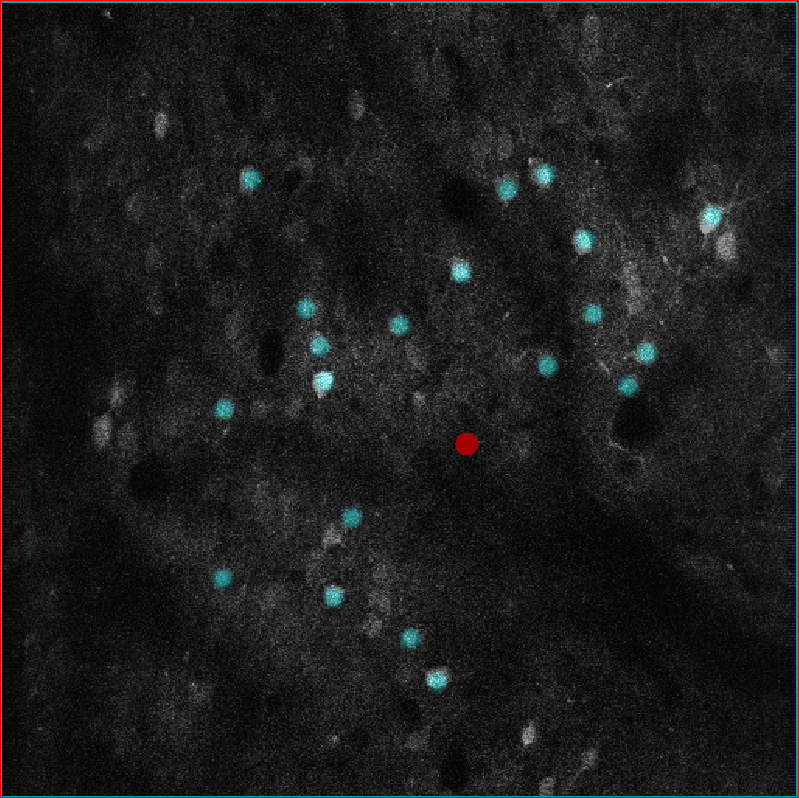 State-of-the-art holographic photostimulation methods, used in concert with two-photon imaging,
allow unprecedented
control and measurement of cell activity in the living brain. Methods for managing data for two-photon imaging
experiments are improving, but there is little to no standardization of data for holographic stimulation methods.
Stimulation in vivo depends on fine-tuning many experimental variables, which poses a challenge for reproducibility
and data sharing between researchers. To improve standardization of photostimulation data storage and processing,
we release this extension as a generic data format for simultaneous holographic stimulation experiments,
using the NWB format to store experimental details and data relating to both acquisition
and photostimulation.
State-of-the-art holographic photostimulation methods, used in concert with two-photon imaging,
allow unprecedented
control and measurement of cell activity in the living brain. Methods for managing data for two-photon imaging
experiments are improving, but there is little to no standardization of data for holographic stimulation methods.
Stimulation in vivo depends on fine-tuning many experimental variables, which poses a challenge for reproducibility
and data sharing between researchers. To improve standardization of photostimulation data storage and processing,
we release this extension as a generic data format for simultaneous holographic stimulation experiments,
using the NWB format to store experimental details and data relating to both acquisition
and photostimulation.
Installation
To install the extension, first clone the ndx_photostim repository to the desired folder using the command
git clone https://github.com/histedlab/ndx-photostim.git
Then, to install the requisite python packages and extension, run:
python -m pip install -r requirements.txt -r requirements-dev.txt
python setup.py install
The extension can then be imported into python scripts via import ndx_photostim.
Usage
For full example usage, see tutorial.ipynb
Below is example code to:
- Create a device used in photostimulation
- Simulate and store photostimulation ROIs
- Store the time series corresponding to each stimulation
- Record all time series and patterns used in an experiment in a table
- Write the above to an NWB file and read it back
import numpy as np
from dateutil.tz import tzlocal
from datetime import datetime
from pynwb import NWBFile, NWBHDF5IO
from ndx_photostim import SpatialLightModulator, Laser, PhotostimulationMethod, HolographicPattern, \
    PhotostimulationSeries, PhotostimulationTable

# create an example NWB file
nwbfile = NWBFile('ndx-photostim_example', 'EXAMPLE_ID', datetime.now(tzlocal()))

# store the spatial light modulator used
slm = SpatialLightModulator(name='slm',
                            model='Meadowlark',
                            size=np.array([512, 512]))

# store the laser used
laser = Laser(name='laser',
              model='Coherent Monaco',
              wavelength=1030,
              power=8,
              peak_pulse_energy=20,
              pulse_rate=500)

# create a container for the method used for photostimulation, and link the SLM and laser to it
ps_method = PhotostimulationMethod(name="methodA",
                                   stimulus_method="scanless",
                                   sweep_pattern="none",
                                   sweep_size=0,
                                   time_per_sweep=0,
                                   num_sweeps=0)
ps_method.add_slm(slm)
ps_method.add_laser(laser)

# define holographic pattern
hp = HolographicPattern(name='pattern1',
                        image_mask_roi=np.round(np.random.rand(5, 5)),
                        stim_duration=0.300,
                        power_per_target=8)

# show the mask
hp.show_mask()

# define stimulation time series using holographic pattern
ps_series = PhotostimulationSeries(name="series_1",
                            format='interval',
                            data=[1, -1, 1, -1],
                            timestamps=[0.5, 1, 2, 4],
                            pattern=hp,
                            method=ps_method)

# add the stimulus to the NWB file
nwbfile.add_stimulus(ps_series)

# create a table to store the time series/patterns for all stimuli together, along with experiment-specific
# parameters
stim_table = PhotostimulationTable(name='test', description='...')
stim_table.add_series(ps_series)

# plot the timestamps when the stimulus was presented
stim_table.plot_presentation_times()

# create a processing module and add the PresentationTable to it
module = nwbfile.create_processing_module(name="photostimulation", description="example photostimulation table")
module.add(stim_table)

# write to an NWB file and read it back
with NWBHDF5IO("example_file.nwb", "w") as io:
    io.write(nwbfile)

with NWBHDF5IO("example_file.nwb", "r", load_namespaces=True) as io:
    read_nwbfile = io.read()

    # Check the file & processing module
    print(read_nwbfile)
    print(read_nwbfile.processing['photostimulation'])

if os.path.exists("example_file.nwb"):
    os.remove("example_file.nwb")
Running tests
Unit and integration
tests are implemented using pytest, and can be run via the command
pytest from the root of the extension directory (i.e., inside ndx-photostim/src). In addition, the
pytest command will also run a test of the example code above.
Documentation
Specification
Documentation for the extension's specification, which is based on the YAML files, is generated and stored in
the ./docs folder. To create it, run the following from the home directory:
cd docs
make fulldoc
This will save documentation to the ./docs/build folder, and can be accessed via the
./docs/build/html/index.html file.
API
To generate documentation for the Python API (stores in ./api_docs), we use Sphinx
and a template from ReadTheDocs. API documentation can
be created by running
sphinx-build -b html api_docs/source/ api_docs/build/
from the home folder. Similar to the specification docs, API documentation is stored in ./api_docs/build. Select
./api_docs/build/index.html to access the API documentation in a website format.
Credit
Code by Carl Harris and Paul LaFosse (equal contribution). Collaboration between the NIMH's Data Science and Sharing Team and Histed Lab.
This extension was created using ndx-template.


Download files
Download the file for your platform. If you're not sure which to choose, learn more about installing packages.
Source Distribution
Built Distribution
Filter files by name, interpreter, ABI, and platform.
If you're not sure about the file name format, learn more about wheel file names.
Copy a direct link to the current filters
File details
Details for the file ndx-photostim-0.0.4.tar.gz.
File metadata
- Download URL: ndx-photostim-0.0.4.tar.gz
- Upload date:
- Size: 28.8 kB
- Tags: Source
- Uploaded using Trusted Publishing? No
- Uploaded via: twine/5.0.0 CPython/3.9.18
File hashes
| Algorithm | Hash digest | |
|---|---|---|
| SHA256 |
f705c17d6793d433472f1ea3b76bf8c530a40d47743f970bed9edf794e42bd06
|
|
| MD5 |
4cd99ff8304f08e8fcb34729759442bd
|
|
| BLAKE2b-256 |
958b1ac4fbd18004ad0f4fdfd8ed90f5d67f4272b3eaf4e1499b2f7b330c7e32
|
File details
Details for the file ndx_photostim-0.0.4-py2.py3-none-any.whl.
File metadata
- Download URL: ndx_photostim-0.0.4-py2.py3-none-any.whl
- Upload date:
- Size: 15.3 kB
- Tags: Python 2, Python 3
- Uploaded using Trusted Publishing? No
- Uploaded via: twine/5.0.0 CPython/3.9.18
File hashes
| Algorithm | Hash digest | |
|---|---|---|
| SHA256 |
34a14a43de429138d559c185ea9e5eb8427585b9e69022b036f765047e5423d1
|
|
| MD5 |
15b90a5abec5ca19f6178c2b52bff5e0
|
|
| BLAKE2b-256 |
6cf20ff9f333993c5cb2427c7586a157a26f88a7f11fc4c8389963c4cd87282f
|






