
neatmesh
Mesh Quality Inspector



neatmesh is a 2D/3D mesh quality inspector and a python library that computes cells volumes, face areas, centers, normals and many more. neatmesh works with all formats supported by meshio.
neatmesh is in early active development stage, and all sort of contributions are welcome (specially if you're new to open source contribution! ☺️)
Installation
Install with:
pip install neatmesh
Usage
Using neatmesh is simple:
neatmesh my_awesome_mesh.su2
or
import neatmesh as nm

mesh = nm.read('my_awesome_mesh.su2')
# mesh.face_areas, mesh.face_centers, mesh.owner_neighbor,
# mesh.n_points, mesh.n_edges, mesh.n_faces, .....
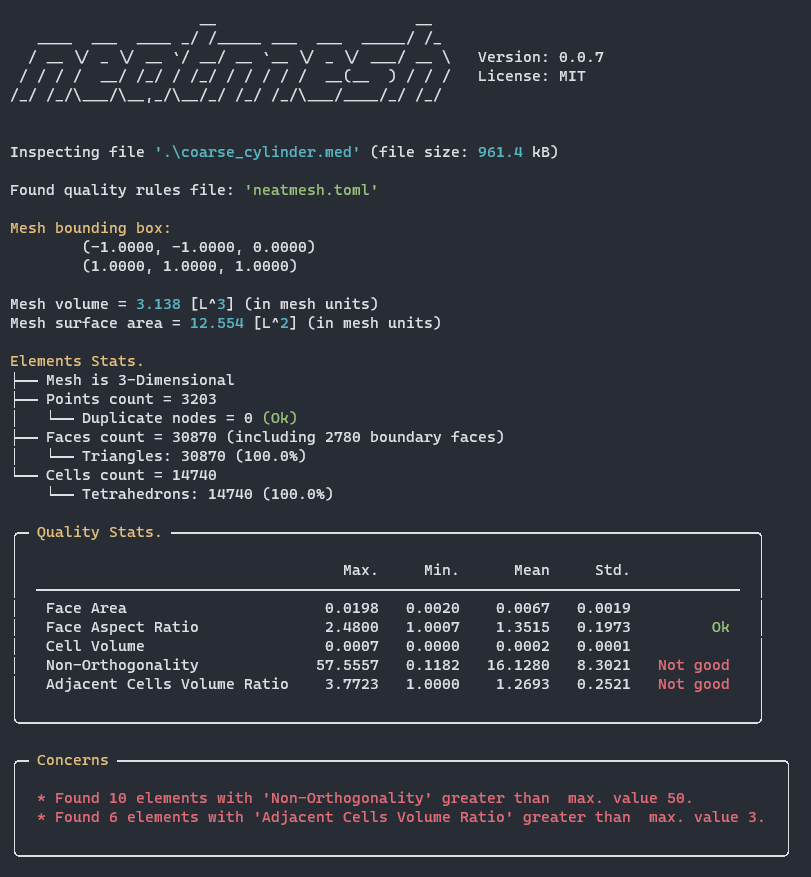
What does neatmesh report?
neatmesh will report file size, mesh bounding box, mesh dimensionality, points count, duplicate points count, face counts and types, cell counts and types, and the following quality statistics
- Face Area: face area in mesh units.
- Face Aspect Ratio: ratio between max. and min. length of face bounding rectangle.
- Cell Volume: volume of 3D cell, current supported cell types: hexahedron, tetrahedron, wedge and pyramid.
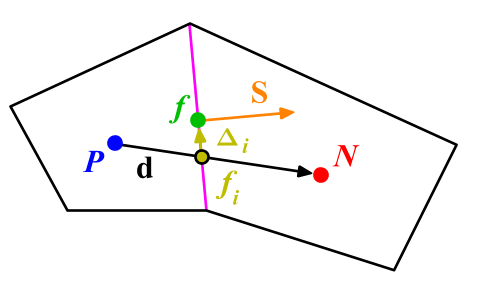
- Non-Orthogonality: angle in degrees between (a) vector connecting two elements centers NP and (b) normal vector to the shared face or edge between the elements
- Neighbor Element Volume/Area Ratio: ratio between the volume (for 3D mesh) or area (for 2D mesh) of all neighboring cells, defined as
max_vol / min_volormax_area / min_area, so it's always greater than or equal 1.
Quality Rules
neatmesh will look for a quality rule file in current working directory: neatmesh.toml, quality.toml, or <input_file_stem>.toml. A quality rule file sets maximum values for quality metrics calculated by neatmesh, for example this is the content of a typical neatmesh.toml file:
You can also specify a custom rules file via --rules / -r:
neatmesh my_awesome_mesh.su2 --rules /path/to/custom_rules.toml
When --rules is provided, it takes precedence over the automatic CWD search.
You can also specify a length unit for reporting via --length-unit / -u:
neatmesh my_awesome_mesh.su2 --length-unit m
When provided, the unit is shown in place of the generic L (e.g., [m^2], [m^3]).
max_non_orhto = 50
max_face_aspect_ratio = 10
max_neighbor_volume_ratio = 3
max_neighbor_area_ratio = 3
duplicate_nodes_warning = false
In case no quality rules file was present, neatmesh will use default max. values:
max_non_orhto = 60
max_face_aspect_ratio = 20
max_neighbor_volume_ratio = 15
max_neighbor_area_ratio = 15
duplicate_nodes_warning = true (default)
1 maintainer

Metadata
1 maintainer
Release files for neatmesh 0.2.0
For a detailed explanation of source distributions (sdists) and built distributions (wheels), please see the package formats documentation.
Source distribution (sdist)
| File | Size | Uploaded | |
|---|---|---|---|
| neatmesh-0.2.0.tar.gz | 19.9 kB | Details |
Built distribution (wheel)
| File | Interpreter | ABI | Platform | Reset |
|---|---|---|---|---|
| neatmesh-0.2.0-py3-none-any.whl | Python 3 | none | any | Details |
Total release size: 37.7 kB
Release files / neatmesh-0.2.0.tar.gz
| Download URL | neatmesh-0.2.0.tar.gz |
|---|---|
| Size | 19.9 kB |
| Tags | Source |
|
SHA-256 checksum How to use checksums |
c8166b98d692f4f64e3909b54944ad4109b910de44557efc4d37482cb427daaa
|
|
BLAKE2b-256 checksum How to use checksums |
5f411f42f0285d4307da38b6710395c6de27830503993d747b8b1c970fd01a75
|
| Upload date | |
|
Uploaded using Trusted Publishing? What is trusted publishing? |
Yes |
| Uploaded via |
twine/6.1.0 CPython/3.13.12
|
Provenance
Provenance describes where a file came from. On PyPI, provenance is shared via attestations, which provide a verifiable record of the build or publishing details. View details, limitations and caveats.


PyPI Publish Attestation
PyPI verified that this artifact, at this checksum, originated from the publisher listed below.
Signed by GitHub Actions, verified by PyPI on Jul 18, 2026.
Transparency logRelease files / neatmesh-0.2.0-py3-none-any.whl
| Download URL | neatmesh-0.2.0-py3-none-any.whl |
|---|---|
| Size | 17.8 kB |
| Tags | Python 3 |
|
SHA-256 checksum How to use checksums |
7fc48f19a67130592ece61a676312919f300ffbd581dcc2772cc51aaec83c6f2
|
|
BLAKE2b-256 checksum How to use checksums |
0d2437d7be0ca28e285cdc40a12c356faf7f6fe5087a8bc6ed8c5a37267501ed
|
| Upload date | |
|
Uploaded using Trusted Publishing? What is trusted publishing? |
Yes |
| Uploaded via |
twine/6.1.0 CPython/3.13.12
|
Provenance
Provenance describes where a file came from. On PyPI, provenance is shared via attestations, which provide a verifiable record of the build or publishing details. View details, limitations and caveats.
PyPI Publish Attestation
PyPI verified that this artifact, at this checksum, originated from the publisher listed below.
Signed by GitHub Actions, verified by PyPI on Jul 18, 2026.
Transparency log













