
nebula-dgl


nebula-dgl is the Lib for Nebula Graph integration with Deep Graph Library (DGL).
nebula-dgl is still WIP, there is a demo project here .
Guide
Installation
Install from PyPi
python3 -m pip install nebula-dgl
python3 -m pip install dgl dglgo -f https://data.dgl.ai/wheels/repo.html
Install from codebase for dev
python3 -m pip install nebula3-python
python3 -m pip install dgl dglgo -f https://data.dgl.ai/wheels/repo.html

# build and install
python3 -m pip install .
Playground
Clone this repository to your local directory first.
git clone https://github.com/wey-gu/nebula-dgl.git
cd nebula-dgl
- Deploy NebulaGraph playground with Nebula-UP:
Install NebulaGraph:
curl -fsSL nebula-up.siwei.io/install.sh | bash
Load example data:
~/.nebula-up/load-basketballplayer-dataset.sh
- Create a jupyter notebook in same docker network:
nebula-net
docker run -it --name dgl -p 8888:8888 --network nebula-net \
    -v "$PWD":/home/jovyan/work jupyter/datascience-notebook \
    start-notebook.sh --NotebookApp.token='secret'
Now you can either:
- access the notebook at http://localhost:8888/lab/tree/work?token=secret and create a new notebook.
Or:
- run ipython with the container:
docker exec -it dgl ipython
cd work
- Install nebula-dgl in notebook:
Install nebula-dgl:
!python3 -m pip install python3 -m pip install nebula3-python==3.3.0
!python3 -m pip install dgl dglgo -f https://data.dgl.ai/wheels/repo.html
!python3 -m pip install .
- Try with a homogeneous graph:
import yaml
import networkx as nx

from nebula_dgl import NebulaLoader


nebula_config = {
    "graph_hosts": [
                ('graphd', 9669),
                ('graphd1', 9669),
                ('graphd2', 9669)
            ],
    "nebula_user": "root",
    "nebula_password": "nebula",
}

with open('example/homogeneous_graph.yaml', 'r') as f:
    feature_mapper = yaml.safe_load(f)

nebula_loader = NebulaLoader(nebula_config, feature_mapper)
homo_dgl_graph = nebula_loader.load()

# or query based
query = """
MATCH p=()-[:follow]->() RETURN p
"""
nebula_loader = NebulaLoader(nebula_config, feature_mapper, query=query, query_space="basketballplayer")
homo_dgl_graph = nebula_loader.load()

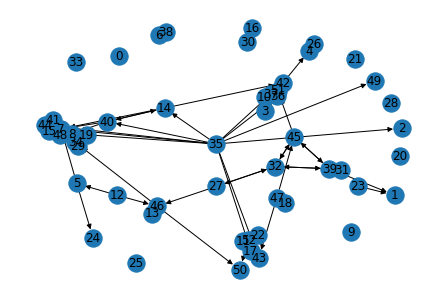
nx_g = homo_dgl_graph.to_networkx()
nx.draw(nx_g, with_labels=True, pos=nx.spring_layout(nx_g))
Result:
- Compute the degree centrality of the graph:
nx.degree_centrality(nx_g)
Result:
{0: 0.0,
 1: 0.04,
 2: 0.02,
 3: 0.02,
 4: 0.06,
 5: 0.06,
 6: 0.04,
 7: 0.24,
 8: 0.16,
 9: 0.0,
 10: 0.02,
 11: 0.04,
 12: 0.04,
 13: 0.04,
 14: 0.1,
 15: 0.04,
 16: 0.0,
 17: 0.1,
 18: 0.04,
 19: 0.04,
 20: 0.0,
 21: 0.0,
 22: 0.04,
 23: 0.02,
 24: 0.02,
 25: 0.04,
 26: 0.06,
 27: 0.0,
 28: 0.02,
 29: 0.0,
 30: 0.04,
 31: 0.12,
 32: 0.04,
 33: 0.22,
 34: 0.14,
 35: 0.1,
 36: 0.04,
 37: 0.14,
 38: 0.1,
 39: 0.02,
 40: 0.14,
 41: 0.08,
 42: 0.1,
 43: 0.12,
 44: 0.12,
 45: 0.08,
 46: 0.1,
 47: 0.02,
 48: 0.04,
 49: 0.12,
 50: 0.06}
Nebula Graph to DGL
from nebula_dgl import NebulaLoader


nebula_config = {
    "graph_hosts": [
                ('graphd', 9669),
                ('graphd1', 9669),
                ('graphd2', 9669)
            ],
    "nebula_user": "root",
    "nebula_password": "nebula"
}

# load feature_mapper from yaml file
with open('example/nebula_to_dgl_mapper.yaml', 'r') as f:
    feature_mapper = yaml.safe_load(f)

nebula_loader = NebulaLoader(nebula_config, feature_mapper)
dgl_graph = nebula_loader.load()
Play homogeneous graph algorithms in networkx
import networkx

with open('example/homogeneous_graph.yaml', 'r') as f:
    feature_mapper = yaml.safe_load(f)

nebula_loader = NebulaLoader(nebula_config, feature_mapper)
homo_dgl_graph = nebula_loader.load()
nx_g = homo_dgl_graph.to_networkx()

# plot it
networkx.draw(nx_g, with_lables=True)

# get degree
networkx.degree(nx_g)

# get degree centrality
networkx.degree_centrality(nx_g)
Multi-Part Loader for Nebula Graph
- For now, the Multi-Part Loader is slow like sequence scan, need to profile the performance.
import yaml
import networkx as nx
import matplotlib.pyplot as plt

from nebula_dgl import NebulaReducedLoader


nebula_config = {
    "graph_hosts": [
                ('127.0.0.1', 9669)
            ],
    "nebula_user": "root",
    "nebula_password": "nebula",
}

with open('example/homogeneous_graph.yaml', 'r') as f:
    feature_mapper = yaml.safe_load(f)

# you only need change the following line: from NebulaLoader to NebulaReducedLoader
# Easy for you to use the multi-part loader
nebula_reduced_loader = NebulaReducedLoader(nebula_config, feature_mapper)
homo_dgl_graph = nebula_reduced_loader.load()
nx_g = homo_dgl_graph.to_networkx()
nx.draw(nx_g, with_labels=True, pos=nx.spring_layout(nx_g))
plt.savefig("multi_graph.png")
1 maintainer

Metadata
1 maintainer
Release files for nebula-dgl 0.1.2
For a detailed explanation of source distributions (sdists) and built distributions (wheels), please see the package formats documentation.
Source distribution (sdist)
| File | Size | Uploaded | Provenance | |
|---|---|---|---|---|
| nebula-dgl-0.1.2.tar.gz | 17.1 kB | Without provenance | Details |
Built distribution (wheel)
| File | Interpreter | ABI | Platform | Reset |
|---|---|---|---|---|
| nebula_dgl-0.1.2-py3-none-any.whl | Python 3 | none | any | Details |
Total release size: 35.2 kB
Release files / nebula-dgl-0.1.2.tar.gz
| Download URL | nebula-dgl-0.1.2.tar.gz |
|---|---|
| Size | 17.1 kB |
| Tags | Source |
|
SHA-256 checksum How to use checksums |
cdde6e0f91b100fcd7e2826519b3c063ef99569ddde81142a785f94d19316187
|
|
BLAKE2b-256 checksum How to use checksums |
3e7efb4a92a238db03f2bedb15e14cfcc6a9931ea3e4b894be7428cee2118790
|
| Upload date | |
|
Uploaded using Trusted Publishing? What is trusted publishing? |
No |
| Uploaded via |
pdm/2.8.0a2 CPython/3.11.4
|
Release files / nebula_dgl-0.1.2-py3-none-any.whl
| Download URL | nebula_dgl-0.1.2-py3-none-any.whl |
|---|---|
| Size | 18.1 kB |
| Tags | Python 3 |
|
SHA-256 checksum How to use checksums |
3d1a66844991bc9b742eb3568f9506a83fe00d11ff7675b66d8e9195bd14d725
|
|
BLAKE2b-256 checksum How to use checksums |
6d78c07ba864b3517e17f2eaea877d4801032a6ee520435cf370c3ab2a077bf9
|
| Upload date | |
|
Uploaded using Trusted Publishing? What is trusted publishing? |
No |
| Uploaded via |
pdm/2.8.0a2 CPython/3.11.4
|
Security for nebula-dgl 0.1.2
Provenance
Provenance describes where a file came from. On PyPI, provenance is shared via attestations, which provide a verifiable record of the build or publishing details. View details, limitations and caveats.
No provenance found
None of the files in this release were uploaded with provenance metadata.
A note on package security
PyPI is a repository for distributing packages, not a service for auditing them. While third-party security researchers and our staff do their best to detect and remove malicious packages, PyPI cannot guarantee the quality, security or suitability of any given package.
To learn more about protecting yourself from malicious actors, visit our package security documentation.














