
NEExT
Network Embedding Experimentation Toolkit
An open-source Python framework for network science and graph machine learning — one coherent pipeline from graph data to research evidence.





Documentation · Website · Issues
What is NEExT?
NEExT turns graph-structured data into machine-learning-ready evidence through one transparent, reproducible pipeline:
Graphs → Features → Embeddings → Evidence
Load graphs from CSV, pandas, or NetworkX into a unified GraphCollection; compute
structural node features (or your own in plain Python); generate graph-level
embeddings via Wasserstein optimal transport or graph neural networks; then train
classifiers/regressors and extract feature importance. It runs on trusted Python
libraries (NumPy, pandas, scikit-learn, XGBoost, NetworkX, iGraph) and works the same
way in a script, a notebook, or the Workbench.
There are two ways to use NEExT:
- The Library — a lightweight Python package for scripting and notebook workflows.
- The Workbench — a local, desktop-style GUI over real NEExT workflows, with
versioned artifacts and job tracking. It runs entirely on your machine (
127.0.0.1, no accounts, no uploads) and is MCP-native, so agents like Claude can drive it.
Installation
pip install NEExT
Optional extras:
pip install "NEExT[gnn]"            # Graph Neural Network embeddings (pure PyTorch)
pip install "NEExT[workbench-mcp]"  # local Workbench + MCP integration
See the docs for the full list of extras.
Quick start
from NEExT import NEExT

nxt = NEExT()

# Load a collection of graphs from CSV
graph_collection = nxt.read_from_csv(
    edges_path="edges.csv",
    node_graph_mapping_path="node_graph_mapping.csv",
    graph_label_path="graph_labels.csv",
)

# Features → Embeddings → Evidence
features = nxt.compute_node_features(graph_collection, feature_list=["all"])
embeddings = nxt.compute_graph_embeddings(
    graph_collection, features, embedding_algorithm="approx_wasserstein"
)
results = nxt.train_ml_model(graph_collection, embeddings, model_type="classifier")
Custom features, GNN embeddings, large-graph sampling, feature importance, and the full API are covered in the documentation.
The Workbench
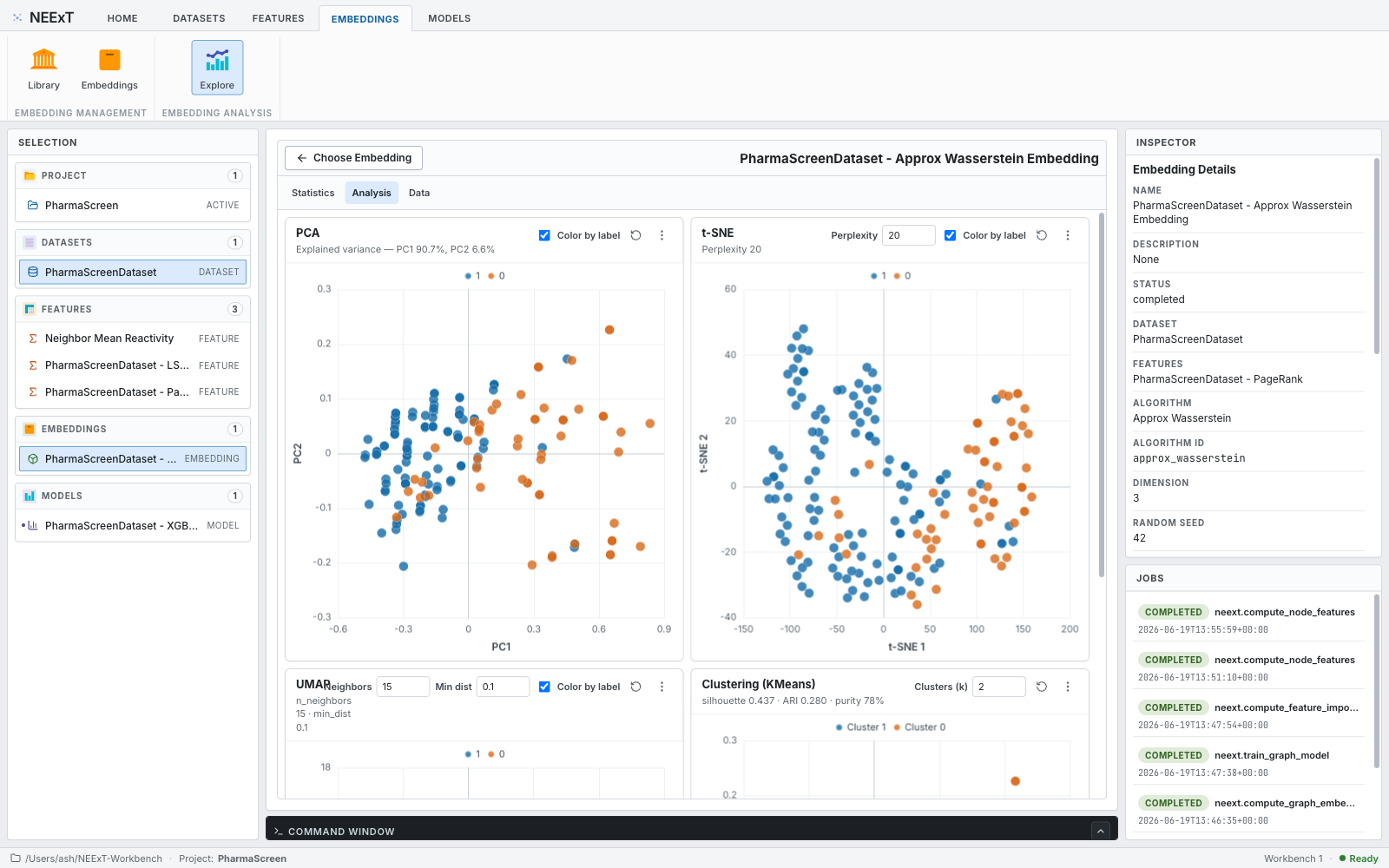
The NEExT Workbench is a local, single-user FastAPI + React application that exposes real NEExT workflows — datasets, features, embeddings, models, and analysis — as a desktop-style UI. Everything stays on your machine, and it speaks MCP so you can drive it from agentic clients.
neext-workbench          # installed package
make neext-workbench     # from a development checkout
Then open http://127.0.0.1:8765. Projects are stored under ~/NEExT-Workbench by
default (override with NEEXT_WORKBENCH_HOME or neext-workbench --workspace <path>).
The full Workbench tour, including MCP client setup, lives in the
documentation.
Learn more
- 📚 Documentation — guides, API reference, and the Workbench tour: neext.app/docs
- 🌐 Website — neext.app
- 🐛 Issues & support — github.com/ashdehghan/NEExT/issues
License
NEExT is released under the MIT License. Created and maintained by Ash Dehghan.


Release files for NEExT 0.3.3
For a detailed explanation of source distributions (sdists) and built distributions (wheels), please see the package formats documentation.
Source distribution (sdist)
| File | Size | Uploaded | Provenance | Actions |
|---|---|---|---|---|
| neext-0.3.3.tar.gz | 683.8 kB | Without provenance | Details for neext-0.3.3.tar.gz |
Built distribution (wheel)
| File | Interpreter | ABI | Platform | Actions Reset |
|---|---|---|---|---|
| neext-0.3.3-py3-none-any.whl | Python 3 | none | any | Details for neext-0.3.3-py3-none-any.whl |
Total release size: 1.3 MB
Release files / neext-0.3.3.tar.gz
| Download URL | neext-0.3.3.tar.gz |
|---|---|
| Size | 683.8 kB |
| Tags | Source |
|
SHA-256 checksum How to use checksums |
db22a2dae61cf03e5ad03ec3c06ee2f2d6eeda0669a2f9908f72b18265c09dbd
|
|
BLAKE2b-256 checksum How to use checksums |
2768ac2c94da94224def9102d25b3d8cf28d0051d05bf76e9bd8f7f468e3287c
|
| Upload date | |
|
Uploaded using Trusted Publishing? What is trusted publishing? |
No |
| Uploaded via |
uv/0.8.15
|
Release files / neext-0.3.3-py3-none-any.whl
| Download URL | neext-0.3.3-py3-none-any.whl |
|---|---|
| Size | 665.8 kB |
| Tags | Python 3 |
|
SHA-256 checksum How to use checksums |
22ca359158aac10801ffb49260673c5bde7c1916453b937faca411f5f9fff47e
|
|
BLAKE2b-256 checksum How to use checksums |
5c58bbc22b31cd5b907d044cf4151a33052ffe907b43bc44119e031ed17c6f4a
|
| Upload date | |
|
Uploaded using Trusted Publishing? What is trusted publishing? |
No |
| Uploaded via |
uv/0.8.15
|
Security for NEExT 0.3.3
Provenance
Provenance describes where a file came from. On PyPI, provenance is shared via attestations, which provide a verifiable record of the build or publishing details. View details, limitations and caveats.
No provenance found
None of the files in this release were uploaded with provenance metadata.
A note on package security
PyPI is a repository for distributing packages, not a service for auditing them. While third-party security researchers and our staff do their best to detect and remove malicious packages, PyPI cannot guarantee the quality, security or suitability of any given package.
To learn more about protecting yourself from malicious actors, visit our package security documentation.














