





review
what is negar
call negar module in your python source code and write error log & text log to a file ...
installation
-
install by pip
# linux sudo python3 -m pip install negar # windows py -m pip install negar -
install by setup.py
# linux

sudo python3 -m pip install https://github.com/sys113/negar/archive/0.5.0.zip

# windows

py -m pip install https://github.com/sys113/negar/archive/0.5.0.zip
example
-
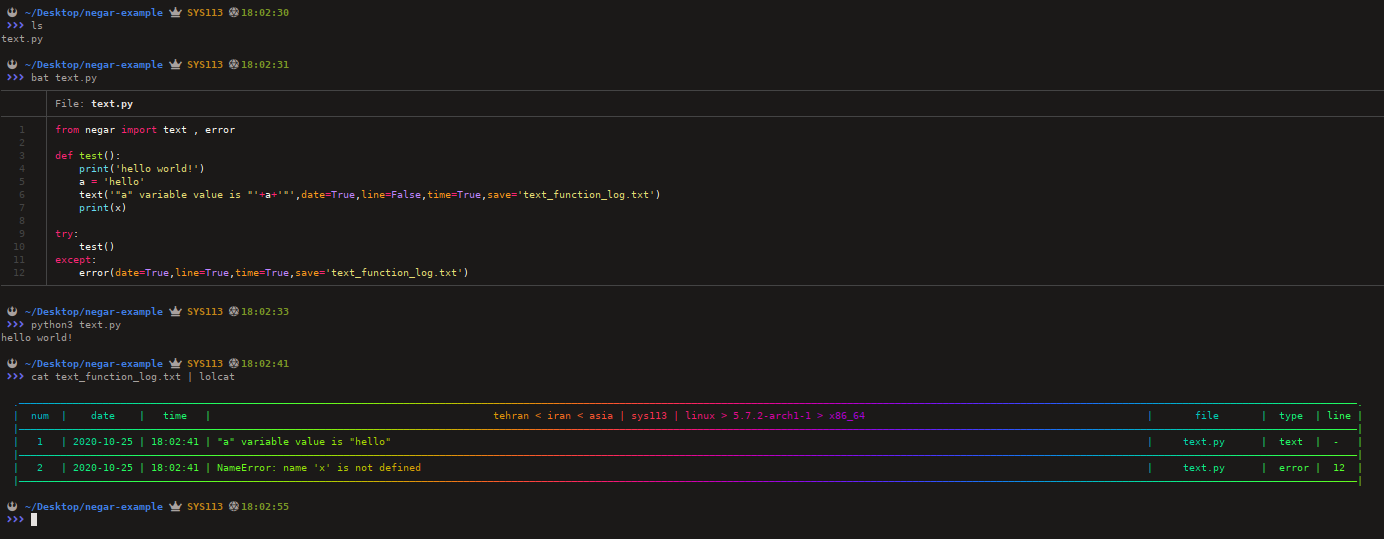
text function example one | example two
-
error function example one | example two
description
-
log_text
  # write 'log_text' to log file
  log_text = 'negar'
-
line
  # set 'Flase' and 'True' value for show line python file in log file , default is False ...
  line = True
-
date
  # set 'Flase' and 'True' value for show date in log file , default is True ...
  line = True
-
time
  # set 'Flase' and 'True' value for time in log file , default is True ...
  line = True
-
save
  # write log to 'negar-log.txt'
  save = 'negar-log.txt'
-
size
  # set 'size' for log file
  size = 2
tips
- log file default size is 2 ...
- log file size range is 1 ... 5 number ...
- maximum size of python file name support is 15 character ...
- maximum number to numbering lines support is 9999999 ...
- maximum python source code line number support is 999999 ...
- default log file name is log.txt ...
- previously defined log file size can'not be resized!
copyright
copyright SYS113 - 2019.
license
MIT license , please see LICENSE file.
donate
- for iranian users : id pay - https://idpay.ir/sys113
- for global users : BTC wallet id - 149JgUmFqG6MvFg79Ldrvdk2bN35ByhMuw
contact me
thanks
- mohamad moradiyani for negar module logo
- Hamed 169 for optimize negar module source code
last word
hope this is negar useful to you and enjoy it.
1 maintainer

Metadata
1 maintainer
Release files for negar 0.6.0
For a detailed explanation of source distributions (sdists) and built distributions (wheels), please see the package formats documentation.
Source distribution (sdist)
| File | Size | Uploaded | |
|---|---|---|---|
| negar-0.6.0.tar.gz | 10.9 kB | Details |
Built distribution (wheel)
| File | Interpreter | ABI | Platform | Reset |
|---|---|---|---|---|
| negar-0.6.0-py2.py3-none-any.whl | Python 2, Python 3 | none | any | Details |
Total release size: 20.3 kB
Release files / negar-0.6.0.tar.gz
| Download URL | negar-0.6.0.tar.gz |
|---|---|
| Size | 10.9 kB |
| Tags | Source |
|
SHA-256 checksum How to use checksums |
da5e5870de843c49f3de570fe436dd275c6ac608c0dc68416011a7da18e11577
|
|
BLAKE2b-256 checksum How to use checksums |
2d2468e9317a86fc73540b316c4bd78ed061af81e7ce59f01b7067763e3c9239
|
| Upload date | |
|
Uploaded using Trusted Publishing? What is trusted publishing? |
No |
| Uploaded via |
twine/3.1.1 pkginfo/1.5.0.1 requests/2.23.0 setuptools/47.3.0 requests-toolbelt/0.9.1 tqdm/4.42.1 CPython/3.8.3
|
Release files / negar-0.6.0-py2.py3-none-any.whl
| Download URL | negar-0.6.0-py2.py3-none-any.whl |
|---|---|
| Size | 9.4 kB |
| Tags | Python 2 Python 3 |
|
SHA-256 checksum How to use checksums |
bae72b57a5ba3f7bedd0704d9e4bb9734dc7f19ba21454e123b2ddff10b88edd
|
|
BLAKE2b-256 checksum How to use checksums |
181d90e15b9565d6a72e786966ced2b970a9f7d8f4de099f61e0e9ca5954d207
|
| Upload date | |
|
Uploaded using Trusted Publishing? What is trusted publishing? |
No |
| Uploaded via |
twine/3.1.1 pkginfo/1.5.0.1 requests/2.23.0 setuptools/47.3.0 requests-toolbelt/0.9.1 tqdm/4.42.1 CPython/3.8.3
|

















