Claude adapter for NeMo Fabric

Project description

NVIDIA NeMo Fabric Claude Adapter

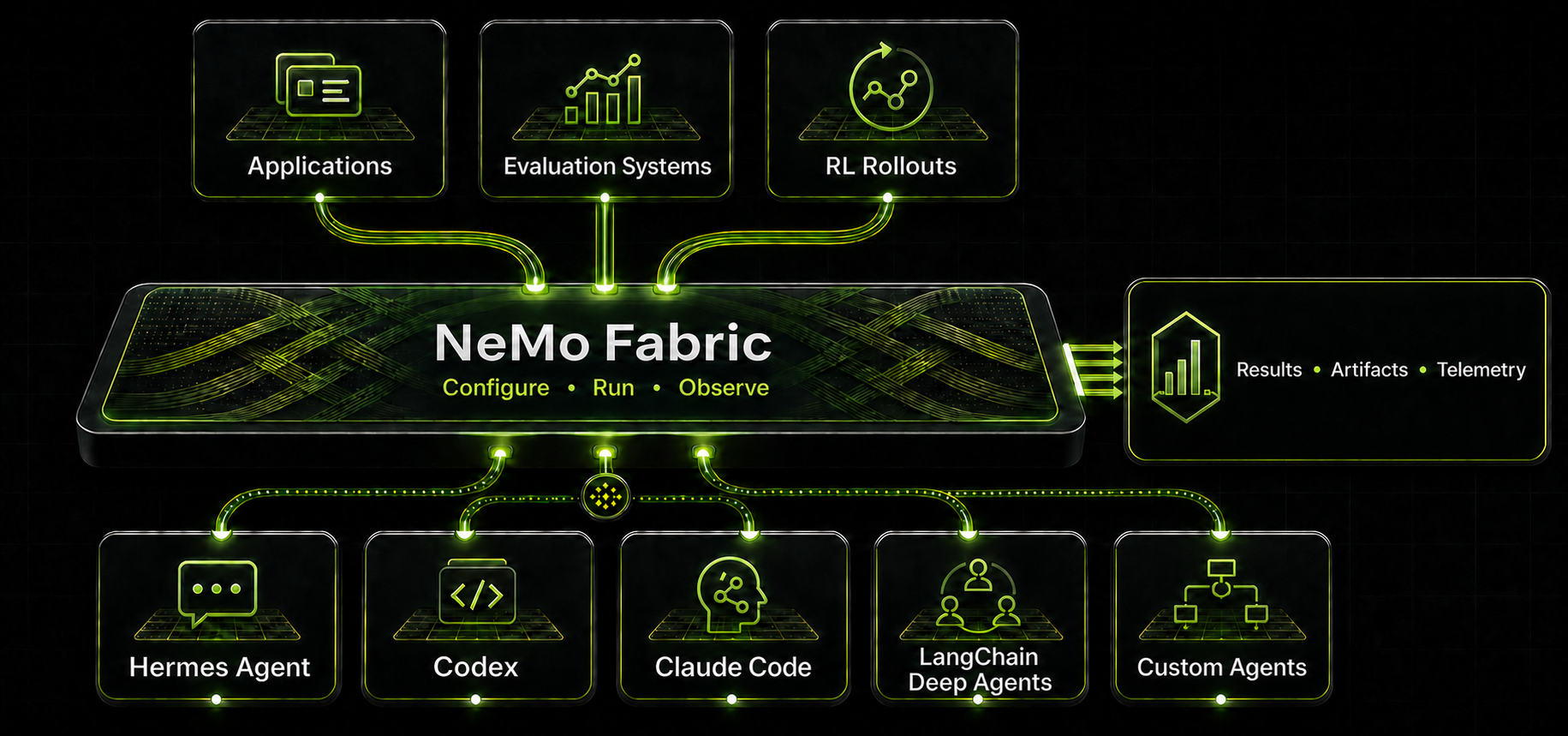
The nvidia.fabric.claude adapter uses the official Claude Agent SDK for Python behind Fabric's normalized invocation contract. The SDK is an implementation detail; consumers select the Claude harness by adapter ID.

This adapter pins claude-agent-sdk==0.2.120. The SDK supplies its compatible Claude Code runtime unless harness.settings.cli_path explicitly selects another executable.

Install

To install just the Claude adapter by itself:

pip install "nemo-fabric[claude]"

To install just the Claude adapter along with the NeMo Fabric Runtime:

pip install "nemo-fabric[claude, runtime]"

Authentication

Fabric preserves Claude's native credential resolution. Use an existing Claude Code login for local development, ANTHROPIC_AUTH_TOKEN for a gateway or proxy bearer credential, ANTHROPIC_API_KEY for a static API credential, or Anthropic Workload Identity Federation (WIF) for production and CI workloads that should not store a long-lived API key.

The adapter forwards the Anthropic profile and federation environment variables that Claude Code and the Claude Agent SDK consume. This includes ANTHROPIC_CONFIG_DIR, ANTHROPIC_PROFILE, the direct federation identifiers, and ANTHROPIC_IDENTITY_TOKEN or ANTHROPIC_IDENTITY_TOKEN_FILE. Fabric reads selected environment values and forwards them to the Claude runtime, but it does not persist or log them in configuration or artifacts. Authentication is validated when Claude starts the invocation.

Unset unused ANTHROPIC_API_KEY and ANTHROPIC_AUTH_TOKEN variables before using WIF. Anthropic credential resolution treats an empty variable as selected, so an empty API credential prevents fallback to a federation profile.

Refer to the Claude adapter authentication guide for mode selection, required WIF variables, and the Relay boundary. Package installation is verified by the adapter wheel and module-entrypoint tests.

Relay-enabled runs also require the external nemo-relay CLI. Fabric accepts CLI versions >=0.6.0,<0.7.0. Install the CLI separately:

cargo install nemo-relay-cli

The Python nemo-relay package does not install this executable. Refer to the NeMo Relay installation guide for other supported installation methods.

Execution Model

Each invoke starts a fresh adapter process. The adapter persists the terminal Claude session ID under the Fabric artifact root, keyed by runtime_id, and passes it as ClaudeAgentOptions.resume on the next invocation. One Fabric runtime therefore maps to one Claude session even though no adapter process stays resident.

Configuration

Configure portable capabilities through the normalized FabricConfig fields:

  • models selects the Claude model. A configured model must use provider="anthropic"; normalized hosted/custom provider resolution is tracked in FABRIC-64.
  • environment.workspace sets the Claude working directory.
  • tools.blocked maps to Claude disallowed_tools using Claude-native tool names.
  • mcp configures stdio, HTTP, streamable HTTP, or SSE servers. For stdio, Fabric parses url as a command plus arguments.
  • skills.paths names skill directories that contain SKILL.md. The adapter stages these directories as a local Claude plugin for the invocation.

Only Claude-specific controls belong in harness.settings:

  • system_prompt, allowed_tools, and permission_mode
  • max_turns, max_budget_usd, and timeout_seconds
  • setting_sources (defaults to [] for deterministic isolation)
  • cli_path for testing or an explicitly installed Claude Code executable
  • nemo_relay_command for an explicitly installed NeMo Relay CLI executable
  • env for variables explicitly forwarded to Claude Code

Putting model_name, cwd, tools, disallowed_tools, mcp_servers, or skills in harness.settings is an error. Use the corresponding normalized field so the same consumer configuration can compose with other adapters.

The adapter filters the inherited environment before launching Claude Code. It retains portable OS/config variables, the selected model's api_key_env, and explicitly configured settings.env values. Raw Claude stderr is consumed by the SDK and is not persisted as a Fabric artifact.

Relay Observability

Enable Relay through the normalized Fabric configuration:

config.enable_relay(
    project="fabric-review",
    output_dir="./artifacts/relay",
)

For each Relay-enabled invocation, Fabric starts one nemo-relay gateway, waits for its health endpoint, and stops it after Claude succeeds, fails, times out, or is canceled. Fabric passes the gateway URL to Claude Code through ANTHROPIC_BASE_URL and NEMO_RELAY_GATEWAY_URL. It also stages an invocation-scoped Claude plugin that forwards lifecycle hooks with nemo-relay hook-forward claude.

The Fabric result includes relay_runtime.gateway_config_path, relay_runtime.gateway_log_path, and the collected relay_artifacts. Relay startup failures return a stable adapter error and retain the gateway log for diagnosis. The default Claude Agent SDK dependency bundles a compatible Claude Code executable. An executable supplied with cli_path must support the Relay plugin's complete hook set, including UserPromptExpansion.

Typed Configuration

Build the agent configuration with the typed SDK models before invoking Fabric:

from pathlib import Path

from nemo_fabric import (
    EnvironmentConfig,
    Fabric,
    FabricConfig,
    HarnessConfig,
    McpConfig,
    McpServerConfig,
    MetadataConfig,
    ModelConfig,
    RuntimeConfig,
    SkillConfig,
    ToolsConfig,
)

base_dir = Path("/workspace/review-agent")
config = FabricConfig(
    metadata=MetadataConfig(name="claude-review-agent"),
    harness=HarnessConfig(
        adapter_id="nvidia.fabric.claude",
        resolution="preinstalled",
        settings={
            "system_prompt": "Review changes for correctness and regressions.",
            "permission_mode": "dontAsk",
            "max_turns": 8,
        },
    ),
    models={
        "default": ModelConfig(
            provider="anthropic",
            model="your-claude-model",
            api_key_env="ANTHROPIC_API_KEY",
        )
    },
    runtime=RuntimeConfig(artifacts="./artifacts"),
    environment=EnvironmentConfig(provider="local", workspace="."),
    tools=ToolsConfig(blocked=["WebFetch"]),
    mcp=McpConfig(
        servers={
            "repo": McpServerConfig(
                transport="stdio",
                url="repo-mcp --root .",
                exposure="harness_native",
            )
        }
    ),
    skills=SkillConfig(paths=["./skills/code-review"]),
)

fabric = Fabric()

One-Shot Run

result = await fabric.run(
    config,
    base_dir=base_dir,
    input="Inspect the repository",
)

print(result.output["response"])
print(result.output["session_id"])

Multi-Turn Runtime

async with await fabric.start_runtime(config, base_dir=base_dir) as runtime:
    first = await runtime.invoke(input="Inspect the repository")
    second = await runtime.invoke(input="Now review the latest patch")

assert first.runtime_id == second.runtime_id
assert first.output["session_id"] == second.output["session_id"]

Resume requires the same workspace and Claude state directory on the same host. The Fabric-to-Claude correlation record alone is insufficient if Claude's underlying transcript store is removed.

Project details


Download files

Download the file for your platform. If you're not sure which to choose, learn more about installing packages.

Source Distribution

nemo_fabric_adapters_claude-0.1.0a20260717.tar.gz (8.0 kB view details)

Uploaded Source

File details

Details for the file nemo_fabric_adapters_claude-0.1.0a20260717.tar.gz.

File metadata

File hashes

Hashes for nemo_fabric_adapters_claude-0.1.0a20260717.tar.gz
Algorithm Hash digest
SHA256 a48779e2ba0211453898053f133a1e074c4c3499daf6aec1831e8046f8768cda
MD5 245850926a6974019ef3a8ee7c79611a
BLAKE2b-256 ce907312ea7878286e5e51876100ff4d558ae059725425a76de2f7cfa2bff2c4

See more details on using hashes here.

Supported by

AWS Cloud computing and Security Sponsor Datadog Monitoring Depot Continuous Integration Fastly CDN Google Download Analytics Pingdom Monitoring Sentry Error logging StatusPage Status page