
nenya-mac




Intro
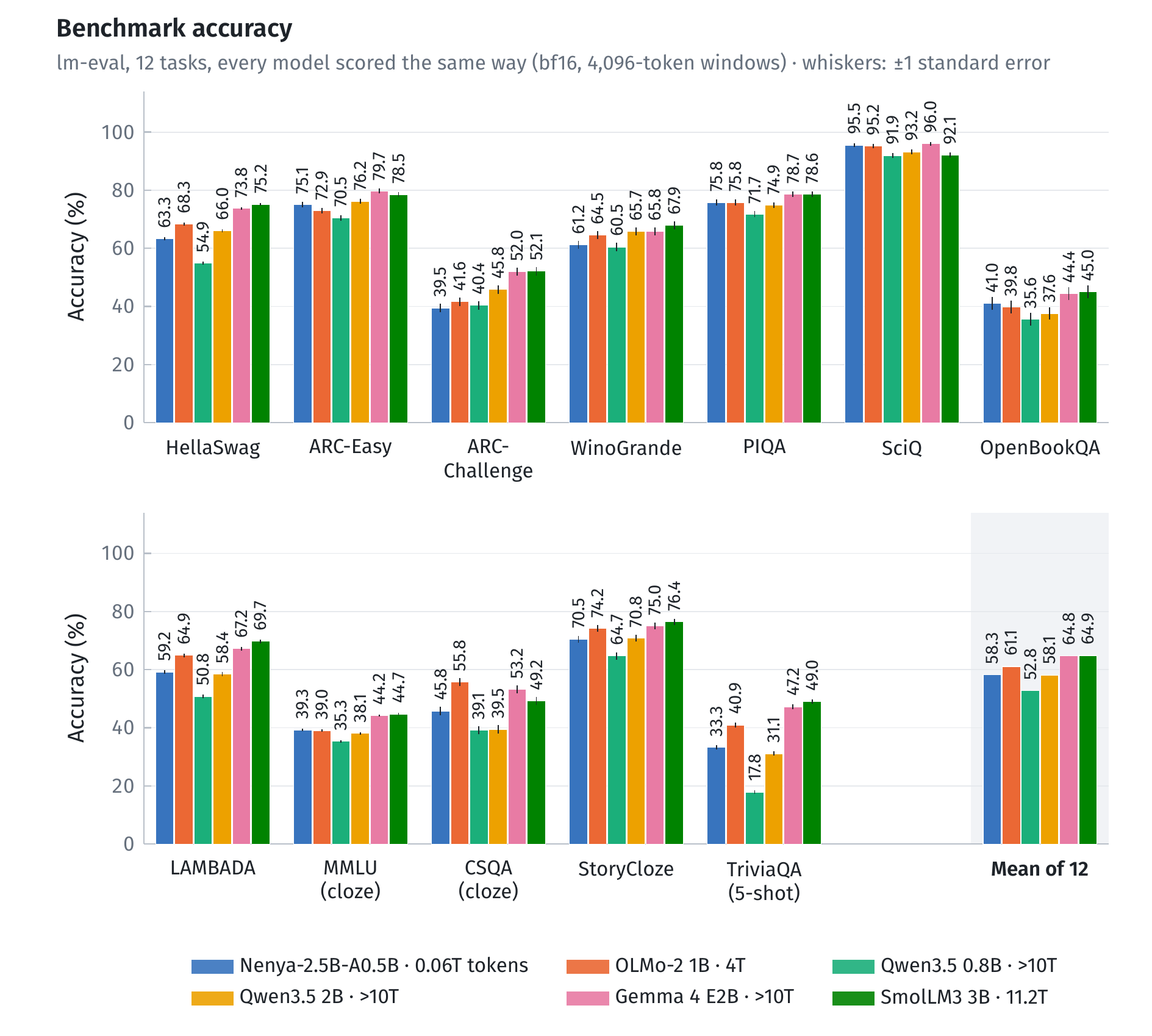
Nenya is a general purpose 0.5B active, 2.5B total parameter mixture-of-experts (MoE) base model. Nenya rivals Qwen3.5 2B on pretraining benchmarks with 500× lower training compute and 3.4× fewer active FLOPs/token.
This package is Nenya's Metal engine for Apple silicon. With it installed, nenya.generate() runs the model on the
Mac's GPU, from 8-bit weights in a single 3.47 GB file hosted in
ArsalanZ/Nenya-2.5B-A0.5B-Base-Metal-8bit.
Quick start
pip install "nenya[mac]"
import nenya
print(nenya.generate("The mitochondrion is the organelle responsible for", max_new_tokens=40))
print(nenya.generate("Question: What is the capital of Australia?\nAnswer:", max_new_tokens=8, temperature=0))
pip install "nenya[mac]" installs two packages: nenya, which provides
nenya.generate(), and this engine, which it runs on. Installing nenya-mac on its own gives you only the engine
(see "Direct use" below).
Benchmarks
Speed and memory on a Mac
One sequence at a time, in the Metal engine.
| Decoding speed (tokens/s) | Apple M4 base | Apple M1 base |
|---|---|---|
| Empty context | 127.1 | 74.3 |
| 1K tokens | 123.9 | 72.5 |
| 4K tokens | 114.1 | 67.6 |
| 16K tokens | 92.5 | 55.5 |
| Peak memory while decoding | Apple M4 base | Apple M1 base |
|---|---|---|
| At 1K tokens | 4.10 GB | 4.07 GB |
| At 16K tokens | 4.30 GB | 4.26 GB |
| Without the weight file (1K / 16K) | 0.67 / 0.86 GB | 0.54 / 0.73 GB |
Prompt processing and time to first token (Apple M4). Prompts run through every layer at once, in chunks of 512 tokens:
| Prompt length (tokens) | 16 | 64 | 256 | 1,024 | 4,096 | 16,384 |
|---|---|---|---|---|---|---|
| Time to first token | 0.04 s | 0.06 s | 0.15 s | 0.57 s | 2.7 s | 18.6 s |
| Prompt processing (tokens/s) | 392 | 1,129 | 1,720 | 1,801 | 1,510 | 909 |
Usage notes
- Download: the first call downloads the weight file (3.47 GB) from
ArsalanZ/Nenya-2.5B-A0.5B-Base-Metal-8bit and
caches it with
huggingface_hub. The engine stays loaded between calls;nenya.unload()frees it. - Sampling: the default is temperature 0.9 with top-k 20, the model's recommended setting for open-ended text.
Use
temperature=0(greedy) for maths, code and short factual answers.top_pandmin_pare supported too. - Backend:
nenya.generate()uses the engine automatically. A call that passes transformers' owngenerate()arguments (e.g.repetition_penalty) runs on transformers instead, with a warning.backend="mac"orbackend="transformers"picks one. - Requirements: a Mac with Apple silicon (M1 or later) and Python 3.12. macOS 11+. The wheel ships the compiled engine, so no Xcode tools are needed.
Direct use, without the text wrapper:
import nenya_mac
eng = nenya_mac.Engine(nenya_mac.default_weights())   # one decoding session (up to 16,384 tokens)
eng.append(prompt_ids)                                  # the prompt: batched through every layer
logits = eng.logits()                                   # next-token logits, numpy float32 [vocab]
new_ids = eng.generate([], 40, temperature=0.9, top_k=20, seed=1, stop=[100257])
eng.reset()
Your own fine-tune, saved in the release's format, runs on the engine after a conversion:
pip install "nenya-mac[convert]", then python -m nenya_mac.convert <folder or repo id> my.oe, and set
NENYA_MAC_WEIGHTS=my.oe. Generating from another repo without converted weights falls back to transformers.
The weight file
The file holds 8-bit matrices in groups of 32, a 4-bit screening copy of the output head with exact fp16 re-scoring of the candidates, the mHC boundaries folded into the output projections, and fp16 Engram tables.
License
Apache 2.0, like the model (LICENSE, NOTICE).
1 maintainer

Metadata
1 maintainer
Release files for nenya-mac 1.0.0
For a detailed explanation of source distributions (sdists) and built distributions (wheels), please see the package formats documentation.
Built distribution (wheel)
| File | Interpreter | ABI | Platform | Actions Reset |
|---|---|---|---|---|
| nenya_mac-1.0.0-py3-none-macosx_11_0_arm64.whl | Python 3 | none | macOS 11.0+ ARM64 | Details for nenya_mac-1.0.0-py3-none-macosx_11_0_arm64.whl |
Release files / nenya_mac-1.0.0-py3-none-macosx_11_0_arm64.whl
| Download URL | nenya_mac-1.0.0-py3-none-macosx_11_0_arm64.whl |
|---|---|
| Size | 117.6 kB |
| Tags | Python 3 macOS 11.0+ ARM64 |
|
SHA-256 checksum How to use checksums |
25f90c0b41d368b1542cf97452a6cd3b03a57a6feebcaf04b4eb5dc3471b6559
|
|
BLAKE2b-256 checksum How to use checksums |
ef1234fce2c7afc8927b566a344ec8ff5e72bb54fcb341c0d25ac211a28bc4ec
|
| Upload date | |
|
Uploaded using Trusted Publishing? What is trusted publishing? |
No |
| Uploaded via |
twine/7.0.0 CPython/3.12.3
|
Security for nenya-mac 1.0.0
Provenance
Provenance describes where a file came from. On PyPI, provenance is shared via attestations, which provide a verifiable record of the build or publishing details. View details, limitations and caveats.
No provenance found
None of the files in this release were uploaded with provenance metadata.
A note on package security
PyPI is a repository for distributing packages, not a service for auditing them. While third-party security researchers and our staff do their best to detect and remove malicious packages, PyPI cannot guarantee the quality, security or suitability of any given package.
To learn more about protecting yourself from malicious actors, visit our package security documentation.













