
Graph Visualization for Python by Neo4j







neo4j-viz is a Python package for creating interactive graph visualizations.
The output is of type IPython.display.HTML and can be viewed directly in a Jupyter Notebook or Streamlit application.
Alternatively, you can export the output to a file and view it in a web browser.
The package wraps the Neo4j Visualization JavaScript library (NVL).
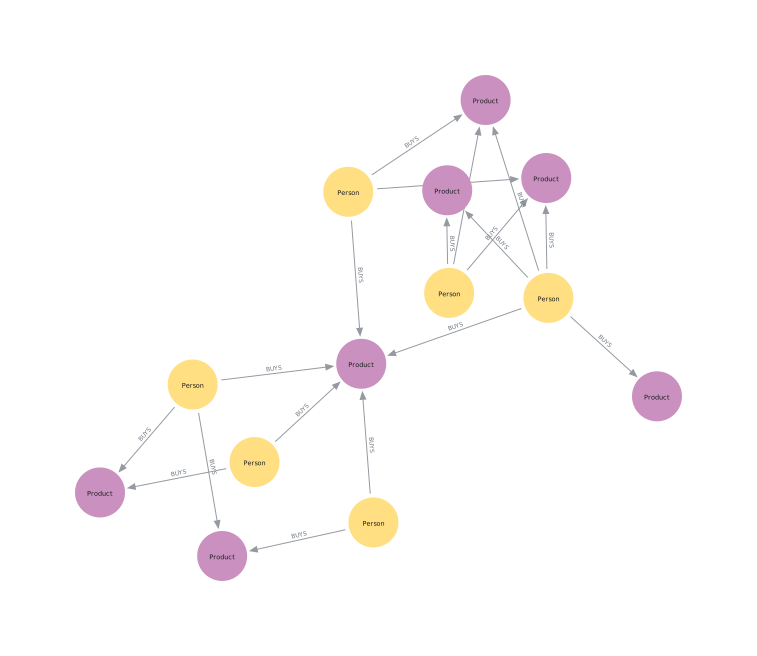
Some notable features
- Easy to import graphs represented as:
- projections in the Neo4j Graph Data Science (GDS) library
- graphs from Neo4j query results
- pandas DataFrames
- Node features:
- Sizing
- Colors
- Captions
- Pinning
- On hover tooltip
- Relationship features:
- Colors
- Captions
- On hover tooltip
- Graph features:
- Zooming
- Panning
- Moving nodes
- Using different layouts
- Additional convenience functionality for:
- Resizing nodes, optionally including scale normalization
- Coloring nodes based on a property
- Toggle whether nodes should be pinned or not
Please note that this list is by no means exhaustive.
Getting started
Installation
Simply install with pip:
pip install neo4j-viz
Basic usage
We will use a small toy graph representing the purchase history of a few people and products.
We start by instantiating the Nodes and Relationships we want in our graph. The only mandatory fields for a node are the "id", and "source" and "target" for a relationship. But the other fields can optionally be used to customize the appearance of the nodes and relationships in the visualization.
Lastly we create a
VisualizationGraph object with the
nodes and relationships we created, and call its render method to display the graph.
from neo4j_viz import Node, Relationship, VisualizationGraph

nodes = [
    Node(id=0, size=10, caption="Person"),
    Node(id=1, size=10, caption="Product"),
    Node(id=2, size=20, caption="Product"),
    Node(id=3, size=10, caption="Person"),
    Node(id=4, size=10, caption="Product"),
]
relationships = [
    Relationship(
        source=0,
        target=1,
        caption="BUYS",
    ),
    Relationship(
        source=0,
        target=2,
        caption="BUYS",
    ),
    Relationship(
        source=3,
        target=2,
        caption="BUYS",
    ),
]

VG = VisualizationGraph(nodes=nodes, relationships=relationships)

VG.render()
This will return a IPython.display.HTML object that can be rendered in a Jupyter Notebook or streamlit application.
Please refer to the documentation for more details on the API and usage.
Examples
For more extensive examples, including how to import graphs from Neo4j GDS projections and Pandas DataFrames, checkout the tutorials chapter in the documentation.
1 maintainer

Release files for neo4j-viz 1.10.0
For a detailed explanation of source distributions (sdists) and built distributions (wheels), please see the package formats documentation.
Source distribution (sdist)
| File | Size | Uploaded | |
|---|---|---|---|
| neo4j_viz-1.10.0.tar.gz | 5.5 MB | Details |
Built distribution (wheel)
| File | Interpreter | ABI | Platform | Reset |
|---|---|---|---|---|
| neo4j_viz-1.10.0-py3-none-any.whl | Python 3 | none | any | Details |
Total release size: 11.0 MB
Release files / neo4j_viz-1.10.0.tar.gz
| Download URL | neo4j_viz-1.10.0.tar.gz |
|---|---|
| Size | 5.5 MB |
| Tags | Source |
|
SHA-256 checksum How to use checksums |
505ca25c8dc2a4131f4da6b4234f70d23cd5ad553fbf9e546cdc835f19288bb4
|
|
BLAKE2b-256 checksum How to use checksums |
1193f64c060b003bd020431314887366144ce3e8a04be298fa466cd665a69c8b
|
| Upload date | |
|
Uploaded using Trusted Publishing? What is trusted publishing? |
No |
| Uploaded via |
uv/0.12.19 {"installer":{"name":"uv","version":"0.12.19","subcommand":["publish"]},"python":null,"implementation":{"name":null,"version":null},"distro":{"name":"Ubuntu","version":"24.04","id":"noble","libc":null},"system":{"name":null,"release":null},"cpu":null,"openssl_version":null,"setuptools_version":null,"rustc_version":null,"ci":true}
|
Release files / neo4j_viz-1.10.0-py3-none-any.whl
| Download URL | neo4j_viz-1.10.0-py3-none-any.whl |
|---|---|
| Size | 5.5 MB |
| Tags | Python 3 |
|
SHA-256 checksum How to use checksums |
d2ae66c92eedecf6a003a11b26a6b95f7ce441a1ff91d651bc6ab4bd71d01697
|
|
BLAKE2b-256 checksum How to use checksums |
a987a75b75fdc17d35c847c6c2e2770d8c880a11936558fab6c4ed64a85ed805
|
| Upload date | |
|
Uploaded using Trusted Publishing? What is trusted publishing? |
No |
| Uploaded via |
uv/0.12.19 {"installer":{"name":"uv","version":"0.12.19","subcommand":["publish"]},"python":null,"implementation":{"name":null,"version":null},"distro":{"name":"Ubuntu","version":"24.04","id":"noble","libc":null},"system":{"name":null,"release":null},"cpu":null,"openssl_version":null,"setuptools_version":null,"rustc_version":null,"ci":true}
|














