

Federal environmental data and regulatory research for AI-assisted NEPA workflows
Works with




Built with





NEPA MCP is the Model Context Protocol (MCP) server layer of the PermitAI toolkit. It gives AI agents structured access to federal environmental, regulatory, biological, cultural, socioeconomic, and jurisdictional data used in NEPA screening and permitting research.
The current inventory includes 19 MCP servers, 46 MCP tools, and 32 GIS layers. Together, the tools and layers represent 78 environmental and regulatory research capabilities. These capabilities draw on public data from 12 federal agencies, along with interagency and nonfederal sources.
The MCP Tool Catalog provides the complete server and tool inventory. The Map Composer MCP server queries public GIS services from eight federal data publishers at request time. It can compose selected results into an interactive map or a provenance-rich GeoJSON export.
Important
NEPA MCP is a screening and research aid. It does not make legal or agency determinations, replace consultation with agencies or Tribes, or guarantee that an upstream dataset is complete or current. Confirm material findings against authoritative records and current requirements.
Quick Start
Prerequisites
- Python 3.12 or newer
pipxfor an isolated installation
Install the stable package from PyPI:
pipx install nepa-mcp
pipx ensurepath
If pipx ensurepath reports a change, reopen the terminal before continuing.
If pipx selects a Python version older than 3.12, repeat the installation with
pipx install --python 3.12 nepa-mcp.
Verify the installation and list the available servers:
nepa-mcp doctor
nepa-mcp list-servers
Upgrade an existing PyPI installation:
pipx upgrade nepa-mcp
Configure an MCP Client
Before continuing: For Claude Code or VS Code, confirm that the terminal is open in the project or workspace you intend to configure. The configuration file will be created or updated there.
| Client | Recommended setup |
|---|---|
| Claude Code | nepa-mcp configure claude |
| VS Code | nepa-mcp configure vscode |
| Codex CLI | nepa-mcp configure codex |
| Codex Desktop | Install the Codex plugin |
Restart or reload the selected client after configuring it; for Codex, start a new task.
Codex Plugin
The Codex plugin registers all 19 servers and includes the nepa-screening
skill. If you use the plugin, do not also run nepa-mcp configure codex.
Install and verify the Python runtime before adding the plugin:
pipx install nepa-mcp
nepa-mcp doctor
doctor should report Installed servers: 19. Then add the marketplace in
Codex Desktop:
- Open Plugins and select Add plugin marketplace.
- Enter
pnnl/nepa-mcpfor Source andv0.1.1for Git ref. - Leave Sparse paths blank, then select Add marketplace.
- Install NEPA-MCP from the NEPA-MCP Local marketplace.
The equivalent Codex CLI commands are:
codex plugin marketplace add pnnl/nepa-mcp --ref v0.1.1
codex plugin add nepa-mcp@nepa-mcp-local
Start a new Codex task after installing the plugin so the new MCP tools and skill are loaded.
Map Composer
map_composer turns project-area data into an interactive HTML map or a
combined GeoJSON file for QGIS, ArcGIS, and other geospatial workflows. It
provides 32 selectable overlays assembled at request time from Census, USFWS,
USACE, USGS, BLM, USFS, NPS, and NIFC public GIS services.
The result is intentionally interactive rather than a fixed stack: start with one of five profiles, then toggle returned layers to preserve visual clarity for the question at hand. Every map reports requested, rendered, empty, partial, and failed layer counts so source coverage remains visible.
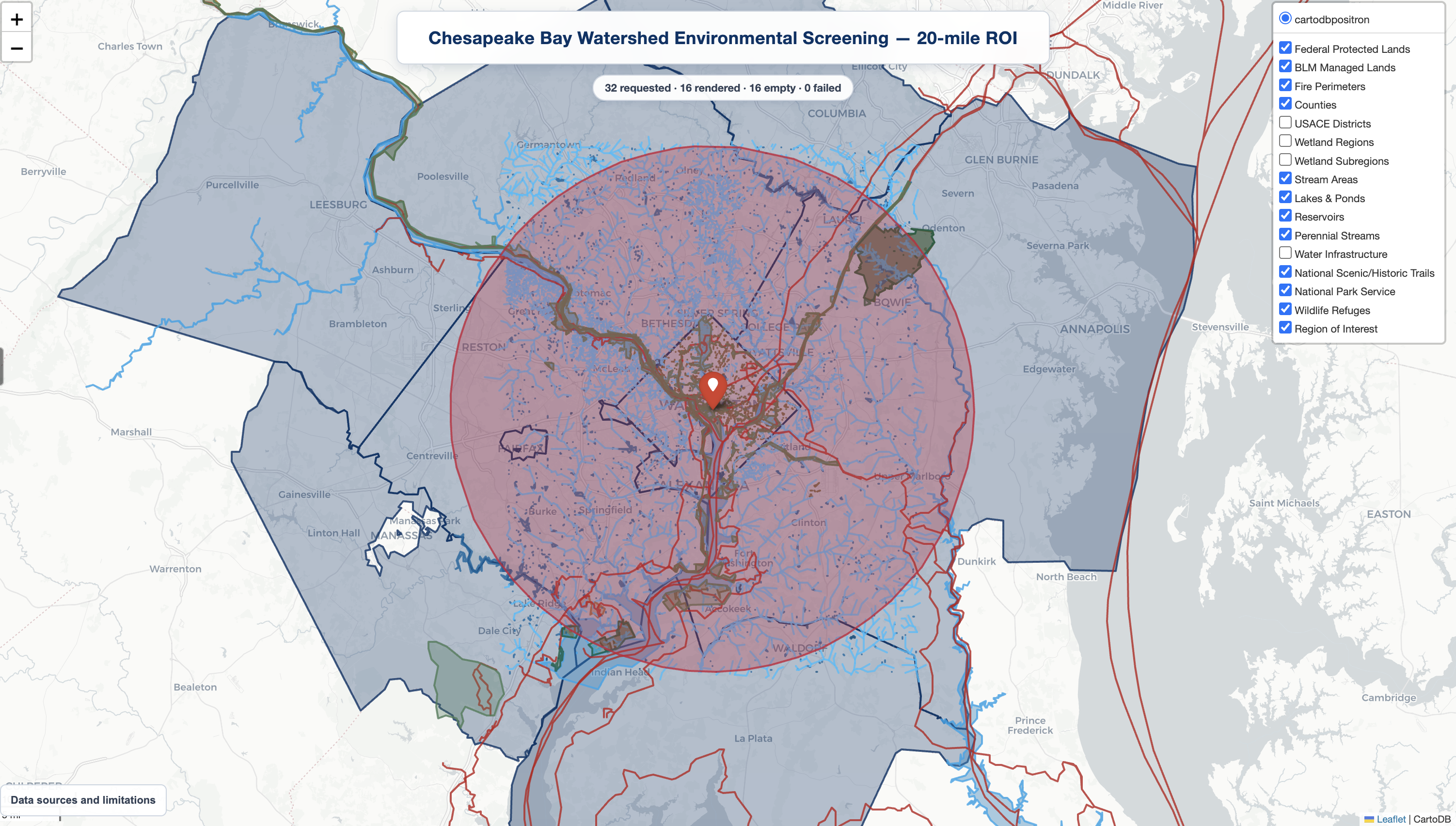
Chesapeake Bay watershed, 20-mile project area: 12 overlays shown from 16 returned locally in a 32-layer request, with no failed sources. The generated map keeps every returned layer independently toggleable.
See the Map Composer guide for profile membership, the complete 32-layer catalog, output behavior, provenance, and artifact storage.
Credentials
Credentials are not required to install NEPA MCP or use the other 17 servers. The Census and EPA AQS servers require credentials before they can return data:
| Server | Environment variables |
|---|---|
census |
CENSUS_API_KEY |
epa_aqs |
EPA_AQS_EMAIL, EPA_AQS_API_KEY |
Set the variables in the shell or create a private per-user credential file:
nepa-mcp configure credentials
nepa-mcp doctor
configure creates a template only when one does not already exist and prints
its location. The default is the operating system's per-user configuration
directory under nepa-mcp/credentials.env; override it with
NEPA_MCP_CONFIG_FILE. Environment variables take precedence over the file.
Credentials are not copied into MCP client or plugin configuration, and
doctor reports only whether each value is present.
Server Inventory
| Server | Source agency / publisher | Purpose |
|---|---|---|
blm |
Bureau of Land Management / Department of the Interior | Approved land-use plans, wilderness areas, national monuments, and National Conservation Areas |
census |
U.S. Census Bureau | ACS 5-Year socioeconomic indicators for intersecting TIGERweb counties |
cfr |
Office of the Federal Register / National Archives and U.S. Government Publishing Office | eCFR and Federal Register records, including executive orders |
efh |
NOAA Fisheries | EFH Mapper data for EFH, HAPC, salmon, HMS, coastal pelagic species, and groundfish screening |
epa_aqs |
U.S. Environmental Protection Agency | Air Quality System monitoring data and NAAQS screening comparisons |
esa_ranges |
NOAA Fisheries, West Coast Region | ESA-listed salmon and steelhead ranges by HUC-12 watershed |
fema_nfhl |
Federal Emergency Management Agency | National Flood Hazard Layer flood zones, levees, and water areas |
gbif |
Global Biodiversity Information Facility and contributing dataset publishers; U.S. Census Bureau for county boundaries | Occurrence records by ROI or county; record-level publisher and license vary |
gis |
Esri | ArcGIS Geometry Service ROI buffers with locally derived GeoJSON and area estimates |
ipac |
U.S. Fish and Wildlife Service / Department of the Interior | IPaC species, critical habitat, migratory birds, wetlands, refuges, and related resources |
map_composer |
Census, USFWS, USACE, USGS, BLM, USFS, NPS, and NIFC public GIS services | Interactive project-area maps and provenance-rich GeoJSON exports across 32 selectable layers |
nepa_assist |
U.S. Environmental Protection Agency | NEPAssist aggregated environmental-screening indicators |
noaa |
NOAA Fisheries, West Coast Region | ESA critical-habitat designations |
nrhp |
National Park Service / Department of the Interior | National Register-listed property locations |
padus |
U.S. Geological Survey / Department of the Interior | PAD-US 4.1 protected-area owner and manager attributes for screening |
pcsrf |
NOAA Fisheries | PCSRF projects plus species ranges, a 2021 critical-habitat snapshot, and Atlantic salmon EFH/HAPC |
tigerweb_counties |
U.S. Census Bureau | TIGERweb county-boundary intersections |
tribal |
U.S. Census Bureau | TIGERweb AIANNHA geographic areas for tribal-consultation screening |
usace |
U.S. Army Corps of Engineers | Regulatory boundaries and wetland delineation regions and subregions |
Many geographic servers also use Esri's ArcGIS Geometry Service to construct ROI buffers. Esri is a supporting geometry-service provider, not the publisher of the agency datasets identified above.
See Geographic Inputs and Data Behavior for ROI constraints, area and clipping semantics, coverage warnings, and partial-source behavior across geographic servers.
Development
uv is required only for source development and
testing. From the repository root:
uv sync --all-groups
uv run ruff check .
uv run ruff format --check .
uv run python -m compileall -q .
uv run pytest -q
Most tests do not require credentials. To exercise the optional Census or EPA
AQS integrations, use uv run nepa-mcp configure or export the variables
listed above. A repository .env file is not loaded automatically; opt into it
with uv run --env-file .env <command>.
Each domain follows the same basic layout:
server_name/
├── requirements.txt
├── server.py
└── src/
    ├── apis/
    └── core/
Shared runtime, HTTP, validation, and ArcGIS utilities live in
nepa_mcp_common/. The root pyproject.toml builds the installable distribution;
individual requirements.txt files remain available for standalone deployment
packaging.
Inspect a server's MCP contract with FastMCP:
uv run fastmcp inspect cfr/server.py:mcp --skip-env
The test suite checks server startup and discovery, tool-schema readability, offline invalid-argument handling, shared utilities, and distribution contents.
Data Sources and Licensing
Source agencies and publishers: Bureau of Land Management · Department of the Interior · U.S. Census Bureau · U.S. Environmental Protection Agency · Esri · Federal Emergency Management Agency · Office of the Federal Register and U.S. Government Publishing Office · Global Biodiversity Information Facility and contributing dataset publishers · National Park Service · National Interagency Fire Center · NOAA Fisheries · U.S. Army Corps of Engineers · U.S. Fish and Wildlife Service · USDA Forest Service · U.S. Geological Survey
Note
Agency and publisher names identify upstream data provenance only. NEPA MCP is an independent project and is not affiliated with, sponsored by, or endorsed by these organizations.
The data-source inventory records the source agencies, endpoints, authentication requirements, license signals, and release notes for the current server inventory. Upstream data remains subject to each source's terms and authoritative-use guidance.
Contributing
Issues and pull requests are welcome. See Contributing for development setup, required checks, pull-request expectations, and DCO sign-off. Participation is governed by the Code of Conduct. Report suspected vulnerabilities through the private process in the Security Policy. See Support for the project's best-effort support boundary and issue-reporting guidance. Current repository-governance roles are listed in Project Roles.
Acknowledgments
This work was supported by the U.S. Department of Energy’s Office of Policy and Office of Critical Minerals and Energy Innovation and performed at Pacific Northwest National Laboratory.
The authors acknowledge Tracy Fuentes for NEPA input during IPaC MCP evaluation; Weili Xu for consultation on packaging MCP servers in Codex Marketplace plugins; Scott Spare, Derek Lilienthal, and David Kocen for discussions on MCP deployment in cloud environments; and Anastasia Bernat for GIS perspectives shared during project discussions.
License
The repository's source code is available under the BSD 3-Clause License. The accompanying PNNL/DOE notice contains the sponsorship, warranty, endorsement, and views disclaimer.
Citation
If you use NEPA MCP in research, environmental assessments, or other scientific
or technical publications, please use the metadata in CITATION.cff
or cite it as:
@software{nepa_mcp,
  author       = {Chaturvedi, Sarthak and Chintalapati, Renuka and Nally, Daniel and Parker, Mike and Munikoti, Sai and Horawalavithana, Sameera},
  title        = {PermitAI NEPA MCP Toolkit: Federal Environmental Data, Regulatory Research, and Geospatial Screening},
  year         = {2026},
  institution  = {Pacific Northwest National Laboratory},
  url          = {https://github.com/pnnl/nepa-mcp},
  version      = {0.1.1},
  license      = {BSD-3-Clause}
}
1 maintainer

Download files
Download the file for your platform. If you're not sure which to choose, learn more about installing packages.
Source Distribution
Built Distribution
Filter files by name, interpreter, ABI, and platform.
If you're not sure about the file name format, learn more about wheel file names.
Copy a direct link to the current filters
File details
Details for the file nepa_mcp-0.1.1.tar.gz.
File metadata
- Download URL: nepa_mcp-0.1.1.tar.gz
- Upload date:
- Size: 179.4 kB
- Tags: Source
- Uploaded using Trusted Publishing? Yes
- Uploaded via:
twine/7.0.0 CPython/3.13.14
File hashes
| Algorithm | Hash digest | |
|---|---|---|
| SHA256 |
f6f8ac3a2cf453e7df5225ff406f77806ff2f2350c004db59d43dcd772bba7a1
|
|
| MD5 |
f219b0314c00eeebecdf6407acf0cf6c
|
|
| BLAKE2b-256 |
9ac8efa5ce0157d610b33b0f18d930db31b3c016279311ad9e642662875bf098
|
Provenance
The following attestation bundles were made for nepa_mcp-0.1.1.tar.gz:
Publisher:
publish-pypi.yml on pnnl/nepa-mcp
-
Statement:
-
Statement type:
https://in-toto.io/Statement/v1 -
Predicate type:
https://docs.pypi.org/attestations/publish/v1 -
Subject name:
nepa_mcp-0.1.1.tar.gz -
Subject digest:
f6f8ac3a2cf453e7df5225ff406f77806ff2f2350c004db59d43dcd772bba7a1 - Sigstore transparency entry: 2513806497
- Sigstore integration time:
-
Permalink:
pnnl/nepa-mcp@39c2fec49cf56cf785057ee38d8e604800987afa -
Branch / Tag:
refs/tags/v0.1.1 - Owner: https://github.com/pnnl
-
Access:
public
-
Token Issuer:
https://token.actions.githubusercontent.com -
Runner Environment:
github-hosted -
Publication workflow:
publish-pypi.yml@39c2fec49cf56cf785057ee38d8e604800987afa -
Trigger Event:
workflow_dispatch
-
Statement type:
File details
Details for the file nepa_mcp-0.1.1-py3-none-any.whl.
File metadata
- Download URL: nepa_mcp-0.1.1-py3-none-any.whl
- Upload date:
- Size: 232.7 kB
- Tags: Python 3
- Uploaded using Trusted Publishing? Yes
- Uploaded via:
twine/7.0.0 CPython/3.13.14
File hashes
| Algorithm | Hash digest | |
|---|---|---|
| SHA256 |
4319ce799ed1df2cad3d754e169320119ba639526af8e2139af5b57d1e5f4fa4
|
|
| MD5 |
d4845759d7cc824dbf54c7d7b542693b
|
|
| BLAKE2b-256 |
a86a55b508e3d8b28b9e2284433033568b499dc728fb11a1b921ea307591ea34
|
Provenance
The following attestation bundles were made for nepa_mcp-0.1.1-py3-none-any.whl:
Publisher:
publish-pypi.yml on pnnl/nepa-mcp
-
Statement:
-
Statement type:
https://in-toto.io/Statement/v1 -
Predicate type:
https://docs.pypi.org/attestations/publish/v1 -
Subject name:
nepa_mcp-0.1.1-py3-none-any.whl -
Subject digest:
4319ce799ed1df2cad3d754e169320119ba639526af8e2139af5b57d1e5f4fa4 - Sigstore transparency entry: 2513806524
- Sigstore integration time:
-
Permalink:
pnnl/nepa-mcp@39c2fec49cf56cf785057ee38d8e604800987afa -
Branch / Tag:
refs/tags/v0.1.1 - Owner: https://github.com/pnnl
-
Access:
public
-
Token Issuer:
https://token.actions.githubusercontent.com -
Runner Environment:
github-hosted -
Publication workflow:
publish-pypi.yml@39c2fec49cf56cf785057ee38d8e604800987afa -
Trigger Event:
workflow_dispatch
-
Statement type:







