
Modern CLI tool for Meroshare IPO automation and NEPSE market data with interactive TUI
Verified details
These details have been verified by PyPIProject links
GitHub Statistics
Maintainers

Project description
Nepse CLI - Meroshare IPO Automation & Market Data


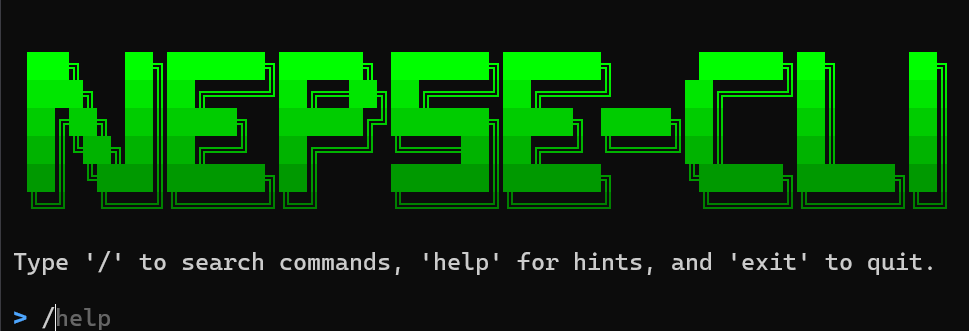
A professional command-line tool for NEPSE market analysis and automated Meroshare IPO applications.
Key Features:
- Comprehensive market data and technical analysis
- Automated IPO/FPO/Rights application (headless or GUI mode)
- Multi-member portfolio tracking and management
- Real-time stock information, signals, and announcements
- Interactive shell with command palette and autocompletion
- Fast API-based IPO application with concurrent processing
Requirements
- Python 3.8 or higher
- Windows, Linux, or macOS
- Internet connection
- Playwright (auto-installed)
- Meroshare account for IPO features
Installation
PyPI (Recommended)
Important: Avoid Microsoft Store Python. Use python.org for proper PATH configuration.
pip install nepse-cli
Update:
pip install --upgrade nepse-cli
Run:
nepse
If command not found, use: python -m nepse_cli or see Troubleshooting.
From Source
Development Installation:
cd "Nepse CLI"
pip install -e .
Windows Quick Start:
Double-click start_nepse.bat to auto-configure and launch.
Browser Setup: Playwright browsers install automatically on first run. Manual installation:
playwright install chromium
Usage
Interactive Shell (Recommended)
nepse
Shell features include command palette (/), autocompletion, command history, and inline help.
Command Categories
IPO Automation
nepse apply              # ⚡ Fast API-based application (single member)
nepse apply-all          # ⚡ Fast API-based apply for all members
nepse result             # Check IPO application results

# Legacy browser-based commands (deprecated)
nepse apply-legacy       # Browser-based application (will be removed)
nepse apply-all-legacy   # Browser-based apply all (will be removed)
Member Management
nepse add-member         # Add/update family member
nepse list-members       # View all members
nepse edit-member        # Edit member details
nepse delete-member      # Remove a member
nepse manage-members     # Interactive member management
Portfolio & Authentication
nepse get-portfolio      # View member portfolio
nepse test-login         # Test Meroshare login
nepse dplist             # List available depository participants
Market Data & Indices
nepse ipo                # Open IPOs/FPOs/Rights
nepse nepse              # NEPSE indices
nepse subidx BANKING     # Sector sub-indices
nepse mktsum             # Market summary
nepse topgl              # Top gainers/losers
nepse sectors            # All sector performance
Stock Analysis
nepse stonk NABIL        # Stock details and live price
nepse profile NABIL      # Company profile
nepse fundamental NABIL  # Fundamental analysis
nepse depth NABIL        # Market depth (order book)
nepse 52week             # 52-week high/low performers
nepse near52             # Stocks near 52-week marks
Trading Information
nepse floor              # Floor sheet (live trades)
nepse floor NABIL        # Filtered by symbol
nepse floor --buyer 58   # Filtered by buyer broker
nepse floor --seller 59  # Filtered by seller broker
nepse brokers            # List all NEPSE brokers (S.N., Broker No., Name)
nepse signals            # Trading signals (strong buy/sell)
nepse announce           # Latest market announcements
nepse holidays           # Upcoming market holidays
Features
IPO Automation Features
- Automated application for IPO, FPO, and Rights offerings
- Multi-member support for family-wide applications
- Browser-based (Playwright) and API-based (fast) modes
- Headless operation with optional GUI for debugging
- Automatic share quantity calculation and validation
- Result checking and status tracking
Market Analysis
- Real-time indices (NEPSE, Sensitive, Float, Sector)
- Stock fundamentals, profiles, and technical indicators
- Market depth and order book analysis
- Trading signals and price alerts
- Floor sheet with live trade data
- 52-week performance tracking
- Broker rankings and analysis
Portfolio Management
- Multi-member portfolio tracking
- Real-time P&L calculation with WACC
- Secure credential storage
- Interactive member management
- Login verification and session handling
User Interface
- Modern TUI with Rich tables and panels
- Interactive shell with autocompletion
- Command palette for quick navigation
- Progress indicators for long operations
- Formatted output with color coding
Configuration
Credential data is stored in: C:\Users\%USERNAME%\Documents\merosharedata\
Files:
family_members.json- Member credentialsipo_config.json- Application settingsnepse_cli_history.txt- Command history
Member Data Structure:
{
  "members": [
    {
      "name": "identifier",
      "dp_value": "139",
      "username": "meroshare_username",
      "password": "meroshare_password",
      "transaction_pin": "1234",
      "applied_kitta": 10,
      "crn_number": "CRN_NUMBER"
    }
  ]
}
Multi-Member Management
Manage credentials for multiple family members to streamline IPO applications.
Setup
nepse add-member
Required information:
- Name identifier (e.g., "Dad", "Mom", "Self")
- DP number and account credentials
- Meroshare username and password
- Transaction PIN (4-digit)
- Default kitta amount
- CRN number
Operations
nepse list-members           # View all members
nepse edit-member            # Modify member details
nepse delete-member          # Remove a member
nepse manage-members         # Interactive management menu
Batch Operations
nepse apply-all              # Apply IPO for all members
nepse fast-apply-all         # Fast apply for all members
Command Reference
Most Used Commands
nepse apply                  # Apply for IPO
nepse fast-apply             # Fast API-based IPO apply
nepse result                 # Check IPO results
nepse stonk <SYMBOL>         # Stock information
nepse mktsum                 # Market overview
nepse ipo                    # Open offerings
nepse get-portfolio          # View portfolio
Available Sector Indices
BANKING, DEVBANK, FINANCE, HOTELS AND TOURISM, HYDROPOWER, INVESTMENT, LIFE INSURANCE, MANUFACTURING AND PROCESSING, MICROFINANCE, MUTUAL FUND, NONLIFE INSURANCE, OTHERS, TRADING
Command Flags
--gui: Show browser window (for browser-based commands)--verbose: Show detailed output- Type
help <command>in shell for command-specific help
Security
- Credentials stored locally in JSON format
- User-level file permissions (600 on Unix)
- Data stored in user's Documents directory
- Never commit credential files to version control
- Use environment variables for CI/CD if needed
Troubleshooting
Windows: 'nepse' Command Not Found
Root Cause: Windows searches for executables in directories listed in the PATH environment variable. When pip install nepse-cli completes successfully, it creates nepse.exe in a user Scripts folder that may not be in your PATH.
Quickest Fix (60 seconds):
Use the module syntax instead:
python -m nepse_cli
Permanent Fix (Recommended):
- Add user Scripts folder to PATH (version-safe):
Why this happens: pip can install nepse.exe in your user Scripts folder, which is not always in Windows PATH.
Steps:
-
Press
Win + R→ typesysdm.cpl→ press Enter -
Click Environment Variables button (bottom right)
-
Under User variables, click Path → Edit
-
Find your actual user Scripts path dynamically:
bash py -c "import site, os; print(os.path.join(site.USER_BASE, 'Scripts'))"Ifpyis not available, use:bash python -c "import site, os; print(os.path.join(site.USER_BASE, 'Scripts'))" -
Copy the printed path (example only:
C:\Users\YourName\AppData\Roaming\Python\PythonXY\Scripts) -
Add that path to Path and save all dialogs
-
Close and reopen Command Prompt/PowerShell
-
Run
nepse -
Admin reinstall (alternative):
Open Command Prompt as Administrator and reinstall:
pip uninstall nepse-cli
pip install nepse-cli
This places the executable in the system Python Scripts folder (usually already in PATH).
Linux/Mac: Command Not Found
- Ensure
~/.local/binis in PATH - Use
pip install --user nepse-cli - Restart terminal after installation
Browser Installation
playwright install chromium
Login Issues
nepse test-login         # Verify credentials
nepse list-members       # Check stored data
nepse edit-member        # Update credentials
Common Errors
- Timeout errors: Check internet connection or use
--guito see what's happening - Element not found: Update playwright browsers or report issue
- API errors: Service may be temporarily down, retry later
Contributing
Contributions are welcome! Please feel free to submit issues, feature requests, or pull requests.
License
This project is licensed under the MIT License. See LICENSE file for details.
Disclaimer
This tool is for educational and personal use only. Users are responsible for complying with Meroshare's terms of service and applicable regulations. The developers are not liable for any misuse or issues arising from the use of this tool.
Project details
Verified details
These details have been verified by PyPIProject links
GitHub Statistics
Maintainers
Release history Release notifications | RSS feed


Download files
Download the file for your platform. If you're not sure which to choose, learn more about installing packages.
Source Distribution
Built Distribution
Filter files by name, interpreter, ABI, and platform.
If you're not sure about the file name format, learn more about wheel file names.
Copy a direct link to the current filters
File details
Details for the file nepse_cli-3.1.25.tar.gz.
File metadata
- Download URL: nepse_cli-3.1.25.tar.gz
- Upload date:
- Size: 86.1 kB
- Tags: Source
- Uploaded using Trusted Publishing? Yes
- Uploaded via: twine/6.1.0 CPython/3.13.12
File hashes
| Algorithm | Hash digest | |
|---|---|---|
| SHA256 |
a69d179bee3137aea5fd939142ec4413be2c573cdc232266a72ccc71d2f18684
|
|
| MD5 |
cfcde3063579cbe9bb7218cc6cbc40c5
|
|
| BLAKE2b-256 |
ff1d674da9f2d28ead269f3ee9ecb3c888e1ce54940015da5b277a41aa660cea
|
Provenance
The following attestation bundles were made for nepse_cli-3.1.25.tar.gz:
Publisher:
python-publish.yml on menaceXnadin/nepse-cli
-
Statement:
-
Statement type:
https://in-toto.io/Statement/v1 -
Predicate type:
https://docs.pypi.org/attestations/publish/v1 -
Subject name:
nepse_cli-3.1.25.tar.gz -
Subject digest:
a69d179bee3137aea5fd939142ec4413be2c573cdc232266a72ccc71d2f18684 - Sigstore transparency entry: 1493832201
- Sigstore integration time:
-
Permalink:
menaceXnadin/nepse-cli@94c642c8187c2b997f74432a49720970d9240424 -
Branch / Tag:
refs/tags/v3.1.25 - Owner: https://github.com/menaceXnadin
-
Access:
private
-
Token Issuer:
https://token.actions.githubusercontent.com -
Runner Environment:
github-hosted -
Publication workflow:
python-publish.yml@94c642c8187c2b997f74432a49720970d9240424 -
Trigger Event:
release
-
Statement type:
File details
Details for the file nepse_cli-3.1.25-py3-none-any.whl.
File metadata
- Download URL: nepse_cli-3.1.25-py3-none-any.whl
- Upload date:
- Size: 90.4 kB
- Tags: Python 3
- Uploaded using Trusted Publishing? Yes
- Uploaded via: twine/6.1.0 CPython/3.13.12
File hashes
| Algorithm | Hash digest | |
|---|---|---|
| SHA256 |
31f3db30799a39cfe851b40b3a3620420529967964f1ddfaa446f1d80462c4f8
|
|
| MD5 |
280696f4b1f8413a233917fc16c1304e
|
|
| BLAKE2b-256 |
b983daec51f43ecd1e4f5ce84312b34b567e9471a8fe823825f00f2a950bc857
|
Provenance
The following attestation bundles were made for nepse_cli-3.1.25-py3-none-any.whl:
Publisher:
python-publish.yml on menaceXnadin/nepse-cli
-
Statement:
-
Statement type:
https://in-toto.io/Statement/v1 -
Predicate type:
https://docs.pypi.org/attestations/publish/v1 -
Subject name:
nepse_cli-3.1.25-py3-none-any.whl -
Subject digest:
31f3db30799a39cfe851b40b3a3620420529967964f1ddfaa446f1d80462c4f8 - Sigstore transparency entry: 1493832283
- Sigstore integration time:
-
Permalink:
menaceXnadin/nepse-cli@94c642c8187c2b997f74432a49720970d9240424 -
Branch / Tag:
refs/tags/v3.1.25 - Owner: https://github.com/menaceXnadin
-
Access:
private
-
Token Issuer:
https://token.actions.githubusercontent.com -
Runner Environment:
github-hosted -
Publication workflow:
python-publish.yml@94c642c8187c2b997f74432a49720970d9240424 -
Trigger Event:
release
-
Statement type:






