
Neptune + scikit-learn integration
Experiment tracking for scikit-learn–trained models.
What will you get with this integration?
- Log, organize, visualize, and compare ML experiments in a single place
- Monitor model training live
- Version and query production-ready models and associated metadata (e.g., datasets)
- Collaborate with the team and across the organization
What will be logged to Neptune?
- classifier and regressor parameters,
- pickled model,
- test predictions,
- test predictions probabilities,
- test scores,
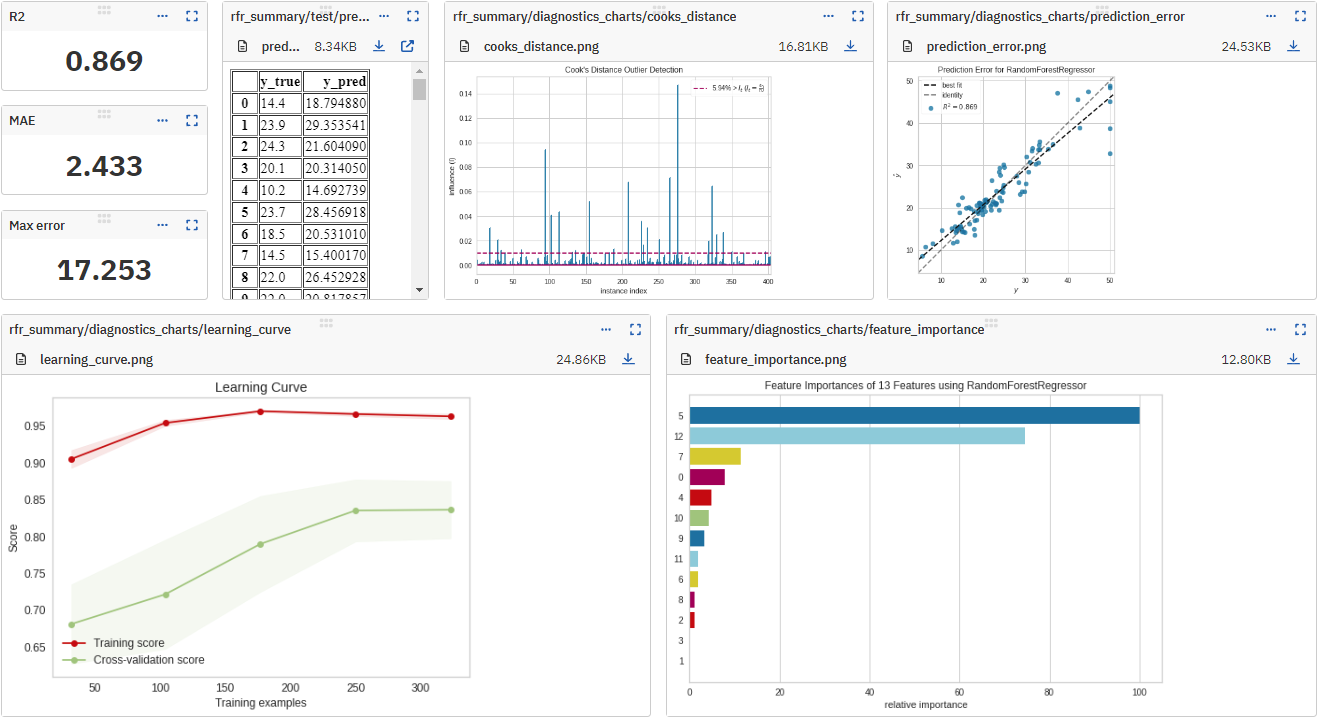
- classifier and regressor visualizations, like confusion matrix, precision-recall chart, and feature importance chart,
- KMeans cluster labels and clustering visualizations,
- metadata including git summary info,
- other metadata
Resources
Example
# On the command line:
pip install neptune-sklearn
# In Python, prepare a fitted estimator
parameters = {
    "n_estimators": 70, "max_depth": 7, "min_samples_split": 3
}

estimator = ...
estimator.fit(X_train, y_train)

# Import Neptune and start a run
import neptune

run = neptune.init_run(
    project="common/sklearn-integration",
    api_token=neptune.ANONYMOUS_API_TOKEN,
)

# Log parameters and scores
run["parameters"] = parameters

y_pred = estimator.predict(X_test)

run["scores/max_error"] = max_error(y_test, y_pred)
run["scores/mean_absolute_error"] = mean_absolute_error(y_test, y_pred)
run["scores/r2_score"] = r2_score(y_test, y_pred)

# Stop the run
run.stop()
Support
If you got stuck or simply want to talk to us, here are your options:
- Check our FAQ page
- You can submit bug reports, feature requests, or contributions directly to the repository.
- Chat! When in the Neptune application click on the blue message icon in the bottom-right corner and send a message. A real person will talk to you ASAP (typically very ASAP),
- You can just shoot us an email at support@neptune.ai
1 maintainer

Metadata
1 maintainer
Release files for neptune-sklearn 2.1.4
For a detailed explanation of source distributions (sdists) and built distributions (wheels), please see the package formats documentation.
Source distribution (sdist)
| File | Size | Uploaded | Provenance | |
|---|---|---|---|---|
| neptune_sklearn-2.1.4.tar.gz | 14.6 kB | Without provenance | Details |
Built distribution (wheel)
| File | Interpreter | ABI | Platform | Reset |
|---|---|---|---|---|
| neptune_sklearn-2.1.4-py3-none-any.whl | Python 3 | none | any | Details |
Total release size: 29.6 kB
Release files / neptune_sklearn-2.1.4.tar.gz
| Download URL | neptune_sklearn-2.1.4.tar.gz |
|---|---|
| Size | 14.6 kB |
| Tags | Source |
|
SHA-256 checksum How to use checksums |
9687a4cc8349e5378766c48fe014ccaf955e155c40f9cc2fd38ebf0fd50a4fd7
|
|
BLAKE2b-256 checksum How to use checksums |
9ba5a7f5aa08f481ef03acd1cc296536a4f0cf1c14a8508c992d7dbb597665a7
|
| Upload date | |
|
Uploaded using Trusted Publishing? What is trusted publishing? |
No |
| Uploaded via |
twine/5.1.1 CPython/3.9.19
|
Release files / neptune_sklearn-2.1.4-py3-none-any.whl
| Download URL | neptune_sklearn-2.1.4-py3-none-any.whl |
|---|---|
| Size | 15.0 kB |
| Tags | Python 3 |
|
SHA-256 checksum How to use checksums |
f0fce972ecf38e801a51aa611b226d00f9a16f0b192c0382b1751d3bccb0ff3f
|
|
BLAKE2b-256 checksum How to use checksums |
8c63eb829b258168b99d5932353102be0be245a27ead2995c60933cc0b1d171e
|
| Upload date | |
|
Uploaded using Trusted Publishing? What is trusted publishing? |
No |
| Uploaded via |
twine/5.1.1 CPython/3.9.19
|
Security for neptune-sklearn 2.1.4
Provenance
Provenance describes where a file came from. On PyPI, provenance is shared via attestations, which provide a verifiable record of the build or publishing details. View details, limitations and caveats.
No provenance found
None of the files in this release were uploaded with provenance metadata.
A note on package security
PyPI is a repository for distributing packages, not a service for auditing them. While third-party security researchers and our staff do their best to detect and remove malicious packages, PyPI cannot guarantee the quality, security or suitability of any given package.
To learn more about protecting yourself from malicious actors, visit our package security documentation.














