
NERNA is a lightweight tool for annotating named entities directly within Python notebooks, ideal for quick and interactive NER tasks without the need for deployment or external servers.

Project description
NERNA (NER Notebook Annotation)
Follow the official repository: NER-Notebook-Annotation - GitHub
NERNA is a lightweight package designed for Named Entity Recognition (NER) annotation directly within Python notebooks.
Originally intended as a Streamlit-based interface, it has been reworked to run natively inside notebook environments (such as Jupyter, Google Colab, Databricks, etc.). This makes it easier to use without requiring deployment of web applications or cloud server contracts.
Key Features
- ✅ Lightweight, interactive JavaScript interface embedded in notebooks
- ✅ Compatible with local notebooks and cloud platforms (e.g., Colab, Databricks)
- ✅ No need for external servers or deployments
- ⚠️ Annotations are made using JavaScript, so they cannot be accessed directly as Python variables. However, the input to the tool must be a Python list of strings.
Usage Example
from nerna import NERAnnotator

# List of texts to annotate
texts = [
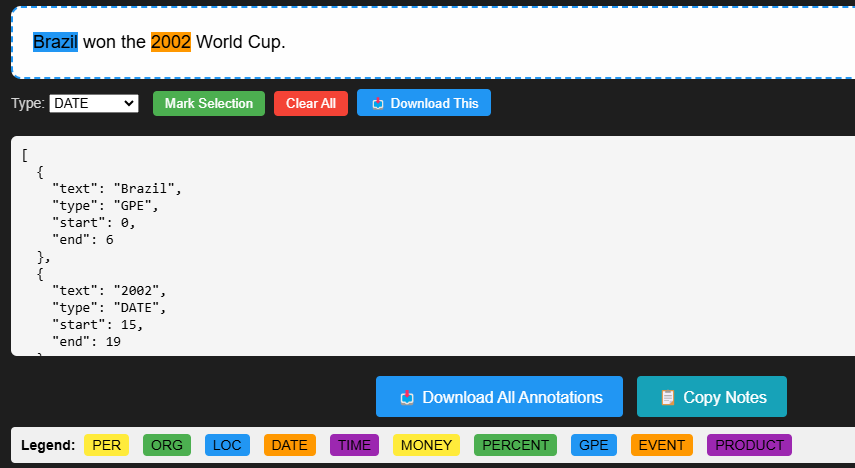
    'Brazil won the 2002 World Cup.',
    'The planet’s drinking water is running out.'
]

# Initialize annotation
annotator = NERAnnotator(texts)

# Render the interactive annotation interface
annotator.render()
Notes
-
Retrieve annotations:
There are two ways to retrieve the annotated data back into Python:
Option A: Export to Python Variable (Recommended for Colab/Jupyter)
Pass the name of your variable to the
rendermethod:# 1. Initialize annotator = NERAnnotator(texts) # 2. Render with variable name annotator.render(variable_name="annotator")
- In the UI, click the "🐍 Export to Python" button.
- Access the data in Python:
# After clicking the button:
print(annotator.annotations)
Option B: Load from JSON (Fallback)
- Click "📥 Download All" in the UI to save a
.jsonfile. - Load it in Python:
from nerna import load_annotations_from_json

data = load_annotations_from_json("path/to/all_annotations_....json")
print(data)
- Annotated results are not automatically returned to Python unless you use the "Export to Python" button.
- Ideal for manual review, small-scale labeling tasks, or quick experimentation in NLP workflows.


Download files
Download the file for your platform. If you're not sure which to choose, learn more about installing packages.
Source Distribution
Built Distribution
Filter files by name, interpreter, ABI, and platform.
If you're not sure about the file name format, learn more about wheel file names.
Copy a direct link to the current filters
File details
Details for the file nerna-0.2.0.tar.gz.
File metadata
- Download URL: nerna-0.2.0.tar.gz
- Upload date:
- Size: 7.8 kB
- Tags: Source
- Uploaded using Trusted Publishing? No
- Uploaded via: twine/6.2.0 CPython/3.9.25
File hashes
| Algorithm | Hash digest | |
|---|---|---|
| SHA256 |
9e774348189119a489d57152eddb259b65aca5eb313e151d37a30e87b0c17c4f
|
|
| MD5 |
9db130b51462ecf9b9f8638a2b9b4922
|
|
| BLAKE2b-256 |
b34bd3c13d48c05de46c54de2622d8fa0e45af0a8003debcf09b6b2eb9e2f252
|
File details
Details for the file nerna-0.2.0-py3-none-any.whl.
File metadata
- Download URL: nerna-0.2.0-py3-none-any.whl
- Upload date:
- Size: 8.8 kB
- Tags: Python 3
- Uploaded using Trusted Publishing? No
- Uploaded via: twine/6.2.0 CPython/3.9.25
File hashes
| Algorithm | Hash digest | |
|---|---|---|
| SHA256 |
10e6b185a61db5801e9ebe48ad85703a929edd40253a6f29aa3799565a072f8a
|
|
| MD5 |
7cacaba2a3684a716b9223c35d0c6a03
|
|
| BLAKE2b-256 |
9568fd68627a57c69abbda21d92dfedbf46b15c8b66fe34f0783338d9cf71d49
|






