
Nervus
Open-source block-diagram modeling and simulation in Python — an alternative to Simulink.
Nervus is Latin for nerve. An engine control unit (ECU) is a vehicle's nervous system, and Nervus aims to be a tool for designing, simulating and eventually generating C code for that kind of control software.
Status: pre-alpha. The simulation engine and core blocks are under active development. See
plan.mdfor the roadmap.
Goals
- A headless simulation engine in pure Python (NumPy/SciPy) that can be scripted, tested and run in CI.
- A clean, modern desktop editor built with PySide6 (Qt), using a Model–View–Controller architecture.
- A block library for control engineering, with automotive blocks such as engine and vehicle dynamics models, lookup tables and state machines.
- C code generation for embedded targets (ECUs), verified against the Python simulation (working: see below).
- Git-friendly model files: plain JSON that can be diffed and reviewed.
What Nervus can do
| Area | Features | Guide |
|---|---|---|
| Editor | block library with search, drag and drop, wires that route around blocks, undo, copy/paste, subsystems, flip/rotate/resize, auto layout, light and dark theme, F1 help with equations for every block, a Python console with the model in scope, Simulink .slx import |
Editor |
| Simulation | continuous, discrete and multirate models; fixed-step and variable-step solvers (also stiff: BDF); zero-crossing detection; an algebraic loop solver; real-time pacing; live scopes | Concepts |
| Parameters and data | model workspace with units, limits and data types; expressions; calibration sets (.nervcal); a data dictionary of signal objects (type, unit, range) bound to named wires |
Workspace |
| Structure | subsystems, masks, enabled/triggered/function-call subsystems, atomic ECU tasks with their own period, variants, linked component libraries | Subsystems, Libraries |
| Logic | State Chart block with a graphical chart editor: nested and parallel states, history, events, guards, timers, calibration parameters | State machines |
| Physical modelling | electrical, rotational, thermal and hydraulic networks connected like real parts; batteries, motors, solenoids, injectors, relays, alternator, glow plugs, NTC thermistors | Physical modelling |
| Electronics | LTspice-style circuit simulation: diodes, BJTs, MOSFETs, op-amps, switches; operating point and DC sweeps; SPICE netlist import and export | Physical modelling, Circuits tutorial |
| Automotive models | mean-value engine, vehicle and driveline, tyres (magic formula), automatic and automated gearboxes, sensor and actuator models, diagnostic monitors with DTCs, adaptive maps, the official WLTC and FTP-75 drive cycles | Tutorials |
| ECU code | C code generation (multirate, calibratable parameters, A2L file, HTML report), fixed-point data types, integer-only code for processors without an FPU, software-in-the-loop check, reusable functions for subsystems, MISRA C:2012 check (cppcheck), FMI 2.0 FMU export and import | C code, Data types |
| Vehicle networks | CAN Pack/Unpack with DBC files (also CAN FD, multiplexed signals, value tables); simulated CAN buses with arbitration, bus load, gateways, rest-bus simulation, fault injection and E2E protection; bus trace with ASC/BLF export; real CAN adapters through python-can | CAN |
| Measurement and calibration | XCP on CAN: calibrate a running model from INCA/CANape or Python, or a real ECU from Python; MDF4 (.mf4) import and export |
CAN: XCP, Testing |
| OBD-II | live data and trouble codes from a real car (ELM327 or CAN), and a simulated ECU to practise with | OBD-II |
| Testing | test cases stored with the model, Signal Builder (test signals drawn in an editor), Test Manager, Data Inspector, parameter sweeps and Monte Carlo runs, model coverage with MC/DC, requirements traceability, Model Advisor | Testing, Verification |
| Analysis | linearisation, trim, Bode, Nyquist, root locus, stability margins, step response, PID tuning | Analysis |
| Learning | 33 tutorials in 7 topics, from your first model to ECU code, CAN and diagnostics, each with a finished example model | Tutorials |
Installation
With pip (Python 3.11 or newer):
pip install "nervus[gui]"                    # the engine and the desktop editor
nervus                                       # start the editor; File ▸ Open Example has every tutorial's model
nervus --copy-examples ~/nervus-examples     # the example models and scripts, to run and change
Optional parts: can (CAN, DBC files, XCP), obd (OBD-II adapters), mdf (MDF4 files), fmi (FMUs), e.g.
pip install "nervus[gui,can]".
For development, from the source, with uv:
git clone git@github.com:ikjbi/nervus.git
cd nervus
uv sync --extra gui     # the engine and the desktop editor (PySide6, pyqtgraph, matplotlib)
uv run nervus           # start the editor
uv sync alone installs only the engine (for scripts); uv sync --all-extras installs everything: the editor,
CAN/DBC (cantools), OBD-II (pyserial), MDF4 (asammdf) and FMI (fmpy). If the editor does not start, see
Troubleshooting.
Learn Nervus
Start with the tutorial Your first model: you build a cruise control in the editor step by step, tune it, and meet integrator windup. Then pick a topic; the tutorial overview has them all:
Coming from MATLAB/Simulink? See Coming from Simulink.
The editor
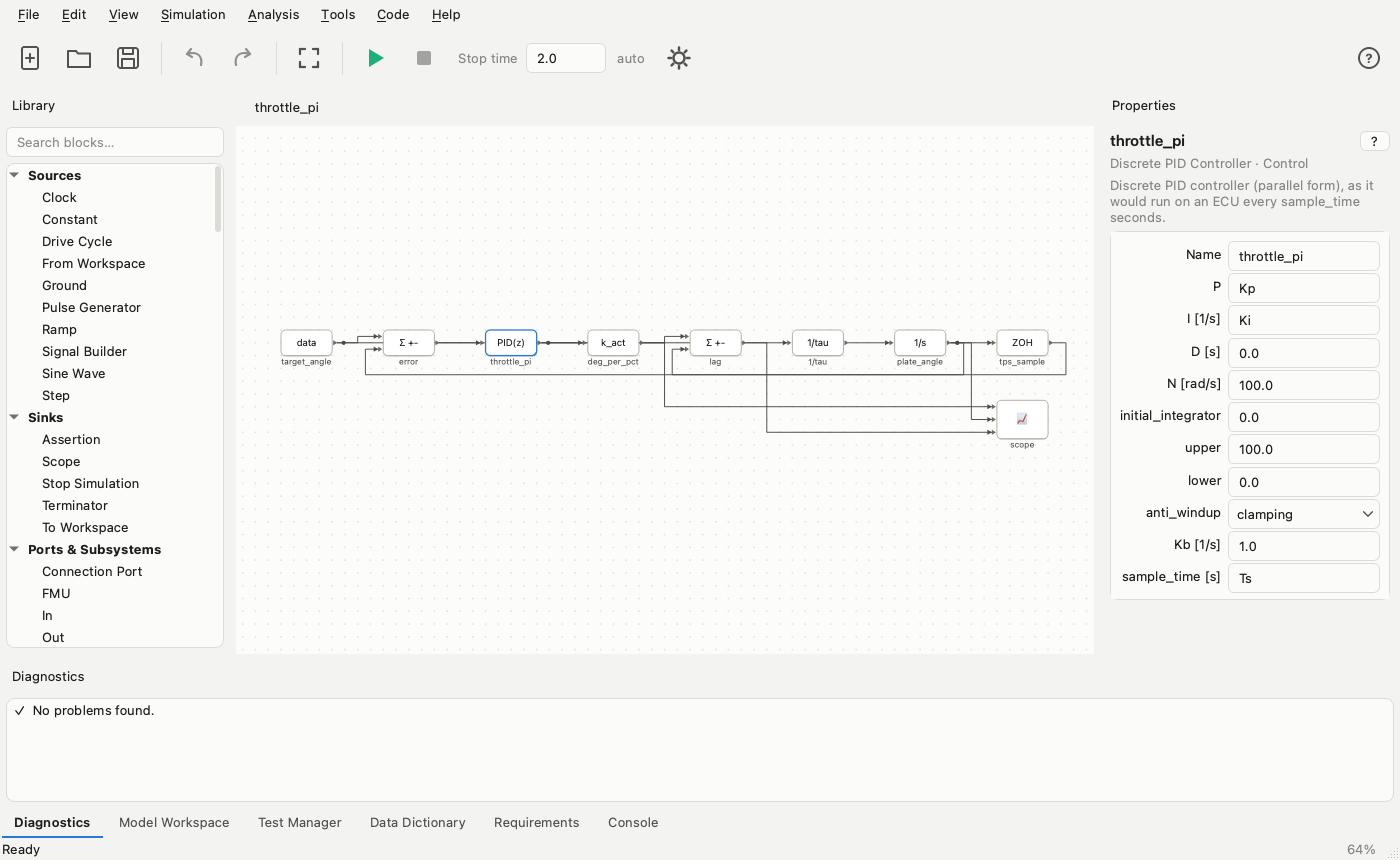
uv run nervus examples/throttle_pi.nervus
Drag blocks from the library, connect ports, edit parameters, press ▶ Run and look at the scopes. Press F1 on any block for its help page, with equations and figures. See docs/editor.md.

C code for the ECU
Select the controller subsystem and choose Code → Generate C Code. You get model.h/model.c with
model_initialize() and model_step(), static memory only, and calibratable parameters. A
software-in-the-loop check compiles the code and compares it with the model step by step. See
docs/codegen.md and the generated example in
examples/generated/ECU.
Test cases
Test cases are saved with the model: input scenarios, calibrations and pass/fail checks. Run them from the Test Manager and compare runs in the Data Inspector, or from Python and pytest. See docs/testing.md.
Quick start (Python)
from nervus import Diagram, simulate
from nervus.blocks import Step, Sum, Gain, Integrator, Scope

# First-order system: dy/dt = (u - y) / tau
d = Diagram("first_order")
u = d.add(Step(time=0.0, final=1.0), name="u")
err = d.add(Sum(signs="+-"), name="err")
k = d.add(Gain(gain=1 / 0.5), name="1/tau")
y = d.add(Integrator(), name="y")
scope = d.add(Scope(num_inputs=2), name="scope")

d.connect(u, err.in_port(0))
d.connect(y, err.in_port(1))
d.chain(err, k, y)
d.connect(u, scope.in_port(0))
d.connect(y, scope.in_port(1))

res = simulate(d, t_final=3.0)
print(res["y"][-1])  # ≈ 1 - exp(-6)
More examples are in examples/.
Documentation
The user guide and block reference are in docs/. To build them locally:
uv run --group docs mkdocs serve
Development
uv run pytest          # tests
uv run ruff check .    # lint
uv run ruff format .   # format
uv run mypy            # type check
See CONTRIBUTING.md.
Safety
Code generated by Nervus is for learning, bench testing and off-road experiments. Do not run it on a vehicle on public roads. Production automotive software requires ISO 26262 processes, qualified tools and certified code.
License
1 maintainer

Metadata
1 maintainer
Release files for nervus 0.1.0
For a detailed explanation of source distributions (sdists) and built distributions (wheels), please see the package formats documentation.
Source distribution (sdist)
| File | Size | Uploaded | Provenance | Actions |
|---|---|---|---|---|
| nervus-0.1.0.tar.gz | 12.7 MB | With provenance | Details for nervus-0.1.0.tar.gz |
Built distribution (wheel)
| File | Interpreter | ABI | Platform | Actions Reset |
|---|---|---|---|---|
| nervus-0.1.0-py3-none-any.whl | Python 3 | none | any | Details for nervus-0.1.0-py3-none-any.whl |
Total release size: 17.5 MB
Release files / nervus-0.1.0.tar.gz
| Download URL | nervus-0.1.0.tar.gz |
|---|---|
| Size | 12.7 MB |
| Tags | Source |
|
SHA-256 checksum How to use checksums |
b55c7696424a8c4687a8cbff10a9bc30efb81f9187bb6e0fed7bf53de63cb347
|
|
BLAKE2b-256 checksum How to use checksums |
6b3e8d6e33dbd5852103871b8555814b514c81c35ad69a872c3cfe460b37a3ee
|
| Upload date | |
|
Uploaded using Trusted Publishing? What is trusted publishing? |
Yes |
| Uploaded via |
twine/7.0.0 CPython/3.13.16
|
Provenance
Provenance describes where a file came from. On PyPI, provenance is shared via attestations, which provide a verifiable record of the build or publishing details. View details, limitations and caveats.


PyPI Publish Attestation
PyPI verified that this artifact, at this checksum, originated from the publisher listed below.
Signed by GitHub Actions, verified by PyPI on Nov 24, 2026.
Transparency logRelease files / nervus-0.1.0-py3-none-any.whl
| Download URL | nervus-0.1.0-py3-none-any.whl |
|---|---|
| Size | 4.8 MB |
| Tags | Python 3 |
|
SHA-256 checksum How to use checksums |
7ca1e2285731b5c1b4d8ee9d3774ad916f45b2e4117096a21631a7d0730675c5
|
|
BLAKE2b-256 checksum How to use checksums |
58e008e884bd4b7d0073cd9c1a58584d05f6a6b27e51a92ead33a1092b9622c0
|
| Upload date | |
|
Uploaded using Trusted Publishing? What is trusted publishing? |
Yes |
| Uploaded via |
twine/7.0.0 CPython/3.13.16
|
Provenance
Provenance describes where a file came from. On PyPI, provenance is shared via attestations, which provide a verifiable record of the build or publishing details. View details, limitations and caveats.
PyPI Publish Attestation
PyPI verified that this artifact, at this checksum, originated from the publisher listed below.
Signed by GitHub Actions, verified by PyPI on Nov 24, 2026.
Transparency logSecurity for nervus 0.1.0
Provenance
Provenance describes where a file came from. On PyPI, provenance is shared via attestations, which provide a verifiable record of the build or publishing details. View details, limitations and caveats.
Full provenance
Both files in this release have been uploaded with provenance metadata.
Attestation for nervus-0.1.0.tar.gz
PyPI Publish Attestation
PyPI verified that this artifact, at this checksum, originated from the publisher listed below.
Signed by GitHub Actions, verified by PyPI on Nov 24, 2026.
Transparency logA note on package security
PyPI is a repository for distributing packages, not a service for auditing them. While third-party security researchers and our staff do their best to detect and remove malicious packages, PyPI cannot guarantee the quality, security or suitability of any given package.
To learn more about protecting yourself from malicious actors, visit our package security documentation.














